mysql教程栏目介绍批量SQL插入

推荐(免费):mysql教程
一条sql语句插入多条数据
INSERT INTO `insert_table` (`datetime`, `uid`, `content`, `type`)
    VALUES ('0', 'userid_0', 'content_0', 0);INSERT INTO `insert_table` (`datetime`, `uid`, `content`, `type`)
    VALUES ('1', 'userid_1', 'content_1', 1);
INSERT INTO `insert_table` (`datetime`, `uid`, `content`, `type`)
VALUES ('0', 'userid_0', 'content_0', 0), ('1', 'userid_1', 'content_1', 1);
第二种SQL执行效率高的主要原因是合并后日志量[mysql的binlog和InnoDB的事务让日志]减少了,降低日志刷盘的数据量和频率,从而提高效率。
通过合并SQL语句,同时也能减少SQL语句解析的次数,减少网络传输的IO。
测试对比数据,分别是单条数据的导入与转换成一条SQL语句进行导入。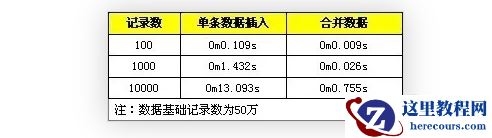
在事务中进行插入处理
START TRANSACTION;INSERT INTO `insert_table` (`datetime`, `uid`, `content`, `type`) VALUES ('0', 'userid_0', 'content_0', 0);INSERT INTO `insert_table` (`datetime`, `uid`, `content`, `type`) VALUES ('1', 'userid_1', 'content_1', 1);...COMMIT;
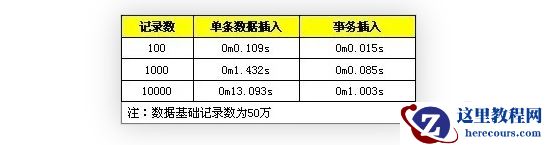
使用事务可以提高数据的插入效率,这是因为进行一个insert操作时,MySQL内部都会建立一个事务,在事务内才进行真正插入处理操作。
通过使用事务减少创建事务的消耗,所有插入都在执行后才进行提交操作
测试对比数据,分笔试不适用事务和使用事务操作
数据有序插入
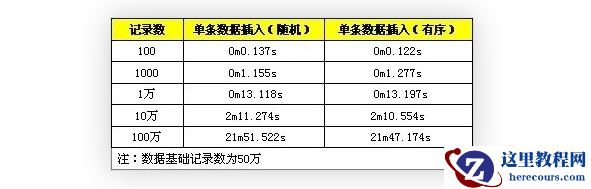
INSERT INTO `insert_table` (`datetime`, `uid`, `content`, `type`) VALUES ('1', 'userid_1', 'content_1', 1);INSERT INTO `insert_table` (`datetime`, `uid`, `content`, `type`) VALUES ('0', 'userid_0', 'content_0', 0);INSERT INTO `insert_table` (`datetime`, `uid`, `content`, `type`) VALUES ('2', 'userid_2', 'content_2',2);INSERT INTO `insert_table` (`datetime`, `uid`, `content`, `type`) VALUES ('0', 'userid_0', 'content_0', 0);INSERT INTO `insert_table` (`datetime`, `uid`, `content`, `type`) VALUES ('1', 'userid_1', 'content_1', 1);INSERT INTO `insert_table` (`datetime`, `uid`, `content`, `type`) VALUES ('2', 'userid_2', 'content_2',2);由于数据库插入时,需要维护索引数据,无需的记录会增大维护索引的成本。
测试对比数据,随机数据与顺序数据的性能对比
先删除索引,插入完成后重建索引
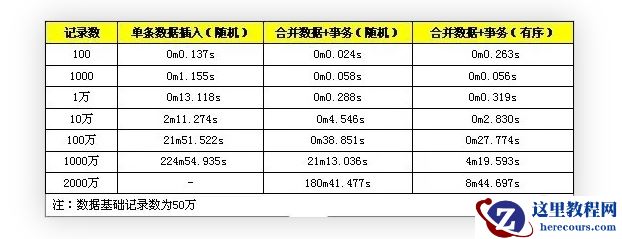
性能综合测试
注意事项
SQL语句是有长度限制,在进行数据合并在同一SQL中务必不能超过SQL长度限制,通过
max_allowed_packet配置可以修改,默认
1M,测试时可以修改为
8M。
事务需要控制大小,事物太大可能影响执行的效率。MySQL有
innodb_log_buffer_size配置项,超过这个值会把innodb的数据刷到磁盘中,这时,效率会有所下降。所以较好的做法是,在数据达到这个值前执行事务提交。