1.启动MySQL时一直不成功,查看错误日志 /var/log/mysql/error.log
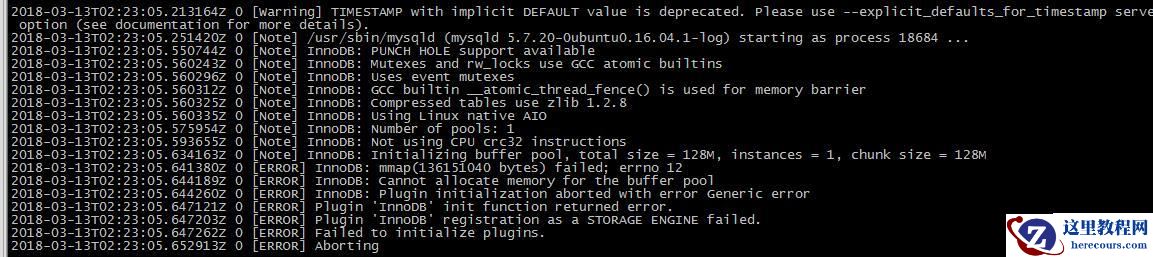
2.主要的错误信息有如下几条: /var/log/mysql/error.log
[ERROR] InnoDB: mmap(136151040 bytes) failed; errno 12
[ERROR] InnoDB: Cannot allocate memory for the buffer pool
[ERROR] InnoDB: Plugin initialization aborted with error Generic error
[ERROR] Plugin 'InnoDB' init function returned error.
[ERROR] Plugin 'InnoDB' registration as a STORAGE ENGINE failed.
[ERROR] Failed to initialize plugins.
[ERROR] Aborting
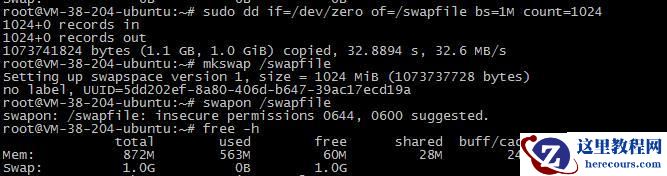
3.查询后是因为内存不足,查看内存: /var/log/mysql/error.log

增加swap交换空间解决问题:
dd if=/dev/zero of=/swapfile bs=1M count=1024
mkswap /swapfile
swapon /swapfile
4.增加自动挂载: /var/log/mysql/error.log
在文件/etc/fstab中加入 /swapfile swap swap defaults 0 0
service mysql start 启动成功
5. 备注:生成空文件
dd if=/dev/zero of=1.txt bs=1M count=2 生成一个指定大小的空文件if=文件名:输入文件名
of=文件名:输出文件名
bs=字节大小
count=个数