
它由两部分组成:MHA Manager(管理节点)和MHA Node(数据节点)。其中,MHA Manager可以单独部署在一台独立的机器上管理多个master-slave集群,也可以部署在一台slave上。MHA Node则运行在每个mysql节点上,MHA Manager会定时探测集群中的master节点,当master出现故障时,它自动将最新数据的slave提升为master,然后将其它所有的slave指向新的master。 在MHA自动故障切换过程中,MHA试图保存master的二进制日志,从而最大程度地保证数据不丢失,当这并不总是可行的,譬如,主服务器硬件故障或无法通过ssh访问,MHA就没法保存二进制日志,这样就只进行了故障转移但丢失了最新数据。可结合MySQL 5.5中推出的半同步复制来降低数据丢失的风险。 MHA软件由两部分组成:Manager工具包和Node工具包,具体说明如下: MHA Manager: 1. masterha_check_ssh:检查MHA的SSH配置状况 2. masterha_check_repl:检查MySQL的复制状况 3. masterha_manager:启动MHA 4. masterha_check_status:检测当前MHA运行状态 5. masterha_master_monitor:检测master是否宕机 6. masterha_master_switch:控制故障转移(自动或手动) 7. masterha_conf_host:添加或删除配置的server信息 8. masterha_stop:关闭MHA MHA Node: save_binary_logs:保存或复制master的二进制日志 apply_diff_relay_logs:识别差异的relay log并将差异的event应用到其它slave中 filter_mysqlbinlog:去除不必要的ROLLBACK事件(MHA已不再使用这个工具) purge_relay_logs:消除中继日志(不会堵塞SQL线程) 另有如下几个脚本需自定义: 1. master_ip_failover:管理VIP 2. master_ip_online_change: 3. masterha_secondary_check:当MHA manager检测到master不可用时,通过masterha_secondary_check脚本来进一步确认,减低误切的风险。 4. send_report:当发生故障切换时,可通过send_report脚本发送告警信息。 集群信息 角色 IP地址 ServerID 类型 Master 192.168.244.10 1 写入 Candicate master 192.168.244.20 2 读 Slave 192.168.244.30 3 读 Monitor host 192.168.244.40 监控集群组 注:操作系统均为RHEL 6.7 其中,master对外提供写服务,备选master提供读服务,slave也提供相关的读服务,一旦master宕机,将会把备选master提升为新的master,slave指向新的master 一、在所有节点上安装MHA node 1. 在MySQL服务器上安装MHA node所需的perl模块(DBD:mysql) # yum install perl-DBD-MySQL -y 2. 在所有的节点上安装mha node 下载地址为:https://code.google.com/p/mysql-master-ha/wiki/Downloads?tm=2 由于该网址在国内被墙,相关文件下载后,放到了个人网盘中,http://pan.baidu.com/s/1boS31vT,有需要的童鞋可自行下载。 # tar xvf mha4mysql-node-0.56.tar.gz # cd mha4mysql-node-0.56 # perl Makefile.PL


Can't locate ExtUtils/MakeMaker.pm in @INC (@INC contains: inc /usr/local/lib64/perl5 /usr/local/share/perl5 /usr/lib64/perl5/vendor_perl /usr/share/perl5/vendor_perl /usr/lib64/perl5 /usr/share/perl5 .) at inc/Module/Install/Can.pm line 6.BEGIN failed--compilation aborted at inc/Module/Install/Can.pm line 6.
Compilation failed in require at inc/Module/Install.pm line 283.
Can't locate ExtUtils/MakeMaker.pm in @INC (@INC contains: inc /usr/local/lib64/perl5 /usr/local/share/perl5 /usr/lib64/perl5/vendor_perl /usr/share/perl5/vendor_perl /usr/lib64/perl5 /usr/share/perl5 .) at inc/Module/Install/Makefile.pm line 4.BEGIN failed--compilation aborted at inc/Module/Install/Makefile.pm line 4.
Compilation failed in require at inc/Module/Install.pm line 283.
Can't locate ExtUtils/MM_Unix.pm in @INC (@INC contains: inc /usr/local/lib64/perl5 /usr/local/share/perl5 /usr/lib64/perl5/vendor_perl /usr/share/perl5/vendor_perl /usr/lib64/perl5 /usr/share/perl5 .) at inc/Module/Install/Metadata.pm line 349.
View Code
通过报错可以看出,是相关依赖包没有安装。 # yum install perl-ExtUtils-MakeMaker -y # perl Makefile.PL
*** Module::AutoInstall version 1.03*** Checking for Perl dependencies...
Can't locate CPAN.pm in @INC (@INC contains: inc /usr/local/lib64/perl5 /usr/local/share/perl5 /usr/lib64/perl5/vendor_perl /usr/share/perl5/vendor_perl /usr/lib64/perl5 /usr/share/perl5 .) at inc/Module/AutoInstall.pm line 277.
# yum install perl-CPAN -y # perl Makefile.PL
*** Module::AutoInstall version 1.03*** Checking for Perl dependencies...
[Core Features]- DBI        ...loaded. (1.609)- DBD::mysql ...loaded. (4.013)*** Module::AutoInstall configuration finished.
Checking if your kit is complete...
Looks good
Writing Makefile for mha4mysql::node
View Code
# make # make install 至此,MHA node节点安装完毕,会在/usr/local/bin下生成以下脚本文件
# ll /usr/local/bin/total 44-r-xr-xr-x 1 root root 16367 Jul 20 07:00 apply_diff_relay_logs-r-xr-xr-x 1 root root 4807 Jul 20 07:00 filter_mysqlbinlog-r-xr-xr-x 1 root root 8261 Jul 20 07:00 purge_relay_logs-r-xr-xr-x 1 root root 7525 Jul 20 07:00 save_binary_logs
二、在Monitor host节点上部署MHA Manager # tar xvf mha4mysql-manager-0.56.tar.gz # cd mha4mysql-manager-0.56 # perl Makefile.PL
*** Module::AutoInstall version 1.03*** Checking for Perl dependencies...
[Core Features]- DBI                   ...loaded. (1.609)- DBD::mysql            ...loaded. (4.013)- Time::HiRes           ...missing.- Config::Tiny          ...missing.- Log::Dispatch         ...missing.- Parallel::ForkManager ...missing.- MHA::NodeConst        ...missing.==> Auto-install the 5 mandatory module(s) from CPAN? [y] y*** Dependencies will be installed the next time you type 'make'.*** Module::AutoInstall configuration finished.
Checking if your kit is complete...
Looks good
Warning: prerequisite Config::Tiny 0 not found.
Warning: prerequisite Log::Dispatch 0 not found.
Warning: prerequisite MHA::NodeConst 0 not found.
Warning: prerequisite Parallel::ForkManager 0 not found.
Warning: prerequisite Time::HiRes 0 not found.
Writing Makefile for mha4mysql::manager
View Code
# make # make install 执行完毕后,会在/usr/local/bin下新增以下几个文件

# ll /usr/local/bin/total 40-r-xr-xr-x 1 root root 1991 Jul 20 00:50 masterha_check_repl-r-xr-xr-x 1 root root 1775 Jul 20 00:50 masterha_check_ssh-r-xr-xr-x 1 root root 1861 Jul 20 00:50 masterha_check_status-r-xr-xr-x 1 root root 3197 Jul 20 00:50 masterha_conf_host-r-xr-xr-x 1 root root 2513 Jul 20 00:50 masterha_manager-r-xr-xr-x 1 root root 2161 Jul 20 00:50 masterha_master_monitor-r-xr-xr-x 1 root root 2369 Jul 20 00:50 masterha_master_switch-r-xr-xr-x 1 root root 5167 Jul 20 00:50 masterha_secondary_check-r-xr-xr-x 1 root root 1735 Jul 20 00:50 masterha_stop
三、配置SSH登录无密码验证 1. 在manager上配置到所有Node节点的无密码验证 # ssh-keygen 一路按“Enter” # ssh-copy-id -i /root/.ssh/id_rsa.pub root@192.168.244.10 # ssh-copy-id -i /root/.ssh/id_rsa.pub root@192.168.244.20 # ssh-copy-id -i /root/.ssh/id_rsa.pub root@192.168.244.30 2. 在Master(192.168.244.10)上配置 # ssh-keygen # ssh-copy-id -i /root/.ssh/id_rsa.pub root@192.168.244.20 # ssh-copy-id -i /root/.ssh/id_rsa.pub root@192.168.244.30 3. 在Candicate master(192.168.244.20)上配置 # ssh-keygen # ssh-copy-id -i /root/.ssh/id_rsa.pub root@192.168.244.10 # ssh-copy-id -i /root/.ssh/id_rsa.pub root@192.168.244.30 4. 在Slave(192.168.244.30)上配置 # ssh-keygen # ssh-copy-id -i /root/.ssh/id_rsa.pub root@192.168.244.10 # ssh-copy-id -i /root/.ssh/id_rsa.pub root@192.168.244.20 四、搭建主从复制环境 1. 在Master上执行备份 # mysqldump --master-data=2 --single-transaction -R --triggers -A > all.sql 其中,-R是备份存储过程,--triggers是备份触发器 -A代表全库 2. 在Master上创建复制用户
mysql> grant replication slave on *.* to 'repl'@'192.168.244.%' identified by 'repl';
Query OK, 0 rows affected (0.09 sec)
3. 查看备份文件all.sql中的CHANGE MASTER语句 # head -n 30 all.sql
-- CHANGE MASTER TO MASTER_LOG_FILE='mysql-bin.000002', MASTER_LOG_POS=120;
4. 将备份文件复制到Candicate master和Slave上 # scp all.sql 192.168.244.20:/root/ # scp all.sql 192.168.244.30:/root/ 5. 在Candicate master上搭建从库 # mysql < all.sql 设置复制信息
mysql> CHANGE MASTER TO
    -> MASTER_HOST='192.168.244.10',    -> MASTER_USER='repl',    -> MASTER_PASSWORD='repl',    -> MASTER_LOG_FILE='mysql-bin.000002',    -> MASTER_LOG_POS=120;
Query OK, 0 rows affected, 2 warnings (0.19 sec)
mysql> start slave;
Query OK, 0 rows affected (0.02 sec)
mysql> show slave status\G
6. 在Slave上搭建从库 7. slave服务器设置为read only
mysql> set global read_only=1;
Query OK, 0 rows affected (0.04 sec)
8. 在Master中创建监控用户
mysql> grant all privileges on *.* to 'monitor'@'%' identified by 'monitor123';
Query OK, 0 rows affected (0.07 sec)
五、 配置MHA 1. 在Monitor host(192.168.244.40)上创建MHA工作目录,并且创建相关配置文件 # mkdir -p /etc/masterha # vim /etc/masterha/app1.cnf
[server default]
manager_log=/masterha/app1/manager.log          //设置manager的日志manager_workdir=/masterha/app1           //设置manager的工作目录master_binlog_dir=/var/lib/mysql                  //设置master默认保存binlog的位置,以便MHA可以找到master的日志master_ip_failover_script= /usr/local/bin/master_ip_failover    //设置自动failover时候的切换脚本master_ip_online_change_script= /usr/local/bin/master_ip_online_change  //设置手动切换时候的切换脚本user=monitor               // 设置监控用户password=monitor123         //设置监控用户的密码ping_interval=1         //设置监控主库,发送ping包的时间间隔,默认是3秒,尝试三次没有回应的时候进行自动failoverremote_workdir=/tmp     //设置远端mysql在发生切换时binlog的保存位置repl_user=repl          //设置复制环境中的复制用户名repl_password=repl    //设置复制用户的密码report_script=/usr/local/bin/send_report    //设置发生切换后发送的报警的脚本secondary_check_script= /usr/local/bin/masterha_secondary_check -s 192.168.244.20 -s 192.168.244.30 --user=root --master_host=192.168.244.10 --master_ip=192.168.244.10 --master_port=3306  //一旦MHA到master的监控之间出现问题,MHA Manager将会判断其它两个slave是否能建立到master_ip 3306端口的连接shutdown_script=""      //设置故障发生后关闭故障主机脚本(该脚本的主要作用是关闭主机防止发生脑裂)ssh_user=root           //设置ssh的登录用户名[server1]hostname=192.168.244.10port=3306[server2]hostname=192.168.244.20port=3306candidate_master=1   //设置为候选master,如果设置该参数以后,发生主从切换以后将会将此从库提升为主库,即使这个主库不是集群中最新的slavecheck_repl_delay=0   //默认情况下如果一个slave落后master 100M的relay logs的话,MHA将不会选择该slave作为一个新的master,因为对于这个slave的恢复需要花费很长时间,通过设置check_repl_delay=0,MHA触发切换在选择一个新的master的时候将会忽略复制延时,这个参数对于设置了candidate_master=1的主机非常有用,因为它保证了这个候选主在切换过程中一定是最新的master[server3]hostname=192.168.244.30port=3306
注意: 1> 在编辑该文件时,后面的注释切记要去掉,MHA并不会将后面的内容识别为注释。 2> 配置文件中设置了master_ip_failover_script, secondary_check_script,master_ip_online_change_script,report_script,对应的文件见文章末 尾。 2. 设置relay log清除方式(在每个Slave上)
mysql> set global relay_log_purge=0;
Query OK, 0 rows affected (0.00 sec)
MHA在发生切换过程中,从库在恢复的过程中,依赖于relay log的相关信息,所以我们这里要将relay log的自动清楚设置为OFF,采用手动清楚relay log的方式。 在默认情况下,从服务器上的中继日志会在SQL线程执行完后被自动删除。但是在MHA环境中,这些中继日志在恢复其它从服务器时可能会被用到,因此需要禁用中继日志的自动清除。改为定期手动清除SQL线程应用完的中继日志。 在ext3文件系统下,删除大的文件需要一定的时间,这样会导致严重的复制延迟,所以在Linux中,一般都是通过硬链接的方式来删除大文件。 3. 设置定期清理relay脚本 MHA节点中包含了purge_relay_logs脚本,它可以为relay log创建硬链接,执行set global relay_log_purge=1,等待几秒钟以便SQL线程切换到新的中继日志,再执行set global relay_log_purge=0。 下面看看脚本的使用方法: # purge_relay_logs --user=monitor --password=monitor123 -disable_relay_log_purge --workdir=/tmp/
2017-04-24 20:27:46: purge_relay_logs script started.
 Found relay_log.info: /var/lib/mysql/relay-log.info
 Opening /var/lib/mysql/mysqld-relay-bin.000001 ..
 Opening /var/lib/mysql/mysqld-relay-bin.000002 ..
 Opening /var/lib/mysql/mysqld-relay-bin.000003 ..
 Opening /var/lib/mysql/mysqld-relay-bin.000004 ..
 Opening /var/lib/mysql/mysqld-relay-bin.000005 ..
 Opening /var/lib/mysql/mysqld-relay-bin.000006 ..
 Executing SET GLOBAL relay_log_purge=1; FLUSH LOGS; sleeping a few seconds so that SQL thread can delete older relay log files (if i
t keeps up); SET GLOBAL relay_log_purge=0; .. ok.2017-04-24 20:27:50: All relay log purging operations succeeded.
其中, --user:mysql用户名 --password:mysql用户的密码 --host: mysqlserver地址 --workdir:指定创建relay log的硬链接的位置,默认的是/var/tmp。由于系统不同分区创建硬链接文件会失败,故需要指定具体的硬链接的位置。 --disable_relay_log_purge:默认情况下,如果relay_log_purge=1,则脚本会直接退出。通过设置这个参数,该脚本会首先将relay_log_purge设置为1,清除掉relay log后,再将该参数设置为0。 设置crontab来定期清理relay log MHA在切换的过程中会直接调用mysqlbinlog命令,故需要在环境变量中指定mysqlbinlog的具体路径。 # vim /etc/cron.d/purge_relay_logs
0 4 * * * /usr/local/bin/purge_relay_logs --user=monitor --password=monitor123 -disable_relay_log_purge --workdir=/tmp/ >> /tmp/purge
_relay_logs.log 2>&1
注意:最好是每台slave服务器在不同时间点执行该计划任务。 4. 将mysqlbinlog的路径添加到环境变量中 六、 检查SSH的配置 在Monitor host上执行 # masterha_check_ssh --conf=/etc/masterha/app1.cnf
Wed Jul 20 14:33:36 2016 - [warning] Global configuration file /etc/masterha_default.cnf not found. Skipping.
Wed Jul 20 14:33:36 2016 - [info] Reading application default configuration from /etc/masterha/app1.cnf..
Wed Jul 20 14:33:36 2016 - [info] Reading server configuration from /etc/masterha/app1.cnf..
Wed Jul 20 14:33:36 2016 - [info] Starting SSH connection tests..
Wed Jul 20 14:33:51 2016 - [debug]
Wed Jul 20 14:33:36 2016 - [debug]  Connecting via SSH from root@192.168.244.10(192.168.244.10:22) to root@192.168.244.20(192.168.244.20:22)..
Wed Jul 20 14:33:48 2016 - [debug]   ok.
Wed Jul 20 14:33:48 2016 - [debug]  Connecting via SSH from root@192.168.244.10(192.168.244.10:22) to root@192.168.244.30(192.168.244.30:22)..
Wed Jul 20 14:33:50 2016 - [debug]   ok.
Wed Jul 20 14:33:55 2016 - [debug]
Wed Jul 20 14:33:37 2016 - [debug]  Connecting via SSH from root@192.168.244.30(192.168.244.30:22) to root@192.168.244.10(192.168.244.10:22)..
Wed Jul 20 14:33:49 2016 - [debug]   ok.
Wed Jul 20 14:33:49 2016 - [debug]  Connecting via SSH from root@192.168.244.30(192.168.244.30:22) to root@192.168.244.20(192.168.244.20:22)..
Wed Jul 20 14:33:54 2016 - [debug]   ok.
Wed Jul 20 14:33:55 2016 - [debug]
Wed Jul 20 14:33:36 2016 - [debug]  Connecting via SSH from root@192.168.244.20(192.168.244.20:22) to root@192.168.244.10(192.168.244.10:22)..
Wed Jul 20 14:33:49 2016 - [debug]   ok.
Wed Jul 20 14:33:49 2016 - [debug]  Connecting via SSH from root@192.168.244.20(192.168.244.20:22) to root@192.168.244.30(192.168.244.30:22)..
Wed Jul 20 14:33:54 2016 - [debug]   ok.
Wed Jul 20 14:33:55 2016 - [info] All SSH connection tests passed successfully.
View Code
七、查看整个集群的状态 在Monitor host上执行 # masterha_check_repl --conf=/etc/masterha/app1.cnf
Wed Jul 20 14:44:30 2016 - [warning] Global configuration file /etc/masterha_default.cnf not found. Skipping.
Wed Jul 20 14:44:30 2016 - [info] Reading application default configuration from /etc/masterha/app1.cnf..
Wed Jul 20 14:44:30 2016 - [info] Reading server configuration from /etc/masterha/app1.cnf..
Wed Jul 20 14:44:30 2016 - [info] MHA::MasterMonitor version 0.56.
Wed Jul 20 14:44:31 2016 - [info] GTID failover mode = 0Wed Jul 20 14:44:31 2016 - [info] Dead Servers:
Wed Jul 20 14:44:31 2016 - [info] Alive Servers:
Wed Jul 20 14:44:31 2016 - [info]   192.168.244.10(192.168.244.10:3306)
Wed Jul 20 14:44:31 2016 - [info]   192.168.244.20(192.168.244.20:3306)
Wed Jul 20 14:44:31 2016 - [info]   192.168.244.30(192.168.244.30:3306)
Wed Jul 20 14:44:31 2016 - [info] Alive Slaves:
Wed Jul 20 14:44:31 2016 - [info]   192.168.244.20(192.168.244.20:3306)  Version=5.6.31 (oldest major version between slaves) log-bin:disabled
Wed Jul 20 14:44:31 2016 - [info]     Replicating from 192.168.244.10(192.168.244.10:3306)
Wed Jul 20 14:44:31 2016 - [info]     Primary candidate for the new Master (candidate_master is set)
Wed Jul 20 14:44:31 2016 - [info]   192.168.244.30(192.168.244.30:3306)  Version=5.6.31 (oldest major version between slaves) log-bin:disabled
Wed Jul 20 14:44:31 2016 - [info]     Replicating from 192.168.244.10(192.168.244.10:3306)
Wed Jul 20 14:44:31 2016 - [info] Current Alive Master: 192.168.244.10(192.168.244.10:3306)
Wed Jul 20 14:44:31 2016 - [info] Checking slave configurations..
Wed Jul 20 14:44:31 2016 - [warning]  log-bin is not set on slave 192.168.244.20(192.168.244.20:3306). This host cannot be a master.
Wed Jul 20 14:44:31 2016 - [warning]  log-bin is not set on slave 192.168.244.30(192.168.244.30:3306). This host cannot be a master.
Wed Jul 20 14:44:31 2016 - [info] Checking replication filtering settings..
Wed Jul 20 14:44:31 2016 - [info]  binlog_do_db= , binlog_ignore_db= Wed Jul 20 14:44:31 2016 - [info]  Replication filtering check ok.
Wed Jul 20 14:44:31 2016 - [error][/usr/local/share/perl5/MHA/MasterMonitor.pm, ln361] None of slaves can be master. Check failover configuration file or log-bin settings in my.cnf
Wed Jul 20 14:44:31 2016 - [error][/usr/local/share/perl5/MHA/MasterMonitor.pm, ln424] Error happened on checking configurations.  at /usr/local/bin/masterha_check_repl line 48.
Wed Jul 20 14:44:31 2016 - [error][/usr/local/share/perl5/MHA/MasterMonitor.pm, ln523] Error happened on monitoring servers.
Wed Jul 20 14:44:31 2016 - [info] Got exit code 1 (Not master dead).
MySQL Replication Health is NOT OK!
View Code
报错很明显,Candicate master和Slave都没有启动log-bin,如果没有启动的话,后续就无法提升为主 设置log-bin后,重新执行:
Wed Jul 20 15:49:58 2016 - [warning] Global configuration file /etc/masterha_default.cnf not found. Skipping.
Wed Jul 20 15:49:58 2016 - [info] Reading application default configuration from /etc/masterha/app1.cnf..
Wed Jul 20 15:49:58 2016 - [info] Reading server configuration from /etc/masterha/app1.cnf..
Wed Jul 20 15:49:58 2016 - [info] MHA::MasterMonitor version 0.56.
Wed Jul 20 15:49:59 2016 - [info] GTID failover mode = 0Wed Jul 20 15:49:59 2016 - [info] Dead Servers:
Wed Jul 20 15:49:59 2016 - [info] Alive Servers:
Wed Jul 20 15:49:59 2016 - [info]   192.168.244.10(192.168.244.10:3306)
Wed Jul 20 15:49:59 2016 - [info]   192.168.244.20(192.168.244.20:3306)
Wed Jul 20 15:49:59 2016 - [info]   192.168.244.30(192.168.244.30:3306)
Wed Jul 20 15:49:59 2016 - [info] Alive Slaves:
Wed Jul 20 15:49:59 2016 - [info]   192.168.244.20(192.168.244.20:3306)  Version=5.6.31-log (oldest major version between slaves) log-bin:enabled
Wed Jul 20 15:49:59 2016 - [info]     Replicating from 192.168.244.10(192.168.244.10:3306)
Wed Jul 20 15:49:59 2016 - [info]     Primary candidate for the new Master (candidate_master is set)
Wed Jul 20 15:49:59 2016 - [info]   192.168.244.30(192.168.244.30:3306)  Version=5.6.31-log (oldest major version between slaves) log-bin:enabled
Wed Jul 20 15:49:59 2016 - [info]     Replicating from 192.168.244.10(192.168.244.10:3306)
Wed Jul 20 15:49:59 2016 - [info] Current Alive Master: 192.168.244.10(192.168.244.10:3306)
Wed Jul 20 15:49:59 2016 - [info] Checking slave configurations..
Wed Jul 20 15:49:59 2016 - [info] Checking replication filtering settings..
Wed Jul 20 15:49:59 2016 - [info]  binlog_do_db= , binlog_ignore_db= Wed Jul 20 15:49:59 2016 - [info]  Replication filtering check ok.
Wed Jul 20 15:49:59 2016 - [info] GTID (with auto-pos) is not supported
Wed Jul 20 15:49:59 2016 - [info] Starting SSH connection tests..
Wed Jul 20 15:50:17 2016 - [info] All SSH connection tests passed successfully.
Wed Jul 20 15:50:17 2016 - [info] Checking MHA Node version..
Wed Jul 20 15:50:18 2016 - [info]  Version check ok.
Wed Jul 20 15:50:18 2016 - [info] Checking SSH publickey authentication settings on the current master..
Wed Jul 20 15:50:20 2016 - [info] HealthCheck: SSH to 192.168.244.10 is reachable.
Wed Jul 20 15:50:21 2016 - [info] Master MHA Node version is 0.56.
Wed Jul 20 15:50:21 2016 - [info] Checking recovery script configurations on 192.168.244.10(192.168.244.10:3306)..
Wed Jul 20 15:50:21 2016 - [info]   Executing command: save_binary_logs --command=test --start_pos=4 --binlog_dir=/var/lib/mysql --output_file=/tmp/save_binary_logs_test --manager_version=0.56 --start_file=mysqld-bin.000002 Wed Jul 20 15:50:21 2016 - [info]   Connecting to root@192.168.244.10(192.168.244.10:22)..
  Creating /tmp if not exists..    ok.
  Checking output directory is accessible or not..
   ok.
  Binlog found at /var/lib/mysql, up to mysqld-bin.000002Wed Jul 20 15:50:23 2016 - [info] Binlog setting check done.
Wed Jul 20 15:50:23 2016 - [info] Checking SSH publickey authentication and checking recovery script configurations on all alive slave servers..
Wed Jul 20 15:50:23 2016 - [info]   Executing command : apply_diff_relay_logs --command=test --slave_user='monitor' --slave_host=192.168.244.20 --slave_ip=192.168.244.20 --slave_port=3306 --workdir=/tmp --target_version=5.6.31-log --manager_version=0.56 --relay_log_info=/var/lib/mysql/relay-log.info  --relay_dir=/var/lib/mysql/  --slave_pass=xxx
Wed Jul 20 15:50:23 2016 - [info]   Connecting to root@192.168.244.20(192.168.244.20:22)..
  Checking slave recovery environment settings..
    Opening /var/lib/mysql/relay-log.info ... ok.
    Relay log found at /var/lib/mysql, up to mysqld-relay-bin.000004
    Temporary relay log file is /var/lib/mysql/mysqld-relay-bin.000004
    Testing mysql connection and privileges..Warning: Using a password on the command line interface can be insecure. done.
    Testing mysqlbinlog output.. done.
    Cleaning up test file(s).. done.
Wed Jul 20 15:50:28 2016 - [info]   Executing command : apply_diff_relay_logs --command=test --slave_user='monitor' --slave_host=192.168.244.30 --slave_ip=192.168.244.30 --slave_port=3306 --workdir=/tmp --target_version=5.6.31-log --manager_version=0.56 --relay_log_info=/var/lib/mysql/relay-log.info  --relay_dir=/var/lib/mysql/  --slave_pass=xxx
Wed Jul 20 15:50:28 2016 - [info]   Connecting to root@192.168.244.30(192.168.244.30:22)..
  Checking slave recovery environment settings..
    Opening /var/lib/mysql/relay-log.info ... ok.
    Relay log found at /var/lib/mysql, up to mysqld-relay-bin.000008
    Temporary relay log file is /var/lib/mysql/mysqld-relay-bin.000008
    Testing mysql connection and privileges..Warning: Using a password on the command line interface can be insecure. done.
    Testing mysqlbinlog output.. done.
    Cleaning up test file(s).. done.
Wed Jul 20 15:50:32 2016 - [info] Slaves settings check done.
Wed Jul 20 15:50:32 2016 - [info]
192.168.244.10(192.168.244.10:3306) (current master) +--192.168.244.20(192.168.244.20:3306) +--192.168.244.30(192.168.244.30:3306)
Wed Jul 20 15:50:32 2016 - [info] Checking replication health on 192.168.244.20..
Wed Jul 20 15:50:32 2016 - [info]  ok.
Wed Jul 20 15:50:32 2016 - [info] Checking replication health on 192.168.244.30..
Wed Jul 20 15:50:32 2016 - [info]  ok.
Wed Jul 20 15:50:32 2016 - [info] Checking master_ip_failover_script status:
Wed Jul 20 15:50:32 2016 - [info]   /usr/local/bin/master_ip_failover --command=status --ssh_user=root --orig_master_host=192.168.244.10 --orig_master_ip=192.168.244.10 --orig_master_port=3306 Wed Jul 20 15:50:32 2016 - [info]  OK.
Wed Jul 20 15:50:32 2016 - [warning] shutdown_script is not defined.
Wed Jul 20 15:50:32 2016 - [info] Got exit code 0 (Not master dead).
MySQL Replication Health is OK.
View Code
检查通过~ 八、 检查MHA Manager的状态
# masterha_check_status --conf=/etc/masterha/app1.cnf
app1 is stopped(2:NOT_RUNNING).
如果正常,会显示“PING_OK”,否则会显示“NOT_RUNNING”,代表MHA监控还没有开启。 九、开启MHA Manager监控 # nohup masterha_manager --conf=/etc/masterha/app1.cnf --remove_dead_master_conf --ignore_last_failover < /dev/null > /masterha/app1/manager.log 2>&1 & 其中, remove_dead_master_conf:该参数代表当发生主从切换后,老的主库的IP将会从配置文件中移除。 ignore_last_failover:在默认情况下,MHA发生切换后将会在/masterha/app1下产生app1.failover.complete文件,下次再次切换的时候如果发现该目录下存在该文件且两次切换的时间间隔不足8小时的话,将不允许触发切换。除非在第一次切换后手动rm -rf /masterha/app1/app1.failover.complete。该参数代表忽略上次MHA触发切换产生的文件。 查看MHA Manager监控是否正常
# masterha_check_status --conf=/etc/masterha/app1.cnf
app1 (pid:1873) is running(0:PING_OK), master:192.168.244.10
十、 关闭MHA Manager监控
# masterha_stop --conf=/etc/masterha/app1.cnf
Stopped app1 successfully.
[1]+  Exit 1                  nohup masterha_manager --conf=/etc/masterha/app1.cnf --remove_dead_master_conf --ignore_last_failover < /dev/null > /masterha/app1/manager.log 2>&1
至此,MHA部分配置完毕,下面,来配置VIP。 十一、VIP配置 VIP配置可以采用两种方式,一是通过引入Keepalived来管理VIP,另一种是在脚本中手动管理。 对于keepalived管理VIP,存在脑裂情况,即当主从网络出现问题时,slave会抢占VIP,这样会导致主从数据库都持有VIP,造成IP冲突,所以在网络不是很好的情况下,不建议采用keepalived服务。 在实际生产中使用较多的也是第二种,即在脚本中手动管理VIP,所以,对keepalived不感兴趣的童鞋可直接跳过第一种方式。 1. keepalived管理VIP 1> 安装keepalived 因为我这里设置了Candicate master,故只在Master和Candicate master上安装。 如果没有Candicate master,两个Slave的地位平等,则两个Slave上都需安装keepalived。 # wget http://www.keepalived.org/software/keepalived-1.2.24.tar.gz # tar xvf keepalived-1.2.24.tar.gz # cd keepalived-1.2.24 # ./configure --prefix=/usr/local/keepalived # make # make install # cp /usr/local/keepalived/etc/rc.d/init.d/keepalived /etc/rc.d/init.d/ # cp /usr/local/keepalived/etc/sysconfig/keepalived /etc/sysconfig/ # mkdir /etc/keepalived # cp /usr/local/keepalived/etc/keepalived/keepalived.conf /etc/keepalived/ # cp /usr/local/keepalived/sbin/keepalived /usr/sbin/ 2> 为keepalived设置单独的日志文件(非必需) keepalived的日志默认是输出到/var/log/message中 # vim /etc/sysconfig/keepalived
KEEPALIVED_OPTIONS="-D -d -S 0"
设置syslog # vim /etc/rsyslog.conf 添加如下内容:
local0.* /var/log/keepalived.log
# service rsyslog restart 2> 配置keepalived 在Master上修改 # vim /etc/keepalived/keepalived.conf
global_defs {
   notification_email {
     slowtech@qq.com
   }
   notification_email_from root@localhost.localdomain
   smtp_server 127.0.0.1
   smtp_connect_timeout 30
   router_id MySQL-HA
}
vrrp_instance VI_1 {
    state BACKUP
    interface eth0
    virtual_router_id 51
    priority 150
    advert_int 1
    nopreempt
    authentication {
        auth_type PASS
        auth_pass 1111
    }
    virtual_ipaddress {        192.168.244.188/24
    }
}
View Code
关于keepalived的参数的详细介绍,可参考: LVS+Keepalived搭建MyCAT高可用负载均衡集群 keepalived工作原理和配置说明 将配置文件scp到Candicate master上 # scp /etc/keepalived/keepalived.conf 192.168.244.20:/etc/keepalived/ 只需将配置文件中的priority设置为90 注意:我们为什么在这里设置keepalived为backup模式呢? 在master-backup模式下,如果主库宕掉,VIP会自动漂移到Slave上,当主库修复,keepalived启动后,还会将VIP抢过来,即使设置了nopreempt(不抢占)的方 式,该动作仍会发生。但在backup-backup模式下,当主库修改,并启动keepalived后,并不会抢占新主的VIP,即便原主的priority高于新主的。 3> 启动keepalived 先在Master上启动 # service keepalived start
env: /etc/init.d/keepalived: Permission denied
# chmod +x /etc/init.d/keepalived # service keepalived start 查看绑定情况 # ip a
1: lo: <LOOPBACK,UP,LOWER_UP> mtu 65536 qdisc noqueue state UNKNOWN
    link/loopback 00:00:00:00:00:00 brd 00:00:00:00:00:00
    inet 127.0.0.1/8 scope host lo
    inet6 ::1/128 scope host
       valid_lft forever preferred_lft forever2: eth0: <BROADCAST,MULTICAST,UP,LOWER_UP> mtu 1500 qdisc pfifo_fast state UP qlen 1000
    link/ether 00:0c:29:c6:47:04 brd ff:ff:ff:ff:ff:ff
    inet 192.168.244.10/24 brd 192.168.244.255 scope global eth0
    inet 192.168.244.188/24 scope global secondary eth0
    inet6 fe80::20c:29ff:fec6:4704/64 scope link
       valid_lft forever preferred_lft forever
View Code
可见,VIP(192168.244.188)已经绑定到Master的eth0网卡上了。 启动Candicate master的keepalived # service keepalived start 4> MHA中引入keepalived 编辑/usr/local/bin/master_ip_failover 相对于原文件,修改地方为93-95行
1 #!/usr/bin/env perl 2 3 # Copyright (C) 2011 DeNA Co.,Ltd. 4 # 5 # This program is free software; you can redistribute it and/or modify 6 # it under the terms of the GNU General Public License as published by 7 # the Free Software Foundation; either version 2 of the License, or 8 # (at your option) any later version. 9 # 10 # This program is distributed in the hope that it will be useful, 11 # but WITHOUT ANY WARRANTY; without even the implied warranty of 12 # MERCHANTABILITY or FITNESS FOR A PARTICULAR PURPOSE. See the 13 # GNU General Public License for more details. 14 # 15 # You should have received a copy of the GNU General Public License 16 # along with this program; if not, write to the Free Software 17 # Foundation, Inc., 18 # 51 Franklin Street, Fifth Floor, Boston, MA 02110-1301 USA 19 20 ## Note: This is a sample script and is not complete. Modify the script based on your environment. 21 22 use strict; 23 use warnings FATAL => 'all'; 24 25 use Getopt::Long; 26 use MHA::DBHelper; 27 my ( 28 $command, $ssh_user, $orig_master_host, 29 $orig_master_ip, $orig_master_port, $new_master_host, 30 $new_master_ip, $new_master_port, $new_master_user, 31 $new_master_password 32 ); 33 34 GetOptions( 35 'command=s' => \$command, 36 'ssh_user=s' => \$ssh_user, 37 'orig_master_host=s' => \$orig_master_host, 38 'orig_master_ip=s' => \$orig_master_ip, 39 'orig_master_port=i' => \$orig_master_port, 40 'new_master_host=s' => \$new_master_host, 41 'new_master_ip=s' => \$new_master_ip, 42 'new_master_port=i' => \$new_master_port, 43 'new_master_user=s' => \$new_master_user, 44 'new_master_password=s' => \$new_master_password, 45 ); 46 47 exit &main(); 48 49 sub main { 50 if ( $command eq "stop" || $command eq "stopssh" ) { 51 52 # $orig_master_host, $orig_master_ip, $orig_master_port are passed. 53 # If you manage master ip address at global catalog database, 54 # invalidate orig_master_ip here. 55 my $exit_code = 1; 56 eval { 57 58 # updating global catalog, etc 59 $exit_code = 0; 60 }; 61 if ($@) { 62 warn "Got Error: $@\n"; 63 exit $exit_code; 64 } 65 exit $exit_code; 66 } 67 elsif ( $command eq "start" ) { 68 69 # all arguments are passed. 70 # If you manage master ip address at global catalog database, 71 # activate new_master_ip here. 72 # You can also grant write access (create user, set read_only=0, etc) here. 73 my $exit_code = 10; 74 eval { 75 my $new_master_handler = new MHA::DBHelper(); 76 77 # args: hostname, port, user, password, raise_error_or_not 78 $new_master_handler->connect( $new_master_ip, $new_master_port, 79 $new_master_user, $new_master_password, 1 ); 80 81 ## Set read_only=0 on the new master 82 $new_master_handler->disable_log_bin_local(); 83 print "Set read_only=0 on the new master.\n"; 84 $new_master_handler->disable_read_only(); 85 86 ## Creating an app user on the new master 87 #print "Creating app user on the new master..\n"; 88 #FIXME_xxx_create_user( $new_master_handler->{dbh} ); 89 $new_master_handler->enable_log_bin_local(); 90 $new_master_handler->disconnect(); 91 92 ## Update master ip on the catalog database, etc 93 my $cmd; 94 $cmd = 'ssh '.$ssh_user.'@'.$orig_master_ip.' service keepalived stop'; 95 system($cmd); 96 $exit_code = 0; 97 }; 98 if ($@) { 99 warn $@;100 101 # If you want to continue failover, exit 10.102 exit $exit_code;103 }104 exit $exit_code;105 }106 elsif ( $command eq "status" ) {107 108 # do nothing109 exit 0;110 }111 else {112 &usage();113 exit 1;114 }115 }116 117 sub usage {118 print119 "Usage: master_ip_failover --command=start|stop|stopssh|status --orig_master_host=host --orig_master_ip=ip --orig_master_port=port --new_master_host=host --new_master_ip=ip --new_master_port=port\n";120 }
View Code
2. 通过脚本的方式管理VIP 编辑/usr/local/bin/master_ip_failover
#!/usr/bin/  software; you can redistribute it and/  not,  Franklin Street, Fifth Floor, Boston, MA  -=> = = = = =              =>            =>    =>      =>    =>     =>       =>     =>     => =>& ( $command eq  || $command eq = &=  access (create user, set read_only== =->=->->->->->&= & $ssh_user\@$new_master_host \
    ` $ssh_user\@$new_master_host \ $ssh_user\@$orig_master_host \
实际生产环境中,推荐这种方式来管理VIP,可有效防止脑裂情况的发生。 至此,MHA高可用环境基本搭建完毕。 关于MHA的常见操作,包括自动Failover,手动Failover,在线切换,可参考另一篇博客: MHA在线切换的步骤和原理 MHA自动Failover与手动Failover的实践及原理 总结: 1. 可单独调试master_ip_failover,master_ip_online_change,send_report等脚本
/usr/local/bin/master_ip_online_change --command=stop --orig_master_ip=192.168.244.10 --orig_master_host=192.168.244.10 --orig_master_port=3306 --orig_master_user=monitor --orig_master_password=monitor123 --orig_master_ssh_user=root --new_master_host=192.168.244.20 --new_master_ip=192.168.244.20 --new_master_port=3306 --new_master_user=monitor --new_master_password=monitor123 --new_master_ssh_user=root
/usr/local/bin/master_ip_failover --command=start --ssh_user=root --orig_master_host=192.168.244.10 --orig_master_ip=192.168.244.10 --orig_master_port=3306 --new_master_host=192.168.244.20 --new_master_ip=192.168.244.20 --new_master_port=3306 --new_master_user='monitor' --new_master_password='monitor123'
2. 官方对于master_ip_failover,master_ip_online_change,send_report脚本,给出的只是sample,切换的逻辑需要自己定义。 很多童鞋对perl并不熟悉,觉得无从下手,其实,完全可以调用其它脚本,譬如python,shell等。 如:
[root@node4 ~]# cat test.pl
#!/usr/bin/perluse strict;
my $cmd='python /root/test.py';
system($cmd);
[root@node4 ~]# cat test.py
#!/usr/bin/python
print "hello,python"[root@node4 ~]# perl test.pl
hello,python
转自: http://www.cnblogs.com/ivictor/p/5686275.html
编辑推荐:
相关推荐
-

-
-
-
-
-
-
-
-
-
-
-
-
-
-

雷神推出 MIX PRO II 迷你主机:基于 Ultra 200H,玻璃上盖 + ARGB 灯效
2 月 9 日消息,雷神 (THUNDEROBOT) 现已宣布推出基于英
-

制造商 Musnap 推出彩色墨水屏电纸书 Ocean C:支持手写笔、第三方安卓应用
2 月 10 日消息,制造商 Musnap 现已在海外推出一款 Oce
热文推荐
- MySQL高可用方案MHA的部署和原理

MySQL高可用方案MHA的部署和原理
26-03-01 - 云吞铺子:RDS for MySQL CPU性能问题分析第一篇

云吞铺子:RDS for MySQL CPU性能问题分析第一篇
26-03-01 - 3ds max制作立体效果的角斗士之王

3ds max制作立体效果的角斗士之王
26-03-01 - mysql用户创建

mysql用户创建
26-03-01 - 怎样通过以太网远程访问PLC 较简单的方法

怎样通过以太网远程访问PLC 较简单的方法
26-03-01 - mysql审核平台yearning及inception安装

mysql审核平台yearning及inception安装
26-03-01 - MySQL高可用方案MHA在线切换的步骤及原理

MySQL高可用方案MHA在线切换的步骤及原理
26-03-01 - 一条SQL语句在MySQL中如何执行的
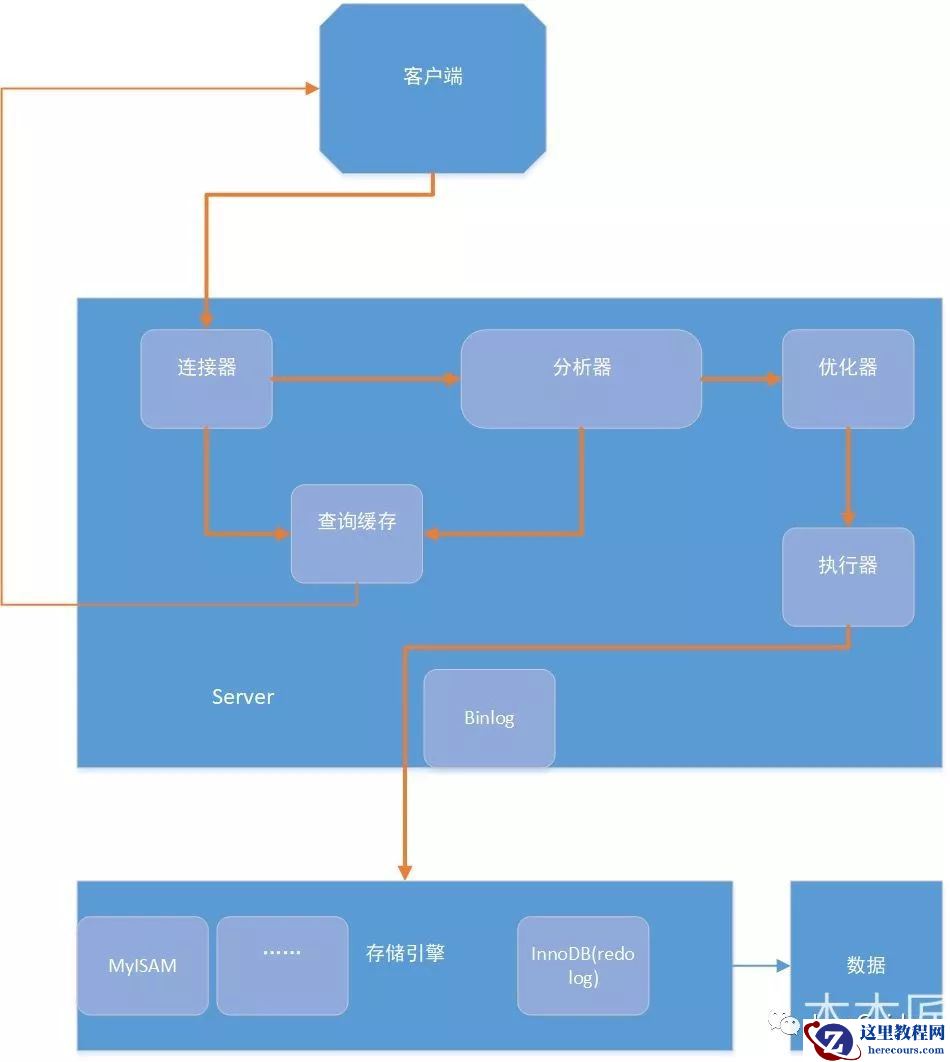
一条SQL语句在MySQL中如何执行的
26-03-01 - SOAR的启发式规则建议

SOAR的启发式规则建议
26-03-01 - 数据库MySQL创建表定义主键 (新手必看)
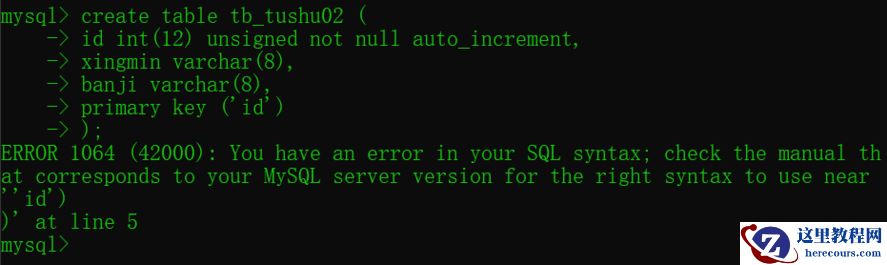
数据库MySQL创建表定义主键 (新手必看)
26-03-01