MySQL的命令行客户端工具mycli,可以实现命令行自动完成补全和语法突出显示。 主页: http://mycli.net 文档: http://mycli.net/docs 安装方法: # pip install -U mycli Collecting mycli Downloading https://files.pythonhosted.org/packages/f9/8a/9f96f12b482ff2e1bbb1d4252e14b4a24ed37daa5b1dcd14c3d990eca9dd/mycli-1.19.0-py2.py3-none-any.whl (56kB) 100% |████████████████████████████████| 61kB 27kB/s Collecting PyMySQL>=0.9.2 (from mycli) Downloading https://files.pythonhosted.org/packages/ed/39/15045ae46f2a123019aa968dfcba0396c161c20f855f11dea6796bcaae95/PyMySQL-0.9.3-py2.py3-none-any.whl (47kB) 100% |████████████████████████████████| 51kB 11kB/s Collecting sqlparse<0.3.0,>=0.2.2 (from mycli) Downloading https://files.pythonhosted.org/packages/65/85/20bdd72f4537cf2c4d5d005368d502b2f464ede22982e724a82c86268eda/sqlparse-0.2.4-py2.py3-none-any.whl Collecting configobj>=5.0.5 (from mycli) Downloading https://files.pythonhosted.org/packages/64/61/079eb60459c44929e684fa7d9e2fdca403f67d64dd9dbac27296be2e0fab/configobj-5.0.6.tar.gz Collecting cryptography>=1.0.0 (from mycli) Downloading https://files.pythonhosted.org/packages/97/18/c6557f63a6abde34707196fb2cad1c6dc0dbff25a200d5044922496668a4/cryptography-2.7-cp34-abi3-manylinux1_x86_64.whl (2.3MB) 100% |████████████████████████████████| 2.3MB 1.3MB/s Collecting cli-helpers[styles]>=1.0.1 (from mycli) Downloading https://files.pythonhosted.org/packages/51/53/d94bb9cd98cd996da6eeea82a077293cd62b825d89a36d3c27714cae5e5b/cli_helpers-1.2.1-py3-none-any.whl Collecting Pygments>=1.6 (from mycli) Downloading https://files.pythonhosted.org/packages/5c/73/1dfa428150e3ccb0fa3e68db406e5be48698f2a979ccbcec795f28f44048/Pygments-2.4.2-py2.py3-none-any.whl (883kB) 100% |████████████████████████████████| 890kB 1.5MB/s Collecting prompt-toolkit>=2.0.6 (from mycli) Downloading https://files.pythonhosted.org/packages/f7/a7/9b1dd14ef45345f186ef69d175bdd2491c40ab1dfa4b2b3e4352df719ed7/prompt_toolkit-2.0.9-py3-none-any.whl (337kB) 100% |████████████████████████████████| 337kB 1.5MB/s Collecting click>=4.1 (from mycli) Using cached https://files.pythonhosted.org/packages/fa/37/45185cb5abbc30d7257104c434fe0b07e5a195a6847506c074527aa599ec/Click-7.0-py2.py3-none-any.whl Collecting six (from configobj>=5.0.5->mycli) Downloading https://files.pythonhosted.org/packages/73/fb/00a976f728d0d1fecfe898238ce23f502a721c0ac0ecfedb80e0d88c64e9/six-1.12.0-py2.py3-none-any.whl Collecting cffi!=1.11.3,>=1.8 (from cryptography>=1.0.0->mycli) Downloading https://files.pythonhosted.org/packages/5f/bf/6aa1925384c23ffeb579e97a5569eb9abce41b6310b329352b8252cee1c3/cffi-1.12.3-cp36-cp36m-manylinux1_x86_64.whl (430kB) 100% |████████████████████████████████| 440kB 1.5MB/s Collecting asn1crypto>=0.21.0 (from cryptography>=1.0.0->mycli) Using cached https://files.pythonhosted.org/packages/ea/cd/35485615f45f30a510576f1a56d1e0a7ad7bd8ab5ed7cdc600ef7cd06222/asn1crypto-0.24.0-py2.py3-none-any.whl Collecting tabulate[widechars]>=0.8.2 (from cli-helpers[styles]>=1.0.1->mycli) Downloading https://files.pythonhosted.org/packages/c2/fd/202954b3f0eb896c53b7b6f07390851b1fd2ca84aa95880d7ae4f434c4ac/tabulate-0.8.3.tar.gz (46kB) 100% |████████████████████████████████| 51kB 5.7MB/s Collecting terminaltables>=3.0.0 (from cli-helpers[styles]>=1.0.1->mycli) Downloading https://files.pythonhosted.org/packages/9b/c4/4a21174f32f8a7e1104798c445dacdc1d4df86f2f26722767034e4de4bff/terminaltables-3.1.0.tar.gz Collecting wcwidth (from prompt-toolkit>=2.0.6->mycli) Downloading https://files.pythonhosted.org/packages/7e/9f/526a6947247599b084ee5232e4f9190a38f398d7300d866af3ab571a5bfe/wcwidth-0.1.7-py2.py3-none-any.whl Collecting pycparser (from cffi!=1.11.3,>=1.8->cryptography>=1.0.0->mycli) Using cached https://files.pythonhosted.org/packages/68/9e/49196946aee219aead1290e00d1e7fdeab8567783e83e1b9ab5585e6206a/pycparser-2.19.tar.gz Installing collected packages: PyMySQL, sqlparse, six, configobj, pycparser, cffi, asn1crypto, cryptography, wcwidth, tabulate, terminaltables, Pygments, cli-helpers, prompt-toolkit, click, mycli Running setup.py install for configobj ... done Running setup.py install for pycparser ... done Running setup.py install for tabulate ... done Running setup.py install for terminaltables ... done Successfully installed PyMySQL-0.9.3 Pygments-2.4.2 asn1crypto-0.24.0 cffi-1.12.3 cli-helpers-1.2.1 click-7.0 configobj-5.0.6 cryptography-2.7 mycli-1.19.0 prompt-toolkit-2.0.9 pycparser-2.19 six-1.12.0 sqlparse-0.2.4 tabulate-0.8.3 terminaltables-3.1.0 wcwidth-0.1.7 You are using pip version 18.1, however version 19.1.1 is available. You should consider upgrading via the 'pip install --upgrade pip' command. [root@test1 20190626]# 使用举例: Examples: - mycli my_database - mycli -u my_user -h my_host.com my_database - mycli mysql://my_user@my_host.com:3306/my_database # mycli -uroot -p -D test -h 192.168.16.150 Password: mysql 5.7.24-log mycli 1.19.0 Chat: https://gitter.im/dbcli/mycli Mail: https://groups.google.com/forum/#!forum/mycli-users Home: http://mycli.net Thanks to the contributor - Dick Marinus mysql root@192.168.16.150:test> select * from aaa dsf dsf_old peihy sq_prebycollecttime t t1 mysql> select * from dsf order by rand() limit 5 \G ***************************[ 1. row ]*************************** id | 281730 name | <null> ***************************[ 2. row ]*************************** id | 448833 name | <null> ***************************[ 3. row ]*************************** id | 441833 name | <null> ***************************[ 4. row ]*************************** id | 686905 name | <null> ***************************[ 5. row ]*************************** id | 392884 name | <null> 5 rows in set Time: 1.311s mysql> 说明: mycli命令后面必须用-D跟数据库名,否则会报错: (1049, "Unknown database 命令帮助信息: # mycli --help Usage: mycli [OPTIONS] [DATABASE] A MySQL terminal client with auto-completion and syntax highlighting. Examples: - mycli my_database - mycli -u my_user -h my_host.com my_database - mycli mysql://my_user@my_host.com:3306/my_database Options: -h, --host TEXT Host address of the database. -P, --port INTEGER Port number to use for connection. Honors $MYSQL_TCP_PORT. -u, --user TEXT User name to connect to the database. -S, --socket TEXT The socket file to use for connection. -p, --password TEXT Password to connect to the database. --pass TEXT Password to connect to the database. --ssh-user TEXT User name to connect to ssh server. --ssh-host TEXT Host name to connect to ssh server. --ssh-port INTEGER Port to connect to ssh server. --ssh-password TEXT Password to connect to ssh server. --ssh-key-filename TEXT Private key filename (identify file) for the ssh connection. --ssl-ca PATH CA file in PEM format. --ssl-capath TEXT CA directory. --ssl-cert PATH X509 cert in PEM format. --ssl-key PATH X509 key in PEM format. --ssl-cipher TEXT SSL cipher to use. --ssl-verify-server-cert Verify server's "Common Name" in its cert against hostname used when connecting. This option is disabled by default. -V, --version Output mycli's version. -v, --verbose Verbose output. -D, --database TEXT Database to use. -d, --dsn TEXT Use DSN configured into the [alias_dsn] section of myclirc file. --list-dsn list of DSN configured into the [alias_dsn] section of myclirc file. -R, --prompt TEXT Prompt format (Default: "\t \u@\h:\d> "). -l, --logfile FILENAME Log every query and its results to a file. --defaults-group-suffix TEXT Read MySQL config groups with the specified suffix. --defaults-file PATH Only read MySQL options from the given file. --myclirc PATH Location of myclirc file. --auto-vertical-output Automatically switch to vertical output mode if the result is wider than the terminal width. -t, --table Display batch output in table format. --csv Display batch output in CSV format. --warn / --no-warn Warn before running a destructive query. --local-infile BOOLEAN Enable/disable LOAD DATA LOCAL INFILE. --login-path TEXT Read this path from the login file. -e, --execute TEXT Execute command and quit. --help Show this message and exit.
分享一个MySQL命令行自动完成和补全的小工具
来源:这里教程网
时间:2026-03-01 12:12:51
作者:
编辑推荐:
- 分享一个MySQL命令行自动完成和补全的小工具03-01
- 3dmax制作逼真的城市高楼大厦教程03-01
- MySQL入门--事务与锁03-01
- 3dmax制作超酷的室外效果图教程03-01
- 在线ER模型设计:可视化MySQL数据库建表及操作03-01
- DTCC 干货 | 中国银联跨中心,异构数据同步技术与实践03-01
- MySQL ALTER命令03-01
- MySQL入门--存储引擎03-01
下一篇:
相关推荐
-

-
-
-
-
-
-
-
-
-
-
-
-
-
-

雷神推出 MIX PRO II 迷你主机:基于 Ultra 200H,玻璃上盖 + ARGB 灯效
2 月 9 日消息,雷神 (THUNDEROBOT) 现已宣布推出基于英
-

制造商 Musnap 推出彩色墨水屏电纸书 Ocean C:支持手写笔、第三方安卓应用
2 月 10 日消息,制造商 Musnap 现已在海外推出一款 Oce
热文推荐
- 3dmax制作逼真的城市高楼大厦教程

3dmax制作逼真的城市高楼大厦教程
26-03-01 - MySQL入门--事务与锁
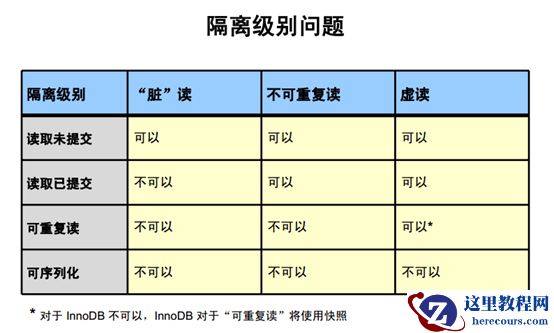
MySQL入门--事务与锁
26-03-01 - 3dmax制作超酷的室外效果图教程

3dmax制作超酷的室外效果图教程
26-03-01 - 在线ER模型设计:可视化MySQL数据库建表及操作

在线ER模型设计:可视化MySQL数据库建表及操作
26-03-01 - DTCC 干货 | 中国银联跨中心,异构数据同步技术与实践

DTCC 干货 | 中国银联跨中心,异构数据同步技术与实践
26-03-01 - MySQL入门--存储引擎
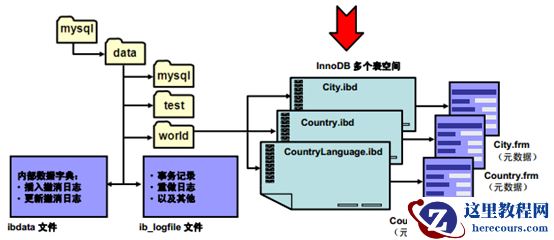
MySQL入门--存储引擎
26-03-01 - 思维导图能做什么?

思维导图能做什么?
26-03-01 - 3ds max制作蝴蝶宝宝建模教程

3ds max制作蝴蝶宝宝建模教程
26-03-01 - MySQL log_timestamps参数与mysql数据库读取my.cnf的顺序
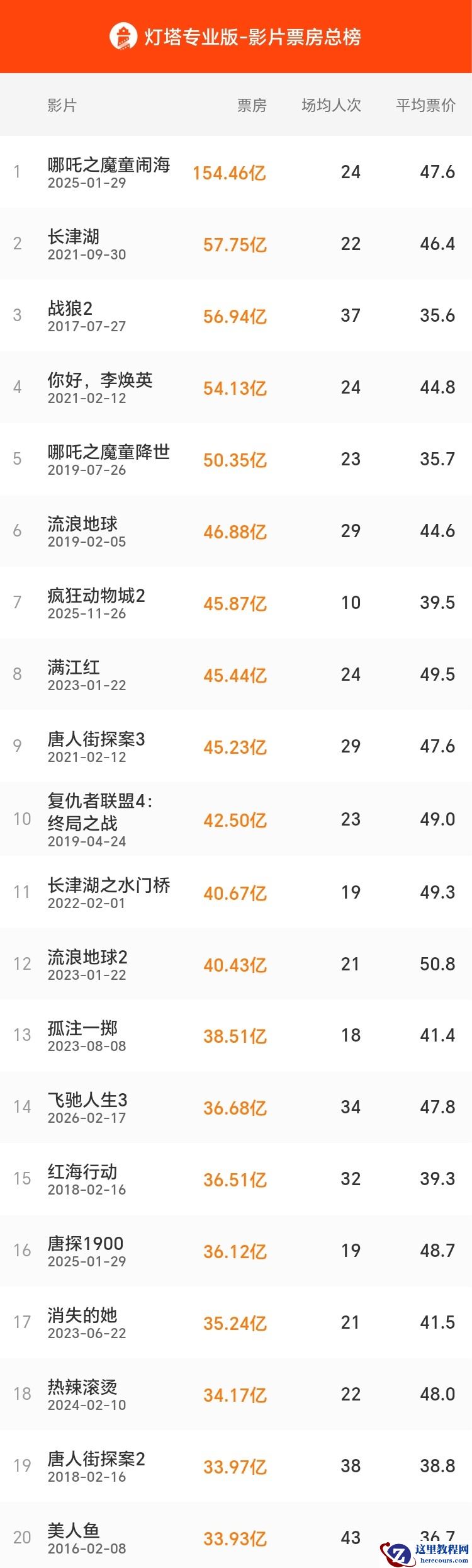
- 票房突破 36 亿:韩寒《飞驰人生 3》超《唐探 1900》,进入中国影史票房榜 TOP15