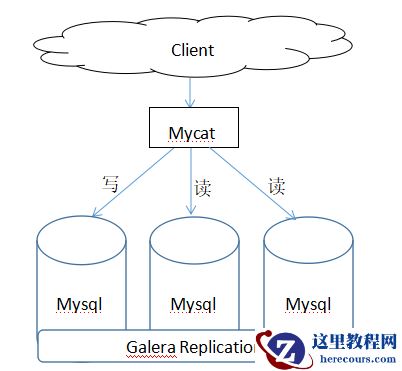
Mycat实现读写分离架构图:
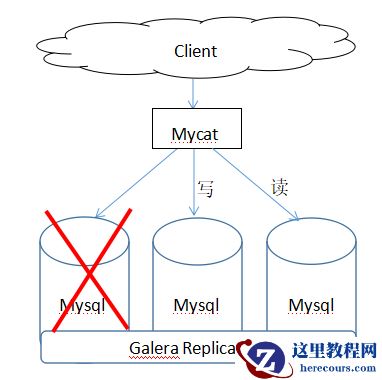
 Mycat主从自动切换架构图:
 Mycat下载地址:http://dl.mycat.io/1.6.7.3/20190828135747/Mycat-server-1.6.7.3-release-20190828135747-linux.tar.gz
Percona-XtraDB-Cluster下载地址:https://www.percona.com/downloads/Percona-XtraDB-Cluster-57/LATEST/
Percona-XtraBackup下载地址:
https://www.percona.com/downloads/Percona-XtraBackup-2.4/LATEST/
yum仓库地址:https://www.percona.com/downloads/percona-release/redhat/
1.下载,安装Percona-XtraDB-Cluster(三台都需要装)
[root@k8s01 ~]# rpm -ivh https://www.percona.com/redir/downloads/percona-release/redhat/1.0-13/percona-release-1.0-13.noarch.rpm
[root@k8s01 ~]# yum repolist
[root@k8s01 ~]# rpm -ivh percona-xtrabackup-24-2.4.13-1.el7.x86_64.rpm
[root@k8s01 ~]# yum install Percona-XtraDB-Cluster-57 -y
2.修改配置,启动服务(k8s01节点)
[root@k8s01 ~]# vim /etc/percona-xtradb-cluster.conf.d/mysqld.cnf
log-bin=k8s01-bin
log-bin-index=k8s01-bin-index
[root@k8s01 ~]# vim /etc/percona-xtradb-cluster.conf.d/wsrep.cnf
[mysqld]
wsrep_provider=/usr/lib64/galera3/libgalera_smm.so
wsrep_cluster_address=gcomm://192.168.54.129,192.168.54.130,192.168.54.128
binlog_format=ROW
default_storage_engine=InnoDB
wsrep_slave_threads= 8
wsrep_log_conflicts
innodb_autoinc_lock_mode=2
wsrep_node_address=192.168.54.128 --三个节点值不一样
wsrep_cluster_name=mycluster
wsrep_node_name=k8s01
pxc_strict_mode=ENFORCING
wsrep_sst_method=xtrabackup-v2
wsrep_sst_auth="sstuser:s3cretPass"
[root@k8s01 ~]# mysql_install_db --defaults-file=/etc/percona-xtradb-cluster.cnf --datadir=/var/lib/mysql --初使化数据
[root@k8s01 ~]# systemctl start
mysql@bootstrap.service --第一次启动,不需要同步数据
[root@k8s01 ~]# ps -ef | grep mysql
root 60672 54285 0 14:56 pts/1 00:00:00 tailf /var/log/mysqld.log
root 66031 1 0 15:03 ? 00:00:00 /bin/sh /usr/bin/mysqld_safe --basedir=/usr --wsrep-new-cluster
mysql 66568 66031 6 15:03 ? 00:00:01 /usr/sbin/mysqld --basedir=/usr --datadir=/var/lib/mysql --plugin-dir=/usr/lib64/mysql/plugin --user=mysql --wsrep-provider=/usr/lib64/galera3/libgalera_smm.so --wsrep-new-cluster --log-error=
/var/log/mysqld.log --pid-file=/var/run/mysqld/mysqld.pid --socket=/var/lib/mysql/mysql.sock --wsrep_start_position=00000000-0000-0000-0000-000000000000:-1root 66763 33815 0 15:04 pts/0 00:00:00 grep --color=auto mysql
Mycat下载地址:http://dl.mycat.io/1.6.7.3/20190828135747/Mycat-server-1.6.7.3-release-20190828135747-linux.tar.gz
Percona-XtraDB-Cluster下载地址:https://www.percona.com/downloads/Percona-XtraDB-Cluster-57/LATEST/
Percona-XtraBackup下载地址:
https://www.percona.com/downloads/Percona-XtraBackup-2.4/LATEST/
yum仓库地址:https://www.percona.com/downloads/percona-release/redhat/
1.下载,安装Percona-XtraDB-Cluster(三台都需要装)
[root@k8s01 ~]# rpm -ivh https://www.percona.com/redir/downloads/percona-release/redhat/1.0-13/percona-release-1.0-13.noarch.rpm
[root@k8s01 ~]# yum repolist
[root@k8s01 ~]# rpm -ivh percona-xtrabackup-24-2.4.13-1.el7.x86_64.rpm
[root@k8s01 ~]# yum install Percona-XtraDB-Cluster-57 -y
2.修改配置,启动服务(k8s01节点)
[root@k8s01 ~]# vim /etc/percona-xtradb-cluster.conf.d/mysqld.cnf
log-bin=k8s01-bin
log-bin-index=k8s01-bin-index
[root@k8s01 ~]# vim /etc/percona-xtradb-cluster.conf.d/wsrep.cnf
[mysqld]
wsrep_provider=/usr/lib64/galera3/libgalera_smm.so
wsrep_cluster_address=gcomm://192.168.54.129,192.168.54.130,192.168.54.128
binlog_format=ROW
default_storage_engine=InnoDB
wsrep_slave_threads= 8
wsrep_log_conflicts
innodb_autoinc_lock_mode=2
wsrep_node_address=192.168.54.128 --三个节点值不一样
wsrep_cluster_name=mycluster
wsrep_node_name=k8s01
pxc_strict_mode=ENFORCING
wsrep_sst_method=xtrabackup-v2
wsrep_sst_auth="sstuser:s3cretPass"
[root@k8s01 ~]# mysql_install_db --defaults-file=/etc/percona-xtradb-cluster.cnf --datadir=/var/lib/mysql --初使化数据
[root@k8s01 ~]# systemctl start
mysql@bootstrap.service --第一次启动,不需要同步数据
[root@k8s01 ~]# ps -ef | grep mysql
root 60672 54285 0 14:56 pts/1 00:00:00 tailf /var/log/mysqld.log
root 66031 1 0 15:03 ? 00:00:00 /bin/sh /usr/bin/mysqld_safe --basedir=/usr --wsrep-new-cluster
mysql 66568 66031 6 15:03 ? 00:00:01 /usr/sbin/mysqld --basedir=/usr --datadir=/var/lib/mysql --plugin-dir=/usr/lib64/mysql/plugin --user=mysql --wsrep-provider=/usr/lib64/galera3/libgalera_smm.so --wsrep-new-cluster --log-error=
/var/log/mysqld.log --pid-file=/var/run/mysqld/mysqld.pid --socket=/var/lib/mysql/mysql.sock --wsrep_start_position=00000000-0000-0000-0000-000000000000:-1root 66763 33815 0 15:04 pts/0 00:00:00 grep --color=auto mysql
3.修改配置,启动服务(k8s02节点) [root@k8s02 ~]# vim /etc/percona-xtradb-cluster.conf.d/mysqld.cnf log-bin=k8s01-bin log-bin-index=k8s01-bin-index [root@k8s02 ~]# vim /etc/percona-xtradb-cluster.conf.d/wsrep.cnf [mysqld] wsrep_provider=/usr/lib64/galera3/libgalera_smm.so wsrep_cluster_address=gcomm://192.168.54.128,192.168.54.129,192.168.54.130 binlog_format=ROW default_storage_engine=InnoDB wsrep_slave_threads= 8 wsrep_log_conflicts innodb_autoinc_lock_mode=2 wsrep_node_address=192.168.54.129 wsrep_cluster_name=mycluster wsrep_node_name=k8s02 pxc_strict_mode=ENFORCING wsrep_sst_method=xtrabackup-v2 wsrep_sst_auth="sstuser:s3cretPass" [root@k8s02 ~]# systemctl start mysql 4.修改配置,启动服务(k8s03节点) [root@k8s03 ~]# vim /etc/percona-xtradb-cluster.conf.d/mysqld.cnf log-bin=k8s01-bin log-bin-index=k8s01-bin-index [root@k8s03 ~]# vim /etc/percona-xtradb-cluster.conf.d/wsrep.cnf [mysqld] wsrep_provider=/usr/lib64/galera3/libgalera_smm.so
default_storage_engine=InnoDB wsrep_slave_threads= 8 wsrep_log_conflicts innodb_autoinc_lock_mode=2 wsrep_node_address=192.168.54.130 wsrep_cluster_name=mycluster wsrep_node_name=k8s03 pxc_strict_mode=ENFORCING wsrep_sst_method=xtrabackup-v2 wsrep_sst_auth="sstuser:s3cretPass" [root@k8s03 ~]# systemctl start mysql 5.测试Percona-XtraDB-Cluster集群数据同步 k8s01节点:
k8s02节点:
6.下载,安装Mycat中间件
[root@[root@k8s01 soft]# rpm -ivh jdk-8u221-linux-x64.rpm
warning: jdk-8u221-linux-x64.rpm: Header V3 RSA/SHA256 Signature, key ID ec551f03: NOKEY
Preparing... ################################# [100%]
Updating / installing...
1:jdk1.8-2000:1.8.0_221-fcs ################################# [100%]
Unpacking JAR files...
tools.jar...
plugin.jar...
javaws.jar...
deploy.jar...
rt.jar...
jsse.jar...
charsets.jar...
localedata.jar...
[root@k8s01 soft]# tar xvf Mycat-server-1.6.7.3-release-20190828135747-linux.tar.gz -C /usr/local/
[root@k8s01 soft]# cd /usr/local/mycat/conf/
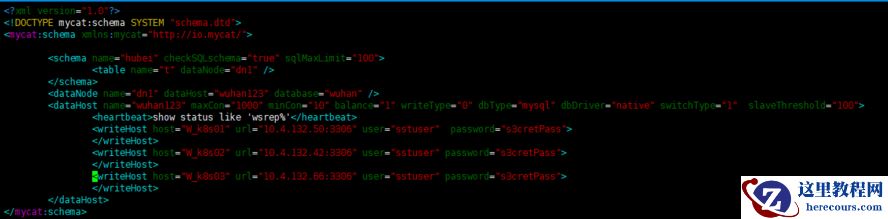
[root@k8s01 conf]# vim schema.xml
 [root@k8s01 conf]# vim server.xml
[root@k8s01 conf]# ../bin/mycat restart
Stopping Mycat-server...
Mycat-server was not running.
Starting Mycat-server...
[root@k8s01 conf]# netstat -antulp | grep 9066
tcp6 0 0 :::9066 :::* LISTEN 100087/java
[root@k8s01 conf]#
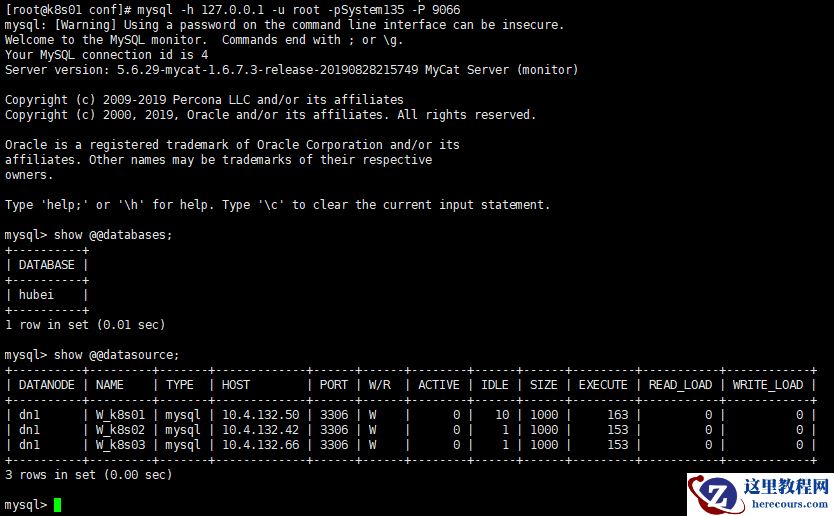
7.使用Mycat验证读,写数据(1).查看管理端口服务
 (2).查看数据,如果想要看负载均衡效果,必须退出终端,再登陆。
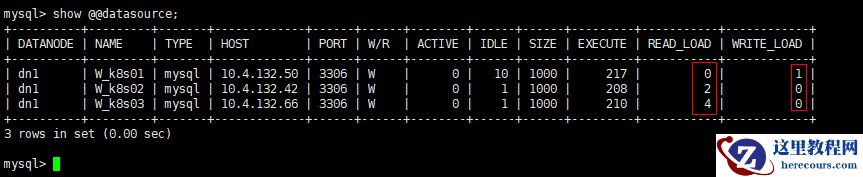
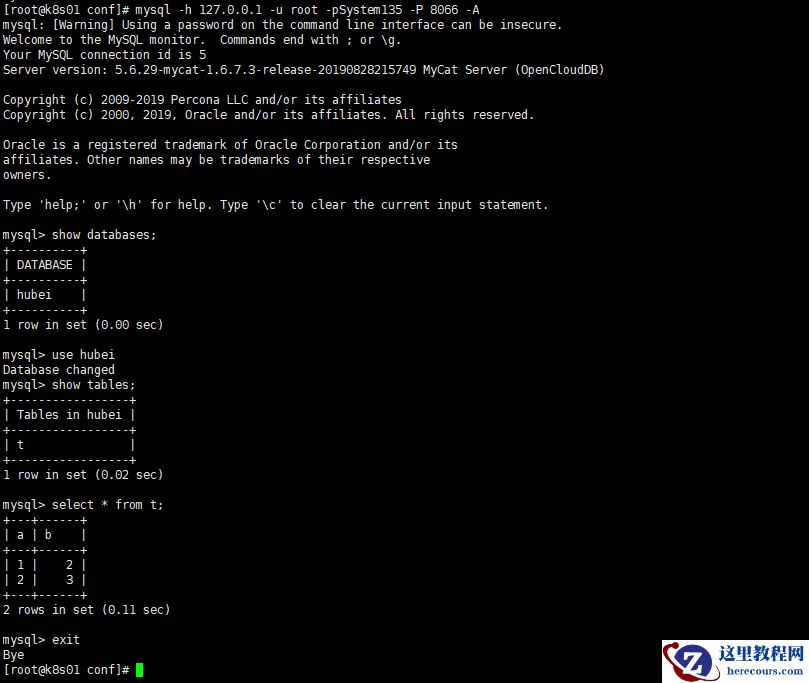 (3).k8s01节点写入数据,k8s02和k8s03读数据
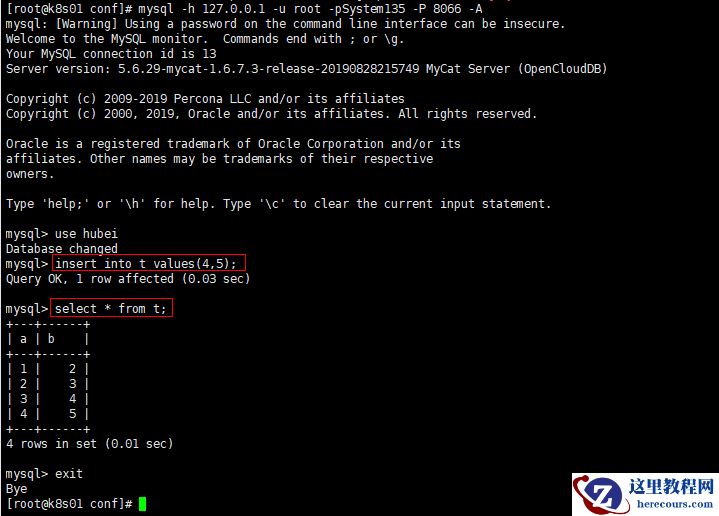
 8.k8s01节点宕机后,k8s02节点负责写入数据,k8s03读数据
[root@k8s01 conf]# systemctl stop mysql@bootstrap.service
[root@k8s01 conf]# netstat -antulp | grep 3306
tcp6 0 0 10.4.132.50:60568 10.4.132.42:3306 ESTABLISHED 100087/java
tcp6 0 0 10.4.132.50:51072 10.4.132.66:3306 ESTABLISHED 100087/java
[root@k8s01 conf]# ps -ef | grep mysqld
root 115559 33815 0 16:58 pts/0 00:00:00 grep --color=auto mysqld
8.k8s01节点宕机后,k8s02节点负责写入数据,k8s03读数据
[root@k8s01 conf]# systemctl stop mysql@bootstrap.service
[root@k8s01 conf]# netstat -antulp | grep 3306
tcp6 0 0 10.4.132.50:60568 10.4.132.42:3306 ESTABLISHED 100087/java
tcp6 0 0 10.4.132.50:51072 10.4.132.66:3306 ESTABLISHED 100087/java
[root@k8s01 conf]# ps -ef | grep mysqld
root 115559 33815 0 16:58 pts/0 00:00:00 grep --color=auto mysqld
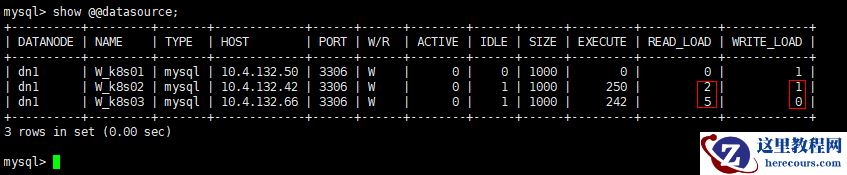
 (2).写入节点是k8s02,读节点是k8s03
 错误处理:
(1).Mysql没有初使化数据
错误处理:
(1).Mysql没有初使化数据
2019-11-15T06:33:04.385659Z 0 [ERROR] Fatal error: Can't open and lock privilege tables: Table 'mysql.user' doesn't exist 2019-11-15T06:33:04.385668Z 0 [ERROR] Fatal error: Failed to initialize ACL/grant/time zones structures or failed to remove temporary table files. 2019-11-15T06:33:04.385687Z 0 [ERROR] Aborting 解决方法: [root@k8s01 conf]# mysql_install_db --defaults-file=/etc/percona-xtradb-cluster.cnf --datadir=/var/lib/mysql --需要初使化数据 (2).第一个节点第一次启动必须要创建新的集群 2019-11-15T06:41:35.761089Z 0 [Note] WSREP: Current view of cluster as seen by this node view ((empty)) 2019-11-15T06:41:35.761280Z 0 [ERROR] WSREP: failed to open gcomm backend connection: 110: failed to reach primary view (pc.wait_prim_timeout): 110 (Connection timed out) at gcomm/src/pc.cpp:connect():159 2019-11-15T06:41:35.761309Z 0 [ERROR] WSREP: gcs/src/gcs_core.cpp:gcs_core_open():209: Failed to open backend connection: -110 (Connection timed out) 2019-11-15T06:41:35.761583Z 0 [ERROR] WSREP: gcs/src/gcs.cpp:gcs_open():1514: Failed to open channel 'pxc_1' at 'gcomm://192.168.54.128,192.168.54.129,192.168.54.130': -110 (Connection timed out) 2019-11-15T06:41:35.761597Z 0 [ERROR] WSREP: gcs connect failed: Connection timed out 2019-11-15T06:41:35.761600Z 0 [ERROR] WSREP: Provider/Node (gcomm://192.168.54.128,192.168.54.129,192.168.54.130) failed to establish connection with cluster (reason: 7) 2019-11-15T06:41:35.761603Z 0 [ERROR] Aborting 解决方法:
(3).没有创建wsrep.cnf用户名 2019-11-15T07:27:59.158666Z 0 [ERROR] WSREP: Command did not run: wsrep_sst_xtrabackup-v2 --role 'donor' --address '192.168.54.129:4444/xtrabackup_sst//1' --socket '/var/lib/mysql/mysql.sock' --datadir '/var/lib/mysql/' --defaults-file '/etc/my.cnf' --defaults-group-suf fix '' --mysqld-version '5.7.27-30-57' '' --gtid '19a21dce-0776-11ea-8879-92a989219bb1:2'2019-11-15T07:27:59.159302Z 0 [Warning] WSREP: Protocol violation. JOIN message sender 0.0 (k8s01) is not in state transfer (SYNCED). Message ignored. 2019-11-15T07:27:59.159405Z 5 [Note] WSREP: Synchronized with group, ready for connections 解决方法: [root@k8s01 conf]# grep sst /etc/percona-xtradb-cluster.conf.d/wsrep.cnf wsrep_sst_method=xtrabackup-v2 wsrep_sst_auth="sstuser:s3cretPass" [root@k8s01 conf]#
mysql> exit Bye [root@k8s01 ~]#
编辑推荐:
相关推荐
-

-
-
-
-
-
-
-
-
-
-
-
-
-
-

雷神推出 MIX PRO II 迷你主机:基于 Ultra 200H,玻璃上盖 + ARGB 灯效
2 月 9 日消息,雷神 (THUNDEROBOT) 现已宣布推出基于英
-

制造商 Musnap 推出彩色墨水屏电纸书 Ocean C:支持手写笔、第三方安卓应用
2 月 10 日消息,制造商 Musnap 现已在海外推出一款 Oce
热文推荐
- Mycat中间件实现Percona Cluster集群读写分离
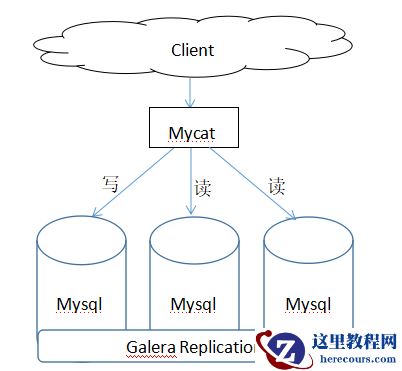
Mycat中间件实现Percona Cluster集群读写分离
26-03-01 - MySQL 安装介绍
MySQL 安装介绍
26-03-01 - PPT参考线设置妙招:PPT参考线如何添加删除及更改颜色
PPT参考线设置妙招:PPT参考线如何添加删除及更改颜色
26-03-01 - 开放融合 | “引擎级”深度对接!POLARDB与SuperMap联合构建首个云原生时空平台
- 重新学习MySQL数据库12:从实践sql语句优化开始

重新学习MySQL数据库12:从实践sql语句优化开始
26-03-01 - 新玩具将至?网友提议小米出 Vision Gran Turismo 双门轿跑车模,雷军回应“马上催!”
- 3ds MAX绘制逼真的劳力士手表效果图

3ds MAX绘制逼真的劳力士手表效果图
26-03-01 - 3ds Max快速打造网格特效的麋鹿效果

3ds Max快速打造网格特效的麋鹿效果
26-03-01 - 3ds Max制作简单的爆炸场景效果

3ds Max制作简单的爆炸场景效果
26-03-01 - 3DsMAX如何快速打出自然的室内光线

3DsMAX如何快速打出自然的室内光线
26-03-01