架构图:
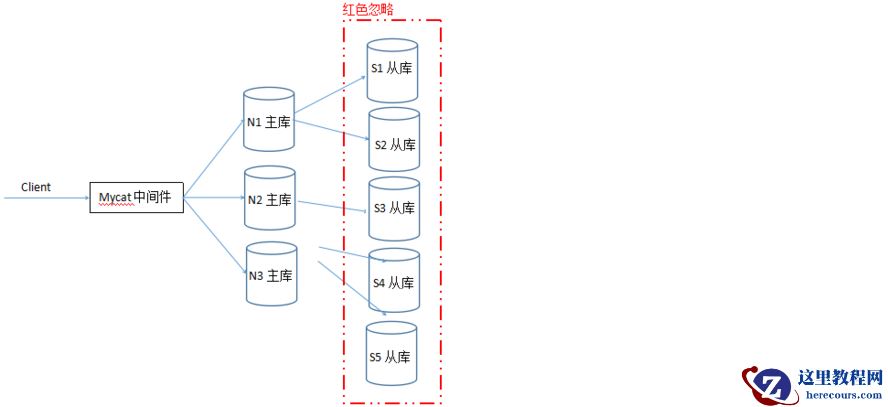 机器规划:
机器规划:
| IP地址 | 主机名 | 角色 | 备注 |
| 10.4.132.50 | k8s01 | mycat,master | |
| 10.4.132.42 | k8s02 | master | |
| 10.4.132.66 | k8s03 | master |
Mycat下载地址:http://dl.mycat.io/1.6.7.3/20190828135747/Mycat-server-1.6.7.3-release-20190828135747-linux.tar.gz Mysql下载地址: http://mirrors.163.com/mysql/Downloads/MySQL-5.7/mysql-5.7.27-linux-glibc2.12-x86_64.tar.gz
[root@k8s01 mysql-5.7.27]# /etc/init.d/mysqld restart ERROR! MySQL server PID file could not be found! Starting MySQL.Logging to '/usr/local/mysql-5.7.27/data/mariadb.log'. ... SUCCESS! [root@k8s01 mysql-5.7.27]# vim /etc/profile export PATH=$PATH:/usr/local/mysql-5.7.27/bin [root@k8s01 mysql-5.7.27]# mysql -u root -p Enter password: Welcome to the MySQL monitor. Commands end with ; or \g. Your MySQL connection id is 3 Server version: 5.7.27 Copyright (c) 2000, 2019, Oracle and/or its affiliates. All rights reserved. Oracle is a registered trademark of Oracle Corporation and/or its affiliates. Other names may be trademarks of their respectiveowners. Type 'help;' or '\h' for help. Type '\c' to clear the current input statement. mysql> set password=password('System135'); Query OK, 0 rows affected, 1 warning (0.00 sec) mysql> flush privileges; Query OK, 0 rows affected (0.00 sec) mysql> exit Bye [root@k8s01 mysql-5.7.27]# mysql -u root -pSystem135 mysql: [Warning] Using a password on the command line interface can be insecure. Welcome to the MySQL monitor. Commands end with ; or \g. Your MySQL connection id is 6 Server version: 5.7.27 MySQL Community Server (GPL) Copyright (c) 2000, 2019, Oracle and/or its affiliates. All rights reserved. Oracle is a registered trademark of Oracle Corporation and/or its affiliates. Other names may be trademarks of their respective owners. Type 'help;' or '\h' for help. Type '\c' to clear the current input statement. mysql> grant all privileges on *.* to repl@'%' identified by '123456'; Query OK, 0 rows affected, 1 warning (0.00 sec) mysql> flush privileges; Query OK, 0 rows affected (0.00 sec) mysql> 2.下载安装Mycat [root@k8s01 soft]# rpm -ivh jdk-8u221-linux-x64.rpm warning: jdk-8u221-linux-x64.rpm: Header V3 RSA/SHA256 Signature, key ID ec551f03: NOKEY Preparing... ################################# [100%] Updating / installing... 1:jdk1.8-2000:1.8.0_221-fcs ################################# [100%] Unpacking JAR files... tools.jar... plugin.jar... javaws.jar... deploy.jar... rt.jar... jsse.jar... charsets.jar... localedata.jar... [root@k8s01 soft]# tar xvf Mycat-server-1.6.7.3-release-20190828135747-linux.tar.gz -C /usr/local/ [root@k8s01 soft]# cd /usr/local/mycat/conf/ [root@k8s01 conf]#
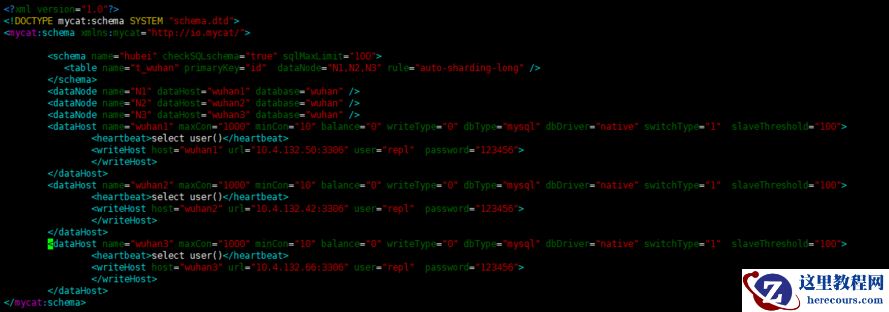 [root@k8s01 conf]# vim rule.xml --其它不要动,只修改以下内容
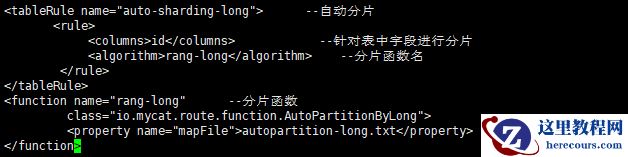 [root@k8s01 conf]# vim autopartition-long.txt
# range start-end ,data node index
# K=1000,M=10000. --K表示1千,M表示1万
0-5=0 --从0到5放到第一个节点
5-10=1 --从6到10放到第二个节点
10-15=2 --从11到15放到第三个节点
[root@k8s01 conf]# vim server.xml --Mycat登陆用户名和密码
[root@k8s01 conf]# vim autopartition-long.txt
# range start-end ,data node index
# K=1000,M=10000. --K表示1千,M表示1万
0-5=0 --从0到5放到第一个节点
5-10=1 --从6到10放到第二个节点
10-15=2 --从11到15放到第三个节点
[root@k8s01 conf]# vim server.xml --Mycat登陆用户名和密码
 [root@k8s01 conf]# ../bin/mycat restart
Stopping Mycat-server...
Stopped Mycat-server.
Starting Mycat-server...
[root@k8s01 conf]# netstat -antulp | grep 8066
tcp6 0 0 :::8066 :::* LISTEN 46762/java
[root@k8s01 conf]# netstat -antulp | grep 9066
tcp6 0 0 :::9066 :::* LISTEN 46762/java
[root@k8s01 conf]#
4.验证数据分片后存放
[root@k8s01 conf]# /usr/local/mysql-5.7.27/bin/mysql -u root -pSystem135 -P8066 -h 127.0.0.1 --登陆Mycat数据数据
[root@k8s01 conf]# ../bin/mycat restart
Stopping Mycat-server...
Stopped Mycat-server.
Starting Mycat-server...
[root@k8s01 conf]# netstat -antulp | grep 8066
tcp6 0 0 :::8066 :::* LISTEN 46762/java
[root@k8s01 conf]# netstat -antulp | grep 9066
tcp6 0 0 :::9066 :::* LISTEN 46762/java
[root@k8s01 conf]#
4.验证数据分片后存放
[root@k8s01 conf]# /usr/local/mysql-5.7.27/bin/mysql -u root -pSystem135 -P8066 -h 127.0.0.1 --登陆Mycat数据数据
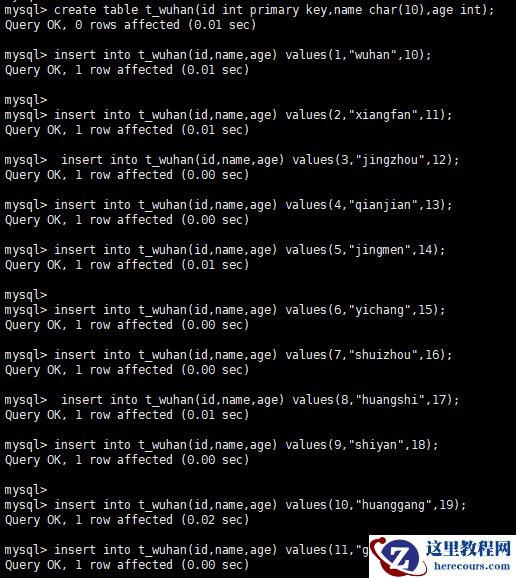 查询写入后的数据:
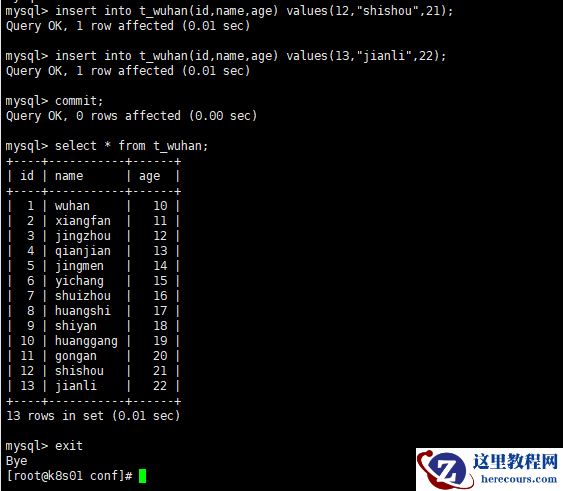 k8s01节点验证数据:
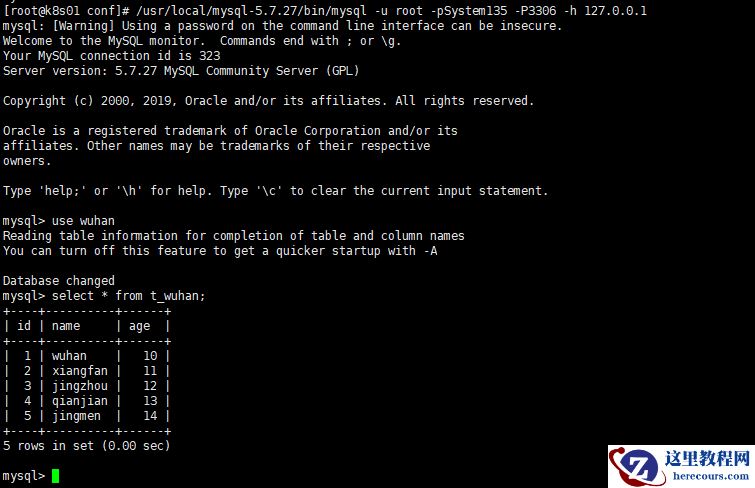 k8s02节点验证数据:
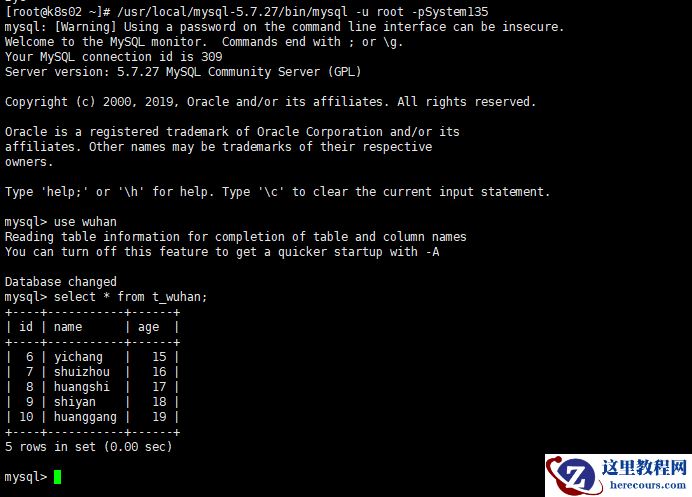 k8s03节点验证数据:
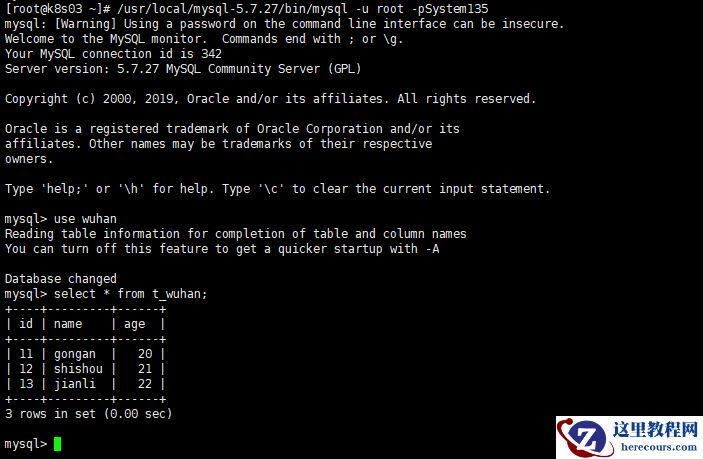 5.数据按日期(月份)分片
[root@k8s01 conf]# vim schema.xml
5.数据按日期(月份)分片
[root@k8s01 conf]# vim schema.xml
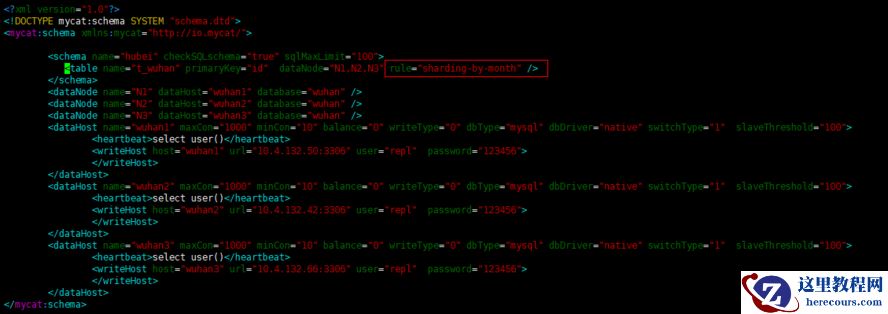 [root@k8s01 conf]# vim rule.xml
 [root@k8s01 conf]# ../bin/mycat restart
Stopping Mycat-server...
Stopped Mycat-server.
Starting Mycat-server...
[root@k8s01 conf]# !net
netstat -antulp | grep 9066
tcp6 0 0 :::9066 :::* LISTEN 69040/java
[root@k8s01 conf]# netstat -antulp | grep 8066
tcp6 0 0 :::8066 :::* LISTEN 69040/java
[root@k8s01 conf]#
6.验证数据分片后存放
[root@k8s01 conf]# ../bin/mycat restart
Stopping Mycat-server...
Stopped Mycat-server.
Starting Mycat-server...
[root@k8s01 conf]# !net
netstat -antulp | grep 9066
tcp6 0 0 :::9066 :::* LISTEN 69040/java
[root@k8s01 conf]# netstat -antulp | grep 8066
tcp6 0 0 :::8066 :::* LISTEN 69040/java
[root@k8s01 conf]#
6.验证数据分片后存放
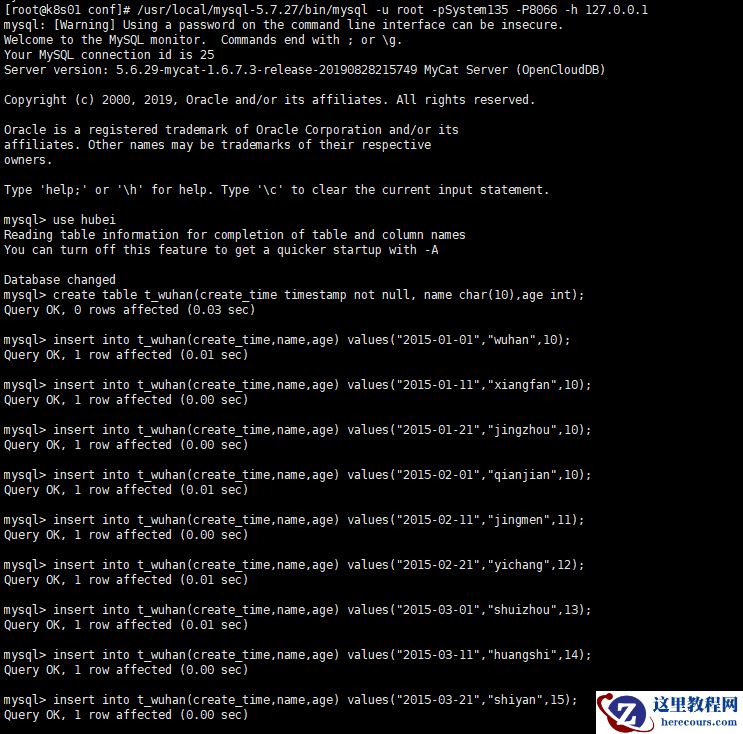 验证数据:
k8s01节点:
验证数据:
k8s01节点:
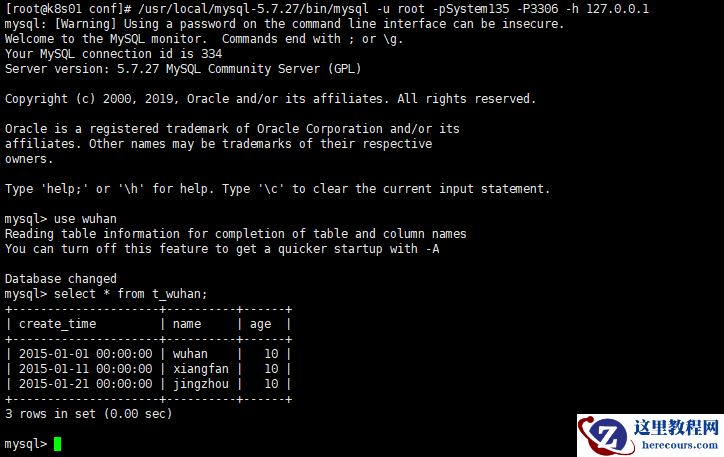 k8s02节点:
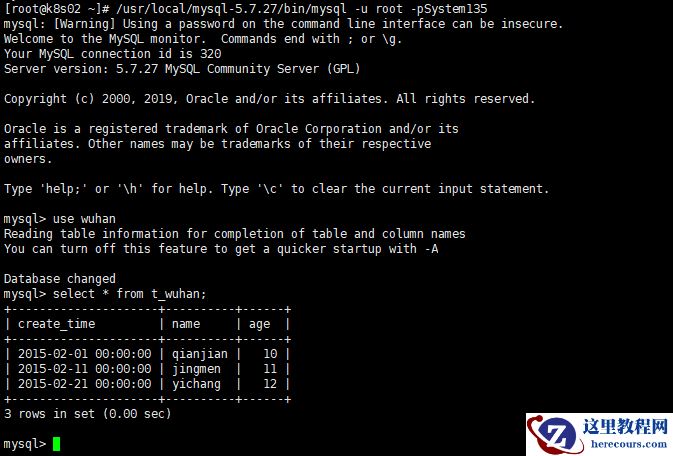 k8s03节点:
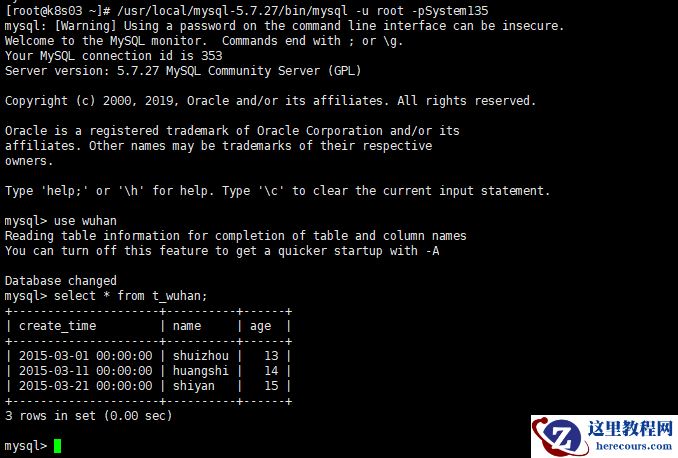 错误处理:
mysql> insert into t_wuhan(create_time,name,age) values("2015-04-01","huanggang",16);
ERROR 1064 (HY000): Can't find a valid data node for specified node index :T_WUHAN -> CREATE_TIME -> 2015-04-01 -> Index : 3
解决方法:
写入4月份数据时会提示找不到节点,是因为有几个节点就会写入几月份数据,比如我只有3个node节点,只能写入1-3月份数据。
7.数据按枚举分片
[root@k8s01 conf]# vim schema.xml
错误处理:
mysql> insert into t_wuhan(create_time,name,age) values("2015-04-01","huanggang",16);
ERROR 1064 (HY000): Can't find a valid data node for specified node index :T_WUHAN -> CREATE_TIME -> 2015-04-01 -> Index : 3
解决方法:
写入4月份数据时会提示找不到节点,是因为有几个节点就会写入几月份数据,比如我只有3个node节点,只能写入1-3月份数据。
7.数据按枚举分片
[root@k8s01 conf]# vim schema.xml
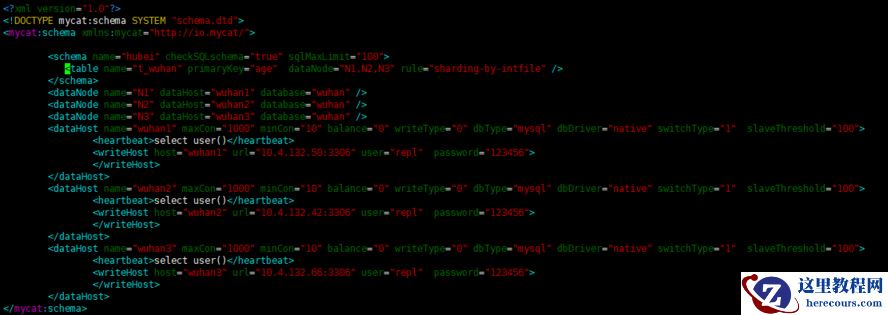 [root@k8s01 conf]# vim rule.xml
 [root@k8s01 conf]# cat partition-hash-int.txt --可以写多个枚举
学生=0
老师=1
DEFAULT_NODE=2
[root@k8s01 conf]#
8.验证数据分片后存放
[root@k8s01 conf]# cat partition-hash-int.txt --可以写多个枚举
学生=0
老师=1
DEFAULT_NODE=2
[root@k8s01 conf]#
8.验证数据分片后存放
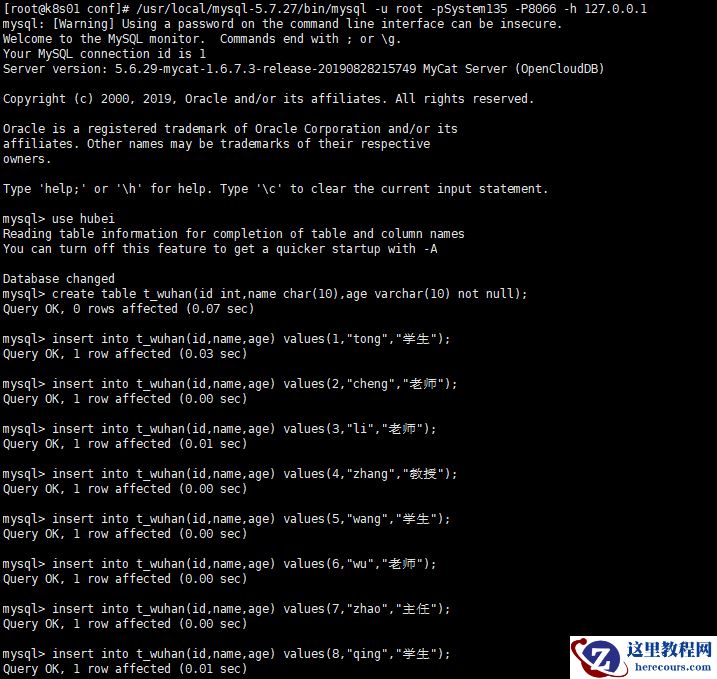 验证数据:
k8s01节点:
验证数据:
k8s01节点:
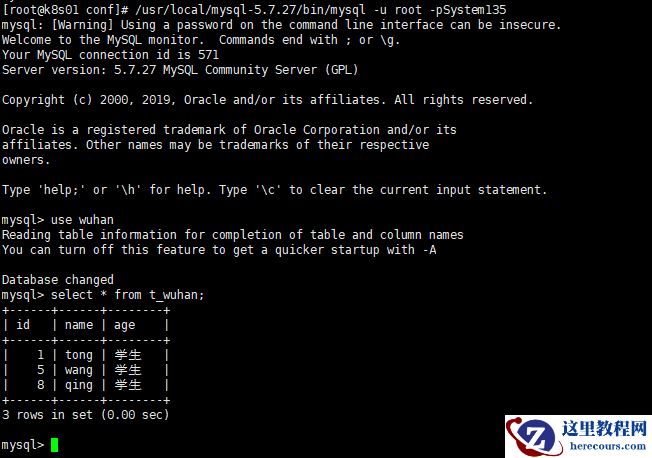 k8s02节点:
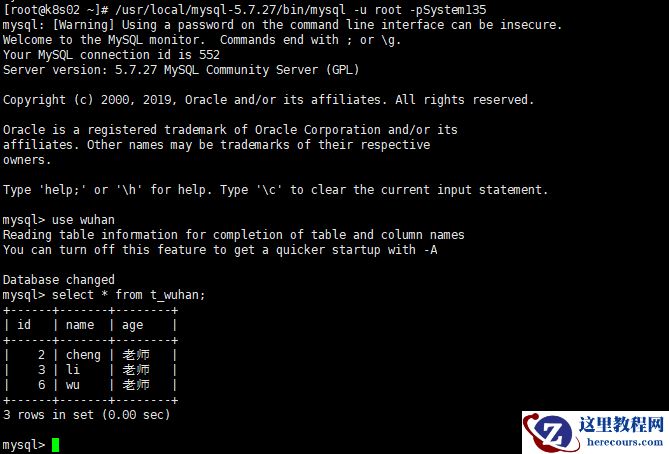 k8s03节点:
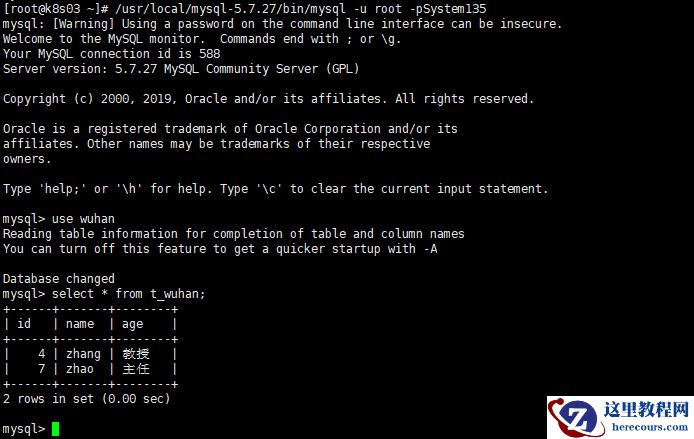
 type:type值默认为0,表示数值是整型。值为1,表示是字符串。
defaultNode:值对应partition-hash-int.txt文件中的DEFAULT_NODE的值。
type:type值默认为0,表示数值是整型。值为1,表示是字符串。
defaultNode:值对应partition-hash-int.txt文件中的DEFAULT_NODE的值。
编辑推荐:
- Mycat中间件实现Mysql数据分片(上篇)03-01
- 查看mysql运行状态的一些sql03-01
- 升级redhat 6.8 默认gdb 7.2到gdb 8.3.1操作指南03-01
- PPT中如何制作折扇效果?简单的方法是什么?03-01
- 如何将一张图片在PPT中设置成黑色?简单的方法是什么?03-01
- MySQL Binlog Digger V4.703-01
- 如何1小时快速上手SQL?03-01
- mysqld --skip-grant-tables03-01
相关推荐
-

-
-
-
-
-
-
-
-
-
-
-
-
-
-

雷神推出 MIX PRO II 迷你主机:基于 Ultra 200H,玻璃上盖 + ARGB 灯效
2 月 9 日消息,雷神 (THUNDEROBOT) 现已宣布推出基于英
-

制造商 Musnap 推出彩色墨水屏电纸书 Ocean C:支持手写笔、第三方安卓应用
2 月 10 日消息,制造商 Musnap 现已在海外推出一款 Oce
热文推荐
- Mycat中间件实现Mysql数据分片(上篇)
Mycat中间件实现Mysql数据分片(上篇)
26-03-01 - 升级redhat 6.8 默认gdb 7.2到gdb 8.3.1操作指南

升级redhat 6.8 默认gdb 7.2到gdb 8.3.1操作指南
26-03-01 - PPT中如何制作折扇效果?简单的方法是什么?
PPT中如何制作折扇效果?简单的方法是什么?
26-03-01 - 如何将一张图片在PPT中设置成黑色?简单的方法是什么?

如何将一张图片在PPT中设置成黑色?简单的方法是什么?
26-03-01 - 中国移动十年老用户,可享受三大特权,你心动了吗
中国移动十年老用户,可享受三大特权,你心动了吗
26-03-01 - 深蓝色经典淡雅个人简历求职应聘PPT模板分享
深蓝色经典淡雅个人简历求职应聘PPT模板分享
26-03-01 - linux netstat一点梳理

linux netstat一点梳理
26-03-01 - 查阅linux tcp内核参数kernel parameter tcp_max_syn_backlog含义之一
- mysql隐式提交事务transaction一点笔记

mysql隐式提交事务transaction一点笔记
26-03-01 - mysql innodb lock锁之record lock之一

mysql innodb lock锁之record lock之一
26-03-01