沃趣科技作为国内领先的数据库云平台解决方案提供商,一直致力于企业级数据库云平台产品的研发,为用户提供高性能、高可用、可扩展的的数据库云环境及不同业务场景需求的数据库平台,满足客户对极致性能、数据安全、容灾备份、业务永续等需求。沃趣科技凭借专业的团队,优质的产品,前沿的技术,贴心的服务赢得了客户的信任与尊重,也获得了市场的认同。
————————————————————————————————————————
前 言
本篇文章介绍Orchestrator raft多节点模式的安装。
环 境
orchestrator机器: 10.10.30.150、10.10.30.128、10.10.30.145
orchestrator后端元数据库MySQL: 10.10.30.150、10.10.30.128、10.10.30.145
目标监控数据库: 10.10.30.130:3306
安装orchestrator元数据库MySQL
在每一台orchestrator机器上安装MySQL,安装的步骤省略,和常规安装MySQL一样。
安装完成后创建orchestrator需要用到的库和用户。
CREATE DATABASE IF NOT EXISTS orchestrator;
CREATE USER 'orchestrator'@'127.0.0.1' IDENTIFIED BY 'orchestrator';
GRANT ALL PRIVILEGES ON `orchestrator`.* TO 'orchestrator'@'127.0.0.1';
这里元数据库MySQL和orchestrator在同一台机器上,所以创建账号的时候用的'127.0.0.1',如果不在同一台机器上,将IP换成orchestrator所在机器ip。 密码按需修改
安装orchestrator
下载orchestrator安装包,这里用的是orchestrator-3.1.2-linux-amd64.tar.gz
https://github.com/github/orchestrator/releases
在每一台orchestrator机器上,解压orchestrator安装包。
tar -xvzf orchestrator-3.1.2-linux-amd64.tar.gz -C /
将/usr/local/orchestrator/orchestrator-sample.conf.json移动到/etc下,并命名为orchestrator.conf.json
[root@10-10-30-150 orchestrator]# ls
orchestrator orchestrator-sample-sqlite.conf.json orchestrator-sample.conf.json resources
[root@10-10-30-150 orchestrator]# cp orchestrator-sample.conf.json /etc/orchestrator.conf.json
目标监控数据库授权
在需要监控的目标数据库上进行授权。这里目标数据库是:10.10.30.130:3306
CREATE
USER
'orchestrator'@
'orch_host'
IDENTIFIED
BY
'orch_topology_password';

GRANT SUPER, PROCESS,
REPLICATION
SLAVE, RELOAD
ON *.*
TO
'orchestrator'@
'orch_host';

GRANT
SELECT
ON mysql.slave_master_info
TO
'orchestrator'@
'orch_host';

GRANT
SELECT
ON ndbinfo.processes
TO
'orchestrator'@
'orch_host';
-- Only for NDB Cluster
其中,将'orch_host' 改成对应orch所在服务器的ip,'orch_topology_password'改成合适的密码。这里orch_host是10.10.30.%,将密码改为orchestrator。
修改 orchestrator配置文件
修改/etc/orchestrator.conf.json如下:
/// 配置orchestrator后端元数据库信息
...
"MySQLOrchestratorHost": "127.0.0.1",
"MySQLOrchestratorPort": 3306,
"MySQLOrchestratorDatabase": "orchestrator",
"MySQLOrchestratorUser": "orchestrator",
"MySQLOrchestratorPassword": "orchestrator",
...
/// 配置orchestrator监控的目标数据库信息
"MySQLTopologyUser": "orchestrator",
"MySQLTopologyPassword": "orchestrator",
...
/// 配置raft的相关参数
"RaftEnabled": true,
"RaftDataDir": "/var/lib/orchestrator",
"RaftBind": "10.10.30.150", #本机ip或者hostname
"DefaultRaftPort": 10008, #raft端口
"RaftNodes": [
"10.10.30.150",
"10.10.30.128",
"10.10.30.145"
  ]
启动 orchestrator
在每台orchestrator机器上启动orchestrator服务。
cd /usr/local/orchestrator && ./orchestrator --config=/etc/orchestrator.conf.json http > /usr/local/orchestrator/orchestrator.log 2>&1 &
web端访问地址10.10.30.150:3000。 页面效果如下:

问 题
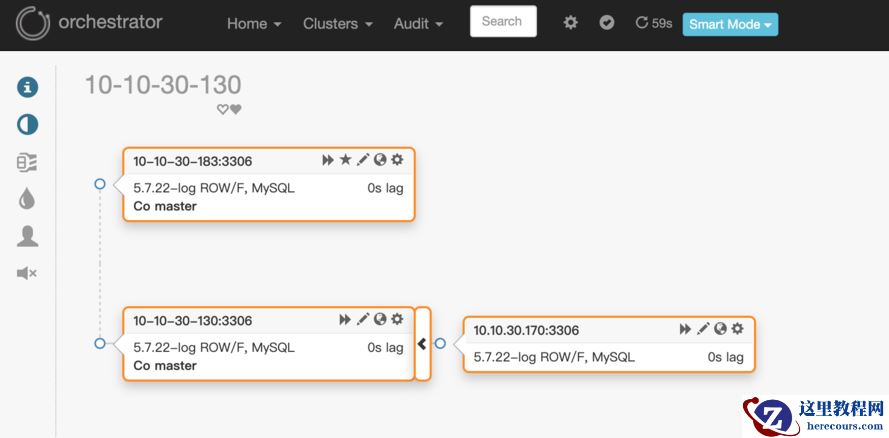
这里假定环境: 10.10.30.170是从库 10.10.30.130是主库 如上图所示
3.1.2版本的orchestrator在通过从库10.10.30.170发现主库的时候,通过show slave status得到的master_host虽然是10.10.30.130,但是页面上显示的却是10.10.30.130这个ip对应的hostname:10-10-30-130,如下图所示:

因此,orchestrator会报10-10-30-130找不到:
2019-11-27 13:48:29 ERROR dial tcp: lookup 10-10-30-130 on 223.5.5.5:53: no such host
如何解决
将orchestrator版本换成3.1.0
在orchestrator机器上的/etc/hosts下配置域名解析信息,添加如下:
10.10.30.130 10-10-30-130
10.10.30.183 10-10-30-183
10.10.30.170 10-10-30-170
| 作者简介
韩杰 沃趣科技高级数据库工程师
专注MySQL数据库三年,精通MySQL体系结构,数据库优化,trouble shooting。服务过多家银行客户,熟悉银行业务及系统下数据库不同架构使用场景。熟悉MySQL主从复制原理,及应用的各种高可用场景。