
点击阅读原文,提升阅读体验: https://www.modb.pro/db/22826?cyn
概述
丢失root密码,意味着不能以超级管理员帐号登录数据库,进行维护工作。需要找回root密码。
处理方法
杀掉mysql进程,然后添加一个参数–skip-grant-tables跳过权限表,启动mysql实例,然后以无密码方式登录数据库,修改root用户密码,再关闭mysql实例(关闭或者kill mysql进程),最后正常启动mysql实例,就可以使用root用户登录数据库了。
关键操作代码
点击阅读原文,提升阅读体验: https://www.modb.pro/db/22826?cyn
mysql -uroot -p ps -ef|grep mysql kill -9 mysql进程号 mysqld_safe --defaults-file=/etc/my.cnf --skip-grant-tables & mysql use mysql; update user set authentication_string=password(‘oracle123’) where user=‘root’; flush privileges; mysqladmin -p shutdown mysqld_safe --defaults-file=/etc/my.cnf & mysql -uroot -p
操作演示日志
[root@source ~]# mysql -uroot -p
Enter password:
ERROR 1045 (28000): Access denied for user 'root'@'localhost' (using password: YES)   ==故意输错密码,模拟root密码丢失==
[root@source ~]#
[root@source ~]# ps -ef|grep mysql
root       6733   6191  0 10:28 pts/0    00:00:00 /bin/sh /usr/local/mysql/bin/mysqld_safe --defaults-file=/etc/my.cnf
mysql      7029   6733  2 11:10 pts/0    00:00:00 /usr/local/mysql/bin/mysqld --defaults-file=/etc/my.cnf --basedir=/usr/local/mysql --datadir=/data/mysql --plugin-dir=/usr/local/mysql/lib/plugin
--user=mysql --log-error=source.err --pid-file=source.pid --port=3306
root       7063   6191  0 11:10 pts/0    00:00:00 grep mysql
[root@source ~]#
[root@source ~]# kill -9 7029 6733
[root@source ~]#
[1]+  Killed                  mysqld_safe --defaults-file=/etc/my.cnf
[root@source ~]#
[root@source ~]# ps -ef|grep mysql
root       7066   6191  0 11:10 pts/0    00:00:00 grep mysql
[root@source ~]#
[root@source ~]#
[root@source ~]# mysqld_safe --defaults-file=/etc/my.cnf --skip-grant-tables &
[1] 7286
[root@source ~]# 2020-02-16T03:11:41.998645Z mysqld_safe Logging to '/data/mysql/source.err'.
2020-02-16T03:11:42.020962Z mysqld_safe Starting mysqld daemon with databases from /data/mysql
[root@source ~]#
[root@source ~]# mysql
Welcome to the MySQL monitor.  Commands end with ; or \g.
Your MySQL connection id is 3
Server version: 5.7.20-log MySQL Community Server (GPL)
Copyright (c) 2000, 2017, Oracle and/or its affiliates. All rights reserved.
Oracle is a registered trademark of Oracle Corporation and/or its
affiliates. Other names may be trademarks of their respective
owners.
Type 'help;' or '\h' for help. Type '\c' to clear the current input statement.
root@db 11:11:  [(none)]>
root@db 11:11:  [(none)]>
root@db 11:12:  [(none)]>
root@db 11:12:  [(none)]> use mysql;
Database changed
root@db 11:12:  [mysql]>
root@db 11:12:  [mysql]> update user set authentication_string=password('oracle123') where user='root'; ==修改密码==
Query OK, 1 row affected, 1 warning (0.01 sec)
Rows matched: 2  Changed: 1  Warnings: 1
root@db 11:13:  [mysql]>
root@db 11:13:  [mysql]> flush privileges;
Query OK, 0 rows affected (0.00 sec)
root@db 11:13:  [mysql]>
root@db 11:14:  [mysql]> exit
Bye
[root@source ~]#
[root@source ~]# mysqladmin -p shutdown
Enter password:
[root@source ~]#
[root@source ~]# 2020-02-16T03:15:27.217666Z mysqld_safe mysqld from pid file /data/mysql/source.pid ended
[1]+  Done                    mysqld_safe --defaults-file=/etc/my.cnf --skip-grant-tables
[root@source ~]#
[root@source ~]# ps -ef|grep mysql
root       7502   6191  0 11:15 pts/0    00:00:00 grep mysql
[root@source ~]#
[root@source ~]# mysqld_safe --defaults-file=/etc/my.cnf &
[1] 7503
[root@source ~]# 2020-02-16T03:15:57.181920Z mysqld_safe Logging to '/data/mysql/source.err'.
2020-02-16T03:15:57.217614Z mysqld_safe Starting mysqld daemon with databases from /data/mysql
[root@source ~]#
[root@source ~]# mysql -uroot -p
Enter password:          ==root密码找回后,正常登录==
Welcome to the MySQL monitor.  Commands end with ; or \g.
Your MySQL connection id is 4
Server version: 5.7.20-log MySQL Community Server (GPL)
Copyright (c) 2000, 2017, Oracle and/or its affiliates. All rights reserved.
Oracle is a registered trademark of Oracle Corporation and/or its
affiliates. Other names may be trademarks of their respective
owners.
Type 'help;' or '\h' for help. Type '\c' to clear the current input statement.
root@db 11:16:  [(none)]>
编辑推荐:
- 忘记mysql root管理员帐号密码处理方法03-01
- mysqldump同步数据到生产注意事项03-01
- pt-online-schema-change使用参数说明03-01
- pxc 三个节点全部异常和正常关闭的启动顺序03-01
- MySQL中InnoDB引擎对索引的扩展03-01
- MySQL 不同版本默认字符集03-01
- MySQL 修改int类型为bigint SQL语句拼接03-01
- mysql 库名大写导致大小写敏感参数报错03-01
下一篇:
相关推荐
-

-
-
-
-
-
-
-
-
-
-
-
-
-
-

雷神推出 MIX PRO II 迷你主机:基于 Ultra 200H,玻璃上盖 + ARGB 灯效
2 月 9 日消息,雷神 (THUNDEROBOT) 现已宣布推出基于英
-

制造商 Musnap 推出彩色墨水屏电纸书 Ocean C:支持手写笔、第三方安卓应用
2 月 10 日消息,制造商 Musnap 现已在海外推出一款 Oce
热文推荐
- MySQL 不同版本默认字符集
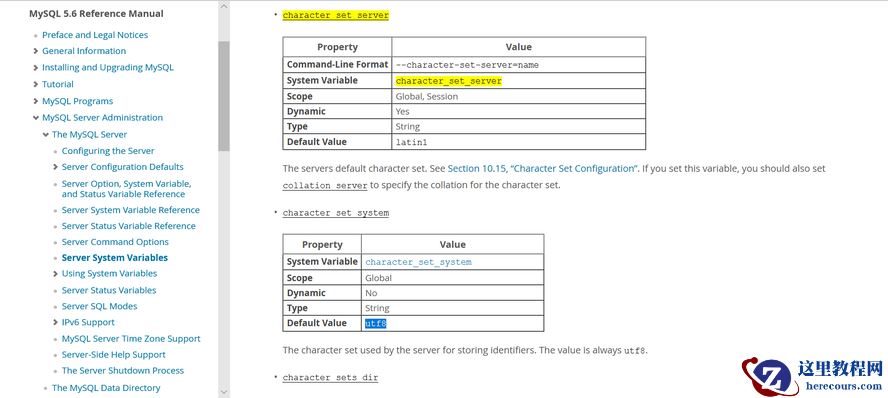
MySQL 不同版本默认字符集
26-03-01 - MYSQL_审计日志查看

MYSQL_审计日志查看
26-03-01 - MYSQL_备份恢复手段

MYSQL_备份恢复手段
26-03-01 - MGR8.0支持savepoint
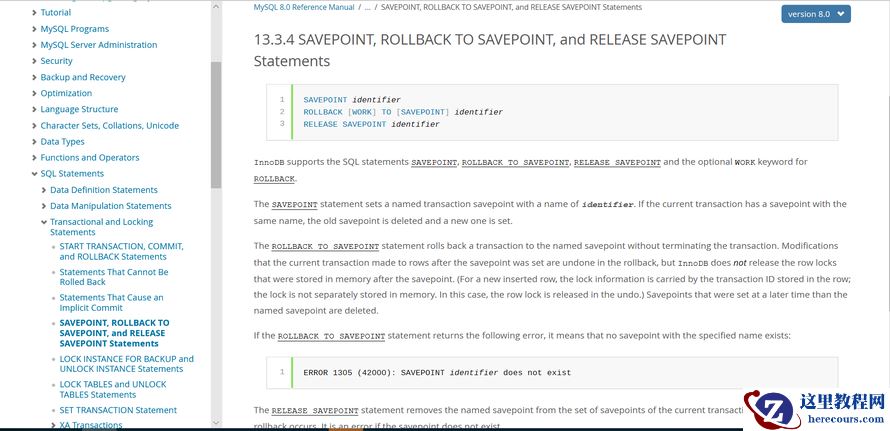
MGR8.0支持savepoint
26-03-01 - Docker二所镜像制作
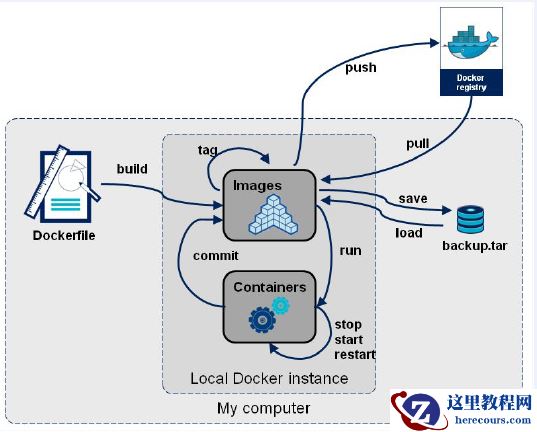
Docker二所镜像制作
26-03-01 - Mysql MHA部署-02主从复制
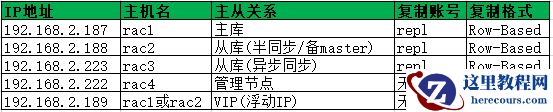
Mysql MHA部署-02主从复制
26-03-01 - MYSQL_架构之主从异步复制
MYSQL_架构之主从异步复制
26-03-01 - Mysql MHA部署-04MHA配置
Mysql MHA部署-04MHA配置
26-03-01 - Mysql MHA部署-03MHA软件安装
Mysql MHA部署-03MHA软件安装
26-03-01 - MYSQL_架构之主从GTID
MYSQL_架构之主从GTID
26-03-01