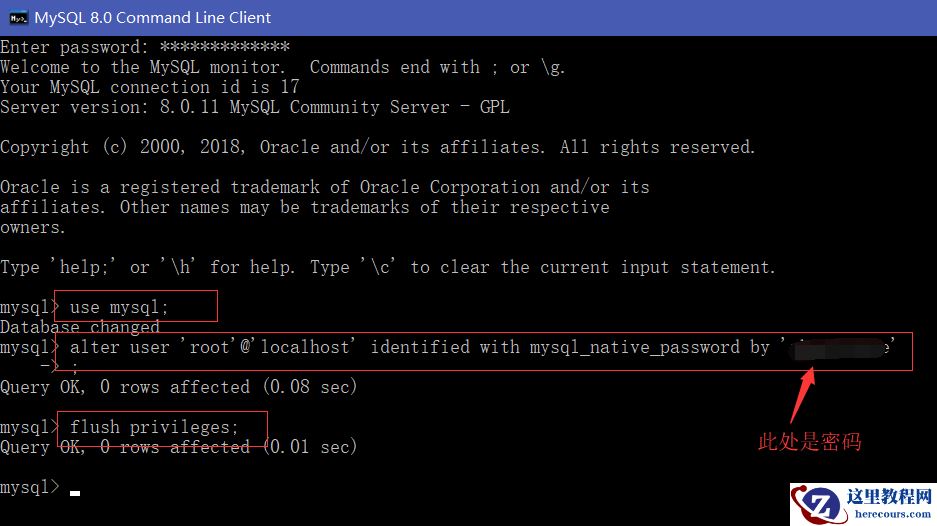
mysql多实例在一台资源足够的情况下管理多个数据库,其中包括安装一个数据库软件初使化多个数据目录,端口不一样就可以。还可安装不同数据库版本来统一管理,各实例数据不共享。 1.安装mysql5.6数据库 [root@test01 ~]# yum -y install autoconf libaio* --mysql5.6依赖autoconf包,mysql5.7依赖libaio包。 [root@test01 ~]# ll total 2310240 -rw-------. 1 root root 1421 Aug 5 2019 anaconda-ks.cfg -rw-r--r--. 1 root root 328563044 May 23 12:17 mysql-5.6.40-linux-glibc2.12-x86_64.tar.gz -rw-r--r--. 1 root root 661718255 May 21 17:54 mysql-5.7.33-linux-glibc2.12-x86_64.tar.gz -rw-r--r--. 1 root root 1375394901 May 7 00:31 Percona-Server-8.0.23-14-Linux.x86_64.glibc2.17.tar.gz [root@test01 ~]# tar xvf mysql-5.6.40-linux-glibc2.12-x86_64.tar.gz -C /usr/local/ [root@test01 ~]# tar xvf mysql-5.7.33-linux-glibc2.12-x86_64.tar.gz -C /usr/local/ [root@test01 ~]# tar xvf Percona-Server-8.0.23-14-Linux.x86_64.glibc2.17.tar.gz -C /usr/local/ [root@test01 ~]# cd /usr/local/ [root@test01 local]# mv mysql-5.6.40-linux-glibc2.12-x86_64/ mysql-5.6.40 [root@test01 local]# mv mysql-5.7.33-linux-glibc2.12-x86_64/ mysql-5.7.33 [root@test01 local]# mv Percona-Server-8.0.23-14-Linux.x86_64.glibc2.17/ Percona-Server-8.0.23 [root@test01 local]# cd mysql-5.6.40/ [root@test01 mysql-5.6.40]# ./scripts/mysql_install_db --user=mysql --group=mysql --basedir=/usr/local/mysql-5.6.40/ --datadir=/usr/local/mysql-5.6.40/data [root@test01 mysql-5.6.40]# cp -a support-files/mysql.server /etc/init.d/mysql5.6 [root@test01 mysql-5.6.40]# chkconfig --add mysql5.6 [root@test01 mysql-5.6.40]# chkconfig mysql5.6 on [root@test01 mysql-5.6.40]# vim /usr/local/mysql-5.6.40/my.cnf [mysqld] basedir = /usr/local/mysql-5.6.40 datadir = /usr/local/mysql-5.6.40/data port = 3306 server_id = 10 [root@test01 mysql-5.6.40]# vim /etc/init.d/mysql5.6 basedir=/usr/local/mysql-5.6.40 datadir=/usr/local/mysql-5.6.40/data conf=/usr/local/mysql-5.6.40/my.cnf [root@test01 mysql-5.6.40]# /etc/init.d/mysql5.6 start Starting MySQL.Logging to '/usr/local/mysql-5.6.40/data/test01.err'. . SUCCESS! [root@test01 mysql-5.6.40]# 2.安装mysql5.7数据库(安装方法与mysql5.6不一样) [root@test01 mysql-5.7.33]# ./bin/mysqld --initialize --user=mysql --basedir=/usr/local/mysql-5.7.33/ --datadir=/usr/local/mysql-5.7.33/data 2021-05-23T06:35:35.375853Z 0 [Warning] TIMESTAMP with implicit DEFAULT value is deprecated. Please use --explicit_defaults_for_timestamp server option (see document ation for more details).2021-05-23T06:36:20.825902Z 0 [Warning] InnoDB: New log files created, LSN=45790 2021-05-23T06:36:22.319561Z 0 [Warning] InnoDB: Creating foreign key constraint system tables. 2021-05-23T06:36:22.637220Z 0 [Warning] No existing UUID has been found, so we assume that this is the first time that this server has been started. Generating a new UUID: 30af30d2-bb91-11eb-a024-00505693d5b3.2021-05-23T06:36:22.675831Z 0 [Warning] Gtid table is not ready to be used. Table 'mysql.gtid_executed' cannot be opened. 2021-05-23T06:36:24.471795Z 0 [Warning] CA certificate ca.pem is self signed. 2021-05-23T06:36:24.862429Z 1 [Note] A temporary password is generated for root@localhost: m5/Gw+pRl#Lr --默认初使密码 [root@test01 mysql-5.7.33]# cp -a support-files/mysql.server /etc/init.d/mysql5.7 [root@test01 mysql-5.7.33]# chkconfig --add mysql5.7 [root@test01 mysql-5.7.33]# chkconfig mysql5.7 on [root@test01 mysql-5.7.33]# vim my.cnf [mysqld] basedir = /usr/local/mysql-5.7.33 datadir = /usr/local/mysql-5.7.33/data port = 3307 server_id = 20 [root@test01 mysql-5.7.33]# vim /etc/init.d/mysql5.7 basedir=/usr/local/mysql-5.7.33 datadir=/usr/local/mysql-5.7.33/data conf=/usr/local/mysql-5.7.33/my.cnf [root@test01 mysql-5.7.33]# /etc/init.d/mysql5.7 start Starting MySQL.Logging to '/usr/local/mysql-5.7.33/data/test01.err'. SUCCESS! [root@test01 mysql-5.7.33]# 3.安装Percona-Server8.0数据库 [root@test01 local]# cd Percona-Server-8.0.23/ [root@test01 Percona-Server-8.0.23]# ./bin/mysqld --initialize --user=mysql --basedir=/usr/local/Percona-Server-8.0.23/ --datadir=/usr/local/Percona-Server-8.0.23/da ta2021-05-23T06:51:18.058721Z 0 [System] [MY-013169] [Server] /usr/local/Percona-Server-8.0.23/bin/mysqld (mysqld 8.0.23-14) initializing of server in progress as proc ess 163582021-05-23T06:51:18.201151Z 1 [System] [MY-013576] [InnoDB] InnoDB initialization has started. 2021-05-23T06:51:32.631345Z 1 [System] [MY-013577] [InnoDB] InnoDB initialization has ended. 2021-05-23T06:51:48.164084Z 6 [Note] [MY-010454] [Server] A temporary password is generated for root@localhost: P-Vkfhobh3>k --默认初使密码 [root@test01 Percona-Server-8.0.23]# chkconfig --add Percona8.0 [root@test01 Percona-Server-8.0.23]# chkconfig Percona8.0 on [root@test01 Percona-Server-8.0.23]# vim my.cnf [mysqld] basedir = /usr/local/Percona-Server-8.0.23 datadir = /usr/local/Percona-Server-8.0.23/data port = 3308 server_id = 30 [root@test01 Percona-Server-8.0.23]# /etc/init.d/Percona8.0 start Starting MySQL (Percona Server)... SUCCESS! [root@test01 Percona-Server-8.0.23]#
编辑推荐:
- mysql多版本实例安装03-01
- load语句在binlog中的记录方式03-01
- MySQL rename table方法大全03-01
- 致同:为客户提供全方位专业服务03-01
- 测试03-01
- 带你看懂MySQL执行计划03-01
- MySQL 迁移表空间,备份单表03-01
- 令人咋舌的隐式转换03-01
相关推荐
-

-
-
-
-
-
-
-
-
-
-
-
-
-
-

雷神推出 MIX PRO II 迷你主机:基于 Ultra 200H,玻璃上盖 + ARGB 灯效
2 月 9 日消息,雷神 (THUNDEROBOT) 现已宣布推出基于英
-

制造商 Musnap 推出彩色墨水屏电纸书 Ocean C:支持手写笔、第三方安卓应用
2 月 10 日消息,制造商 Musnap 现已在海外推出一款 Oce