如何用.net搭建一个remoting server。
一,.Net+FluorineFx开发环境搭建
我在GAE中用了WebORB for java做了remoting框架, 但是对于.net,我并不打算用WebORB for .net搭建remoting server。与WebORB for .net相比,FluofineFx的普及程度及名气更大一些。我倾向于使用后者。
1,下载Microsoft .NET Framework,安装:http://www.asp.net/downloads/essential/
2,下载Visual Web Developer 2008 Express Edition,安装:http://www.microsoft.com/express/vwd/
3,下载FluofineFx,安装:http://www.fluorinefx.net/download.html
4,下载SQL Server 2005 Express Edition(http://www.microsoft.com/Sqlserver/2005/en/us/express.aspx)及Microsoft SQL Server Management Studio Express(http://www.microsoft.com/downloads/details.aspx?FamilyID=c243a5ae-4bd1-4e3d-94b8-5a0f62bf7796&displaylang=en),安装
以上4步是在本地布署基于.Net+FluorineFx的flex server端开发环境,安装步骤较为简单,不再一一叙述。当然,如果你已经有了Visual Studio,便不用再安装vwd express版本;如果已经有SQL Server标准版或企业版,也不用安装SQL Server 2005 Expres。数据库版本没有特别要求,sql2000应该也是可以的。我选用express版本,是因为它们全是免费的。
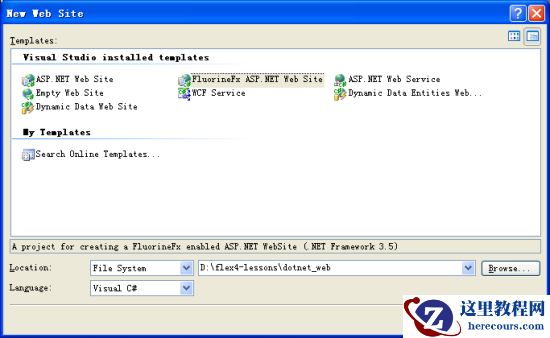
打开vwd,创建一个FluorineFx Asp.net web site,如下图所示:
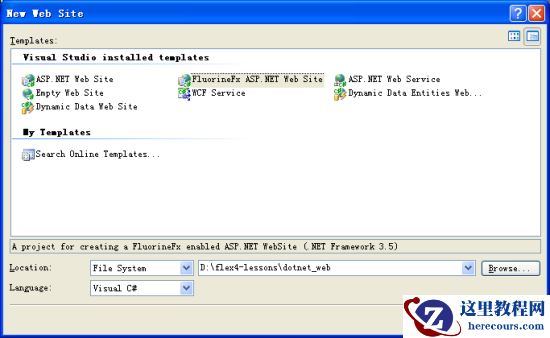
配置iis,使http://localhost/指向gapp_flexblog项目的war目录;使http://localhost/dotnet/指向适才创建的web site根目录。打开浏览器,访问http://localhost/dotnet/Gateway.aspx, 验证配置是否成功,糟糕,爆出了如下error:
Parser Error Message: Could not load file or assembly ‘FluorineFx’ or one of its dependencies. 系统找不到指定的文件。 (D:flex4-lessonsdotnet_webweb.config line 180)
Source Error:
Line 178:
Line 179:
Line 180:这是由于网站项目未能正确添加FluorineFx.dll引用造成的。切到vwd,右键点击项目,选择Add Reference:
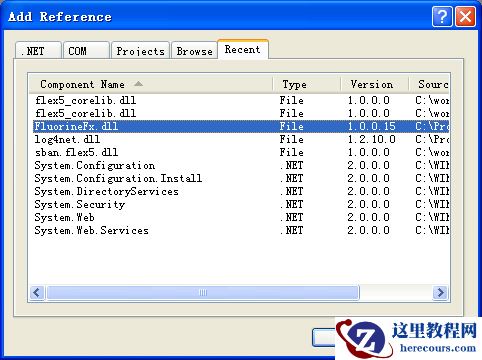
选择Fluorinefx.dll(该文件可在FluorineFx的安装目录下找到),添加。再次访问http://localhost/dotnet/Gateway.aspx, 页面一片空白,这便是正常了。至此,.Net+FluorineFx开发环境配置成功。
修改WEB-INF/flex/remoting-config.xml中destination为GenericDestination。
二,数据库与数据表的创建
打开SQL Server Management Studio,添加新数据库,名为flexblog。添加一个新表,名为Greeting,表结构如下:
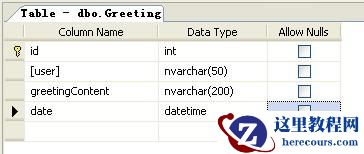
创建Greeting的sql语句为:
USE [flexblog]
GO
SET ANSI_NULLS ON
GO
SET QUOTED_IDENTIFIER ON
GO
CREATE TABLE [dbo].[Greeting](
[id] [bigint] IDENTITY(1,1) NOT NULL,
[user] [nvarchar](50) COLLATE Chinese_PRC_CI_AS NOT NULL,
[greetingContent] [nvarchar](200) COLLATE Chinese_PRC_CI_AS NOT NULL,
[date] [datetime] NOT NULL CONSTRAINT [DF_Greeting_date] DEFAULT (getdate()),
CONSTRAINT [PK_Greeting] PRIMARY KEY CLUSTERED
(
[id] ASC
)WITH (PAD_INDEX = OFF, IGNORE_DUP_KEY = OFF) ON [PRIMARY]
) ON [PRIMARY]该数据库并非打算只给.net用,为避免重复工作,php计划也使用该数据库。【创来编程学习网】
三,数据模型与.Net Remoting接口
我采用EF(Asp.Net Entity Framework)做为数据模型框架,在App_Code下添加Asp.net Entity Data Model,命名为Model.edmx,命名空间采用sban.flexblog。按照向导一步一步创建,中间有一步让选择是否把connString添加到web.config中,选择添加。这样web.config便有了如下配置:
EF整体来说,对CRUD的执行效率比ADO.Net, 比Linq to SQL要高很多。
在目录App_Code/sban/flexblog下,添加HelloWorld.cs,内容如下:
using System;
using System.Collections.Generic;
using System.Text;
using FluorineFx;
using System.Data.Linq;
using System.Linq;
namespace sban.flexblog
{
[RemotingService("flexblog remoting service")]
public class HelloWorld
{
private flexblogEntities entities = new flexblogEntities();
public bool greet2(string user, string content)
{
entities.AddToGreeting(new Greeting() { user = user, greetingContent = content, date = DateTime.Now});
entities.SaveChanges();
return true;
}
public bool deleteById(int id)
{
Greeting greeting = getGreetingById(id);
if (null != greeting)
{
entities.DeleteObject(greeting);
entities.SaveChanges();
return true;
}
return false;
}
public bool editGreeting(long id, string content)
{
Greeting greeting = getGreetingById(id);
if (null != greeting)
{
greeting.greetingContent = content;
entities.SaveChanges();
return true;
}
return false;
}
public Greeting getGreetingById(long id)
{
return (from g in entities.Greeting
where g.id == id
select g).AsEnumerable().First();
}
public bool deleteAllGreetings()
{
var query = from g in entities.Greeting select g;
foreach (var g in query)
{
entities.DeleteObject(g);
}
entities.SaveChanges();
return true;
}
public IList getAllGreetings()
{
return (from g in entities.Greeting select g).ToList();
}
}
}【创来编程学习网】该类用.net重写了Greeting应用所需的所有接口,其方法名称,返回类型,命名空间等与先前第四课中java代码完全相同。把站点debug起来,地址为http://localhost:2037/dotnet_web/Gateway.aspx。修改gapp_flexblog_client中Greeting.mxml文件,把RemotingObject的endpoint改为http://localhost:2037/dotnet_web/Gateway.aspx。这个地址在读者的机器上有可能会不同。之所以用debug模式,在于方便调试。修改过的Index.mxml的部分代码如下:
private function configRemoting() : void
{
_remotingObj.source = "sban.flexblog.HelloWorld";
_remotingObj.endpoint = "http://localhost:2037/dotnet_web/Gateway.aspx";
}仅有endpoing不同而已。
把gapp_flexblog_client项目的输出目录定位在bin-debug目录下,并且在iis中设置http://localhost/指向该目录。运行基于.net的Greeting应用,效果与java版本相同:
【创来编程学习网】 <!-- 正文结束 -->