[20180918]disconnect session和kill session的区别.txt http://fatihacar.com/blog/show-and-kill-transaction-lock-in-oracle/ Show and Kill Transaction Lock in Oracle Category: Administration — Fatih Acar @ 23:19 You can see the transaction lock with enterprise manager or command prompt. The KILL SESSION command doesn't actually kill the session. It merely asks the session to kill itself. In some situations, like waiting for a reply from a remote database or rolling back transactions, the session will not kill itself immediately and will wait for the current operation to complete. In these cases the session will have a status of "marked for kill". It will then be killed as soon as possible. The ALTER SYSTEM DISCONNECT SESSION syntax as an alternative method for killing Oracle sessions. Unlike the KILL SESSION command which asks the session to kill itself, the DISCONNECT SESSION command kills the dedicated server process (or virtual circuit when using Shared Sever), which is equivalent to killing the server process from the operating system. The basic syntax is similar to the KILL SESSION command with the addition of the POST_TRANSACTION clause. The SID and SERIAL# values of the relevant session can be substituted into one of the following statements. The POST_TRANSACTION clause waits for ongoing transactions to complete before disconnecting the session, while the IMMEDIATE clause disconnects the session and ongoing transactions are recovered immediately. With Command Prompt SQL> select SID,serial#,username from v$session where SID in (select blocking_session from v$session); If you want to kill session, you can use below command. SQL>alter system kill session 'SID,SERIAL#' immediate; or SQL>alter system disconnect session 'SID,SERIAL#' immediate; SQL>alter system disconnect sessiob 'SID,SERIAL#' post_transaction; --//视乎文档讲alter system disconnect session 才可能是kill session. --//oracle 命令的命令方式真不科学,个人感觉!! --//不过作者提到 alter system kill session 'SID,SERIAL#' immediate; --//加入immediate效果应该一样的. --//再转载一个链接: https://www.cnblogs.com/andy6/p/5778363.html 如何彻底杀掉不良用户会话 在ORACLE数据库当中,有时候会使用ALTER SYSTEM KILL SESSION 'sid,serial#'杀掉一个会话进程,但是使用这个SQL语句杀掉会话后, 数据库并不会立即释放掉相关的资源,有时候你会发现锁定的资源很长时间也不会释放,即使会话状态为"KILLED",依然会阻塞其它会 话。 在ORACLE数据库杀掉会话进程有三种方式: 1: ALTER SYSTEM KILL SESSION 关于KILL SESSION Clause ,如下官方文档描述所示,alter system kill session实际上不是真正的杀死会话,它只是将会话标记为终 止。等待PMON进程来清除会话。 select sid,serial# from v$session where username='DEMO';查询用户的 sid,serial# 可以使用ALTER SYSTEM KILL SESSION 'sid,serial#' IMMEDIATE 来快速回滚事物、释放会话的相关锁、立即返回当前会话的控制权。 Specify IMMEDIATE to instruct Oracle Database to roll back ongoing transactions, release all session locks, recover the entire session state, and return control to you immediately. 2: ALTER SYSTEM DISCONNECT SESSION ALTER SYSTEM DISCONNECT SESSION 杀掉专用服务器(DEDICATED SERVER)或共享服务器的连接会话,它等价于从操作系统杀掉进程。它有 两个选项POST_TRANSACTION和IMMEDIATE, 其中POST_TRANSACTION表示等待事务完成后断开会话,IMMEDIATE表示中断会话,立即回滚事 务。 SQL> ALTER SYSTEM DISCONNECT SESSION 'sid,serial#' POST_TRANSACTION; SQL> ALTER SYSTEM DISCONNECT SESSION 'sid,serial#' IMMEDIATE; 3: KILL -9 SPID (Linux) 或 orakill ORACLE_SID spid (Windows) 可以使用下面SQL语句找到对应的操作系统进程SPID,然后杀掉。当然杀掉操作系统进程是一件危险的事情,尤其不要误杀。所以在执行 前,一定要谨慎确认。 select SPID from v$process where addr in (SELECT PADDR FROM V$SESSION WHERE USERNAME='用户名字'); (找到用户的spid) kill -9 spid 在数据库如果要彻底杀掉一个会话,尤其是大事务会话,最好是使用ALTER SYSTEM DISCONNECT SESSION IMMEDIATE或使用下面步骤: 1:首先在操作系统级别Kill掉进程。 2:在数据库内部KILL SESSION 或者反过来亦可。这样可以快速终止进程,释放资源。 --//我的测试: 1.环境: SCOTT@test01p> @ ver1 PORT_STRING VERSION BANNER CON_ID ------------------------------ -------------- -------------------------------------------------------------------------------- ---------- IBMPC/WIN_NT64-9.1.0 12.1.0.1.0 Oracle Database 12c Enterprise Edition Release 12.1.0.1.0 - 64bit Production 0 2.测试alter system kill session 'sid,serial#' immediate; --//session 1: SCOTT@test01p> @ spid SID SERIAL# PROCESS SERVER SPID PID P_SERIAL# C50 ---------- ---------- ------------------------ --------- -------------------- ------- ---------- -------------------------------------------------- 151 5 5356:2724 DEDICATED 2892 22 3 alter system kill session '151,5' immediate; --//session 2: SYS@test> alter system kill session '151,5' immediate; System altered. --//session 1: SCOTT@test01p> select sysdete from dual ; select sysdete from dual * ERROR at line 1: ORA-03113: end-of-file on communication channel Process ID: 2892 Session ID: 151 Serial number: 5 ERROR: ORA-03114: not connected to ORACLE --//如果rac环境应该写成: alter system kill session 'sid,serial#,@inst_id' immediate; 3.测试 ALTER SYSTEM DISCONNECT SESSION: --//session 1: SCOTT@test01p> @ spid SID SERIAL# PROCESS SERVER SPID PID P_SERIAL# C50 ---------- ---------- ------------------------ --------- -------------------- ------- ---------- -------------------------------------------------- 93 523 1920:3748 DEDICATED 5632 57 22 alter system kill session '93,523' immediate; --//session 2: SYS@test> alter system DISCONNECT session '93,523' immediate; System altered. --//session 1: SCOTT@test01p> select sysdete from dual ; select sysdete from dual * ERROR at line 1: ORA-03113: end-of-file on communication channel Process ID: 5632 Session ID: 93 Serial number: 523
[20180918]disconnect session和kill session的区别.txt
来源:这里教程网
时间:2026-03-03 12:00:13
作者:
编辑推荐:
下一篇:
相关推荐
-

-
-
-
-
-
-
-
-
-
-
-
-
-
-

雷神推出 MIX PRO II 迷你主机:基于 Ultra 200H,玻璃上盖 + ARGB 灯效
2 月 9 日消息,雷神 (THUNDEROBOT) 现已宣布推出基于英
-

制造商 Musnap 推出彩色墨水屏电纸书 Ocean C:支持手写笔、第三方安卓应用
2 月 10 日消息,制造商 Musnap 现已在海外推出一款 Oce
热文推荐
- Oracle rac进程详解
Oracle rac进程详解
26-03-03 - 回滚与撤销(一)

回滚与撤销(一)
26-03-03 - 一次夜维SQL的性能优化
一次夜维SQL的性能优化
26-03-03 - 添加控制文件(add control file)
添加控制文件(add control file)
26-03-03 - DBA“老司机”怎么看待Oracle自治数据仓库?

DBA“老司机”怎么看待Oracle自治数据仓库?
26-03-03 - MyBatis中的JdbcType映射介绍
MyBatis中的JdbcType映射介绍
26-03-03 - Oracle CDC 变更数据捕获技术
Oracle CDC 变更数据捕获技术
26-03-03 - 如何改变Word 2010文档中超链接颜色
如何改变Word 2010文档中超链接颜色
26-03-03 - impdp导入报错ORA-04030的解决方法
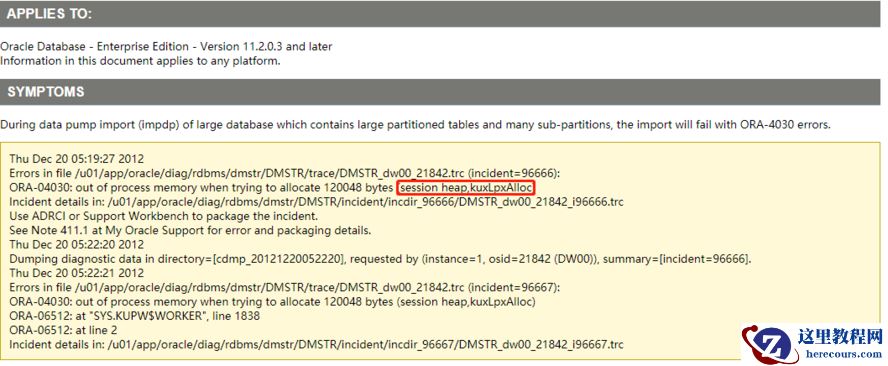
impdp导入报错ORA-04030的解决方法
26-03-03 - 深度解析v$transaction中回滚段信息xidusn, xidslot, ubablk, ubafil