[20181026]12c Attribute Clustering特性.txt --//作者很早的演示,链接:https://richardfoote.wordpress.com/2014/08/26/12-1-0-2-introduction-to-attribute-clustering-the-division-bell/ --//我当时的测试环境12.1.0.1,还不支持这个特性,一直没有机会测试: --//我当时想到底有多少人会使用这个特性整理组织表数据. --//首先简单介绍: Attribute Clustering实际上按照特定的字段组织表,使相同的值聚集起来,总的来讲就是减少索引的聚集因子. One of the really cool new features introduced in 12.1.0.2 is Attribute Clustering. This new table based attribute allows you to very easily cluster data in close physical proximity based on the content of specific columns. --//直接拿作者的例子测试. 1.环境: SCOTT@test01p> @ ver1 PORT_STRING VERSION BANNER CON_ID ------------------------------ -------------- -------------------------------------------------------------------------------- ---------- IBMPC/WIN_NT64-9.1.0 12.2.0.1.0 Oracle Database 12c Enterprise Edition Release 12.2.0.1.0 - 64bit Production 0 2.测试: SCOTT@test01p> create table ziggy (id number, code number, name varchar2(30)); Table created. SCOTT@test01p> insert into ziggy select rownum, mod(rownum,100), 'DAVID BOWIE' from dual connect by level <= 200000; 200000 rows created. --//我减少记录数200000. SCOTT@test01p> commit; Commit complete. SCOTT@test01p> exec dbms_stats.gather_table_stats(ownname=>user, tabname=>'ZIGGY', estimate_percent=>null, method_opt=>'FOR ALL COLUMNS SIZE 1'); PL/SQL procedure successfully completed. SCOTT@test01p> create index ziggy_code_i on ziggy(code); Index created. SCOTT@test01p> select index_name, clustering_factor, num_rows from user_indexes where index_name='ZIGGY_CODE_I'; INDEX_NAME CLUSTERING_FACTOR NUM_ROWS -------------------- ----------------- ---------- ZIGGY_CODE_I 68878 200000 --//说明这样建立的索引(字段code)的clustering_factor会很高. 3.执行sql语句看看: SCOTT@test01p> alter session set statistics_level=all; Session altered. SCOTT@test01p> set FEEDBACK only SCOTT@test01p> select * from ziggy where code = 42; ID CODE NAME ---------- ---------- -------------------- 2000 rows selected. SCOTT@test01p> set FEEDBACK 6 SCOTT@test01p> @ dpc '' '' PLAN_TABLE_OUTPUT ------------------------------------- SQL_ID 9svg0v4s134jh, child number 0 ------------------------------------- select * from ziggy where code = 42 Plan hash value: 2421001569 --------------------------------------------------------------------------------------------------------------------- | Id | Operation | Name | Starts | E-Rows |E-Bytes| Cost (%CPU)| E-Time | A-Rows | A-Time | Buffers | --------------------------------------------------------------------------------------------------------------------- | 0 | SELECT STATEMENT | | 1 | | | 206 (100)| | 2000 |00:00:00.01 | 735 | |* 1 | TABLE ACCESS FULL| ZIGGY | 1 | 2000 | 40000 | 206 (1)| 00:00:01 | 2000 |00:00:00.01 | 735 | --------------------------------------------------------------------------------------------------------------------- Query Block Name / Object Alias (identified by operation id): ------------------------------------------------------------- 1 - SEL$1 / ZIGGY@SEL$1 Predicate Information (identified by operation id): --------------------------------------------------- 1 - filter("CODE"=42) --//可以发现群集因子太高了,oracle选择全表扫描。 SCOTT@test01p> set FEEDBACK only SCOTT@test01p> select /*+ index (ziggy, ziggy_code_i) */ * from ziggy where code = 42; ID CODE NAME ---------- ---------- -------------------- 2000 rows selected. SCOTT@test01p> set FEEDBACK 6 SCOTT@test01p> @ dpc '' '' PLAN_TABLE_OUTPUT ------------------------------------- SQL_ID 568j8hhfby3r4, child number 0 ------------------------------------- select /*+ index (ziggy, ziggy_code_i) */ * from ziggy where code = 42 Plan hash value: 3294205578 ------------------------------------------------------------------------------------------------------------------------------------------------------- | Id | Operation | Name | Starts | E-Rows |E-Bytes| Cost (%CPU)| E-Time | A-Rows | A-Time | Buffers | Reads | ------------------------------------------------------------------------------------------------------------------------------------------------------- | 0 | SELECT STATEMENT | | 1 | | | 693 (100)| | 2000 |00:00:00.16 | 712 | 8 | | 1 | TABLE ACCESS BY INDEX ROWID BATCHED| ZIGGY | 1 | 2000 | 40000 | 693 (0)| 00:00:01 | 2000 |00:00:00.16 | 712 | 8 | |* 2 | INDEX RANGE SCAN | ZIGGY_CODE_I | 1 | 2000 | | 4 (0)| 00:00:01 | 2000 |00:00:00.16 | 16 | 8 | ------------------------------------------------------------------------------------------------------------------------------------------------------- Query Block Name / Object Alias (identified by operation id): ------------------------------------------------------------- 1 - SEL$1 / ZIGGY@SEL$1 2 - SEL$1 / ZIGGY@SEL$1 Predicate Information (identified by operation id): --------------------------------------------------- 2 - access("CODE"=42) --//我建立的数据集合偏小,buffers差别不大。但是cost=693比全表扫描206多。 4.建立新表具有Attribute Clustering. SCOTT@test01p> create table ziggy2 (id number, code number, name varchar2(30)) clustering by linear order (code) without materialized zonemap; Table created. --//链接的说明: The CLUSTERING BY LINEAR ORDER clause orders data in the table based on the specified columns, in this case the CODE column. Up to 10 columns can be included using this particular technique (there are other attribute clustering options which I'll again cover in later articles, yes I'll be writing quite a few new articles) :) WITHOUT MATERIALIZED ZONEMAP means I don't want to create these new Zone Maps index structures at this stage which could potentially reduce the amount of table storage needed to be accessed (again, I'll discuss these at another time). --//实际上CLUSTERING BY LINEAR ORDER就是建立表按照code组织.字段最多包括10个. --//按照作着介绍必须采用直接路径插入导入数据才有attribute clustering或者选择重新组织表. SCOTT@test01p> insert /*+ append */ into ziggy2 select * from ziggy; 200000 rows created. SCOTT@test01p> @ dpc '' '' PLAN_TABLE_OUTPUT ------------------------------------- SQL_ID 0arqdyc9vznpg, child number 0 ------------------------------------- insert /*+ append */ into ziggy2 select * from ziggy Plan hash value: 1975011999 ------------------------------------------------------------------------------------------------------------------------------------------------------------------------------------------ | Id | Operation | Name | Starts | E-Rows |E-Bytes|E-Temp | Cost (%CPU)| E-Time | A-Rows | A-Time | Buffers | Reads | Writes | OMem | 1Mem | Used-Mem | ------------------------------------------------------------------------------------------------------------------------------------------------------------------------------------------ | 0 | INSERT STATEMENT | | 1 | | | | 1425 (100)| | 0 |00:00:00.62 | 3691 | 16 | 691 | | | | | 1 | LOAD AS SELECT | ZIGGY2 | 1 | | | | | | 0 |00:00:00.62 | 3691 | 16 | 691 | 2068K| 2068K| 2068K (0)| | 2 | OPTIMIZER STATISTICS GATHERING | | 1 | 200K| 3906K| | 1425 (1)| 00:00:01 | 200K|00:00:00.49 | 2395 | 16 | 0 | 256K| 256K| | | 3 | SORT ORDER BY | | 1 | 200K| 3906K| 6288K| 1425 (1)| 00:00:01 | 200K|00:00:00.08 | 725 | 0 | 0 | 8912K| 1165K| 7921K (0)| | 4 | TABLE ACCESS FULL | ZIGGY | 1 | 200K| 3906K| | 206 (1)| 00:00:01 | 200K|00:00:00.01 | 725 | 0 | 0 | | | | ------------------------------------------------------------------------------------------------------------------------------------------------------------------------------------------ Query Block Name / Object Alias (identified by operation id): ------------------------------------------------------------- 1 - SEL$1 4 - SEL$1 / ZIGGY@SEL$1 --//注意看id=3的执行计划SORT ORDER BY,隐含排序code字段导入表. SCOTT@test01p> commit; Commit complete. SCOTT@test01p> create index ziggy2_code_i on ziggy2(code); Index created. SCOTT@test01p> exec dbms_stats.gather_table_stats(ownname=>user, tabname=>'ZIGGY2',estimate_percent=>null, method_opt=>'FOR ALL COLUMNS SIZE 1'); PL/SQL procedure successfully completed. SCOTT@test01p> select index_name, clustering_factor, num_rows from user_indexes where index_name='ZIGGY2_CODE_I'; INDEX_NAME CLUSTERING_FACTOR NUM_ROWS -------------------- ----------------- ---------- ZIGGY2_CODE_I 691 200000 --//前面CLUSTERING_FACTOR=68878,而现在表ZIGGY2才691。 SCOTT@test01p> set FEEDBACK only SCOTT@test01p> select * from ziggy2 where code=42; ID CODE NAME ---------- ---------- -------------------- 2000 rows selected. SCOTT@test01p> set FEEDBACK 6 SCOTT@test01p> @ dpc '' '' PLAN_TABLE_OUTPUT ------------------------------------- SQL_ID 0vjk3yq2ks48x, child number 0 ------------------------------------- select * from ziggy2 where code=42 Plan hash value: 16801974 ----------------------------------------------------------------------------------------------------------------------------------------------- | Id | Operation | Name | Starts | E-Rows |E-Bytes| Cost (%CPU)| E-Time | A-Rows | A-Time | Buffers | ----------------------------------------------------------------------------------------------------------------------------------------------- | 0 | SELECT STATEMENT | | 1 | | | 11 (100)| | 2000 |00:00:00.01 | 34 | | 1 | TABLE ACCESS BY INDEX ROWID BATCHED| ZIGGY2 | 1 | 2000 | 40000 | 11 (0)| 00:00:01 | 2000 |00:00:00.01 | 34 | |* 2 | INDEX RANGE SCAN | ZIGGY2_CODE_I | 1 | 2000 | | 4 (0)| 00:00:01 | 2000 |00:00:00.01 | 16 | ----------------------------------------------------------------------------------------------------------------------------------------------- Query Block Name / Object Alias (identified by operation id): ------------------------------------------------------------- 1 - SEL$1 / ZIGGY2@SEL$1 2 - SEL$1 / ZIGGY2@SEL$1 Predicate Information (identified by operation id): --------------------------------------------------- 2 - access("CODE"=42) --//oracle执行计划选择索引范围扫描。 5.对于ziggy表可以修改属性,重新组织表: SCOTT@test01p> alter table ziggy add clustering by linear order(code) without materialized zonemap; Table altered. SCOTT@test01p> alter table ziggy move; Table altered. SCOTT@test01p> alter index ziggy_code_i rebuild; Index altered. SCOTT@test01p> select index_name, clustering_factor, num_rows from user_indexes where index_name='ZIGGY_CODE_I'; INDEX_NAME CLUSTERING_FACTOR NUM_ROWS -------------------- ----------------- ---------- ZIGGY_CODE_I 691 200000 --//这样执行select * from ziggy where code=42;必然选择索引,不贴出执行计划了。 6.总结: --//我觉得应该很少有人使用这个特性,总觉得这样仅仅减少手工操作的麻烦.比如你想手工按照code导入.也许操作需要许多步骤. --//补充测试: SCOTT@test01p> select table_name,clustering from dba_tables where owner=user and table_name in ('ZIGGY','ZIGGY2','DEPT'); TABLE_NAME CLU -------------------- --- DEPT NO ZIGGY2 YES ZIGGY YES SCOTT@test01p> @ddl scott.ZIGGY C100 ------------------------------------------------------------------------ CREATE TABLE "SCOTT"."ZIGGY" ( "ID" NUMBER, "CODE" NUMBER, "NAME" VARCHAR2(30) ) SEGMENT CREATION IMMEDIATE PCTFREE 10 PCTUSED 40 INITRANS 1 MAXTRANS 255 NOCOMPRESS LOGGING STORAGE(INITIAL 65536 NEXT 1048576 MINEXTENTS 1 MAXEXTENTS 2147483645 PCTINCREASE 0 FREELISTS 1 FREELIST GROUPS 1 BUFFER_POOL DEFAULT FLASH_CACHE DEFAULT CELL_FLASH_CACHE DEFAULT) TABLESPACE "USERS" CLUSTERING BY LINEAR ORDER ("SCOTT"."ZIGGY"."CODE") YES ON LOAD YES ON DATA MOVEMENT WITHOUT MATERIALIZED ZONEMAP ; --//不知道那个表记录 CLUSTERING BY LINEAR ORDER ("SCOTT"."ZIGGY"."CODE")信息。先暂时放一下。
[20181026]12c Attribute Clustering特性.txt
来源:这里教程网
时间:2026-03-03 12:10:28
作者:
编辑推荐:
- [20180829]ora-00054.txt03-03
- [20181026]12c Attribute Clustering特性.txt03-03
- word2003安装教程03-03
- word如何删除页眉页脚横线03-03
- oracle权限03-03
- [20181026]12c增强索引在线DDL操作.txt03-03
- word图片文字如何设置03-03
- word文字竖排显示如何设置03-03
相关推荐
-

-
-
-
-
-
-
-
-
-
-
-
-
-
-

雷神推出 MIX PRO II 迷你主机:基于 Ultra 200H,玻璃上盖 + ARGB 灯效
2 月 9 日消息,雷神 (THUNDEROBOT) 现已宣布推出基于英
-

制造商 Musnap 推出彩色墨水屏电纸书 Ocean C:支持手写笔、第三方安卓应用
2 月 10 日消息,制造商 Musnap 现已在海外推出一款 Oce
热文推荐
- oracle权限
oracle权限
26-03-03 - word图片文字如何设置
word图片文字如何设置
26-03-03 - linux vdo验证 oracle asm diskgroup sector_size 4096 udev asmlib
- 《魔兽世界:至暗之夜》DLC 上线,微星发布联名限量 RTX 5070 显卡
- 西山居 3D 射击游戏《尘白禁区》发布停机维护公告,开服时间暂未公布
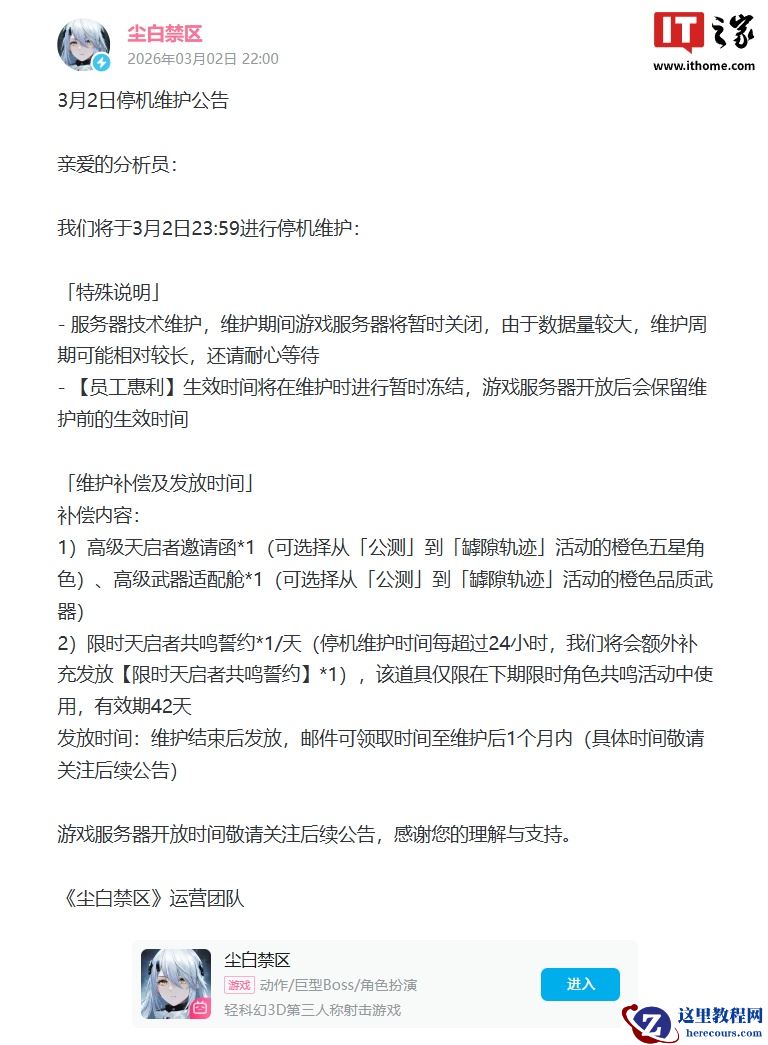
西山居 3D 射击游戏《尘白禁区》发布停机维护公告,开服时间暂未公布
26-03-03 - oraclePL/SQL与存储过程,函数
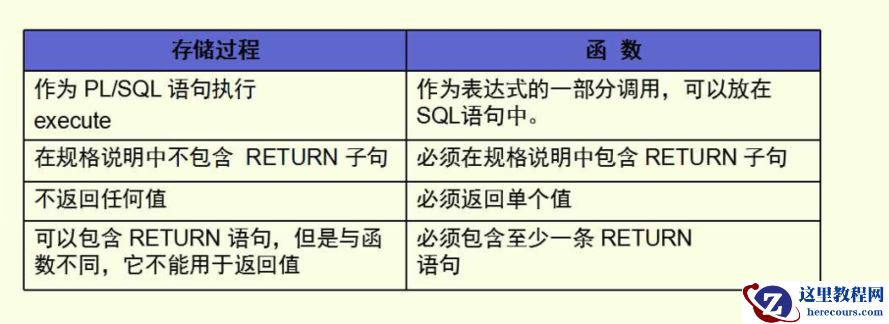
oraclePL/SQL与存储过程,函数
26-03-03 - oracle角色
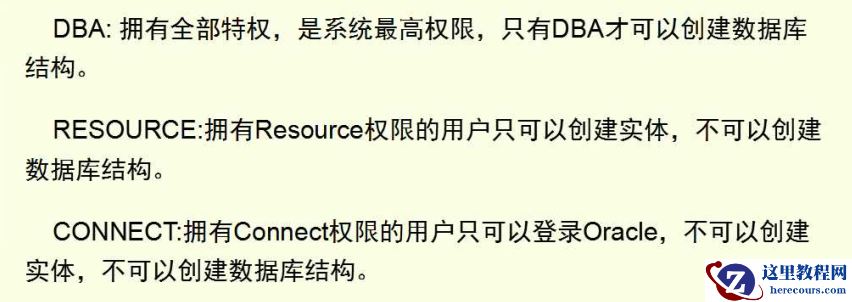
oracle角色
26-03-03 - oracle索引,同义词
oracle索引,同义词
26-03-03 - 炮轰微软 Office 功能区界面,LibreOffice 称自家 UI 设计更优秀
- Word如何让表格首行以标题行形式重复出现实现图解教程
Word如何让表格首行以标题行形式重复出现实现图解教程
26-03-03