Oracle 性能优化-EXPDP备份速度优化01
问题现象:
数据库每天两次expdp备份,中午一次,晚上一次,最近连续两天发现,中午备份正常,耗时
2个小时,晚上备份确需要
5小时;
环境:
DB:Oracle 11.2.0.1.0
OS:Windows Server 2012
问题分析:
怀疑晚上备份时间段,数据库内部或数据库操作系统存在大的作业,导致资源争用;
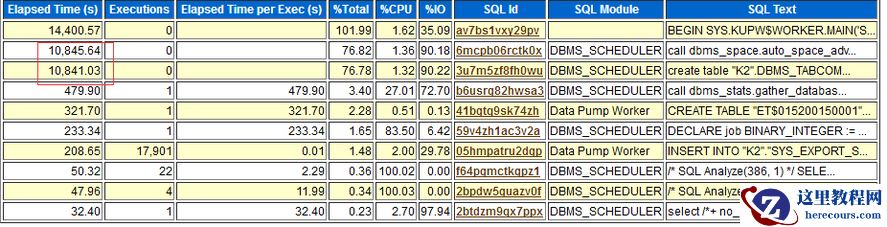
生成晚上备份时间段AWR报告,通过
TOP SQL可以看到,除了第一个
expdp作业特别耗时以外,第二和第三也特别耗时;
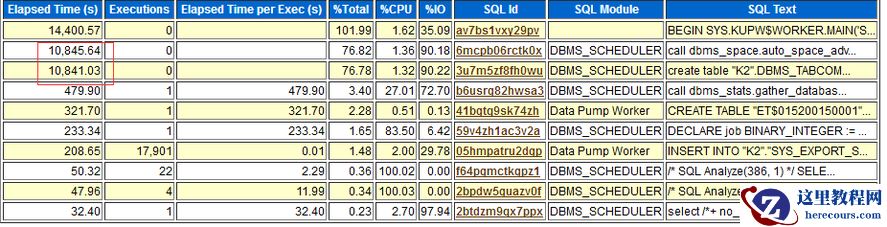 详细SQL如下:
SQL一:执行
3个小时没有执行完成;
call dbms_space.auto_space_advisor_job_proc ( )
SQL二:执行
4个小时没有执行完成,
Oracle通过
CTAS方式自动备份了数据库里最大的一张表,占用大量资源,并产生大量归档文件;
create table "CHENJCH".DBMS_TABCOMP_TEMP_UNCMP tablespace "CHENJCH_TBS_STANDARD" nologging as select /*+ FULL("CHENJCH"."T_BAS_XXX") */ * from "CHENJCH"."T_BAS_XXX" sample block( 99) mytab
二个耗时SQL
都是由
DBMS_SCHEDULER
中
auto_space_advisor
产生的;
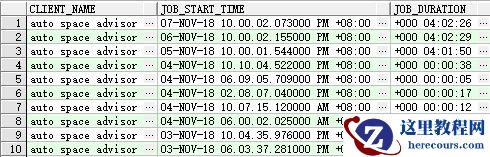
可以看到最近几天auto space advisor执行时间突然增加到
4个小时;
select
client_name
,
job_start_time
,
job_duration
from
dba_autotask_job_history
where
client_name
=
'auto space advisor'
order
by
2
desc
;
详细SQL如下:
SQL一:执行
3个小时没有执行完成;
call dbms_space.auto_space_advisor_job_proc ( )
SQL二:执行
4个小时没有执行完成,
Oracle通过
CTAS方式自动备份了数据库里最大的一张表,占用大量资源,并产生大量归档文件;
create table "CHENJCH".DBMS_TABCOMP_TEMP_UNCMP tablespace "CHENJCH_TBS_STANDARD" nologging as select /*+ FULL("CHENJCH"."T_BAS_XXX") */ * from "CHENJCH"."T_BAS_XXX" sample block( 99) mytab
二个耗时SQL
都是由
DBMS_SCHEDULER
中
auto_space_advisor
产生的;
可以看到最近几天auto space advisor执行时间突然增加到
4个小时;
select
client_name
,
job_start_time
,
job_duration
from
dba_autotask_job_history
where
client_name
=
'auto space advisor'
order
by
2
desc
;
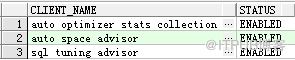
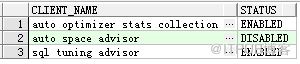
 解决方案:禁用auto space advisor
select
client_name
,
status
from
dba_autotask_client
;
解决方案:禁用auto space advisor
select
client_name
,
status
from
dba_autotask_client
;
 begin
DBMS_AUTO_TASK_ADMIN.DISABLE
(
client_name
=>
'auto space advisor'
,
operation
=>
NULL
,
window_name
=>
NULL
);
end
;
begin
DBMS_AUTO_TASK_ADMIN.DISABLE
(
client_name
=>
'auto space advisor'
,
operation
=>
NULL
,
window_name
=>
NULL
);
end
;
 禁用后备份时间缩短到两个小时;
欢迎关注我的微信公众号"IT小Chen",共同学习,共同成长!!!
禁用后备份时间缩短到两个小时;
欢迎关注我的微信公众号"IT小Chen",共同学习,共同成长!!!
 https://support.oracle.com/epmos/faces/SearchDocDisplay?_adf.ctrl-state=1dn99viqdd_9&_afrLoop=419884478500803
How to Stop Creating Table DBMS_TABCOMP_TEMP_UNCMP? (文档 ID 1326118.1)
https://support.oracle.com/epmos/faces/SearchDocDisplay?_adf.ctrl-state=1dn99viqdd_9&_afrLoop=419884478500803
How to Stop Creating Table DBMS_TABCOMP_TEMP_UNCMP? (文档 ID 1326118.1)
|
How to Stop Creating Table DBMS_TABCOMP_TEMP_UNCMP? ( 文档 ID 1326118.1) |
转到底部 |
|
修改时间:2018-8-4 类型:PROBLEM
|
|
In this Document SymptomsCause Solution References
APPLIES TO: Oracle Database - Enterprise Edition - Version 11.2.0.1 to 11.2.0.2 [Release 11.2] Information in this document applies to any platform. SYMPTOMS After upgrading to 11g, during running of the Automatic Segment Advisor, the table dms_tabcomp_temp_uncmp is being created and is taking up lots of space. Note: You may see ORA-1652 error: Unable to extend temp segment. CAUSE The issue is related to unpublished Bug 8896202: "ENABLE COMPRESSION ADVISOR TO ESTIMATE EXADATA HCC COMPRESSION RATIOS." SOLUTION The following solutions are available: 1. Apply one-off Patch 8896202 for unpublished Bug 8896202, if available. This fix will stop excessive redo log from being generated due to this table. 2. Apply 11.2.0.2 patchset where fix is included. 3. Workaround: Disable the Automatic Segment Adviser, as this is what makes the call to the Compression Advisor in 11.2. These steps can be found in the "Configuring the Automatic Segment Advisor" section of the Oracle Database Administrator's Guide 11g Release 2 (11.2) . Here is the excerpt from the guide: Configuring the Automatic Segment Advisor The Automatic Segment Advisor is an automated maintenance task. As such, you can use Enterprise Manager or PL/SQL package procedure calls to modify when (and if) this task runs. You can also control the resources allotted to it by modifying the appropriate resource plans. You can call PL/SQL package procedures to make these changes, but the easier way to is to use Enterprise Manager. To configure the Automatic Segment Advisor task with Enterprise Manager: 1. Log in to Enterprise Manager as user SYSTEM. 2. On the Database Home page, under the Space Summary heading, click the numeric link next to the label Segment Advisor Recommendations. The Segment Advisor Recommendations page appears. 3. Under the Related Links heading, click the link entitled Automated Maintenance Tasks. The Automated Maintenance Tasks page appears. 4. Click Configure. The Automated Maintenance Tasks Configuration page appears. 5. To completely disable the Automatic Segment Advisor, under Task Settings, select Disabled next to the Segment Advisor label, and then click Apply. REFERENCES NOTE:19047.1 - OERR: ORA-1652 "unable to extend temp segment by %s in tablespace %s" Reference Note |