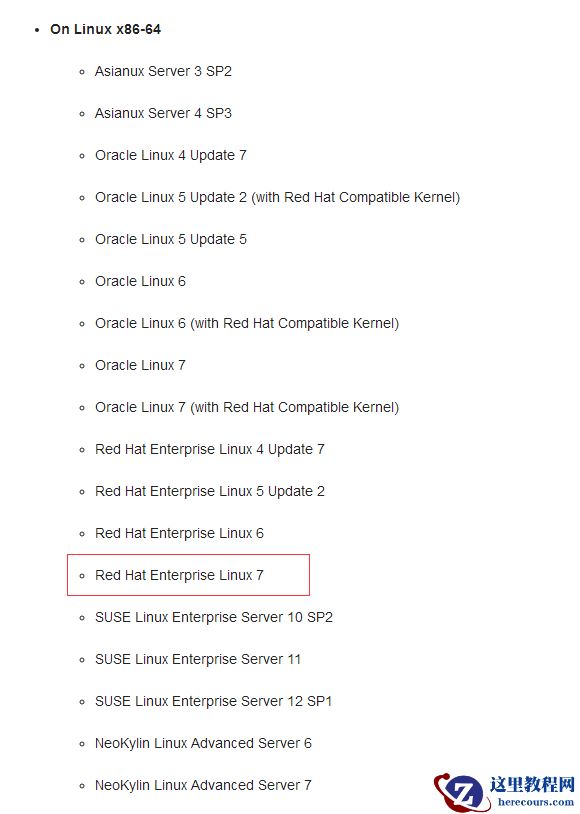
首先,我们安装前需要先查看下官方文档,看看是否支持,依据官方文档的说明是支持linux 7版本的(
https://docs.oracle.com/cd/E11882_01/install.112/e47689/pre_install.htm#LADBI1106)
 安装过程都挺顺利,在安装grid后跑root.sh时候遇到第一个问题:
ohasd failed to start
Failed to start the Clusterware. Last 20 lines of the alert log follow:
2018-12-11 14:57:23.327:
[client(41946)]CRS-2101:The OLR was formatted using version 3..
报错的原因是:linux7跟linux7以下在运行和重启进程方面是有较大的差别的,从linux 7开始是使用systemd而不是initd运行进程和重启进程,而我们的root.sh脚本是通过传统的initd调用运行ohasd进程。
解决方法也是比较简单的,按照如下步骤逐一执行即可:
1. 以root用户创建服务文件
touch /usr/lib/systemd/system/ohas.service
chmod 777 /usr/lib/systemd/system/ohas.service
2. 将以下内容添加到新创建的ohas.service文件中
[root@racnode1 init.d]# vi /usr/lib/systemd/system/ohas.service
[Unit]
Description=Oracle High Availability Services
After=syslog.target
[Service]
ExecStart=/etc/init.d/init.ohasd run >/dev/null 2>&1 Type=simple
Restart=always
[Install]
WantedBy=multi-user.target
3. 以root用户运行下面的命令
(也建议在执行root.sh脚本前先完成第一二步,然后开始执行root.sh脚本后,一直刷新/etc/init.d ,直到出现 init.ohasd 文件,
立刻执行这个第三步,这样可以顺利一次完成root.sh脚本的执行)
systemctl daemon-reload
systemctl enable ohas.service
systemctl start ohas.service
4. 查看运行状态
systemctl status ohas.service
?.ohas.service - Oracle High Availability Services
Loaded: loaded (/usr/lib/systemd/system/ohas.service; enabled; vendor preset: disabled)
Active:
failed
(Result: start-limit) since Tue 2018-12-11 15:16:26 CST; 13s ago
Process: 20389 ExecStart=/etc/init.d/init.ohasd run >/dev/null 2>&1 Type=simple (code=exited, status=203/EXEC)
Main PID: 20389 (code=exited, status=203/EXEC)
Dec 11 15:16:25 epsprac2 systemd[1]: ohas.service: main process exited, code=exited, status=203/EXEC
Dec 11 15:16:25 epsprac2 systemd[1]: Unit ohas.service entered failed state.
Dec 11 15:16:25 epsprac2 systemd[1]: ohas.service failed.
Dec 11 15:16:26 epsprac2 systemd[1]: ohas.service holdoff time over, scheduling restart.
Dec 11 15:16:26 epsprac2 systemd[1]: start request repeated too quickly for ohas.service
Dec 11 15:16:26 epsprac2 systemd[1]: Failed to start Oracle High Availability Services.
Dec 11 15:16:26 epsprac2 systemd[1]: Unit ohas.service entered failed state.
Dec 11 15:16:26 epsprac2 systemd[1]: ohas.service failed.
此时状态为失败,原因是现在还没有/etc/init.d/init.ohasd文件。
下面可以重新运行脚本root.sh 不会再报ohasd failed to start错误了。
如果还是报ohasd failed to start错误,可能是root.sh脚本创建了init.ohasd之后,ohas.service没有马上启动,解决方法参考以下:
当运行root.sh时,一直刷新/etc/init.d ,直到出现 init.ohasd 文件,马上手动启动ohas.service服务 命令:systemctl start ohas.service
注意:节点二执行root.sh脚本时候也需要完成如上操作
第二个小坑是在安装数据库软件的时候遇到的:
Error in invoking target 'agent nmhs' of makefile '/u01/app/oracle/product/11.2.0/db_1/sysman/lib/ins_emagent.mk'
如果是没有需要用到emagent的话,这个问题是可以忽略跳过的,一定要解决它的话,参考如下操作:
保留安装过程,另外开启一个终端窗口,将ins_emagent.mk文件中的 $(MK_EMAGENT_NMECTL)更改为$(MK_EMAGENT_NMECTL) -lnnz11,然后在安装过程中点击Retry即可。
这点在metalink上也有较详细的说明(ID 2299494.1)
安装过程都挺顺利,在安装grid后跑root.sh时候遇到第一个问题:
ohasd failed to start
Failed to start the Clusterware. Last 20 lines of the alert log follow:
2018-12-11 14:57:23.327:
[client(41946)]CRS-2101:The OLR was formatted using version 3..
报错的原因是:linux7跟linux7以下在运行和重启进程方面是有较大的差别的,从linux 7开始是使用systemd而不是initd运行进程和重启进程,而我们的root.sh脚本是通过传统的initd调用运行ohasd进程。
解决方法也是比较简单的,按照如下步骤逐一执行即可:
1. 以root用户创建服务文件
touch /usr/lib/systemd/system/ohas.service
chmod 777 /usr/lib/systemd/system/ohas.service
2. 将以下内容添加到新创建的ohas.service文件中
[root@racnode1 init.d]# vi /usr/lib/systemd/system/ohas.service
[Unit]
Description=Oracle High Availability Services
After=syslog.target
[Service]
ExecStart=/etc/init.d/init.ohasd run >/dev/null 2>&1 Type=simple
Restart=always
[Install]
WantedBy=multi-user.target
3. 以root用户运行下面的命令
(也建议在执行root.sh脚本前先完成第一二步,然后开始执行root.sh脚本后,一直刷新/etc/init.d ,直到出现 init.ohasd 文件,
立刻执行这个第三步,这样可以顺利一次完成root.sh脚本的执行)
systemctl daemon-reload
systemctl enable ohas.service
systemctl start ohas.service
4. 查看运行状态
systemctl status ohas.service
?.ohas.service - Oracle High Availability Services
Loaded: loaded (/usr/lib/systemd/system/ohas.service; enabled; vendor preset: disabled)
Active:
failed
(Result: start-limit) since Tue 2018-12-11 15:16:26 CST; 13s ago
Process: 20389 ExecStart=/etc/init.d/init.ohasd run >/dev/null 2>&1 Type=simple (code=exited, status=203/EXEC)
Main PID: 20389 (code=exited, status=203/EXEC)
Dec 11 15:16:25 epsprac2 systemd[1]: ohas.service: main process exited, code=exited, status=203/EXEC
Dec 11 15:16:25 epsprac2 systemd[1]: Unit ohas.service entered failed state.
Dec 11 15:16:25 epsprac2 systemd[1]: ohas.service failed.
Dec 11 15:16:26 epsprac2 systemd[1]: ohas.service holdoff time over, scheduling restart.
Dec 11 15:16:26 epsprac2 systemd[1]: start request repeated too quickly for ohas.service
Dec 11 15:16:26 epsprac2 systemd[1]: Failed to start Oracle High Availability Services.
Dec 11 15:16:26 epsprac2 systemd[1]: Unit ohas.service entered failed state.
Dec 11 15:16:26 epsprac2 systemd[1]: ohas.service failed.
此时状态为失败,原因是现在还没有/etc/init.d/init.ohasd文件。
下面可以重新运行脚本root.sh 不会再报ohasd failed to start错误了。
如果还是报ohasd failed to start错误,可能是root.sh脚本创建了init.ohasd之后,ohas.service没有马上启动,解决方法参考以下:
当运行root.sh时,一直刷新/etc/init.d ,直到出现 init.ohasd 文件,马上手动启动ohas.service服务 命令:systemctl start ohas.service
注意:节点二执行root.sh脚本时候也需要完成如上操作
第二个小坑是在安装数据库软件的时候遇到的:
Error in invoking target 'agent nmhs' of makefile '/u01/app/oracle/product/11.2.0/db_1/sysman/lib/ins_emagent.mk'
如果是没有需要用到emagent的话,这个问题是可以忽略跳过的,一定要解决它的话,参考如下操作:
保留安装过程,另外开启一个终端窗口,将ins_emagent.mk文件中的 $(MK_EMAGENT_NMECTL)更改为$(MK_EMAGENT_NMECTL) -lnnz11,然后在安装过程中点击Retry即可。
这点在metalink上也有较详细的说明(ID 2299494.1)
oracle RAC 11g for linux 7的那些坑
来源:这里教程网
时间:2026-03-03 12:51:47
作者:
编辑推荐:
下一篇:
相关推荐
-

-
-
-
-
-
-
-
-
-
-
-
-
-
-

雷神推出 MIX PRO II 迷你主机:基于 Ultra 200H,玻璃上盖 + ARGB 灯效
2 月 9 日消息,雷神 (THUNDEROBOT) 现已宣布推出基于英
-

制造商 Musnap 推出彩色墨水屏电纸书 Ocean C:支持手写笔、第三方安卓应用
2 月 10 日消息,制造商 Musnap 现已在海外推出一款 Oce
热文推荐
- oracle RAC 11g for linux 7的那些坑
oracle RAC 11g for linux 7的那些坑
26-03-03 - ORACLE 数据库服务器业务高峰期高危动作之IOSCAN(HPUNIX)
- Reasons for incorrect gl balance

Reasons for incorrect gl balance
26-03-03 - Oracle 12.2 学习系列(一)CDB多租户容器数据库
Oracle 12.2 学习系列(一)CDB多租户容器数据库
26-03-03 - 判断standby日志是否同步primary

判断standby日志是否同步primary
26-03-03 - 问鼎大师我的OCM之路——程向智
问鼎大师我的OCM之路——程向智
26-03-03 - oracle、mysql数据库窗口下执行操作系统命令
oracle、mysql数据库窗口下执行操作系统命令
26-03-03 - 由db_domain引起的数据库连接异常
由db_domain引起的数据库连接异常
26-03-03 - Oracle表空间切换路径,解决硬盘满导致的ORA-01653问题

Oracle表空间切换路径,解决硬盘满导致的ORA-01653问题
26-03-03 - Debian日志分析最佳实践(新手也能掌握的Linux系统日志管理与安全审计指南)