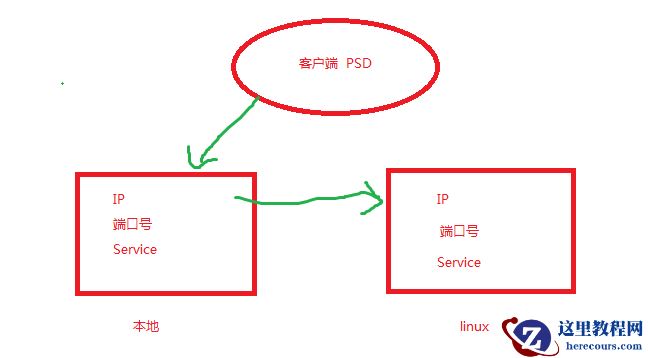
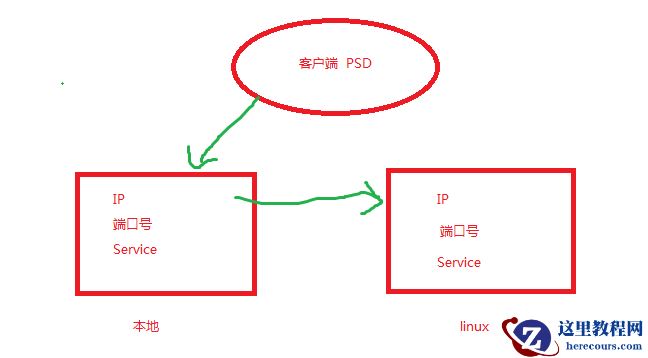
客户端工具plsql developer 链接Windows上的tnsname - NEW ,再通过NEW去链接linux上的监听。去链接数据库
1 验证linux上的监听状态
1 查看监听状态
[oracle@dan ~]$ lsnrctl status
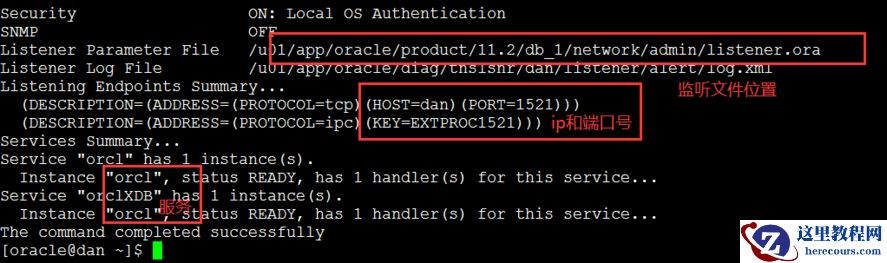
监听中3个必不可少的:ip、端口号、service。说明linux监听正常。所以我们通过xshall是通过密码文件可以链接进入数据库的
[oracle@dan ~]$ sqlplus / as sysdba SQL*Plus: Release 11.2.0.4.0 Production on Sun Mar 8 20:59:48 2020 Copyright (c) 1982, 2013, Oracle. All rights reserved. Connected to: Oracle Database 11g Enterprise Edition Release 11.2.0.4.0 - 64bit Production With the Partitioning, OLAP, Data Mining and Real Application Testing options
如果要走网络的话,就需要下面的tnsnames.ora
2 查看linux上的listener.ora
[oracle@dan admin]$ pwd /u01/app/oracle/product/11.2/db_1/network/admin/
[oracle@dan admin]$ cat listener.ora # listener.ora Network Configuration File: /u01/app/oracle/product/11.2/db_1/network/admin/listener.ora # Generated by Oracle configuration tools. LISTENER = (DESCRIPTION_LIST = (DESCRIPTION = (ADDRESS = (PROTOCOL = TCP) (HOST = dan)(PORT = 1521)) (ADDRESS = (PROTOCOL = IPC)(KEY = EXTPROC1521)) ) ) ADR_BASE_LISTENER = /u01/app/oracle
从listener.ora可以看出ip和端口号,但是看不到服务
2 查看linux上的tnsnames.ora,没有的话,可以手工添加
NEW= (DESCRIPTION = (ADDRESS_LIST = (ADDRESS = (PROTOCOL = TCP)(HOST = 192.168.56.56)(PORT = 1521)) ) (CONNECT_DATA = (SERVICE_NAME = orcl) ) )
走网络验证:
[oracle@dan admin]$ sqlplus system/oracle@NEW SQL*Plus: Release 11.2.0.4.0 Production on Sun Mar 8 21:22:53 2020 Copyright (c) 1982, 2013, Oracle. All rights reserved. Connected to: Oracle Database 11g Enterprise Edition Release 11.2.0.4.0 - 64bit Production With the Partitioning, OLAP, Data Mining and Real Application Testing options SQL>
能进入 ,说明tnsnames.ora没有问题。
如果不能进入,先查看防火墙,
service iptables status
sestatus
如果都关闭了,再就需要验证ip、端口、服务
[oracle@dan admin]$ pin g 192.168.56.56
[oracle@dan admin]$ telnet 192.168.56.56 1521
服务的话,就通过查看监听lsnrctl stauts 中的service 查看。
同样也可以验证串名:
[oracle@dan admin]$ tnspin g NEW
最后的最后。文件名一定要记住是tnsnames.ora 。。。。。。是有s的。这个搞了很傻
2 本地tnsnames
1 在本地的E:\app\Administrator\product\11.2.0\dbhome_1\NETWORK\ADMIN 也有个tnsnames.ora文件。客户端工具就是通过Windows的tnsnames去链接的linux的监听,再 去链接数据库
2 查看Windows的tnsnamesNEW=
(DESCRIPTION =
(ADDRESS_LIST =
(ADDRESS = (PROTOCOL = TCP)(HOST = 192.168.56.56)(PORT = 1521))
)
(CONNECT_DATA =
(SERVICE_NAME = orcl)
)
)
这里其实和linux上的一致,其实要链接psd的话,没有linux上的tnsnames也可以,因为Windows是链接的linu上的监听。监听的3要素:ip、端口、service
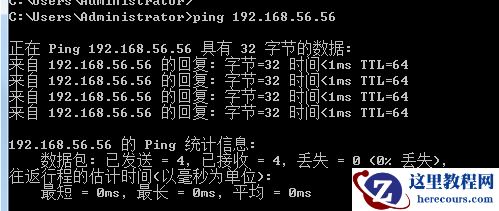
3 如果psd链接不通,就要验证ip、端口、service a)验证ip。没有问题
 b)验证端口号,从上面linux上的监听状态lsnrctl status,知道端口号是1521。能进入说明端口号1521也没有问题。

 c)服务本地中的(SERVICE_NAME = orcl) 和linux上的监听状态中的series是一致的。
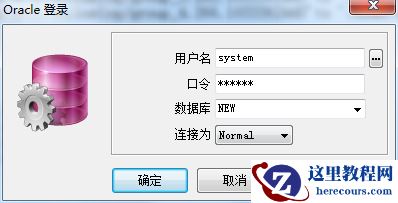
这时候,psd就能通过本地的链接串NEW链接到数据库了
c)服务本地中的(SERVICE_NAME = orcl) 和linux上的监听状态中的series是一致的。
这时候,psd就能通过本地的链接串NEW链接到数据库了
 但是sys用户始终是不能链接[oracle@dan admin]$ sqlplus sys/oracle@NEW as sysdba
SQL*Plus: Release 11.2.0.4.0 Production on Sun Mar 8 21:46:41 2020
Copyright (c) 1982, 2013, Oracle. All rights reserved.
ERROR:
ORA-28009: connection as SYS should be as SYSDBA or SYSOPER
Enter user-name: EXIT
Enter password:
ERROR:
ORA-01017: invalid username/password; logon denied
难道是sys密码错误?SQL> alter user sys identified by oracle;
User altered.
[oracle@dan admin]$ sqlplus sys/oracle@NEW as sysdba
但是还是同样的错误,后来,sys用户是特殊的用户。是需要特殊的密码文件,在$ORALE_HOME/dbs里[oracle@dan admin]$ cd $ORACLE_HOME/dbs
[oracle@dan dbs]$ ll
total 97884
-rw-rw----. 1 oracle dba 1544 Mar 8 16:56 hc_orcl.dat
-rw-r--r--. 1 oracle dba 2851 May 15 2009 init.ora
-rw-r-----. 1 oracle dba 24 Mar 8 12:06 lkORCL
-rw-r-----. 1 oracle dba 3584 Mar 8 16:26 spfileorcl.ora里面就没有orapw文件。所以通过网络一直登陆不上
[oracle@dan dbs]$ orapwd file=$ORACLE_HOME/dbs/orapw$ORACLE_SID password=oracle force=y;验证[oracle@dan dbs]$ sqlplus sys/oracle@NEW as sysdba
SQL*Plus: Release 11.2.0.4.0 Production on Sun Mar 8 21:55:05 2020
Copyright (c) 1982, 2013, Oracle. All rights reserved.
Connected to:
Oracle Database 11g Enterprise Edition Release 11.2.0.4.0 - 64bit Production
With the Partitioning, OLAP, Data Mining and Real Application Testing options
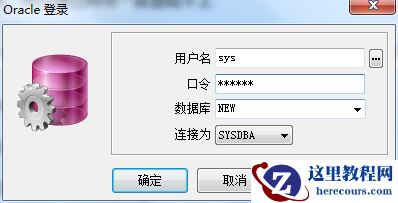
应该是没有问题了,去psd验证一下
但是sys用户始终是不能链接[oracle@dan admin]$ sqlplus sys/oracle@NEW as sysdba
SQL*Plus: Release 11.2.0.4.0 Production on Sun Mar 8 21:46:41 2020
Copyright (c) 1982, 2013, Oracle. All rights reserved.
ERROR:
ORA-28009: connection as SYS should be as SYSDBA or SYSOPER
Enter user-name: EXIT
Enter password:
ERROR:
ORA-01017: invalid username/password; logon denied
难道是sys密码错误?SQL> alter user sys identified by oracle;
User altered.
[oracle@dan admin]$ sqlplus sys/oracle@NEW as sysdba
但是还是同样的错误,后来,sys用户是特殊的用户。是需要特殊的密码文件,在$ORALE_HOME/dbs里[oracle@dan admin]$ cd $ORACLE_HOME/dbs
[oracle@dan dbs]$ ll
total 97884
-rw-rw----. 1 oracle dba 1544 Mar 8 16:56 hc_orcl.dat
-rw-r--r--. 1 oracle dba 2851 May 15 2009 init.ora
-rw-r-----. 1 oracle dba 24 Mar 8 12:06 lkORCL
-rw-r-----. 1 oracle dba 3584 Mar 8 16:26 spfileorcl.ora里面就没有orapw文件。所以通过网络一直登陆不上
[oracle@dan dbs]$ orapwd file=$ORACLE_HOME/dbs/orapw$ORACLE_SID password=oracle force=y;验证[oracle@dan dbs]$ sqlplus sys/oracle@NEW as sysdba
SQL*Plus: Release 11.2.0.4.0 Production on Sun Mar 8 21:55:05 2020
Copyright (c) 1982, 2013, Oracle. All rights reserved.
Connected to:
Oracle Database 11g Enterprise Edition Release 11.2.0.4.0 - 64bit Production
With the Partitioning, OLAP, Data Mining and Real Application Testing options
应该是没有问题了,去psd验证一下
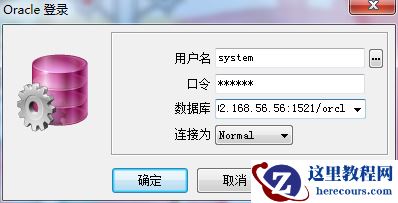
 也可以用 ip:端口号/service name
 完成
完成
编辑推荐:
- psd 链接本地tnsnames03-03
- Oracle ORA-06512&ORA-08103对象已不存在之查询期间表上索引被删除03-03
- Oracle面试宝典-进程结构篇03-03
- RAC集群常用管理命令03-03
- 基础架构迁云(一)03-03
- Oracle面试宝典-内存结构篇03-03
- Oracle面试宝典-事务篇03-03
- 7天酒店在此次疫情中坚信危机过后都是商机03-03
相关推荐
-

-
-
-
-
-
-
-
-
-
-
-
-
-
-

雷神推出 MIX PRO II 迷你主机:基于 Ultra 200H,玻璃上盖 + ARGB 灯效
2 月 9 日消息,雷神 (THUNDEROBOT) 现已宣布推出基于英
-

制造商 Musnap 推出彩色墨水屏电纸书 Ocean C:支持手写笔、第三方安卓应用
2 月 10 日消息,制造商 Musnap 现已在海外推出一款 Oce