Oracle 19C Data Guard
基础运维
-08 DML
重定向
 DML
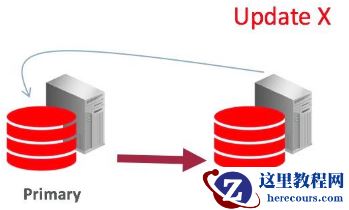
重定向说明:
在Active Data Guard Standby Databases
执行
DML
操作
Performing DML Operations on Active Data Guard Standby Databases
您可以在ADG
备库端运行
DML
操作。这使您能够在备用数据库上运行以读为主的应用程序,这些应用程序偶尔执行
DML
。
You can run DML operations on Active Data Guard standby databases. This
enables you to run read-mostly applications, which occasionally execute DMLs, on the standby database.
standby
数据库上的
DML
操作可以透明地重定向到
primary
数据库并在
primary
数据库上运行。这包括作为
PL/SQL
块一部分的
DML
语句。
DML operations on a standby can be transparently redirected to and run on the
primary database. This includes DML statements that are part of PL/SQL blocks.
ADG
会话将等待,直到将相应的更改发送到并应用到
ADG standby
。在DML
操作期间保持读取一致性,运行
DML
的
standby
数据库可以查看其未提交的更改。但是,所有其他
standby
数据库实例只能在事务提交后才能查看这些更改。
The Active Data Guard session waits until the corresponding changes are shipped to and applied to the Active Data Guard standby. Read consistency is maintained during the DML operation and the standby database on which the DML is run can view its uncommitted changes. However, all the other standby database instances can view these changes only after the transaction is committed.
Note:
避免在ADG
端执行过多的
DML
,因为执行最终是在主库端执行,过多的
DML
操作会影响主库性能。
Avoid running too may DML operations on Active Data Guard standby databases. Because the operations are actually performed on the primary, too many DMLs may impact the performance of the primary.
ALTER SESSION ENABLE ADG_REDIRECT_DML;
ALTER S
YSTEM
ENABLE ADG_REDIRECT_DML;
Example 10-1 Performing DML Operations on a Physical Standby Database
SQL> ALTER SESSION ENABLE ADG_REDIRECT_DML;
SQL> INSERT INTO employees VALUES (.......);
此时,更改后的数据仅对运行该命令的备用数据库可见。在主数据库上提交插入操作之后,将把更改发回并应用于所有备用数据库。
At this point, the changed data is visible only to the standby database on which the
command was run. After the insert operation is committed on the primary database, the changes are shipped back and applied to all the standby databases.
实验过程如下:
一
主库cjcdb:
创建测试数据
SQL> create user c##cjc identified by oracle;
SQL> grant connect,resource,dba to c##cjc;
SQL> create table c##cjc.t1 as select level as id from dual connect by level<=10;
备库:chendb
SQL> select * from c##cjc.t1;
ID
----------
1
2
......
10
10 rows selected.
二
备库chendb
启用会话级别
adg_redirect_dml
SQL> conn c##cjc/oracle
SQL> show parameter ADG_REDIRECT_DML
NAME
TYPE
VALUE
------------------------------------ ----------- ------------------------------
adg_redirect_dml
boolean
FALSE
SQL> alter session enable adg_redirect_dml;
SQL> select open_mode from v$database;
OPEN_MODE
--------------------
READ ONLY WITH APPLY
SQL> show user
USER is "C##CJC"
三
启用10046
事件,跟踪当前会话
SQL> alter session set tracefile_identifier='10046
C
';
SQL> alter session set events '10046 trace name context forever ,level 12';
SQL> insert into t1 values(1);
四
数据提交之前,查看主库事务信息
1
主库:通过v$transaction
查询出当前事务对应的会话地址
SQL>
select
addr
from
v$transaction
;
DML
重定向说明:
在Active Data Guard Standby Databases
执行
DML
操作
Performing DML Operations on Active Data Guard Standby Databases
您可以在ADG
备库端运行
DML
操作。这使您能够在备用数据库上运行以读为主的应用程序,这些应用程序偶尔执行
DML
。
You can run DML operations on Active Data Guard standby databases. This
enables you to run read-mostly applications, which occasionally execute DMLs, on the standby database.
standby
数据库上的
DML
操作可以透明地重定向到
primary
数据库并在
primary
数据库上运行。这包括作为
PL/SQL
块一部分的
DML
语句。
DML operations on a standby can be transparently redirected to and run on the
primary database. This includes DML statements that are part of PL/SQL blocks.
ADG
会话将等待,直到将相应的更改发送到并应用到
ADG standby
。在DML
操作期间保持读取一致性,运行
DML
的
standby
数据库可以查看其未提交的更改。但是,所有其他
standby
数据库实例只能在事务提交后才能查看这些更改。
The Active Data Guard session waits until the corresponding changes are shipped to and applied to the Active Data Guard standby. Read consistency is maintained during the DML operation and the standby database on which the DML is run can view its uncommitted changes. However, all the other standby database instances can view these changes only after the transaction is committed.
Note:
避免在ADG
端执行过多的
DML
,因为执行最终是在主库端执行,过多的
DML
操作会影响主库性能。
Avoid running too may DML operations on Active Data Guard standby databases. Because the operations are actually performed on the primary, too many DMLs may impact the performance of the primary.
ALTER SESSION ENABLE ADG_REDIRECT_DML;
ALTER S
YSTEM
ENABLE ADG_REDIRECT_DML;
Example 10-1 Performing DML Operations on a Physical Standby Database
SQL> ALTER SESSION ENABLE ADG_REDIRECT_DML;
SQL> INSERT INTO employees VALUES (.......);
此时,更改后的数据仅对运行该命令的备用数据库可见。在主数据库上提交插入操作之后,将把更改发回并应用于所有备用数据库。
At this point, the changed data is visible only to the standby database on which the
command was run. After the insert operation is committed on the primary database, the changes are shipped back and applied to all the standby databases.
实验过程如下:
一
主库cjcdb:
创建测试数据
SQL> create user c##cjc identified by oracle;
SQL> grant connect,resource,dba to c##cjc;
SQL> create table c##cjc.t1 as select level as id from dual connect by level<=10;
备库:chendb
SQL> select * from c##cjc.t1;
ID
----------
1
2
......
10
10 rows selected.
二
备库chendb
启用会话级别
adg_redirect_dml
SQL> conn c##cjc/oracle
SQL> show parameter ADG_REDIRECT_DML
NAME
TYPE
VALUE
------------------------------------ ----------- ------------------------------
adg_redirect_dml
boolean
FALSE
SQL> alter session enable adg_redirect_dml;
SQL> select open_mode from v$database;
OPEN_MODE
--------------------
READ ONLY WITH APPLY
SQL> show user
USER is "C##CJC"
三
启用10046
事件,跟踪当前会话
SQL> alter session set tracefile_identifier='10046
C
';
SQL> alter session set events '10046 trace name context forever ,level 12';
SQL> insert into t1 values(1);
四
数据提交之前,查看主库事务信息
1
主库:通过v$transaction
查询出当前事务对应的会话地址
SQL>
select
addr
from
v$transaction
;
 2
主库:通过上一步的会话地址,在
v$session
中找到对应
sql_id
等
SQL>
select
prev_hash_value
,
prev_sql_id
from
v$session
where
taddr
=
'000000007BE7CF20'
;
2
主库:通过上一步的会话地址,在
v$session
中找到对应
sql_id
等
SQL>
select
prev_hash_value
,
prev_sql_id
from
v$session
where
taddr
=
'000000007BE7CF20'
;
 3
主库:通过上一步的
sql_id
,在
v$sql
中查询出正在执行的
SQL
SQL>
select
*
from
v$sql
where
sql_id
=
'66xyn363mxuzu'
;
---
INSERT INTO "T1" "A1" ("ID") VALUES (1)
3
主库:通过上一步的
sql_id
,在
v$sql
中查询出正在执行的
SQL
SQL>
select
*
from
v$sql
where
sql_id
=
'66xyn363mxuzu'
;
---
INSERT INTO "T1" "A1" ("ID") VALUES (1)
 SQL>
select sql_text,sql_id,hash_value,service from v$sql where sql_id='66xyn363mxuzu';
SQL>
select sql_text,sql_id,hash_value,service from v$sql where sql_id='66xyn363mxuzu';
 结论:
备库端执行的DML
语句,实际上重定位到主库上执行了,具体是怎么实现的呢?
五:备库:提交事务,生成10046
跟踪文件
SQL> commit;
SQL> alter session set events '10046 trace name context off';
[oracle@cjcos02 trace]$ pwd
/u01/app/oracle/diag/rdbms/chendb/chendb/trace
六
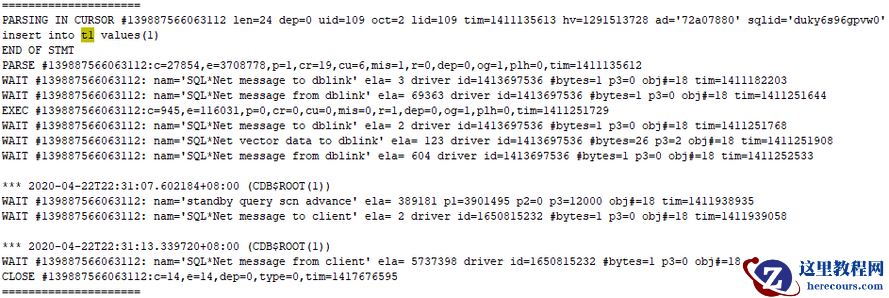
查看10046
跟踪文件
[oracle@cjcos02 trace]$ vim chendb_ora_3590_10046C.trc
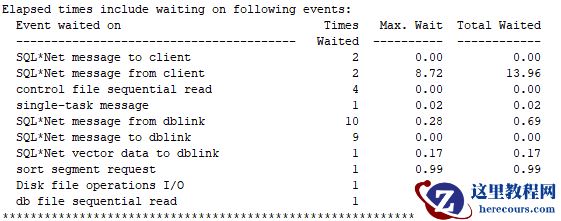
等待事件:和dblink
有关
SQL*Net message to dblink
SQL*Net message from dblink
结论:
备库端执行的DML
语句,实际上重定位到主库上执行了,具体是怎么实现的呢?
五:备库:提交事务,生成10046
跟踪文件
SQL> commit;
SQL> alter session set events '10046 trace name context off';
[oracle@cjcos02 trace]$ pwd
/u01/app/oracle/diag/rdbms/chendb/chendb/trace
六
查看10046
跟踪文件
[oracle@cjcos02 trace]$ vim chendb_ora_3590_10046C.trc
等待事件:和dblink
有关
SQL*Net message to dblink
SQL*Net message from dblink
 格式化跟踪文件:
[oracle@cjcos02 trace]$ tkprof chendb_ora_3590_10046C.trc 10046.trc
格式化跟踪文件:
[oracle@cjcos02 trace]$ tkprof chendb_ora_3590_10046C.trc 10046.trc
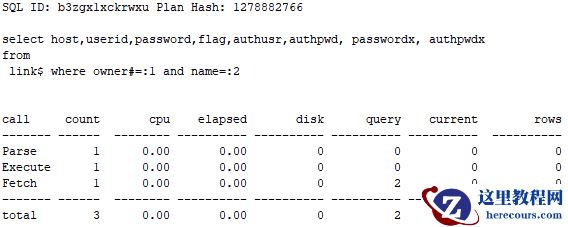
 递归
SQL
也和
dblink
有关
SQL ID: b3zgx1xckrwxu Plan Hash: 1278882766
select host,userid,password,flag,authusr,authpwd, passwordx, authpwdx
from
link$ where owner#=:1 and name=:2
递归
SQL
也和
dblink
有关
SQL ID: b3zgx1xckrwxu Plan Hash: 1278882766
select host,userid,password,flag,authusr,authpwd, passwordx, authpwdx
from
link$ where owner#=:1 and name=:2
 结论:
在备库端执行
DML
时,备库端通过
dblink
远程连接到主库,在主库端执行
DML
语句,待主库执行成功并将数据同步回备库端后,备库端显示
DML
语句执行完成。
七:常见问题
备库执行DML
语句时,报如下错误:
ORA-16397: statement redirection from Oracle Active Data Guard standby database
问题原因:
不支持SYS
用户会话级别启用
DML
重定向。
解决方案:
使用非SYS
用户启用和测试。
错误重现过程如下:
SQL>
show user
USER is "SYS"
SQL> alter session set tracefile_identifier='10046';
SQL> alter session set events '10046 trace name context forever ,level 12';
SQL> insert into test1 values(1);
insert into test1 values(1)
*
ERROR at line 1:
ORA-16397: statement redirection from Oracle Active Data Guard standby database
to primary database failed
欢迎关注我的微信公众号"IT小Chen",共同学习,共同成长!!!
结论:
在备库端执行
DML
时,备库端通过
dblink
远程连接到主库,在主库端执行
DML
语句,待主库执行成功并将数据同步回备库端后,备库端显示
DML
语句执行完成。
七:常见问题
备库执行DML
语句时,报如下错误:
ORA-16397: statement redirection from Oracle Active Data Guard standby database
问题原因:
不支持SYS
用户会话级别启用
DML
重定向。
解决方案:
使用非SYS
用户启用和测试。
错误重现过程如下:
SQL>
show user
USER is "SYS"
SQL> alter session set tracefile_identifier='10046';
SQL> alter session set events '10046 trace name context forever ,level 12';
SQL> insert into test1 values(1);
insert into test1 values(1)
*
ERROR at line 1:
ORA-16397: statement redirection from Oracle Active Data Guard standby database
to primary database failed
欢迎关注我的微信公众号"IT小Chen",共同学习,共同成长!!!
Oracle 19C Data Guard基础运维-08 DML重定向
来源:这里教程网
时间:2026-03-03 15:30:50
作者:
编辑推荐:
下一篇:
相关推荐
-

-
-
-
-
-
-
-
-
-
-
-
-
-
-

雷神推出 MIX PRO II 迷你主机:基于 Ultra 200H,玻璃上盖 + ARGB 灯效
2 月 9 日消息,雷神 (THUNDEROBOT) 现已宣布推出基于英
-

制造商 Musnap 推出彩色墨水屏电纸书 Ocean C:支持手写笔、第三方安卓应用
2 月 10 日消息,制造商 Musnap 现已在海外推出一款 Oce
![[20200420]V$SES_OPTIMIZER_ENV 查不到刚修改的隐含参数.txt](/d/file/efpub/2026/03-03/small87105623285d9500e1fabc2b52e2c4061772523049.jpg "[20200420]V$SES_OPTIMIZER_ENV 查不到刚修改的隐含参数.txt")
热文推荐
- Oracle 19C Data Guard基础运维-08 DML重定向
Oracle 19C Data Guard基础运维-08 DML重定向
26-03-03 - [20200420]V$SES_OPTIMIZER_ENV 查不到刚修改的隐含参数.txt
- oracle如何查看执行计划
oracle如何查看执行计划
26-03-03 - Oracle 20C 多租户_体系结构介绍
Oracle 20C 多租户_体系结构介绍
26-03-03 - PLSQL Developer 行号
PLSQL Developer 行号
26-03-03 - extractvalue处理XMLTYPE类型超过4000字节ORA-01706的解决方法
- Oracle 数据库的众多 “NAME”
Oracle 数据库的众多 “NAME”
26-03-03 - Oracle 19C+13.4EMCC数据库监控
Oracle 19C+13.4EMCC数据库监控
26-03-03 - Oracle GoldenGate 11g官方文档Administrator’s Guide续一
- Oracle 19C+13.4EMCC主机监控
Oracle 19C+13.4EMCC主机监控
26-03-03