
Oracle RAC
实施方案详细说明
-
安装后的检查
06
查看数据库版本
SQL> select * from v$version;
 查看集群名称
[root@rac01 bin]# ./cemutlo --help
查看集群名称
[root@rac01 bin]# ./cemutlo --help
 [root@rac01 bin]# ./cemutlo -n
rac-cluster
[root@rac01 bin]# ./cemutlo -w
2:1:
查看集群状态
[root@rac01 ~]# cd /u01/app/11.2.0/grid/bin/
[root@rac01 bin]# ./crsctl check cluster -all
**************************************************************
rac01:
CRS-4537: Cluster Ready Services is online
CRS-4529: Cluster Synchronization Services is online
CRS-4533: Event Manager is online
**************************************************************
rac02:
CRS-4537: Cluster Ready Services is online
CRS-4529: Cluster Synchronization Services is online
CRS-4533: Event Manager is online
**************************************************************
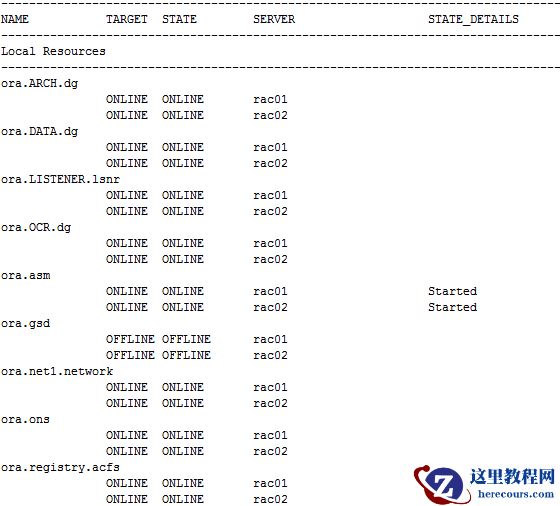
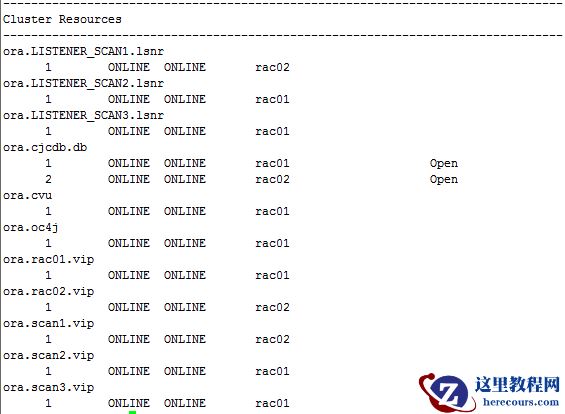
查看资源状态
[root@rac01 bin]# ./crsctl stat res -t
[root@rac01 bin]# ./cemutlo -n
rac-cluster
[root@rac01 bin]# ./cemutlo -w
2:1:
查看集群状态
[root@rac01 ~]# cd /u01/app/11.2.0/grid/bin/
[root@rac01 bin]# ./crsctl check cluster -all
**************************************************************
rac01:
CRS-4537: Cluster Ready Services is online
CRS-4529: Cluster Synchronization Services is online
CRS-4533: Event Manager is online
**************************************************************
rac02:
CRS-4537: Cluster Ready Services is online
CRS-4529: Cluster Synchronization Services is online
CRS-4533: Event Manager is online
**************************************************************
查看资源状态
[root@rac01 bin]# ./crsctl stat res -t
 查看
CRS
状态
[root@rac01 bin]# ./crsctl check crs
CRS-4638: Oracle High Availability Services is online
CRS-4537: Cluster Ready Services is online
CRS-4529: Cluster Synchronization Services is online
CRS-4533: Event Manager is online
查看OHASD
状态
[root@rac01 bin]# ./crsctl check has
CRS-4638: Oracle High Availability Services is online
禁用crs
自启动
[root@rac01 bin]# ./crsctl disable crs
CRS-4621: Oracle High Availability Services autostart is disabled.
[root@rac02 bin]# ./crsctl disable crs
CRS-4621: Oracle High Availability Services autostart is disabled.
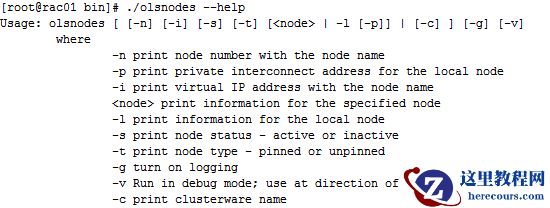
查看
节点
信息
[root@rac01 bin]# ./olsnodes --help
查看
CRS
状态
[root@rac01 bin]# ./crsctl check crs
CRS-4638: Oracle High Availability Services is online
CRS-4537: Cluster Ready Services is online
CRS-4529: Cluster Synchronization Services is online
CRS-4533: Event Manager is online
查看OHASD
状态
[root@rac01 bin]# ./crsctl check has
CRS-4638: Oracle High Availability Services is online
禁用crs
自启动
[root@rac01 bin]# ./crsctl disable crs
CRS-4621: Oracle High Availability Services autostart is disabled.
[root@rac02 bin]# ./crsctl disable crs
CRS-4621: Oracle High Availability Services autostart is disabled.
查看
节点
信息
[root@rac01 bin]# ./olsnodes --help
 [root@rac01 bin]# ./olsnodes
rac01
rac02
[root@rac01 bin]# ./olsnodes -c
rac-cluster
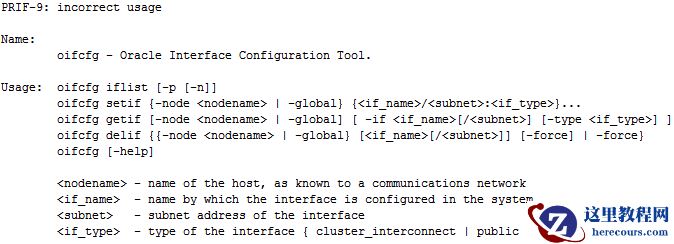
查看网络接口信息
[root@rac01 bin]# ./oifcfg --help
[root@rac01 bin]# ./olsnodes
rac01
rac02
[root@rac01 bin]# ./olsnodes -c
rac-cluster
查看网络接口信息
[root@rac01 bin]# ./oifcfg --help
 [root@rac01 bin]# ./oifcfg getif
eth0 192.168.31.0 global public
eth1 10.10.10.0 global cluster_interconnect
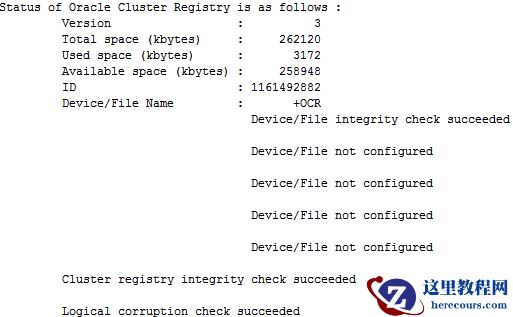
查看OCR
信息
[root@rac01 bin]# ./ocrcheck -config
Oracle Cluster Registry configuration is :
Device/File Name : +OCR
[root@rac01 bin]# ./ocrcheck
[root@rac01 bin]# ./oifcfg getif
eth0 192.168.31.0 global public
eth1 10.10.10.0 global cluster_interconnect
查看OCR
信息
[root@rac01 bin]# ./ocrcheck -config
Oracle Cluster Registry configuration is :
Device/File Name : +OCR
[root@rac01 bin]# ./ocrcheck
 查看olr
信息
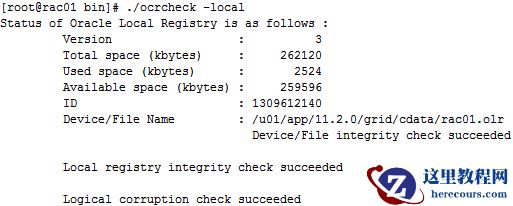
[root@rac01 bin]# ./ocrcheck -local
查看olr
信息
[root@rac01 bin]# ./ocrcheck -local
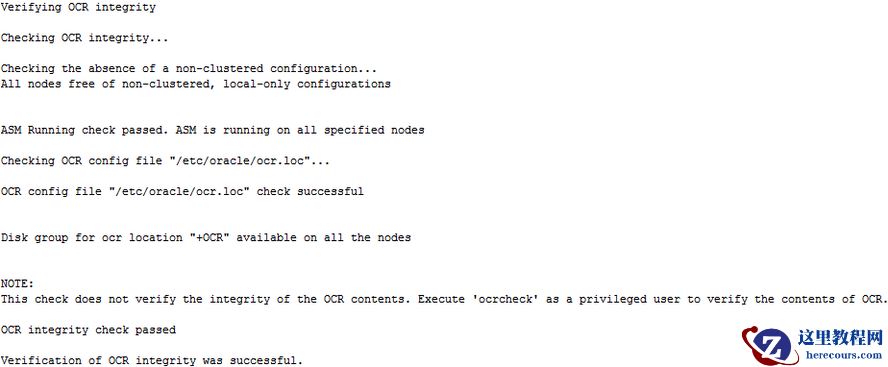
 检查OCR
完整性
[grid@rac01 ~]$ cluvfy comp ocr -n all -verbose
检查OCR
完整性
[grid@rac01 ~]$ cluvfy comp ocr -n all -verbose
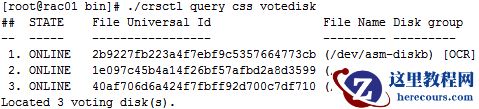
 查看votedisk
信息
[root@rac01 bin]# ./crsctl query css votedisk
查看votedisk
信息
[root@rac01 bin]# ./crsctl query css votedisk
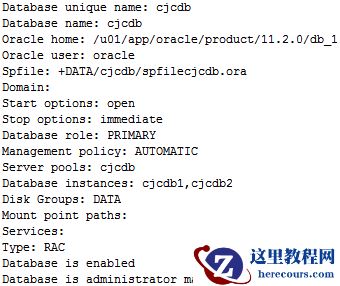
 查看数据库信息
[root@rac01 bin]# ./srvctl config database
cjcdb
[root@rac01 bin]# ./srvctl config database -d cjcdb -a
查看数据库信息
[root@rac01 bin]# ./srvctl config database
cjcdb
[root@rac01 bin]# ./srvctl config database -d cjcdb -a
 [root@rac01 bin]# ./srvctl status database -d cjcdb
Instance cjcdb1 is running on node rac01
Instance cjcdb2 is running on node rac02
[root@rac01 bin]# ./srvctl status database -d cjcdb -v
Instance cjcdb1 is running on node rac01. Instance status: Open.
Instance cjcdb2 is running on node rac02. Instance status: Open.
查看SCAN
配置
[root@rac01 bin]# ./srvctl config scan
SCAN name: rac-scan.cjc.com, Network: 1/192.168.31.0/255.255.255.0/eth0
SCAN VIP name: scan1, IP: /rac-scan.cjc.com/192.168.31.60
SCAN VIP name: scan2, IP: /rac-scan.cjc.com/192.168.31.70
SCAN VIP name: scan3, IP: /rac-scan.cjc.com/192.168.31.50
查看DNS
解析
[root@rac01 bin]# nslookup rac-scan.cjc.com
Server:
192.168.31.90
Address:
192.168.31.90#53
Name:
rac-scan.cjc.com
Address: 192.168.31.70
Name:
rac-scan.cjc.com
Address: 192.168.31.50
Name:
rac-scan.cjc.com
Address: 192.168.31.60
查看SCAN VIP
状态
[root@rac01 bin]# ./srvctl status scan
SCAN VIP scan1 is enabled
SCAN VIP scan1 is running on node rac02
SCAN VIP scan2 is enabled
SCAN VIP scan2 is running on node rac01
SCAN VIP scan3 is enabled
SCAN VIP scan3 is running on node rac01
显示SCAN
监听器的状态
[root@rac01 bin]# ./srvctl status scan_listener
SCAN Listener LISTENER_SCAN1 is enabled
SCAN listener LISTENER_SCAN1 is running on node rac02
SCAN Listener LISTENER_SCAN2 is enabled
SCAN listener LISTENER_SCAN2 is running on node rac01
SCAN Listener LISTENER_SCAN3 is enabled
SCAN listener LISTENER_SCAN3 is running on node rac01
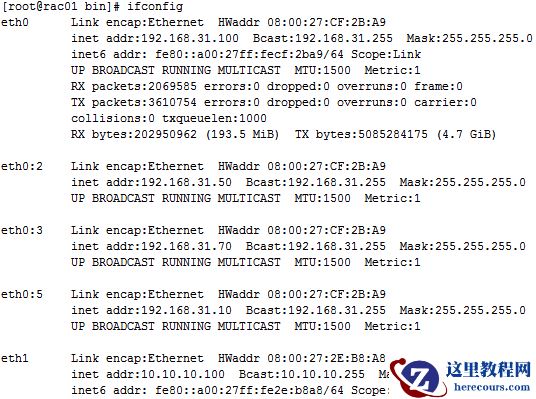
查看服务器IP
[root@rac01 bin]# ifconfig
[root@rac01 bin]# ./srvctl status database -d cjcdb
Instance cjcdb1 is running on node rac01
Instance cjcdb2 is running on node rac02
[root@rac01 bin]# ./srvctl status database -d cjcdb -v
Instance cjcdb1 is running on node rac01. Instance status: Open.
Instance cjcdb2 is running on node rac02. Instance status: Open.
查看SCAN
配置
[root@rac01 bin]# ./srvctl config scan
SCAN name: rac-scan.cjc.com, Network: 1/192.168.31.0/255.255.255.0/eth0
SCAN VIP name: scan1, IP: /rac-scan.cjc.com/192.168.31.60
SCAN VIP name: scan2, IP: /rac-scan.cjc.com/192.168.31.70
SCAN VIP name: scan3, IP: /rac-scan.cjc.com/192.168.31.50
查看DNS
解析
[root@rac01 bin]# nslookup rac-scan.cjc.com
Server:
192.168.31.90
Address:
192.168.31.90#53
Name:
rac-scan.cjc.com
Address: 192.168.31.70
Name:
rac-scan.cjc.com
Address: 192.168.31.50
Name:
rac-scan.cjc.com
Address: 192.168.31.60
查看SCAN VIP
状态
[root@rac01 bin]# ./srvctl status scan
SCAN VIP scan1 is enabled
SCAN VIP scan1 is running on node rac02
SCAN VIP scan2 is enabled
SCAN VIP scan2 is running on node rac01
SCAN VIP scan3 is enabled
SCAN VIP scan3 is running on node rac01
显示SCAN
监听器的状态
[root@rac01 bin]# ./srvctl status scan_listener
SCAN Listener LISTENER_SCAN1 is enabled
SCAN listener LISTENER_SCAN1 is running on node rac02
SCAN Listener LISTENER_SCAN2 is enabled
SCAN listener LISTENER_SCAN2 is running on node rac01
SCAN Listener LISTENER_SCAN3 is enabled
SCAN listener LISTENER_SCAN3 is running on node rac01
查看服务器IP
[root@rac01 bin]# ifconfig
 查看ASM
配置
[root@rac01 bin]# ./srvctl config asm
ASM home: /u01/app/11.2.0/grid
ASM listener: LISTENER
查看监听配置
[root@rac01 bin]# ./srvctl config listener
Name: LISTENER
Network: 1, Owner: grid
Home: <CRS home>
End points: TCP:1521
查看节点状态
[root@rac01 bin]# ./srvctl status nodeapps -n rac01
VIP rac01-vip is enabled
VIP rac01-vip is running on node: rac01
Network is enabled
Network is running on node: rac01
GSD is disabled
GSD is not running on node: rac01
ONS is enabled
ONS daemon is running on node: rac01
[root@rac01 bin]# ./srvctl status nodeapps -n rac02
VIP rac02-vip is enabled
VIP rac02-vip is running on node: rac02
Network is enabled
Network is running on node: rac02
GSD is disabled
GSD is not running on node: rac02
ONS is enabled
ONS daemon is running on node: rac02
欢迎关注我的微信公众号"IT小Chen",共同学习,共同成长!!!
查看ASM
配置
[root@rac01 bin]# ./srvctl config asm
ASM home: /u01/app/11.2.0/grid
ASM listener: LISTENER
查看监听配置
[root@rac01 bin]# ./srvctl config listener
Name: LISTENER
Network: 1, Owner: grid
Home: <CRS home>
End points: TCP:1521
查看节点状态
[root@rac01 bin]# ./srvctl status nodeapps -n rac01
VIP rac01-vip is enabled
VIP rac01-vip is running on node: rac01
Network is enabled
Network is running on node: rac01
GSD is disabled
GSD is not running on node: rac01
ONS is enabled
ONS daemon is running on node: rac01
[root@rac01 bin]# ./srvctl status nodeapps -n rac02
VIP rac02-vip is enabled
VIP rac02-vip is running on node: rac02
Network is enabled
Network is running on node: rac02
GSD is disabled
GSD is not running on node: rac02
ONS is enabled
ONS daemon is running on node: rac02
欢迎关注我的微信公众号"IT小Chen",共同学习,共同成长!!!
Oracle RAC实施方案详细说明-安装后的检查06
来源:这里教程网
时间:2026-03-03 15:40:49
作者:
编辑推荐:
- Oracle RAC实施方案详细说明-安装后的检查0603-03
- 这款类似简媒的工具软件,比简媒更好哦!03-03
- 自媒体一键分发视频,快手、抖音、火山、小红书、全民微视都支持03-03
- 使用数据泵迁移遇到的问题03-03
- 分区手动转自动实验03-03
- 世界500强常用的管理方法和工具推荐03-03
- Oracle19c orapwd修改密码之后连接数据库报ORA-1215403-03
- Oracle EBS SLA 详解03-03
下一篇:
相关推荐
-

-
-
-
-
-
-
-
-
-
-
-
-
-
-

雷神推出 MIX PRO II 迷你主机:基于 Ultra 200H,玻璃上盖 + ARGB 灯效
2 月 9 日消息,雷神 (THUNDEROBOT) 现已宣布推出基于英
-

制造商 Musnap 推出彩色墨水屏电纸书 Ocean C:支持手写笔、第三方安卓应用
2 月 10 日消息,制造商 Musnap 现已在海外推出一款 Oce
热文推荐
- Oracle RAC实施方案详细说明-安装后的检查06

Oracle RAC实施方案详细说明-安装后的检查06
26-03-03 - 这款类似简媒的工具软件,比简媒更好哦!

这款类似简媒的工具软件,比简媒更好哦!
26-03-03 - 自媒体一键分发视频,快手、抖音、火山、小红书、全民微视都支持

自媒体一键分发视频,快手、抖音、火山、小红书、全民微视都支持
26-03-03 - 使用数据泵迁移遇到的问题
使用数据泵迁移遇到的问题
26-03-03 - 分区手动转自动实验

分区手动转自动实验
26-03-03 - 世界500强常用的管理方法和工具推荐

世界500强常用的管理方法和工具推荐
26-03-03 - Oracle EBS SLA 详解
Oracle EBS SLA 详解
26-03-03 - OGG19C学习2-ogg命令行接口
OGG19C学习2-ogg命令行接口
26-03-03 - ORACLE删除-表分区和数据
ORACLE删除-表分区和数据
26-03-03 - 还不知道,如何选择适合自己的项目管理软件?

还不知道,如何选择适合自己的项目管理软件?
26-03-03