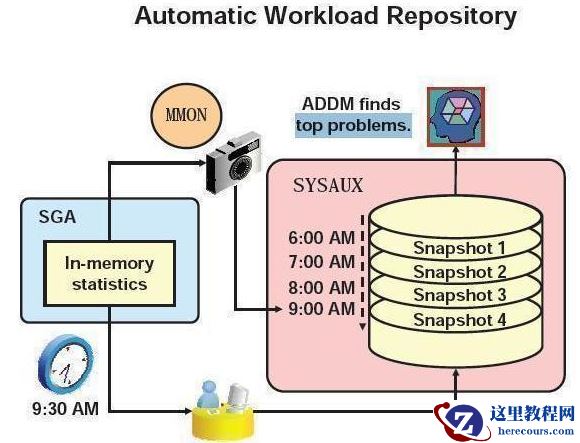
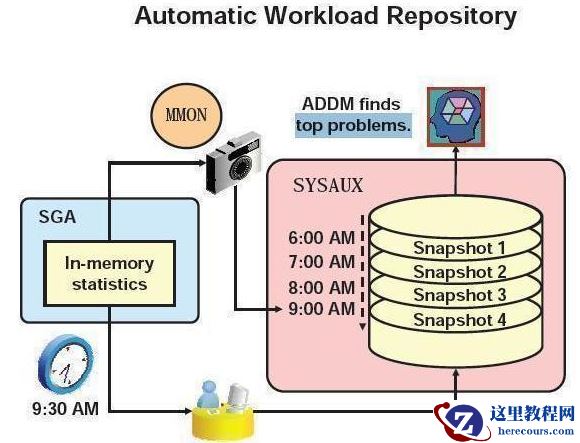
ORACLE10G之后,awr就是oracle内部的一个组件了; 报告不能包括数据库启停动作 由oracle的参数控制awr的机制:
 1.控制awr机制的参数,统计信息级别
SYS@orcl11g> show parameter statistics_level
NAME TYPE VALUE
------------------------------------ ----------- -------------
statistics_level string TYPICAL
statistics_level:
basic --关闭awr
typical --典型的
all --收集更加细致的信息
SYS@orcl11g> select STATISTICS_NAME ,ACTIVATION_LEVEL from V$STATISTICS_LEVEL;
STATISTICS_NAME ACTIVAT
---------------------------------------------------------------- -------------
Buffer Cache Advice TYPICAL
MTTR Advice TYPICAL
Timed Statistics TYPICAL
Timed OS Statistics ALL
Segment Level Statistics TYPICAL
PGA Advice TYPICAL
Plan Execution Statistics ALL
Shared Pool Advice TYPICAL
Modification Monitoring TYPICAL
Longops Statistics TYPICAL
Bind Data Capture TYPICAL
Ultrafast Latch Statistics TYPICAL
Threshold-based Alerts TYPICAL
Global Cache Statistics TYPICAL
Global Cache CPU Statistics ALL
Active Session History TYPICAL
Undo Advisor, Alerts and Fast Ramp up TYPICAL
Streams Pool Advice TYPICAL
Time Model Events TYPICAL
Plan Execution Sampling TYPICAL
Automated Maintenance Tasks TYPICAL
SQL Monitoring TYPICAL
Adaptive Thresholds Enabled TYPICAL
V$IOSTAT_* statistics TYPICAL
24 rows selected.
2.awr信息的保留时长,以及awr快照收集的时间间隔
默认awr信息保留时间为8天,快照收集的时间间隔为:1小时,快照保存在sysaux表空间;
--修改的命令:
begin DBMS_WORKLOAD_REPOSITORY.MODIFY_SNAPSHOT_SETTINGS(12960,30); end;
--表明将保留时长设置为:60*24*9 = 12960,快照收集时间间隔设置为30分钟;
SYS@orcl11g>
select * from dba_hist_wr_control
DBID SNAP_INTERVAL RETENTION TOPNSQL
--------------- ------------------------------ ------------------------------ ---------------
971282091 +00000 00:30:00.0 +00009 00:00:00.0 DEFAULT
自动动调整 保存时间 是8天,以上修改命令要大于8天才能执行,10g中是7天
3.生成awr报告
[oracle@memory admin]$ pwd
/u01/app/oracle/product/11.2.0/db_home1/rdbms/admin
[oracle@db253 admin]$ ls awr*
awrblmig.sql awrextr.sql awrginp.sql awrinpnm.sql awrrpt.sql
awrddinp.sql awrgdinp.sql awrgrpti.sql awrinput.sql awrsqrpi.sql
awrddrpi.sql awrgdrpi.sql awrgrpt.sql awrload.sql awrsqrpt.sql
awrddrpt.sql awrgdrpt.sql awrinfo.sql awrrpti.sql
SYS@orcl11g> @?/rdbms/admin/awrrpt.sql
Current Instance
~~~~~~~~~~~~~~~~
DB Id DB Name Inst Num Instance
----------------- -------------- ------------ ------------
915341431 ORCL11G 1 orcl11g
Specify the Report Type
~~~~~~~~~~~~~~~~~~~~~~~
Would you like an HTML report, or a plain text report?
Enter 'html' for an HTML report, or 'text' for plain text
Defaults to 'html'
Enter value for report_type:
html
。。。。。
Instances in this Workload Repository schema
~~~~~~~~~~~~~~~~~~~~~~~~~~~~~~~~~~~~~~~~~~~~
DB Id Inst Num DB Name Instance Host
----------------- -------------- -------------- ------------ ---------------------------
* 915341431 1 ORCL11G orcl11g g11252.neves.com
Using 915341431 for database Id
Using 1 for instance number
Specify the number of days of snapshots to choose from
~~~~~~~~~~~~~~~~~~~~~~~~~~~~~~~~~~~~~~~~~~~~~~~~~~~~~~
Entering the number of days (n) will result in the most recent
(n) days of snapshots being listed. Pressing <return> without
specifying a number lists all completed snapshots.
Enter value for num_days:
2 --显示最近2天的快照信息,生成报告时使用的快照不能跨越数据库启停动作.
Listing the last 2 days of Completed Snapshots
Instance DB Name Snap Id Snap Started Snap Level
------------ -------------- --------- ------------------------- --------------
orcl11g ORCL11G 2 27 Mar 2013 09:52 1
3 27 Mar 2013 11:00 1
4 27 Mar 2013 12:00 1
5 27 Mar 2013 13:00 1
6 27 Mar 2013 14:00 1
7 27 Mar 2013 15:00 1
8 27 Mar 2013 16:00 1
9 27 Mar 2013 17:00 1
10 28 Mar 2013 09:17 1
11 28 Mar 2013 10:00 1
Specify the Begin and End Snapshot Ids
~~~~~~~~~~~~~~~~~~~~~~~~~~~~~~~~~~~~~~
Enter value for begin_snap: 3
Begin Snapshot Id specified: 3
Enter value for end_snap: 5 --跨越时间越久,越容易掩盖一些问题,一些问题会由于时间长而稀释掉
Specify the Report Name
~~~~~~~~~~~~~~~~~~~~~~~
The default report file name is awrrpt_1_3_5.html. To use this name,
press <return> to continue, otherwise enter an alternative.
Enter value for report_name: /home/oracle/awr_3_5.html
***********************************************************************************************************
查看当前的AWR(automatic workload repository)保存策略:
col SNAP_INTERVAL format a20
col RETENTION format a20
select * from dba_hist_wr_control;
查看AWR的快照ID
SELECT SNAP_ID,
to_char(BEGIN_INTERVAL_TIME,'yyyy-mm-dd hh24:mi:ss') BEGIN_INTERVAL_TIME,
to_char(STARTUP_TIME,'yyyy-mm-dd hh24:mi:ss') STARTUP_TIME
FROM dba_hist_snapshot ORDER BY 1;
用 sys 之外的用户(SCOTT) 创建 AWR 报告:
CONNECT / AS SYSDBA
GRANT ADVISOR TO SCOTT;
GRANT SELECT_CATALOG_ROLE TO SCOTT;
GRANT EXECUTE ON sys.dbms_workload_repository TO SCOTT;
手动创建快照:
SYS@prod>exec dbms_workload_repository.create_snapshot;
1.控制awr机制的参数,统计信息级别
SYS@orcl11g> show parameter statistics_level
NAME TYPE VALUE
------------------------------------ ----------- -------------
statistics_level string TYPICAL
statistics_level:
basic --关闭awr
typical --典型的
all --收集更加细致的信息
SYS@orcl11g> select STATISTICS_NAME ,ACTIVATION_LEVEL from V$STATISTICS_LEVEL;
STATISTICS_NAME ACTIVAT
---------------------------------------------------------------- -------------
Buffer Cache Advice TYPICAL
MTTR Advice TYPICAL
Timed Statistics TYPICAL
Timed OS Statistics ALL
Segment Level Statistics TYPICAL
PGA Advice TYPICAL
Plan Execution Statistics ALL
Shared Pool Advice TYPICAL
Modification Monitoring TYPICAL
Longops Statistics TYPICAL
Bind Data Capture TYPICAL
Ultrafast Latch Statistics TYPICAL
Threshold-based Alerts TYPICAL
Global Cache Statistics TYPICAL
Global Cache CPU Statistics ALL
Active Session History TYPICAL
Undo Advisor, Alerts and Fast Ramp up TYPICAL
Streams Pool Advice TYPICAL
Time Model Events TYPICAL
Plan Execution Sampling TYPICAL
Automated Maintenance Tasks TYPICAL
SQL Monitoring TYPICAL
Adaptive Thresholds Enabled TYPICAL
V$IOSTAT_* statistics TYPICAL
24 rows selected.
2.awr信息的保留时长,以及awr快照收集的时间间隔
默认awr信息保留时间为8天,快照收集的时间间隔为:1小时,快照保存在sysaux表空间;
--修改的命令:
begin DBMS_WORKLOAD_REPOSITORY.MODIFY_SNAPSHOT_SETTINGS(12960,30); end;
--表明将保留时长设置为:60*24*9 = 12960,快照收集时间间隔设置为30分钟;
SYS@orcl11g>
select * from dba_hist_wr_control
DBID SNAP_INTERVAL RETENTION TOPNSQL
--------------- ------------------------------ ------------------------------ ---------------
971282091 +00000 00:30:00.0 +00009 00:00:00.0 DEFAULT
自动动调整 保存时间 是8天,以上修改命令要大于8天才能执行,10g中是7天
3.生成awr报告
[oracle@memory admin]$ pwd
/u01/app/oracle/product/11.2.0/db_home1/rdbms/admin
[oracle@db253 admin]$ ls awr*
awrblmig.sql awrextr.sql awrginp.sql awrinpnm.sql awrrpt.sql
awrddinp.sql awrgdinp.sql awrgrpti.sql awrinput.sql awrsqrpi.sql
awrddrpi.sql awrgdrpi.sql awrgrpt.sql awrload.sql awrsqrpt.sql
awrddrpt.sql awrgdrpt.sql awrinfo.sql awrrpti.sql
SYS@orcl11g> @?/rdbms/admin/awrrpt.sql
Current Instance
~~~~~~~~~~~~~~~~
DB Id DB Name Inst Num Instance
----------------- -------------- ------------ ------------
915341431 ORCL11G 1 orcl11g
Specify the Report Type
~~~~~~~~~~~~~~~~~~~~~~~
Would you like an HTML report, or a plain text report?
Enter 'html' for an HTML report, or 'text' for plain text
Defaults to 'html'
Enter value for report_type:
html
。。。。。
Instances in this Workload Repository schema
~~~~~~~~~~~~~~~~~~~~~~~~~~~~~~~~~~~~~~~~~~~~
DB Id Inst Num DB Name Instance Host
----------------- -------------- -------------- ------------ ---------------------------
* 915341431 1 ORCL11G orcl11g g11252.neves.com
Using 915341431 for database Id
Using 1 for instance number
Specify the number of days of snapshots to choose from
~~~~~~~~~~~~~~~~~~~~~~~~~~~~~~~~~~~~~~~~~~~~~~~~~~~~~~
Entering the number of days (n) will result in the most recent
(n) days of snapshots being listed. Pressing <return> without
specifying a number lists all completed snapshots.
Enter value for num_days:
2 --显示最近2天的快照信息,生成报告时使用的快照不能跨越数据库启停动作.
Listing the last 2 days of Completed Snapshots
Instance DB Name Snap Id Snap Started Snap Level
------------ -------------- --------- ------------------------- --------------
orcl11g ORCL11G 2 27 Mar 2013 09:52 1
3 27 Mar 2013 11:00 1
4 27 Mar 2013 12:00 1
5 27 Mar 2013 13:00 1
6 27 Mar 2013 14:00 1
7 27 Mar 2013 15:00 1
8 27 Mar 2013 16:00 1
9 27 Mar 2013 17:00 1
10 28 Mar 2013 09:17 1
11 28 Mar 2013 10:00 1
Specify the Begin and End Snapshot Ids
~~~~~~~~~~~~~~~~~~~~~~~~~~~~~~~~~~~~~~
Enter value for begin_snap: 3
Begin Snapshot Id specified: 3
Enter value for end_snap: 5 --跨越时间越久,越容易掩盖一些问题,一些问题会由于时间长而稀释掉
Specify the Report Name
~~~~~~~~~~~~~~~~~~~~~~~
The default report file name is awrrpt_1_3_5.html. To use this name,
press <return> to continue, otherwise enter an alternative.
Enter value for report_name: /home/oracle/awr_3_5.html
***********************************************************************************************************
查看当前的AWR(automatic workload repository)保存策略:
col SNAP_INTERVAL format a20
col RETENTION format a20
select * from dba_hist_wr_control;
查看AWR的快照ID
SELECT SNAP_ID,
to_char(BEGIN_INTERVAL_TIME,'yyyy-mm-dd hh24:mi:ss') BEGIN_INTERVAL_TIME,
to_char(STARTUP_TIME,'yyyy-mm-dd hh24:mi:ss') STARTUP_TIME
FROM dba_hist_snapshot ORDER BY 1;
用 sys 之外的用户(SCOTT) 创建 AWR 报告:
CONNECT / AS SYSDBA
GRANT ADVISOR TO SCOTT;
GRANT SELECT_CATALOG_ROLE TO SCOTT;
GRANT EXECUTE ON sys.dbms_workload_repository TO SCOTT;
手动创建快照:
SYS@prod>exec dbms_workload_repository.create_snapshot;