在这种模式下,OPatch首先将补丁应用到本地节点,然后将补丁传播到所有其他节点,最后更新清单。在整个修补过程中,所有实例都必须关闭。
在这种模式下,OPatch修补本地节点,要求用户提供节点的子集,这将是要修补的节点的第一个子集。在修补了最初的节点子集之后,Opatch将修补程序传播到其他节点,最后更新清单。停机时间将发生在第二个节点子集关闭和修补的初始节点子集启动之间。
使用这种方法,没有停机时间。每个节点都将打补丁并启动,而其他所有节点都已启动并运行,从而不会破坏系统。
You can patch Oracle Real Application Clusters in three different ways:
The following sections provide detailed information for these types of Oracle Real Application Clusters patching.
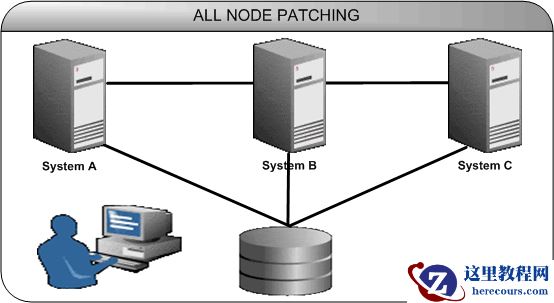
All Node Patching
Figure 7–1 shows a basic example of All Node Patching.
Figure 7-1 All Node Patching
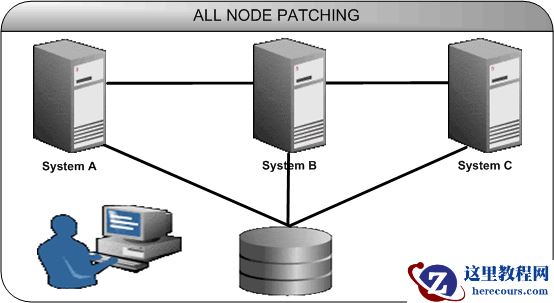
Systems A, B, and C are nodes in this cluster. When you perform All Node Patching in this cluster, you bring down systems A, B, and C, apply patches to all these nodes, then bring systems A, B, and C back up again.
Rolling Patching
In Rolling Patching, you shut down each node, apply the patch, then bring up each node again. You do this separately for each node until you patch all nodes in the cluster. This is the most efficient method of applying an interim patch to an Oracle Real Application Clusters setup, because there is absolutely no downtime during the application of patches, as only one system is brought down at any given time. Only some patches can be applied in this mode. The type is generally specified in the patch metadata.
Figure 7–2 shows a basic example of Rolling Patching.
Figure 7-2 Rolling Patching
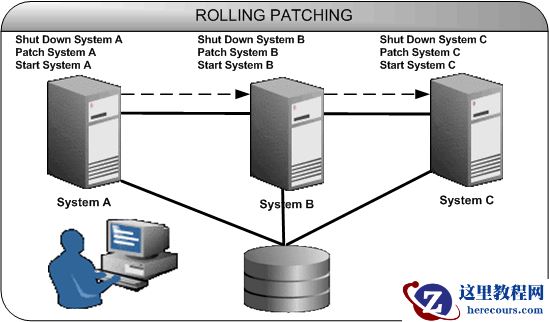
When you perform Rolling Patching in this cluster, the patches are applied in a rolling fashion. You initially bring down system A, apply a patch to it, then bring it back up. You do the same thing for systems B and C.
Minimum Downtime Patching
In Minimum Downtime Patching, the nodes are divided into sets. Initially, you shut down the first set and apply a patch to it. After this, you shut down the second set. You then bring up the first set and apply a patch to the second set. You now bring up the second set. All the nodes in the cluster are now patched. This method leads to less downtime for Oracle Real Application Clusters when both sets are brought down. This mode is executed by using -minimize_downtime command line option. You can also activate this option from the response file.
Figure 7–3 shows a basic example of Minimum Downtime Patching.
Figure 7-3 Minimum Downtime Patching
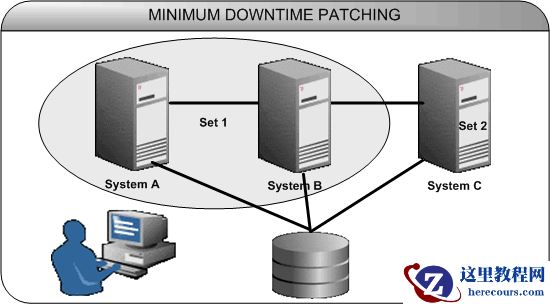
Systems A, B, and C are nodes in this cluster. It is divided into two sets: Set 1 contains systems A and B, and Set 2 contains system C. When you perform Minimum Downtime Patching in this cluster, you shut down Set 1 and apply a patch to it. You now shut down Set 2. Then, you bring up Set 1 and apply a patch to Set 2. After you apply the patch, you bring up Set 2 again. Now both Sets 1 and 2 are patched.
[grid@node1 ~]$ crsctl status res -t //查看集群资源状态
ora.racdb.db
1 ONLINE ONLINE node1 Open
2 ONLINE ONLINE node2 Open
节点 1 :
[grid@node1 ~]$ srvctl stop instance -d racdb -i racdb1 //关闭节点1实例
ora.racdb.db
1 OFFLINE OFFLINE Instance Shutdown
2 ONLINE ONLINE node2 Open
[oracle@node1 ~]$ unzip p27734982_112040_Linux-x86-64.zip //补丁包在mos下载
[oracle@node1 ~]$ cd 27734982/
// Determine whether any currently installed one-off patches conflict with the PSU patch as follows: // 补丁冲突集检测
[oracle@node1 27734982]$ /u01/app/oracle/product/1124/dbhome_1/OPatch/ opatch prereq CheckConflictAgainstOHWithDetail -ph ./
[oracle@node1 27734982]$ /u01/app/oracle/product/1124/dbhome_1/OPatch/opatch apply //应用补丁
Composite patch 27734982 successfully applied.
[grid@node1 ~]$ srvctl start instance -d racdb -i racdb1 //将节点1启动
[grid@node1 ~]$ crsctl status res -t
ora.racdb.db
1 ONLINE ONLINE node1 Open
2 ONLINE ONLINE node2 Open
节点 2 :
[grid@node1 ~]$ srvctl stop instance -d racdb -i racdb2 //关闭节点2
[oracle@node1 ~]$ unzip p27734982_112040_Linux-x86-64.zip
[oracle@node1 ~]$ cd 27734982/
[oracle@node1 27734982]$ /u01/app/oracle/product/1124/dbhome_1/OPatch/opatch apply //应用补丁
Composite patch 27734982 successfully applied.
[grid@node1 ~]$ srvctl start instance -d racdb -i racdb2 //将节点2启动
ora.racdb.db
1 ONLINE ONLINE node1 Open
2 ONLINE ONLINE node2 Open
// 执行@catbundle.sql反应补丁信息到dba_registry_history视图中
[grid@node1 ~]$cd $ORACLE_HOME/rdbms/admin [grid@node1 ~]$sqlplus /nolog SQL> connect / as sysdba SQL> startup SQL> @catbundle.sql psu apply SQL> quit
查看补丁安装记录:
select action_time,action,comments from dba_Registry_history
查看当前安装所有补丁:
[oracle@service1 OPatch]$ ./opatch lsinv
查看当前Opatch版本:
[oracle@service1 OPatch]$ ./opatch version
OPatch Version: 11.2.0.3.25
OPatch succeeded.
滚动补丁:
How to determine if a patch is a "rolling patch" or not?
Later 10gR2 or 11g: opatch query -is_rolling_patch [unzipped patch location]
参考read me来判断该补丁是否为滚动补丁
在集群环境中,当应用/回滚补丁时,默认情况下,除非指定了选项“ -local”,否则opatch将在所有节点上执行。
但是,这在opatch 11.2.0.3.16和12.2.0.1.9及更高版本中已更改;进行更改后,默认情况下,opatch仅在本地节点上有效。