环境介绍:
Linux
数据库版本12.2.0.1.190115:
数据库架构:三节点RAC
故障产生过程:
由于之前三节点实例不间断重启hang住,故准备将数据库补丁打到最新12.2.0.1.200714。
[17:46:17]SXSBK:   Error in bootstrap log /u01/app/oracle/cfgtoollogs/sqlpatch/sqlpatch_204978_2020_08_27_17_43_51/bootstrap1_SXSBCDB_SXSBK.log:
[17:46:17]    Error at line 79: ORA-04088: error during execution of trigger 'ODIN.ODTAC_SOURCELOG'
[17:46:17]    Error at line 80: ORA-00604: error occurred at recursive SQL level 1
[17:46:17]    Error at line 81: ORA-01400: cannot insert NULL into ("ODIN"."ODDS_SOURCELOG"."IP_ADDRESS")
[17:46:17]    Error at line 82: ORA-06512: at line 18
[17:46:17]    Error at line 108: ORA-04088: error during execution of trigger 'ODIN.ODTAC_SOURCELOG'
[17:46:17]    Error at line 109: ORA-00604: error occurred at recursive SQL level 1
[17:46:17]    Error at line 110: ORA-01400: cannot insert NULL into ("ODIN"."ODDS_SOURCELOG"."IP_ADDRESS")
[17:46:17]    Error at line 111: ORA-06512: at line 18
停掉相关触发器,继续打,最后提示无最新补丁可应用:
[oracle@sxrsj01 OPatch]$ ./datapatch -verbose
SQL Patching tool version 12.2.0.1.0 Production on Fri Aug 28 18:35:56 2020
Copyright (c) 2012, 2018, Oracle.  All rights reserved.

Log file for this invocation: /u01/app/oracle/cfgtoollogs/sqlpatch/sqlpatch_313452_2020_08_28_18_35_56/sqlpatch_invocation.log

Connecting to database...OK
Note:  Datapatch will only apply or rollback SQL fixes for PDBs
       that are in an open state, no patches will be applied to closed PDBs.
       Please refer to Note: Datapatch: Database 12c Post Patch SQL Automation
       (Doc ID 1585822.1)
Bootstrapping registry and package to current versions...done
Determining current state...done

ate of SQL patches:Current st
ies 12.2.0.1.200714Bundle serDBJAN2020RUR:
alled in the binary  Not inst registry and not installed in any PDB
ies DBRU:          Bundle ser
5 in the binary reg  ID 19011istry and ID 190115 in PDB CDB$ROOT, ID 190115 in PDB PDB$SEED, ID 190115 in PDB SXGGFW, ID 190115 in PDB SXJHK, ID 190115 in PDB SXYTH, ID 190115 in PDB SXJCK, ID 190115 in PDB SXRCJY, ID 190115 in PDB SXSBK

ches to installatioAdding patn queue and performing prereq checks...
on queue:          Installati
following PDBs: CDB  For the $ROOT PDB$SEED SXGGFW SXJHK SXYTH SXJCK SXRCJY SXSBK
g to roll back         Nothin
g to apply             Nothin
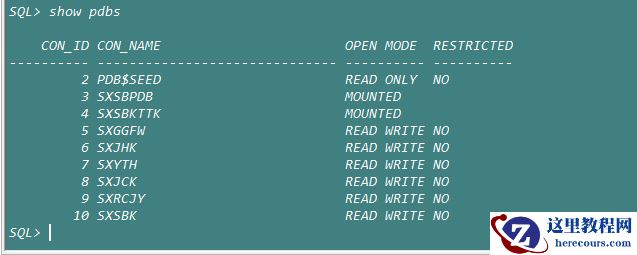
由于集群之间心跳网络不稳定,在8月26日9:16数据库发生了脑裂,导致其中一个节点被驱逐,主机重启。
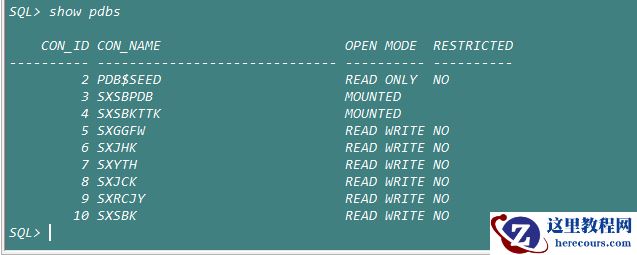
重启后发现业务连接不上,所有pdb为受限模式,
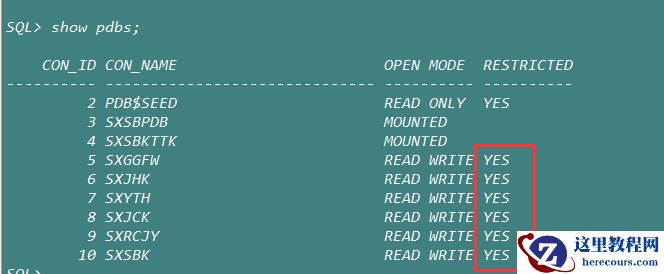
查看视图提示19年补丁有问题:
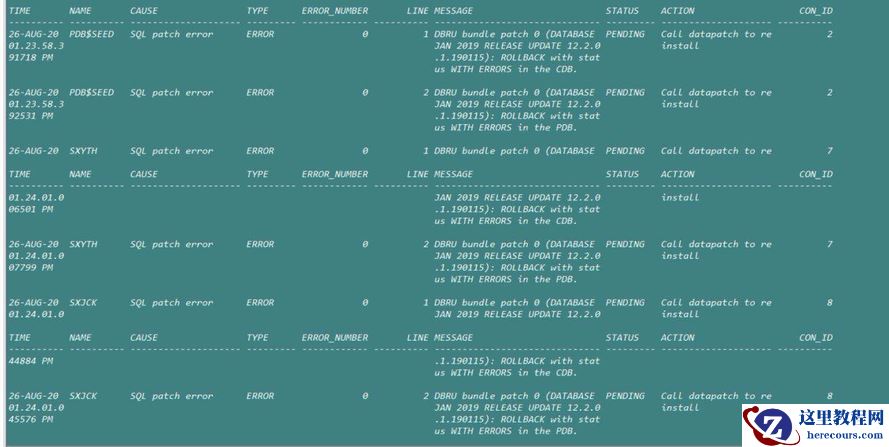
执行datapatch -verbose自动回退19年补丁,修复了所有补丁,但是最后一个数据量最大的pdb依旧是受限模式,由于业务需要使用数据库,临时授予所有业务用户临时访问受限模式数据库权限:
Grant restricted session to user;
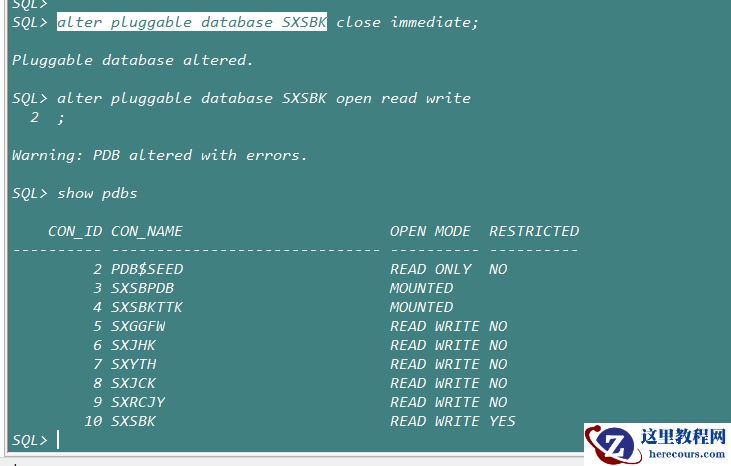
由于一时间没有修复,决定利用之前tar数据库软件包回退20年补丁,回到19年补丁。
回退以后运行datapatch -verbose -pdb sxsbk,需要很长时间,后发现ogg在运行,故停止ogg,问题依旧没有解决。
[oracle@sxrsj01 OPatch]$  ./datapatch -verbose -pdbs SXSBK
SQL Patching tool version 12.2.0.1.0 Production on Fri Aug 28 20:23:37 2020
Copyright (c) 2012, 2018, Oracle.  All rights reserved.

Log file for this invocation: /u01/app/oracle/cfgtoollogs/sqlpatch/sqlpatch_209827_2020_08_28_20_23_37/sqlpatch_invocation.log

Connecting to database...OK
Note:  Datapatch will only apply or rollback SQL fixes for PDBs
       that are in an open state, no patches will be applied to closed PDBs.
       Please refer to Note: Datapatch: Database 12c Post Patch SQL Automation
       (Doc ID 1585822.1)
Bootstrapping registry and package to current versions...done
Determining current state...done

Current state of SQL patches:
Bundle series 12.2.0.1.200714DBJAN2020RUR:
  Not installed in the binary registry and not installed in any PDB
Bundle series DBRU:
  ID 190115 in the binary registry and ID 190115 with errors in PDB SXSBK

Adding patches to installation queue and performing prereq checks...
Installation queue:
  For the following PDBs: SXSBK
    Nothing to roll back
    The following patches will be applied:
      28822515 (DATABASE JAN 2019 RELEASE UPDATE 12.2.0.1.190115)

Installing patches...
Patch installation complete.  Total patches installed: 1

Validating logfiles...
Patch 28822515 apply (pdb SXSBK): WITH ERRORS
  logfile: /u01/app/oracle/cfgtoollogs/sqlpatch/28822515/22636216/28822515_apply_SXSBCDB_SXSBK_2020Aug28_20_24_43.log (errors)
    Error at line 3897: Warning: Package Body created with compilation errors.
    Error at line 3903: 3073/5   PL/SQL: Statement ignored
    Error at line 3904: 3073/21  PLS-00306: wrong number or types of arguments in call to
    Error at line 3928: Warning: Package Body created with compilation errors.
    Error at line 3934: 24/12    PLS-00323: subprogram or cursor 'GET_OPTIONAL_PRIVILEGES' is
    Error at line 4315: Warning: Package Body created with compilation errors.
    Error at line 4321: 18788/3  PL/SQL: Statement ignored
    Error at line 4322: 18788/33 PLS-00302: component 'COMMON_SECTIONS_INITIALIZED' must be
    Error at line 4325: 18792/3  PL/SQL: Statement ignored
    Error at line 4326: 18792/29 PLS-00302: component 'COMMON_SECTIONS_INITIALIZED' must be
Please refer to MOS Note 1609718.1 and/or the invocation log
/u01/app/oracle/cfgtoollogs/sqlpatch/sqlpatch_209827_2020_08_28_20_23_37/sqlpatch_invocation.log
for information on how to resolve the above errors.
SQL Patching tool complete on Fri Aug 28 20:25:53 2020
查询mos: datapatch Fails with Error: "ORA-04063" or "ORA-06508" or "ORA-29913 ,KUP-00600"or "KUP-04020" (Doc ID 1948198.1)
原因有下面三种:
External Table OPATCH_XML_INV is corrupted .
 or
OPATCH_XML_INV does not exists:
SQL> select * from OPATCH_XML_INV ;
select * from OPATCH_XML_INV
  *
ERROR at line 1:
ORA-00942: table or view does not exist
 or
Readsize is less.
解决方式:
Always use the latest opatch tool :
1)Need to check if the external table exists using the following :
SQL> desc SYS.OPATCH_XML_INV ;
If it exists then drop it:
SQL> drop table SYS.OPATCH_XML_INV;
2) Recreate the table:
(Provided greater readsize)
Execute the following DDL :
For Unix
CREATE TABLE opatch_xml_inv
(
xml_inventory CLOB
)
ORGANIZATION EXTERNAL
(
TYPE oracle_loader
DEFAULT DIRECTORY opatch_script_dir
ACCESS PARAMETERS
(
RECORDS DELIMITED BY NEWLINE
READSIZE 67108864
preprocessor opatch_script_dir:'qopiprep.bat'
BADFILE opatch_script_dir:'qopatch_bad.bad'
LOGFILE opatch_log_dir:'qopatch_log.log'
FIELDS TERMINATED BY 'UIJSVTBOEIZBEFFQBL'
MISSING FIELD VALUES ARE NULL
REJECT ROWS WITH ALL NULL FIELDS
(
xml_inventory CHAR(100000000)
)
)
LOCATION(opatch_script_dir:'qopiprep.bat')
)
PARALLEL 1
REJECT LIMIT UNLIMITED;
For Windows :
CREATE TABLE opatch_xml_inv
(
xml_inventory CLOB
)
ORGANIZATION EXTERNAL
(
TYPE oracle_loader
DEFAULT DIRECTORY opatch_script_dir
ACCESS PARAMETERS
(
RECORDS DELIMITED BY NEWLINE
DISABLE_DIRECTORY_LINK_CHECK
READSIZE 67108864
preprocessor opatch_script_dir:'qopiprep.bat'
BADFILE opatch_script_dir:'qopatch_bad.bad'
LOGFILE opatch_log_dir:'qopatch_log.log'
FIELDS TERMINATED BY 'UIJSVTBOEIZBEFFQBL'
MISSING FIELD VALUES ARE NULL
REJECT ROWS WITH ALL NULL FIELDS
(
xml_inventory CHAR(100000000)
)
)
LOCATION(opatch_script_dir:'qopiprep.bat')
)
PARALLEL 1
REJECT LIMIT UNLIMITED;
3)Execute the following to compile the DBMS_QOPATCH:
alter package sys.DBMS_QOPATCH compile body ;

set long 20000 longchunksize 20000 pagesize 0 linesize 1000 feedback off verify off trimspool on
column ddl format a1000
set long 20000
select dbms_metadata.get_ddl('TABLE','OPATCH_XML_INV','SYS') from dual;
4)The package body 'DBMS_QOPATCH' and table 'opatch_xml_inv' should be VALID .
SQL> select owner, object_name,object_type,status FROM dba_objects where object_name in ('DBMS_QOPATCH' ,'OPATCH_XML_INV');
Also check Components CATALOG and CATPROC are VALID
SQL> select comp_id, status, version from dba_registry;
5)Execute the : datapatch
./datapatch -verbose
Note: If it's a CDB .Then need to execute following commands for each PDB:
a)SQL> alter session set container=<PDB> ;

b)SQL> show con_name ===> Show return PDB name

c)SQL>exec dbms_pdb.exec_as_oracle_script('drop table SYS.OPATCH_XML_INV');

d)SQL> @?/rdbms/admin/catqitab.sql

e) Execute the following to compile the DBMS_QOPATCH:
  SQL>alter package sys.DBMS_QOPATCH compile body ;
按照说明执行,cdb跟所有pdb都得执行