About the Oracle GoldenGate Trail
This appendix includes the following sections:
Trail Recovery Mode
Trail File Header Record
Trail Record Format
Example of an Oracle GoldenGate Record
Record Header Area
Record Data Area
Tokens Area
Oracle GoldenGate Operation Types
Oracle GoldenGate Trail Header Record
C.1 Trail Recovery Mode
By default, Extract operates in append mode, where if there is a process failure, a recovery marker is written to the trail and Extract appends recovery data to the file so that a history of all prior data is retained for recovery purposes.
In append mode, the Extract initialization determines the identity of the last complete transaction that was written to the trail at startup time. With that information, Extract ends recovery when the commit record for that transaction is encountered in the data source; then it begins new data capture with the next committed transaction that qualifies for extraction and begins appending the new data to the trail. A data pump or Replicat starts reading again from that recovery point.
Overwrite mode is another version of Extract recovery that was used in versions of Oracle GoldenGate prior to version 10.0. In these versions, Extract overwrites the existing transaction data in the trail after the last write-checkpoint position, instead of appending the new data. The first transaction that is written is the first one that qualifies for extraction after the last read checkpoint position in the data source.
If the version of Oracle GoldenGate on the target is older than version 10, Extract will automatically revert to overwrite mode to support backward compatibility. This behavior can be controlled manually with the
RECOVERYOPTIONS parameter.
Parent topic: About the Oracle GoldenGate Trail
C.2 Trail File Header Record
As of Oracle GoldenGate version 10.0, each file of a trail contains a file header record that is stored at the beginning of the file. The file header contains information about the trail file itself. Previous versions of Oracle GoldenGate do not contain this header.
Because all of the Oracle GoldenGate processes are decoupled and thus can be of different Oracle GoldenGate versions, the file header of each trail file contains a version indicator. By default, the version of a trail file is the current version of the process that created the file. If you need to set the version of a trail, use the
FORMAT option of the
EXTTRAIL,
EXTFILE,
RMTTRAIL, or
RMTFILE parameter.
To ensure forward and backward compatibility of files among different Oracle GoldenGate process versions, the file header fields are written in a standardized token format. New tokens that are created by new versions of a process can be ignored by older versions, so that backward compatibility is maintained. Likewise, newer Oracle GoldenGate versions support older tokens. Additionally, if a token is deprecated by a new process version, a default value is assigned to the token so that older versions can still function properly. The token that specifies the file version is
COMPATIBILITY and can be viewed in the Logdump utility and also by retrieving it with the
GGFILEHEADER option of the
@GETENV function.
A trail or extract file must have a version that is equal to, or lower than, that of the process that reads it. Otherwise the process will abend. Additionally, Oracle GoldenGate forces the output trail or file of a data pump to be the same version as that of its input trail or file. Upon restart, Extract rolls a trail to a new file to ensure that each file is of only one version (unless the file is empty).
Parent topic: About the Oracle GoldenGate Trail
C.3 Trail Record Format
Each change record written by Oracle GoldenGate to a trail or extract file includes a header area, a data area, and possibly a user token area. The record header contains information about the transaction environment, and the data area contains the actual data values that were extracted. The token area contains information that is specified by Oracle GoldenGate users for use in column mapping and conversion.
Oracle GoldenGate trail files are unstructured. You can view Oracle GoldenGate records with the Logdump utility provided with the Oracle GoldenGate software. For more information, see Logdump Reference for Oracle GoldenGate.
Note:
As enhancements are made to the Oracle GoldenGate software, the trail record format is subject to changes that may not be reflected in this documentation. To view the current structure, use the Logdump utility.
Parent topic: About the Oracle GoldenGate Trail
C.4 Example of an Oracle GoldenGate Record
The following illustrates an Oracle GoldenGate record as viewed with Logdump. The first portion (the list of fields) is the header and the second portion is the data area. The record looks similar to this on all platforms supported by Oracle GoldenGate.
Figure C-1 Sample Trail Record as Viewed with the Logdump Utility
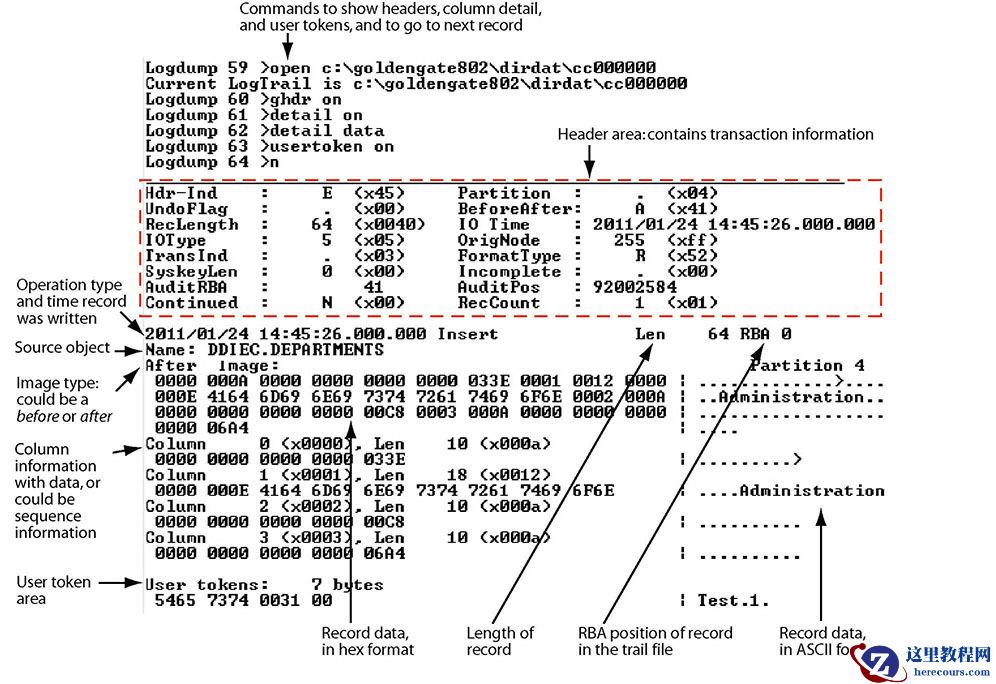 Description of "Figure C-1 Sample Trail Record as Viewed with the Logdump Utility"
Parent topic: About the Oracle GoldenGate Trail
C.5 Record Header Area
The Oracle GoldenGate record header provides metadata of the data that is contained in the record and includes the following information.
The operation type, such as an insert, update, or delete
The before or after indicator for updates
Transaction information, such as the transaction group and commit timestamp
Parent topic: About the Oracle GoldenGate Trail
C.5.1 Description of Header Fields
The following describes the fields of the Oracle GoldenGate record header. Some fields apply only to certain platforms.
Table C-1 Oracle GoldenGate record header fields
| Field | Description |
|---|---|
|
|
Should always be a value of
|
|
|
(NonStop) Conditionally set if Oracle GoldenGate is extracting aborted transactions from the TMF audit trail. Normally,
|
|
|
The length, in bytes, of the record buffer. |
|
|
The type of operation represented by the record. See Table C-2 for a list of operation types. |
|
|
The place of the record within the current transaction. Values are: 0 — first record in transaction 1 — neither first nor last record in transaction 2 — last record in the transaction 3 — only record in the transaction |
|
|
(NonStop) The length of the system key (4 or 8 bytes) if the source is a NonStop file and has a system key. If a system key exists, the first
|
|
|
Identifies the transaction log identifier, such as the Oracle redo log sequence number. |
|
|
(Windows and UNIX) Identifies whether or not the record is a segment of a larger piece of data that is too large to fit within one record.
|
|
|
This field is for Oracle GoldenGate internal use and may not be meaningful for any particular database. For Windows and UNIX records, this field will always be a value of 4 (
For NonStop records, the value of this field depends on the record type: In the case of
For other non-bulk NonStop operations, the value can be either 0 or 4. A value of 4 indicates that the data is in
|
|
|
Identifies whether the record is a before (
|
|
|
The time when the operation occurred, in local time of the source system, in GMT format. This time may be the same or different for every operation in a transaction depending on when the operation occurred. |
|
|
(NonStop) The node number of the system where the data was extracted. Each system in a NonStop cluster has a unique node number. Node numbers can range from 0 through 255. For records other than NonStop in origin,
|
|
|
Identifies whether the data was read from the transaction log or fetched from the database.
|
|
|
This field is obsolete. |
|
|
Identifies the position in the transaction log of the data. |
|
|
(Windows and UNIX) Used for
|
Parent topic: Record Header Area
C.5.2 Using Header Data
Some of the data available in the Oracle GoldenGate record header can be used for mapping by using the
GGHEADER option of the
@GETENV function or by using any of the following transaction elements as the source expression in a
COLMAP statement in the
TABLE or
MAP parameter.
GGS_TRANS_TIMESTAMP
GGS_TRANS_RBA
GGS_OP_TYPE
GGS_BEFORE_AFTER_IND
Parent topic: Record Header Area
C.6 Record Data Area
The data area of the Oracle GoldenGate trail record contains the following:
The time that the change was written to the Oracle GoldenGate file
The type of database operation
The length of the record
The relative byte address within the trail file
The table name
The data changes in hex format
The following explains the differences in record image formats used by Oracle GoldenGate on Windows, UNIX, Linux, and NonStop systems.
Parent topic: About the Oracle GoldenGate Trail
C.6.1 Full Record Image Format (NonStop Sources)
A
full record image contains the values of all of the columns of a processed row. Full record image format is generated in the trail when the source system is HP NonStop, and only when the
IOType specified in the record header is one of the following:
3 — Delete 5 — Insert 10 — Update
Each full record image has the same format as if retrieved from a program reading the original file or table directly. For SQL tables, datetime fields, nulls, and other data is written exactly as a program would select it into an application buffer. Although datetime fields are represented internally as an eight-byte timestamp, their external form can be up to 26 bytes expressed as a string. Enscribe records are retrieved as they exist in the original file.
When the operation type is
Insert or
Update, the image contains the contents of the record
after the operation (the after image). When the operation type is
Delete, the image contains the contents of the record
before the operation (the before image).
For records generated from an Enscribe database, full record images are output unless the original file has the
AUDITCOMPRESS attribute set to
ON. When
AUDITCOMPRESS is
ON, compressed update records are generated whenever the original file receives an update operation. (A full image can be retrieved by the Extract process by using the
FETCHCOMPS parameter.)
Parent topic: Record Data Area
C.6.2 Compressed Record Image Format (Windows, UNIX, Linux Sources)
A
compressed record image contains only the key (primary, unique,
KEYCOLS) and the columns that changed in the processed row. By default, trail records written by processes on Windows and UNIX systems are always compressed. The format of a compressed record is as follows:
column_index column_length column_data[...]
Where:
column_index is the ordinal index of the column within the source table (2 bytes).
colum_length is the length of the data (2 bytes).
column_data is the data, including
NULL or
VARCHAR length indicators.
Enscribe records written from the NonStop platform may be compressed. The format of a compressed Enscribe record is as follows:
field_offset field_length field_value[...]
Where:
field_offset is the offset within the original record of the changed value (2 bytes).
field_length is the length of the data (2 bytes).
field_value is the data, including
NULL or
VARCHAR length indicators.
The first field in a compressed Enscribe record is the primary or system key.
Parent topic: Record Data Area
C.7 Tokens Area
The trail record also can contain two areas for tokens. One is for internal use and is not documented here, and the other is the user tokens area. User tokens are environment values that are captured and stored in the trail record for replication to target columns or other purposes. If used, these tokens follow the data portion of the record and appear similar to the following when viewed with Logdump:
| Parameter | Value |
|---|---|
TKN-HOST TKN-GROUP TKN-BA_IND TKN-COMMIT_TS TKN-POS TKN-RBA TKN-TABLE TKN-OPTYPE TKN-LENGTH TKN-TRAN_IND |
: syshq : EXTORA : AFTER : 2011-01-24 17:08:59.000000 : 3604496 : 4058 : SOURCE.CUSTOMER : INSERT : 57 : BEGIN |
Parent topic: About the Oracle GoldenGate Trail
C.8 Oracle GoldenGate Operation Types
The following are some of the Oracle GoldenGate operation types. Types may be added as new functionality is added to Oracle GoldenGate. For a more updated list, use the
SHOW RECTYPE command in the Logdump utility.
Table C-2 Oracle GoldenGate Operation Types
| Type | Description | Platform |
|---|---|---|
|
1-Abort |
A transaction aborted. |
NSK TMF |
|
2-Commit |
A transaction committed. |
NSK TMF |
|
3-Delete |
A record/row was deleted. A
|
All |
|
4-EndRollback |
A database rollback ended |
NSK TMF |
|
5-Insert |
A record/row was inserted. An
|
All |
|
6-Prepared |
A networked transaction has been prepared to commit. |
NSK TMF |
|
7-TMF-Shutdown |
A TMF shutdown occurred. |
NSK TMF |
|
8-TransBegin |
No longer used. |
NSK TMF |
|
9-TransRelease |
No longer used. |
NSK TMF |
|
10-Update |
A record/row was updated. An
|
All |
|
11-UpdateComp |
A record/row in
|
NSK TMF |
|
12-FileAlter |
An attribute of a database file was altered. |
NSK |
|
13-FileCreate |
A database file was created. |
NSK |
|
14-FilePurge |
A database file was deleted. |
NSK |
|
15-FieldComp |
A row in a SQL table was updated. In this format, only the changed bytes are present. Before images of unchanged columns are not logged by the database. A 4-byte descriptor in the format of
|
All |
|
16-FileRename |
A file was renamed. |
NSK |
|
17-AuxPointer |
Contains information about which AUX trails have new data and the location at which to read. |
NSK TMF |
|
18-NetworkCommit |
A networked transaction committed. |
NSK TMF |
|
19-NetworkAbort |
A networked transaction was aborted. |
NSK TMF |
|
90-(GGS)SQLCol |
A column or columns in a SQL table were added, or an attribute changed. |
NSK |
|
100-(GGS)Purgedata |
All data was removed from the file (
|
NSK |
|
101-(GGS)Purge(File) |
A file was purged. |
NSK non-TMF |
|
102-(GGS)Create(File) |
A file was created. The Oracle GoldenGate record contains the file attributes. |
NSK non-TMF |
|
103-(GGS)Alter(File) |
A file was altered. The Oracle GoldenGate record contains the altered file attributes. |
NSK non-TMF |
|
104-(GGS)Rename(File) |
A file was renamed. The Oracle GoldenGate record contains the original and new names. |
NSK non-TMF |
|
105-(GGS)Setmode |
A
|
NSK non-TMF |
|
106-GGSChangeLabel |
A
|
NSK non-TMF |
|
107-(GGS)Control |
A
|
NSK non-TMF |
|
115 and 117 (GGS)KeyFieldComp(32) |
A primary key was updated. The Oracle GoldenGate record contains the before image of the key and the after image of the key and the row. The data is in
|
Windows and UNIX |
|
116-LargeObject 116-LOB |
Identifies a
|
Windows and UNIX |
|
132-(GGS) SequenceOp |
Identifies an operation on a sequence. |
Windows and UNIX |
|
134-UNIFIED UPDATE 135-UNIFIED PKUPDATE |
Identifies a unified trail record that contains both before and after values in the same record. The before image in a
|
Windows and UNIX |
|
160 - DDL_Op |
Identifies a DDL operation |
Windows and UNIX |
|
161- RecordFragment |
Identifies part of a large row that must be stored across multiple records (more than just the base record). |
Windows and UNIX |
|
200-GGSUnstructured Block 200-BulkIO |
A
|
NSK non-TMF |
|
201 through 204 |
These are different types of NonStop trace records. Trace records are used by Oracle GoldenGate support analysts. The following are descriptions.
|
NSK non-TMF |
|
205-GGSComment |
Indicates a comment record created by the Logdump utility. Comment records are created by Logdump at the beginning and end of data that is saved to a file with Logdump's
|
All |
|
249 through 254 |
These are different types of NonStop trace records. Trace records are used by Oracle GoldenGate support analysts. The following are descriptions.
|
NSK non-TMF |
Parent topic: About the Oracle GoldenGate Trail
C.9 Oracle GoldenGate Trail Header Record
In addition to the transaction-related records that are in the Oracle GoldenGate trail, each trail file contains a file header.
The file header is stored as a record at the beginning of a trail file preceding the data records. The information that is stored in the trail header provides enough information about the records to enable an Oracle GoldenGate process to determine whether the records are in a format that the current version of Oracle GoldenGate supports.
The trail header fields are stored as tokens, where the token format remains the same across all versions of Oracle GoldenGate. If a version of Oracle GoldenGate does not support any given token, that token is ignored. Depracated tokens are assigned a default value to preserve compatibility with previous versions of Oracle GoldenGate.
You can view the trail header with the
FILEHEADER command in the Logdump utility. For more information about the tokens in the file header, see
Logdump Reference for Oracle GoldenGate.
Parent topic: About the Oracle GoldenGate Trail
编辑推荐:
- About the Oracle GoldenGate Trail03-03
- How To Deal With Split Brain In Oracle 19c Rac-20220303-03
- 19c RAC 双实例03-03
- Oracle ADG 自动切换脚本分享03-03
- [重庆思庄每日技术分享]-free buffer waits 等待事件03-03
- 【UP_ORACLE】能够升级到Oracle 19c的数据库版本清单03-03
- 【FLASHBACK】Oracle flashback data archive 介绍03-03
- Release Schedule of Current Database Releases (Doc ID 742060.1)03-03
相关推荐
-

-
-
-
-
-
-
-
-
-
-
-
-
-
-

雷神推出 MIX PRO II 迷你主机:基于 Ultra 200H,玻璃上盖 + ARGB 灯效
2 月 9 日消息,雷神 (THUNDEROBOT) 现已宣布推出基于英
-

制造商 Musnap 推出彩色墨水屏电纸书 Ocean C:支持手写笔、第三方安卓应用
2 月 10 日消息,制造商 Musnap 现已在海外推出一款 Oce
热文推荐
- About the Oracle GoldenGate Trail
About the Oracle GoldenGate Trail
26-03-03 - 19c RAC 双实例
19c RAC 双实例
26-03-03 - Oracle ADG 自动切换脚本分享
Oracle ADG 自动切换脚本分享
26-03-03 - 【UP_ORACLE】能够升级到Oracle 19c的数据库版本清单

【UP_ORACLE】能够升级到Oracle 19c的数据库版本清单
26-03-03 - Release Schedule of Current Database Releases (Doc ID 742060.1)
- Oracle 架构汇总
Oracle 架构汇总
26-03-03 - 盖世无双之国产数据库风云榜-2022年02月
盖世无双之国产数据库风云榜-2022年02月
26-03-03 - db file sequential read

db file sequential read
26-03-03 - Oracle ADG 备库添加备库
Oracle ADG 备库添加备库
26-03-03 - 数据库对比系列之一
数据库对比系列之一
26-03-03