
16 Instantiating Oracle GoldenGate with an Initial Load
This chapter includes the following sections: Overview of the Initial-Load Procedure Loading Data with a Database Utility Loading Data with Oracle Data Pump Loading Data from File to Replicat Loading Data from File to Database Utility Loading Data with an Oracle GoldenGate Direct Load Loading Data with a Direct Bulk Load to SQL*Loader Loading Data with Teradata Load Utilities Overview of the Initial-Load Procedure Loading Data with a Database Utility Loading Data with Oracle Data Pump Loading Data from File to Replicat Loading Data from File to Database Utility Loading Data with an Oracle GoldenGate Direct Load Loading Data with a Direct Bulk Load to SQL*Loader Loading Data with Teradata Load Utilities
16.1 Overview of the Initial-Load Procedure
You can use Oracle GoldenGate to:
Perform a standalone batch load to populate database tables for migration or other purposes.
Load data into database tables as part of an initial synchronization run in preparation for change synchronization with Oracle GoldenGate.
Parent topic: Instantiating Oracle GoldenGate with an Initial Load
16.1.1 Improving the Performance of an Initial Load
For all initial load methods except those performed with a database utility, you can load large databases more quickly by using parallel Oracle GoldenGate processes. To use parallel processing, take the following steps.
- Follow the directions in this chapter for creating an initial-load Extract and an initial-load Replicat for each set of parallel processes that you want to use.
-
With the
TABLE andMAP parameters, specify a different set of tables for each pair of Extract-Replicat processes, or you can use theSQLPREDICATE option ofTABLE to partition the rows of large tables among the different Extract processes.
For all initial load methods, testing has shown that using the
TCPBUFSIZE option in the
RMTHOST parameter produced three times faster throughput than loads performed without it. Do not use this parameter if the target system is NonStop.
Parent topic: Overview of the Initial-Load Procedure
16.1.2 Prerequisites for Initial Load
Verify that you meet the prerequisites for executing an initial load that are described in the following sections.
Parent topic: Overview of the Initial-Load Procedure
16.1.2.1 Disable DDL Processing
Before executing an initial load, disable DDL extraction and replication. DDL processing is controlled by the
DDL parameter in the Extract and Replicat parameter files.
Parent topic: Prerequisites for Initial Load
16.1.2.2 Prepare the Target Tables
The following are suggestions that can make the load go faster and help you to avoid errors.
Data: Make certain that the target tables are empty. Otherwise, there may be duplicate-row errors or conflicts between existing rows and rows that are being loaded.
Constraints: Disable foreign-key constraints and check constraints. Foreign-key constraints can cause errors, and check constraints can slow down the loading process. Constraints can be reactivated after the load concludes successfully.
Indexes: Remove indexes from the target tables. Indexes are not necessary for inserts. They will slow down the loading process significantly. For each row that is inserted into a table, the database will update every index on that table. You can add back the indexes after the load is finished.
Note:
A primary index is required for all applications that access DB2 for z/OS target tables. You can delete all other indexes from the target tables, except for the primary index.
Keys: For Oracle GoldenGate to reconcile the replicated incremental data changes with the results of the load, each target table must have a primary or unique key. If you cannot create a key through your application, use the
KEYCOLS option of the
TABLE and
MAP parameters to specify columns as a substitute key for Oracle GoldenGate's purposes. A key helps identify which row to process. If you cannot create keys, the source database must be quiesced for the load.
Parent topic: Prerequisites for Initial Load
16.1.2.3 Configure the Manager Process
On the source and target systems, configure and start a Manager process. One Manager can be used for the initial-load processes and the change-synchronization processes. See Configuring Manager and Network Communications for more information.
Parent topic: Prerequisites for Initial Load
16.1.2.4 Create Change-synchronization Groups
To prepare for the capture and replication of transactional changes during the initial load, create online Extract and Replicat groups. You will start these groups during the load procedure. See Configuring Online Change Synchronization for more information.
Note:
If the load is performed from a quiet source database and will not be followed by continuous change synchronization, you can omit these groups.
Do not start the Extract or Replicat groups until instructed to do so in the initial-load instructions. Change synchronization keeps track of transactional changes while the load is being applied, and then the target tables are reconciled with those changes.
Note:
The first time that Extract starts in a new Oracle GoldenGate configuration, any open transactions will be skipped. Only transactions that begin after Extract starts are captured.
Parent topic: Prerequisites for Initial Load
16.1.2.5 Sharing Parameters between Process Groups
Some of the parameters that you use in a change-synchronization parameter file also are required in an initial-load Extract and initial-load Replicat parameter file. You can copy those parameters from one parameter file to another, or you can store them in a central file and use the
OBEY parameter in each parameter file to retrieve them. Alternatively, you can create an Oracle GoldenGate macro for the shared parameters and then call the macro from each parameter file with the
MACRO parameter.
See
Getting Started with the Oracle GoldenGate Process Interfaces for more information about using
OBEY and using macros.
Parent topic: Prerequisites for Initial Load
16.2 Loading Data with a Database Utility
To use a database copy utility to establish the target data, you start a change-synchronization Extract group to extract ongoing data changes while the database utility makes and applies a static copy of the data. When the copy is finished, you start the change-synchronization Replicat group to re-synchronize rows that were changed while the copy was being applied. From that point forward, both Extract and Replicat continue running to maintain data synchronization. This method does not involve any special initial-load Extract or Replicat processes.
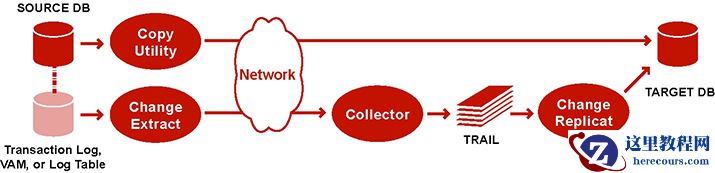 Description of the illustration initsync_copyutil.jpg
Note:
The objects and data types being loaded in this method must be supported by Oracle GoldenGate for your database and also by the database utility that is being used. For items that are supported for your database, see the Oracle GoldenGate installation and configuration documentation for that database. For items that are supported by the database utility, see the database vendor's documentation.
-
On the source and target systems, run GGSCI and start the Manager process.
START MANAGER
Note:
In a Windows cluster, start the Manager resource from the Cluster Administrator.
- On the source system, start change extraction.
START EXTRACT group
Where:
groupis the name of the Extract group.- (Oracle, if replicating sequences) Issue the
DBLOGIN command as the user who hasEXECUTE privilege onupdate.Sequence.GGSCI> DBLOGIN USERID DBLOGINuser, PASSWORD password [encryption_options]
- (Oracle, if replicating sequences) Issue the following command to update each source sequence and generate redo. From the redo, Replicat performs initial synchronization of the sequences on the target. You can use an asterisk wildcard for any or all characters in the name of a sequence (but not the owner).
FLUSH SEQUENCE owner.sequence
- View the Replicat parameter file to make certain that the
HANDLECOLLISIONS parameter is listed. If not, add the parameter to the file.Caution:
Do not use the
VIEW PARAMS orEDIT PARAMS command to view or edit an existing parameter file that is in a character set other than that of the local operating system (such as one where theCHARSET option was used to specify a different character set). View the parameter file from outside GGSCI if this is the case; otherwise, the contents may become corrupted..- On the target system, start change replication.
START REPLICAT group
Where:
groupis the name of the Replicat group.- On the target system, issue the following command to verify the status of change replication.
INFO REPLICAT group
- On the target system, issue the following command to turn off the
HANDLECOLLISIONS parameter and disable the initial-load error handling.SEND REPLICAT group, NOHANDLECOLLISIONS
- On the target system, edit the Replicat parameter file to remove the
HANDLECOLLISIONS parameter. This preventsHANDLECOLLISIONS from being enabled again the next time Replicat starts.Caution:
Do not use the
VIEW PARAMS orEDIT PARAMS command to view or edit an existing parameter file that is in a character set other than that of the local operating system (such as one where theCHARSET option was used to specify a different character set). View the parameter file from outside GGSCI if this is the case; otherwise, the contents may become corrupted.- Save and close the parameter file.
From this point forward, Oracle GoldenGate continues to synchronize data changes.
Parent topic: Instantiating Oracle GoldenGate with an Initial Load
16.3 Loading Data with Oracle Data Pump
This method uses the Oracle Data Pump utility to establish the target data. After you apply the copy to the target, you record the SCN at which the copy stopped. Transactions that were included in the copy are skipped to avoid collisions from integrity violations. From the process start point, Oracle GoldenGate maintains data synchronization. No initial-load Oracle GoldenGate processes are required for these methods.
- Using Automatic Per Table Instantiation
- Using Oracle Data Pump Table Instantiation
Parent topic: Instantiating Oracle GoldenGate with an Initial Load
16.3.1 Using Automatic Per Table Instantiation
You can automatically instantiate per table CSN filtering for Oracle Database with Oracle Data Pump, which avoids having all of your the tables at same SCN.
On the Source Database
-
Use
ADD TRANDATA andADD SCHEMATRANDATA to automatically prepare your tables. -
Use
INFO TRANDATA to make sure that your table is prepared for instantiation and at what point it was done. -
Stop Replicat on the target database.
-
Start Extract with the correct
TABLE statement. -
EXPORT your tables using Oracle data pump, which automatically generates import actions to set instantiation SCN at the target upon import.
On the Target Database
-
Start Replicat using one of the following:
For Metadata Trail Replicats, set the
DBOPTIONS ENABLE_INSTANTIATION_FILTERING parameter in the Replicat parameter file to enable table-level instantiation filtering.For all other Replicats, set the
DBOPTIONSsource_dbase_nameglobal_nameparameter in the Replicat parameter file whereglobal_nameis the global name of the Oracle source database that the trail is coming from.Note:
When the source has no
DOMAIN, do not specify aDOMAIN for the downstream database.Replicat queries the instantiation SCN on any new mapping and filter records accordingly
For more information, see the Reference for Oracle GoldenGate for Windows and UNIX.
Parent topic: Loading Data with Oracle Data Pump
16.3.2 Using Oracle Data Pump Table Instantiation
To perform instantiation with Oracle Data Pump, see My Oracle Support document 1276058.1. To obtain this document, do the following:
- Go to http://support.oracle.com.
- Under Sign In, select your language and then log in with your Oracle Single Sign-On (SSO).
- On the Dashboard, expand the Knowledge Base heading.
-
Under
Enter Search Terms, paste or type the document ID of
1276058.1 and then click Search. - In the search results, select Oracle GoldenGate Best Practices: Instantiation from an Oracle Source Database [Article ID 1276058.1].
- Click the link under Attachments to open the article.
Parent topic: Loading Data with Oracle Data Pump
16.4 Loading Data from File to Replicat
To use Replicat to establish the target data, you use an initial-load Extract to extract source records from the source tables and write them to an extract file in canonical format. From the file, an initial-load Replicat loads the data using the database interface. During the load, the change-synchronization groups extract and replicate incremental changes, which are then reconciled with the results of the load.
During the load, the records are applied to the target database one record at a time, so this method is considerably slower than any of the other initial load methods. This method permits data transformation to be done on either the source or target system.
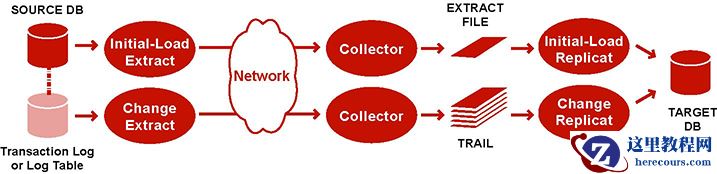 Description of the illustration initsyncreplicat.jpg
To Load Data From File to Replicat
-
On the source and target systems, run GGSCI and start Manager.
START MANAGER
Note:
In a Windows cluster, start the Manager resource from the Cluster Administrator.
- On the source system, issue the following command to create an initial-load Extract parameter file.
EDIT PARAMS initial-load_Extract
- Enter the parameters listed in Table 16-1 in the order shown, starting a new line for each parameter statement. The following is a sample initial-load Extract parameter file for loading data from file to Replicat.
SOURCEISTABLE
SOURCEDB mydb, USERIDALIAS ogg
RMTHOSTOPTIONS ny4387, MGRPORT 7888, ENCRYPT AES 192 KEYNAME mykey
ENCRYPTTRAIL AES192
RMTFILE /ggs/dirdat/initld, MEGABYTES 2, PURGE
TABLE hr.*;
TABLE sales.*;
Table 16-1 Initial-load Extract Parameters
Parameter Description SOURCEISTABLE
Designates Extract as an initial load process extracting records directly from the source tables.
[SOURCEDB dsn | catalog]
[, USERIDALIAS alias, options |
, USERID user, options]
Specifies database connection information.
SOURCEDB specifies the source data source name (DSN) or SQL/MX catalog. See
Reference for Oracle GoldenGate for Windows and UNIX for more information.
USERID andUSERIDALIAS specify database credentials if required. See Configuring Oracle GoldenGate Security for more information about security options.RMTHOSTOPTIONS hostname, MGRPORT portnumber[, ENCRYPT algorithm KEYNAME keyname]
Specifies the target system, the port where Manager is running, and optional encryption of data across TCP/IP.
ENCRYPTTRAIL algorithm
Encrypts the data in the remote file. See Configuring Oracle GoldenGate Security for more information about security options.
RMTFILE path,
[MEGABYTES n]
pathis the relative or fully qualified name of the file.MEGABYTES designates the size of each file.Specifies the extract file to which the load data will be written. Oracle GoldenGate creates this file during the load. Checkpoints are not maintained with
RMTFILE.Note that the size of an extract file cannot exceed 2GB.
TABLE [container. | catalog.]owner.object;
Specifies the fully qualified name of an object or a fully qualified wildcarded specification for multiple objects. If the database is an Oracle multitenant container database or a SQL/MX database, the object name must include the name of the container or catalog unless
SOURCECATALOG is used.See Specifying Object Names in Oracle GoldenGate Input for guidelines for specifying object names in parameter files.
CATALOGEXCLUDESCHEMAEXCLUDETABLEEXCLUDEEXCLUDEWILDCARDOBJECTSONLYParameters that can be used in conjunction with one another to exclude specific objects from a wildcard specification in the associated
TABLE statement. See Reference for Oracle GoldenGate for Windows and UNIX for details.- On the target system, issue the following command to create an initial-load Replicat parameter file.
EDIT PARAMS initial-load_Replicat
- Enter the parameters listed in Table 16-2 in the order shown, starting a new line for each parameter statement. The following is a sample initial-load Replicat parameter file for loading data from file to Replicat.
SPECIALRUN
END RUNTIME
TARGETDB mydb, USERIDALIAS ogg
EXTFILE /ggs/dirdat/initld
SOURCEDEFS /ggs/dirdef/source_defs
MAP hr.*, TARGET hr.*;
MAP sales.*, TARGET hr.*;
Table 16-2 Initial-load Replicat parameters
Parameter Description SPECIALRUN
Implements the initial-load Replicat as a one-time run that does not use checkpoints.
END RUNTIME
Directs the initial-load Replicat to terminate when the load is finished.
[TARGETDB dsn | catalog]
[, USERIDALIAS alias, options |
, USERID user, options]
Specifies database connection information.
TARGETDB specifies the target datasource name (DSN) or SQL/MX catalog. See
Reference for Oracle GoldenGate for Windows and UNIX for more information.
USERID andUSERIDALIAS specify database credentials if required. See Configuring Oracle GoldenGate Security for more information about security options.EXTFILE path
pathis the relative or fully qualified name of the file.Specifies the input extract file specified with the Extract parameter
RMTFILE.{SOURCEDEFS file} | ASSUMETARGETDEFSUse
SOURCEDEFS if the source and target tables have different definitions. Specify the relative or fully qualified name of the source-definitions file generated by DEFGEN.Use
ASSUMETARGETDEFS if the source and target tables have the same definitions.Specifies how to interpret data definitions.
For more information about data definitions files, see Associating Replicated Data with Metadata.
SOURCECATALOGSpecifies a default source Oracle container or source SQL/MX catalog for subsequent
MAP statements. Enables the use of two-part names (schema.object) where three-part names otherwise would be required for those databases. You can use multiple instances of this parameter to specify different default containers or catalogs for different sets ofMAP parameters.MAP [container. | catalog.]owner.object, TARGET owner.object[, DEF template] ;
Specifies a relationship between a source object or objects and a target object or objects.
MAP specifies the source object, andTARGET specifies the target object.For the source object, specify the fully qualified name of the object or a fully qualified wildcarded specification for multiple objects. For an Oracle multitenant container database or a SQL/MX database, the source object name must include the name of the container or catalog unless
SOURCECATALOG is used.For the target object, specify only the
owner.objectcomponents of the name, regardless of the database. Replicat can only connect to one Oracle container or SQL/MX catalog. Use a separate Replicat process for each container or catalog to which you want to load data.See Specifying Object Names in Oracle GoldenGate Input for guidelines for specifying object names in parameter files.
The
DEF option specifies a definitions template. For more information about data definitions, see Associating Replicated Data with Metadata. See Reference for Oracle GoldenGate for Windows and UNIX for more information and options for theMAP parameter.CATALOGEXCLUDESCHEMAEXCLUDEMAPEXCLUDEEXCLUDEWILDCARDOBJECTSONLYParameters that can be used in conjunction with one another to exclude specific source objects from a wildcard specification in the associated
MAP statement. See Reference for Oracle GoldenGate for Windows and UNIX for details.- On the source system, start change extraction.
START EXTRACT group
- (Oracle, if replicating sequences) Issue the
DBLOGIN command as the user who hasEXECUTE privilege onupdate.Sequence.GGSCI> DBLOGIN USERID DBLOGINuser, PASSWORD password [encryption_options]
- (Oracle, if replicating sequences) Issue the following command to update each source sequence and generate redo. From the redo, Replicat performs initial synchronization of the sequences on the target. You can use an asterisk wildcard for any or all characters in the name of a sequence (but not the owner).
FLUSH SEQUENCE owner.sequence
- From the directory where Oracle GoldenGate is installed on the source system, start the initial-load Extract.
UNIX and Linux:
$ /GGS directory/extract paramfile dirprm/initial-load_Extract.prm reportfile path
Windows:
C:\> GGS directory\extract paramfile dirprm\initial-load_Extract.prm reportfile path
Where:
initial-load_Extractis the name of the initial-load Extract that you used when creating the parameter file, andpathis the relative or fully qualified name of the Extract report file.- On the target system, start the initial-load Replicat.
UNIX and Linux:
$ /GGS directory/replicat paramfile dirprm/initial-load_Replicat.prm reportfile path
Windows:
C:\> GGS directory\replicat paramfile dirprm\initial-load_Replicat.prm reportfile path
Where:
initial-load_Replicatis the name of the initial-load Replicat that you used when creating the parameter file, andpathis the relative or fully qualified name of the Replicat report file.- On the target system, start change replication.
START REPLICAT group
- On the target system, issue the following command to verify the status of change replication.
INFO REPLICAT group
- On the target system, issue the following command to turn off the
HANDLECOLLISIONS parameter and disable the initial-load error handling.SEND REPLICAT group, NOHANDLECOLLISIONS
- On the target system, edit the Replicat parameter file to remove the
HANDLECOLLISIONS parameter. This preventsHANDLECOLLISIONS from being enabled again the next time Replicat starts.Caution:
Do not use the
VIEW PARAMS orEDIT PARAMS command to view or edit an existing parameter file that is in a character set other than that of the local operating system (such as one where theCHARSET option was used to specify a different character set). View the parameter file from outside GGSCI if this is the case; otherwise, the contents may become corrupted.- Save and close the parameter file.
From this point forward, Oracle GoldenGate continues to synchronize data changes.
Parent topic: Instantiating Oracle GoldenGate with an Initial Load
16.5 Loading Data from File to Database Utility
To use a database bulk-load utility, you use an initial-load Extract to extract source records from the source tables and write them to an extract file in external ASCII format. The file can be read by Oracle's SQL*Loader, Microsoft's BCP, DTS, or SQL Server Integration Services (SSIS) utility, or IBM's Load Utility (
LOADUTIL).Note:
The objects and data types being loaded in this method must be supported by Oracle GoldenGate for your database and also by the database utility that is being used. For items that are supported for your database, see the Oracle GoldenGate installation and configuration documentation for that database. For items that are supported by the database utility, see the database vendor's documentation.
During the load, the change-synchronization groups extract and replicate incremental changes, which are then reconciled with the results of the load. As part of the load procedure, Oracle GoldenGate uses the initial-load Replicat to create run and control files required by the database utility.
Any data transformation must be performed by the initial-load Extract on the source system because the control files are generated dynamically and cannot be pre-configured with transformation rules.
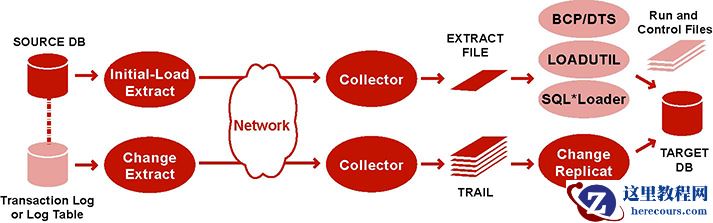 Description of the illustration initsyncbulk.jpg
To Load Data From File to Database Utility
-
On the source and target systems, run GGSCI and start Manager.
START MANAGER
- On the source system, issue the following command to create an initial-load Extract parameter file.
EDIT PARAMS initial-load_Extract
- Enter the parameters listed in Table 16-3 in the order shown, starting a new line for each parameter statement. The following is a sample initial-load Extract parameter file for loading data from file to database utility.
SOURCEISTABLE
SOURCEDB mydb, USERIDALIAS ogg
RMTHOSTOPTIONS ny4387, MGRPORT 7888, ENCRYPT AES 192 KEYNAME mykey
ENCRYPTTRAIL AES192
FORMATASCII, SQLLOADER
RMTFILE /ggs/dirdat/initld, MEGABYTES 2, PURGE
TABLE hr.*;
TABLE sales.*;
Table 16-3 Initial-load Extract Parameters
Parameter Description SOURCEISTABLE
Designates Extract as an initial load process that extracts records directly from the source tables.
[SOURCEDB dsn]
[, USERIDALIAS alias, options |
, USERID user, options]
Specifies database connection information.
SOURCEDB specifies the source datasource name (DSN). See
Reference for Oracle GoldenGate for Windows and UNIX for more information.
USERID andUSERIDALIAS specify database credentials if required. See Configuring Oracle GoldenGate Security for more information about security options.RMTHOSTOPTIONS hostname, MGRPORT portnumber[, ENCRYPT algorithm KEYNAME keyname] [, PARAMS - E -d defs_file]
-E converts ASCII to EBCDIC.-ddefs_filespecifies the source definitions file.Specifies the target system, the port where Manager is running, and optional encryption of data across TCP/IP.
The
PARAMS clause is necessary when loading with IBM's Load Utility, because Oracle GoldenGate will need to refer to the source definitions file.ENCRYPTTRAIL algorithm
Encrypts the data in the remote file. See Configuring Oracle GoldenGate Security for more information about security options.
FORMATASCII, {BCP | SQLLOADER}BCP is used for BCP, DTS, or SSIS.SQLLOADER is used for Oracle SQL*Loader or IBM Load Utility.Directs output to be formatted as ASCII text rather than the default canonical format. This parameter must be listed before
RMTFILE. For information about limitations and options, see
Reference for Oracle GoldenGate for Windows and UNIX.
RMTFILE path, [MEGABYTES n]
pathis the relative or fully qualified name of the fileMEGABYTES designates the size of each file, up to 2MB.Specifies the extract file to which the load data will be written. Oracle GoldenGate creates this file during the load. Checkpoints are not maintained with
RMTFILE.TABLE [container.]owner.object;
Specifies the fully qualified name of an object or a fully qualified wildcarded specification for multiple objects. If the database is an Oracle multitenant container database, the object name must include the name of the container unless
SOURCECATALOG is used. See Specifying Object Names in Oracle GoldenGate Input for guidelines for specifying object names in parameter files.CATALOGEXCLUDESCHEMAEXCLUDETABLEEXCLUDEEXCLUDEWILDCARDOBJECTSONLYParameters that can be used in conjunction with one another to exclude specific objects from a wildcard specification in the associated
TABLE statement. See Reference for Oracle GoldenGate for Windows and UNIX for details.- On the target system, issue the following command to create an initial-load Replicat parameter file.
EDIT PARAMS initial-load_Replicat
- Enter the parameters listed in Table 16-4 in the order shown, starting a new line for each parameter statement. The following is a sample initial-load Replicat parameter file for loading data from file to database utility.
GENLOADFILES sqlldr.tpl
USERIDALIAS ogg
EXTFILE /ggs/dirdat/initld
SOURCEDEFS /ggs/dirdef/source_defs
MAP hr.*, TARGET hr.*;
MAP sales.*, TARGET hr.*;
Table 16-4 Initial-load Replicat Parameters
Parameter Description GENLOADFILES template
Generates run and control files for the database utility. For instructions on using this parameter, see Reference for Oracle GoldenGate for Windows and UNIX.
[TARGETDB dsn | container]
[, USERIDALIAS alias, options |
, USERID user, options]
Specifies database connection information.
TARGETDB specifies the target datasource name (DSN) or Oracle container. See
Reference for Oracle GoldenGate for Windows and UNIX for more information.
USERID andUSERIDALIAS specify database credentials if required. See Configuring Oracle GoldenGate Security for more information about security options.EXTFILE path | EXTTRAIL path
pathis the relative or fully qualified name of the fileUse
EXTTRAIL only if you used theMAXFILES option of theRMTFILE parameter in the Extract parameter file.Specifies the extract file specified with the Extract parameter
RMTFILE.{SOURCEDEFS path} | ASSUMETARGETDEFSUse
SOURCEDEFS if the source and target tables have different definitions. Specify the relative or fully qualified name of the source-definitions file generated by DEFGEN.Use
ASSUMETARGETDEFS if the source and target tables have the same definitions.Specifies how to interpret data definitions. For more information about data definitions files, see Associating Replicated Data with Metadata.
SOURCECATALOGSpecifies a default source Oracle container in a multitenant container database for subsequent
MAP statements. Enables the use of two-part names (schema.object) where three-part names otherwise would be required. You can use multiple instances of this parameter to specify different default containers for different sets ofMAP parameters.MAP [container.]owner.object, TARGET owner.object[, DEF template] ;
Specifies a relationship between a source object or objects and a target object or objects.
MAP specifies the source object, andTARGET specifies the target object.For the source object, specify the fully qualified name of the object or a fully qualified wildcarded specification for multiple objects. For an Oracle multitenant container database, the source object name must include the name of the container unless
SOURCECATALOG is used.For the target object, specify only the
owner.objectcomponents of the name, regardless of the database. Replicat can only connect to one Oracle container. Use a separate Replicat process for each container to which you want to load data.See Specifying Object Names in Oracle GoldenGate Input for guidelines for specifying object names in parameter files.
The
DEF option specifies a definitions template. For more information about data definitions, see Associating Replicated Data with Metadata.See Reference for Oracle GoldenGate for Windows and UNIX for more information and options for theMAP parameter.CATALOGEXCLUDESCHEMAEXCLUDEMAPEXCLUDEEXCLUDEWILDCARDOBJECTSONLYParameters that can be used in conjunction with one another to exclude specific source objects from a wildcard specification in the associated
MAP statement. See Reference for Oracle GoldenGate for Windows and UNIX for details.- On the source system, start change extraction.
START EXTRACT group
- (Oracle, if replicating sequences) Issue the
DBLOGIN command as the user who hasEXECUTE privilege onupdate.Sequence.GGSCI> DBLOGIN USERID DBLOGINuser, PASSWORD password [encryption_options]
- (Oracle, if replicating sequences) Issue the following command to update each source sequence and generate redo. From the redo, Replicat performs initial synchronization of the sequences on the target. You can use an asterisk wildcard for any or all characters in the name of a sequence (but not the owner).
FLUSH SEQUENCE owner.sequence
- From the directory where Oracle GoldenGate is installed on the source system, start the initial-load Extract.
UNIX and Linux:
$ /GGS directory/extract paramfile dirprm/initial-load_Extract.prm reportfile path
Windows:
C:\> GGS directory\extract paramfile dirprm\initial-load_Extract.prm reportfile path
Where:
initial-load_Extractis the name of the initial-load Extract that you used when creating the parameter file, andpathis the relative or fully qualified name of the Extract report file.- On the target system, start the initial-load Replicat.
UNIX and Linux:
$ /GGS directory/replicat paramfile dirprm/initial-load_Replicat.prm reportfile path
Windows:
C:\> GGS directory\replicat paramfile dirprm\initial-load_Replicat.prm reportfile path
Where:
initial-load_Replicatis the name of the initial-load Replicat that you used when creating the parameter file, andpathis the relative or fully qualified name of the Replicat report file.- On the target system, start change replication.
START REPLICAT group
- On the target system, issue the following command to verify the status of change replication.
INFO REPLICAT group
- On the target system, issue the following command to turn off the
HANDLECOLLISIONS parameter and disable the initial-load error handling.SEND REPLICAT group, NOHANDLECOLLISIONS
- On the target system, edit the Replicat parameter file to remove the
HANDLECOLLISIONS parameter. This preventsHANDLECOLLISIONS from being enabled again the next time Replicat starts.Caution:
Do not use the
VIEW PARAMS orEDIT PARAMS command to view or edit an existing parameter file that is in a character set other than that of the local operating system (such as one where theCHARSET option was used to specify a different character set). View the parameter file from outside GGSCI if this is the case; otherwise, the contents may become corrupted..- Save and close the parameter file.
From this point forward, Oracle GoldenGate continues to synchronize data changes.
Parent topic: Instantiating Oracle GoldenGate with an Initial Load
16.6 Loading Data with an Oracle GoldenGate Direct Load
To use an Oracle GoldenGate direct load, you run an Oracle GoldenGate initial-load Extract to extract the source records and send them directly to an initial-load Replicat task. A task is started dynamically by the Manager process and does not require the use of a Collector process or file. The initial-load Replicat task delivers the load in large blocks to the target database. Transformation and mapping can be done by Extract, Replicat, or both. During the load, the change-synchronization groups extract and replicate incremental changes, which are then reconciled with the results of the load.
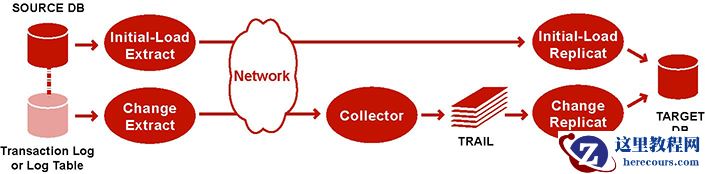 Description of the illustration initsync_dirload.jpg
To control which port is used by Replicat, and to speed up the search and bind process, use the
DYNAMICPORTLIST parameter in the Manager parameter file. Manager passes the list of port numbers that are specified with this parameter to the Replicat task process. Replicat first searches for a port from this list, and only if no ports are available from the list does Replicat begin scanning in ascending order from the default Manager port number until it finds an available port.This method supports standard character, numeric, and datetime data types, as well as
CLOB,NCLOB,BLOB,LONG,XML, and user-defined datatypes (UDT) embedded with the following attributes:CHAR,NCHAR,VARCHAR,NVARCHAR,RAW,NUMBER,DATE,FLOAT,TIMESTAMP,CLOB,BLOB,XML, andUDT. Character sets are converted between source and target where applicable.This method supports Oracle internal tables, but does not convert between the source and target character sets during the load.
To Load Data with an Oracle GoldenGate Direct Load
- On the source system, issue the following command to create an initial-load Extract parameter file.
- On the source system, issue the following command to create an initial-load Extract parameter file.
- On the source system, start change extraction.