说明AutoUpgrade工具的功能包含了:1. 升级前识别问题2. 执行升级前和升级后操作3. 部署升级4. 执行升级后操作5. 自动启动升级后的 Oracle 数据库注:如果ORACLE_HOME里面包含了autoupgrade.jar,建议下载最新的autoupgrade.jar( 最新的jar包在MOS 2485457.1)。
实验环境
搭建平台:VMware Workstation
OS:RHEL 7.6
DB:Oracle 11.2.0.4 & 12.2.0.1 升级步骤 1. 生成config文件模板(1)检查java版本, 需要升级到jdk1.8(linux 7默认版本)
$ java -version
openjdk version "1.8.0_161"
OpenJDK Runtime Environment (build 1.8.0_161-b14)
OpenJDK 64-Bit Server VM (build 25.161-b14, mixed mode)
(2)生成config文件模板
$ java -jar ./autoupgrade.jar -create_sample_file config
(3)编辑config文件
$ cp sample_config.cfg config.cfg
$ vi config.cfg
global.autoupg_log_dir=/u01/app/oracle/cfgtoollogs/autoupgrade

#
# Database number 1 - Full DB/CDB upgrade
#
upg1.log_dir=/u01/app/oracle/cfgtoollogs/autoupgrade/employee             # Path of the log directory for the upgrade job
upg1.sid=PROD1                                             # ORACLE_SID of the source DB/CDB
upg1.source_home=/u01/app/oracle/product/11.2.0/dbhome_1  # Path of the source ORACLE_HOME
upg1.target_home=/u01/app/oracle/product/12.2.0/dbhome_1  # Path of the target ORACLE_HOME
upg1.start_time=NOW                                       # Optional. [NOW | +XhYm (X hours, Y minutes after launch) | dd/mm/yyyy hh:mm:ss]
upg1.upgrade_node=hhw                                # Optional. To find out the name of your node, run the hostname utility. Default is ''localhost''
upg1.run_utlrp=yes                                  # Optional. Whether or not to run utlrp after upgrade
upg1.timezone_upg=yes                              # Optional. Whether or not to run the timezone upgrade
upg1.target_version=12.2                      # Oracle version of the target ORACLE_HOME.  Only required when the target Oracle database version is 12.2
2. 执行analyze操作检查升级的前置条件
$ java -jar autoupgrade.jar -config config.cfg -mode analyze
AutoUpgrade is not fully tested on OpenJDK 64-Bit Server VM, Oracle recommends to use Java HotSpot(TM)
AutoUpgrade 22.4.220712 launched with default internal options
Processing config file ...
+--------------------------------+
| Starting AutoUpgrade execution |
+--------------------------------+
1 Non-CDB(s) will be analyzed
Type 'help' to list console commands
upg> Job 100 completed
------------------- Final Summary --------------------
Number of databases            [ 1 ]

Jobs finished                  [1]
Jobs failed                    [0]

Please check the summary report at:
/u01/app/oracle/cfgtoollogs/autoupgrade/cfgtoollogs/upgrade/auto/status/status.html
/u01/app/oracle/cfgtoollogs/autoupgrade/cfgtoollogs/upgrade/auto/status/status.log
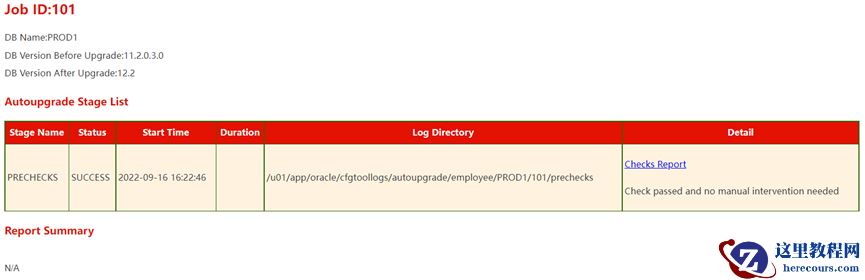
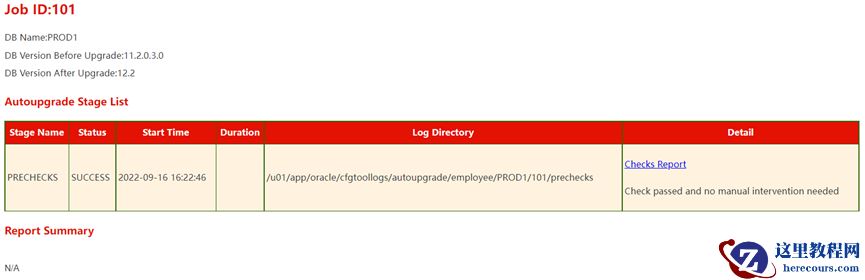
查看生成的status.html是否显示“SUCCESS”
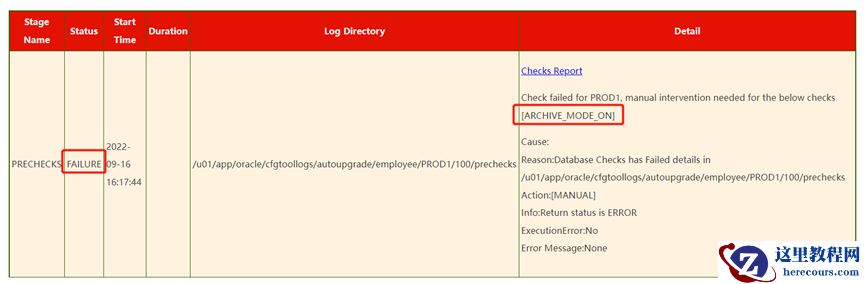
 如果不开启归档,会报错:
 3. 下载并安装12.2的安装包并打最新PSU这一步如果不打PSU,则会报错:
2022-09-09 09:16:27.452 ERROR Dispatcher failed:
34Error: UPG-1411
35Invalid version /u01/app/oracle/product/12.2.0.1/dbhome_1/rdbms/admin/ of catctl.pl for AutoUpgrade; patch the target home
36Cause: Invalid version of catctl.pl and catctl.pm
此处下载过程过程省略, 下载地址在MOS 2118136.2 注:这里我用的是文件系统库(非ASM),只需下载DB的PSU,如果涉及到GI,则需要下载GI的PSU(里面包括了DB的PSU)打PSU过程:
$ su - oracle
$ unzip -d $ORACLE_HOME /home/oracle/soft/p6880880_122010_Linux-x86-64.zip

$ cd ~/soft/
$ unzip p33587128_122010_Linux-x86-64.zip
$ cd 33587128
$ $ORACLE_HOME/OPatch/opatch apply

$ $ORACLE_HOME/OPatch/opatch lspatches
33587128;Database Jan 2022 Release Update : 12.2.0.1. 220118 (33587128)

OPatch succeeded.
4. 升级到12.2步骤(1)$ java -jar autoupgrade.jar -config config.txt -mode deploy 注:该命令仅适用于本地升级,异地升级命令见后文。查看进度:
upg> lsj
 +----+-------+---------+---------+-------+--------------+--------+------------+
 |Job#|DB_NAME|    STAGE|OPERATION| STATUS|    START_TIME| UPDATED|     MESSAGE|
 +----+-------+---------+---------+-------+--------------+--------+------------+
 | 100| LHR11G|DBUPGRADE|EXECUTING|RUNNING|22/09/09 09:29|01:02:17|98%Upgraded |
+----+-------+---------+---------+-------+--------------+--------+------------+
Total jobs 1
(2)查看组件升级情况:
SQL > select COMP_ID,COMP_NAME,VERSION,STATUS from dba_registry;

COMP_ID    COMP_NAME                                VERSION         ATUS
---------- ---------------------------------------- --------------- ---------------
CATALOG    Oracle Database Catalog Views            12.2.0.1.0      UPGRADED
CATPROC    Oracle Database Packages and Types       12.2.0.1.0      UPGRADED
JAVAVM     JServer JAVA Virtual Machine             12.2.0.1.0      UPGRADED
XML        Oracle XDK                               12.2.0.1.0      UPGRADED
CATJAVA    Oracle Database Java Packages            12.2.0.1.0      UPGRADED
APS        OLAP Analytic Workspace                  12.2.0.1.0      UPGRADED
XOQ        Oracle OLAP API                          11.2.0.4.0      VALID
OWM        Oracle Workspace Manager                 12.2.0.1.0      UPGRADED
CONTEXT    Oracle Text                              12.2.0.1.0      UPGRADED
XDB        Oracle XML Database                      12.2.0.1.0      UPGRADED
ORDIM      Oracle Multimedia                        11.2.0.4.0      UPGRADING
SDO        Spatial                                  11.2.0.4.0      VALID
APEX       Oracle Application Express               3.2.1.00.12     VALID
(3)升级完成:
+----+-------+----------+---------+-------+--------------+--------+-------------+
|Job#|DB_NAME|     STAGE|OPERATION| STATUS|    START_TIME| UPDATED|      MESSAGE|
+----+-------+----------+---------+-------+--------------+--------+-------------+
| 100| LHR11G|POSTFIXUPS|EXECUTING|RUNNING|22/09/09 09:29|01:08:19|Remaining 3/4|
+----+-------+----------+---------+-------+--------------+--------+-------------+
Total jobs 1
upg> Job 100 completed
------------------- Final Summary --------------------
Number of databases            [ 1 ]

Jobs finished                  [1]
Jobs failed                    [0]
Jobs pending                   [0]

Please check the summary report at:
/home/oracle/cfgtoollogs/upgrade/auto/status/status.html
/home/oracle/cfgtoollogs/upgrade/auto/status/status.log
注: 如果是 异机升级(比如用备份恢复到异机),则需要使用如下两个命令:1)java -jar autoupgrade.jar -config config.txt -mode fixups2)java -jar autoupgrade.jar -config config.txt -mode upgrade (4)升级完成后步骤alter system set compatible='12.2.0' scope=spfile; ##重启DB生效