
1 使用EXPDP导出报错:
[oracle@host3 ~]$ expdp \'/ as sysdba\' JOB_NAME=xsc1 directory=JCSJ_PUMP_22_22 tables=userA.c_tableA dumpfile=c_tableA1009.dmp logfile=c_tableA1009.log CLUSTER=N
Export: Release 11.2.0.4.0 - Production on Sun Oct 9 15:13:18 2022
Copyright (c) 1982, 2011, Oracle and/or its affiliates. All rights reserved.
Connected to: Oracle Database 11g Enterprise Edition Release 11.2.0.4.0 - 64bit Production
With the Partitioning, Real Application Clusters, Automatic Storage Management, OLAP,
Data Mining and Real Application Testing options
ORA-31626: job does not exist
ORA-31633: unable to create master table "SYS.XSC1"
ORA-06512: at "SYS.DBMS_SYS_ERROR", line 95
ORA-06512: at "SYS.KUPV$FT", line 1038
ORA-00955: name is already used by an existing object
2 在Oracle官网查看相关文档,同如下文档一致(
DataPump Export Or Import Fails With Errors ORA-31633 ORA-6512 ORA-955 (Doc ID 556425.1))
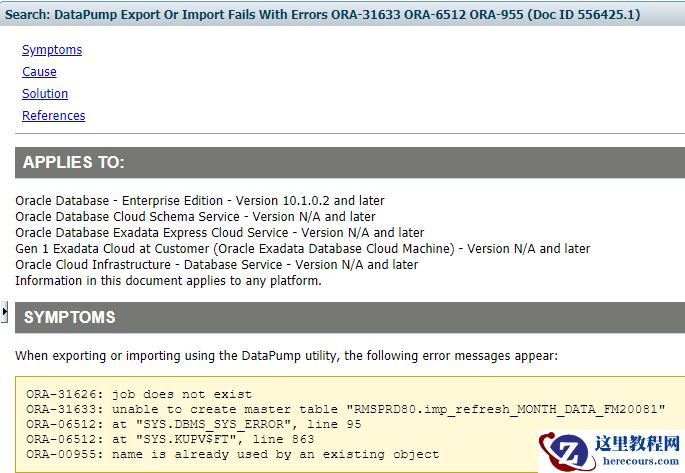
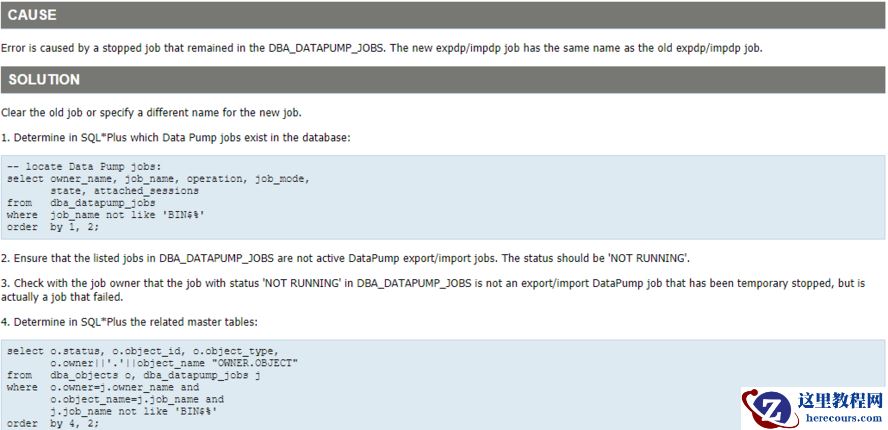
 3 按照如上文档,针对JOB名称及相关SQl做相关修改。3.1 查看数据导出导入是否有相同的名称,及相关JOB运行的状态,发现为没有运行
set linesize 300
col OPERATION for a10
col TTACHED_SESSIONS for a10
col JOB_MODE for a10
col STATE for a12
select owner_name, job_name, operation, job_mode,
state, attached_sessions
from dba_datapump_jobs
where job_name like 'XSC%'
order by 1, 2;
OWNER_NAME JOB_NAME OPERATION JOB_MODE STATE ATTACHED_SESSIONS
------------------------------ ------------------------------ ---------- ---------- ------------ -----------------
SYS XSC1 IMPORT FULL NOT RUNNING 0
3.2 使用如下语句查看数据库对象的名称。
col OWNER.OBJECT for a20
select o.status, o.object_id, o.object_type,
o.owner||'.'||object_name "OWNER.OBJECT"
from dba_objects o, dba_datapump_jobs j
where o.owner=j.owner_name and
o.object_name=j.job_name and
j.job_name like 'XSC%'
order by 4, 2;
STATUS OBJECT_ID OBJECT_TYPE OWNER.OBJECT
------- ---------- ------------------- --------------------
VALID 4202097 TABLE SYS.XSC1
3.3 使用如下语句可以查看以前执行的JOB时间、报错原因及相关的执行命令。
3 按照如上文档,针对JOB名称及相关SQl做相关修改。3.1 查看数据导出导入是否有相同的名称,及相关JOB运行的状态,发现为没有运行
set linesize 300
col OPERATION for a10
col TTACHED_SESSIONS for a10
col JOB_MODE for a10
col STATE for a12
select owner_name, job_name, operation, job_mode,
state, attached_sessions
from dba_datapump_jobs
where job_name like 'XSC%'
order by 1, 2;
OWNER_NAME JOB_NAME OPERATION JOB_MODE STATE ATTACHED_SESSIONS
------------------------------ ------------------------------ ---------- ---------- ------------ -----------------
SYS XSC1 IMPORT FULL NOT RUNNING 0
3.2 使用如下语句查看数据库对象的名称。
col OWNER.OBJECT for a20
select o.status, o.object_id, o.object_type,
o.owner||'.'||object_name "OWNER.OBJECT"
from dba_objects o, dba_datapump_jobs j
where o.owner=j.owner_name and
o.object_name=j.job_name and
j.job_name like 'XSC%'
order by 4, 2;
STATUS OBJECT_ID OBJECT_TYPE OWNER.OBJECT
------- ---------- ------------------- --------------------
VALID 4202097 TABLE SYS.XSC1
3.3 使用如下语句可以查看以前执行的JOB时间、报错原因及相关的执行命令。
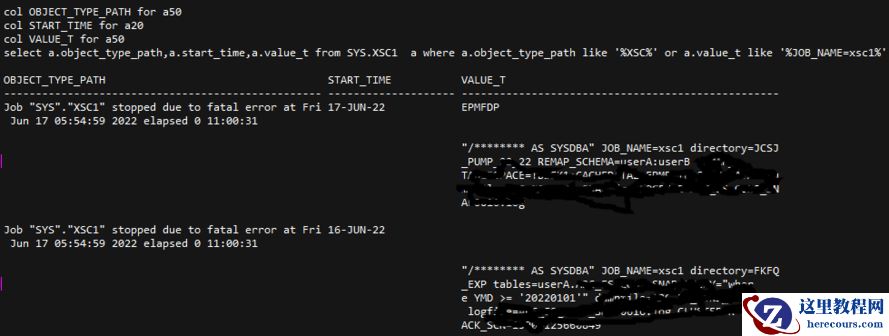 3.4 删除相关表
SYS@host3 >drop table SYS.XSC1;
Table dropped.
4 再次执行,一切OK。
[oracle@host3 ~]$ expdp \'/ as sysdba\' JOB_NAME=xsc1 directory=JCSJ_PUMP_22_22 tables=userA.c_tableA dumpfile=c_tableA1009.dmp logfile=c_tableA1009.log CLUSTER=N
Export: Release 11.2.0.4.0 - Production on Sun Oct 9 15:14:36 2022
Copyright (c) 1982, 2011, Oracle and/or its affiliates. All rights reserved.
Connected to: Oracle Database 11g Enterprise Edition Release 11.2.0.4.0 - 64bit Production
With the Partitioning, Real Application Clusters, Automatic Storage Management, OLAP,
Data Mining and Real Application Testing options
Starting "SYS"."XSC1": "/******** AS SYSDBA" JOB_NAME=xsc1 directory=JCSJ_PUMP_22_22 tables=userA.c_tableA dumpfile=c_tableA1009.dmp logfile=c_tableA1009.log CLUSTER=N
Estimate in progress using BLOCKS method...
Processing object type TABLE_EXPORT/TABLE/TABLE_DATA
Total estimation using BLOCKS method: 4.197 GB
Processing object type TABLE_EXPORT/TABLE/TABLE
Processing object type TABLE_EXPORT/TABLE/GRANT/OWNER_GRANT/OBJECT_GRANT
Processing object type TABLE_EXPORT/TABLE/COMMENT
Processing object type TABLE_EXPORT/TABLE/INDEX/INDEX
Processing object type TABLE_EXPORT/TABLE/CONSTRAINT/CONSTRAINT
Processing object type TABLE_EXPORT/TABLE/INDEX/STATISTICS/INDEX_STATISTICS
Processing object type TABLE_EXPORT/TABLE/STATISTICS/TABLE_STATISTICS
. . exported "userA"."c_tableA" 3.566 GB 52201647 rows
Master table "SYS"."XSC1" successfully loaded/unloaded
******************************************************************************
Dump file set for SYS.XSC1 is:
/goldengate/ftp/yx/c_tableA1009.dmp
Job "SYS"."XSC1" successfully completed at Sun Oct 9 15:46:14 2022 elapsed 0 00:31:33
3.4 删除相关表
SYS@host3 >drop table SYS.XSC1;
Table dropped.
4 再次执行,一切OK。
[oracle@host3 ~]$ expdp \'/ as sysdba\' JOB_NAME=xsc1 directory=JCSJ_PUMP_22_22 tables=userA.c_tableA dumpfile=c_tableA1009.dmp logfile=c_tableA1009.log CLUSTER=N
Export: Release 11.2.0.4.0 - Production on Sun Oct 9 15:14:36 2022
Copyright (c) 1982, 2011, Oracle and/or its affiliates. All rights reserved.
Connected to: Oracle Database 11g Enterprise Edition Release 11.2.0.4.0 - 64bit Production
With the Partitioning, Real Application Clusters, Automatic Storage Management, OLAP,
Data Mining and Real Application Testing options
Starting "SYS"."XSC1": "/******** AS SYSDBA" JOB_NAME=xsc1 directory=JCSJ_PUMP_22_22 tables=userA.c_tableA dumpfile=c_tableA1009.dmp logfile=c_tableA1009.log CLUSTER=N
Estimate in progress using BLOCKS method...
Processing object type TABLE_EXPORT/TABLE/TABLE_DATA
Total estimation using BLOCKS method: 4.197 GB
Processing object type TABLE_EXPORT/TABLE/TABLE
Processing object type TABLE_EXPORT/TABLE/GRANT/OWNER_GRANT/OBJECT_GRANT
Processing object type TABLE_EXPORT/TABLE/COMMENT
Processing object type TABLE_EXPORT/TABLE/INDEX/INDEX
Processing object type TABLE_EXPORT/TABLE/CONSTRAINT/CONSTRAINT
Processing object type TABLE_EXPORT/TABLE/INDEX/STATISTICS/INDEX_STATISTICS
Processing object type TABLE_EXPORT/TABLE/STATISTICS/TABLE_STATISTICS
. . exported "userA"."c_tableA" 3.566 GB 52201647 rows
Master table "SYS"."XSC1" successfully loaded/unloaded
******************************************************************************
Dump file set for SYS.XSC1 is:
/goldengate/ftp/yx/c_tableA1009.dmp
Job "SYS"."XSC1" successfully completed at Sun Oct 9 15:46:14 2022 elapsed 0 00:31:33
DataPump Export ORA-31626 ORA-31633 ORA-00955
来源:这里教程网
时间:2026-03-03 17:56:50
作者:
编辑推荐:
- DataPump Export ORA-31626 ORA-31633 ORA-0095503-03
- StoneDB 主从切换实践方案03-03
- 11g元数据导入19c分区表创建不成功03-03
- 19c 自动打RU补丁03-03
- 车载娱乐:互联网厂商的新战场03-03
- 19c exadata不能设置的参数03-03
- oracle基于SCN增量恢复03-03
- oracle单表按时间导出03-03
下一篇:
相关推荐
-

-
-
-
-
-
-
-
-
-
-
-
-
-
-

雷神推出 MIX PRO II 迷你主机:基于 Ultra 200H,玻璃上盖 + ARGB 灯效
2 月 9 日消息,雷神 (THUNDEROBOT) 现已宣布推出基于英
-

制造商 Musnap 推出彩色墨水屏电纸书 Ocean C:支持手写笔、第三方安卓应用
2 月 10 日消息,制造商 Musnap 现已在海外推出一款 Oce
热文推荐
- DataPump Export ORA-31626 ORA-31633 ORA-00955
- StoneDB 主从切换实践方案

StoneDB 主从切换实践方案
26-03-03 - 11g元数据导入19c分区表创建不成功
11g元数据导入19c分区表创建不成功
26-03-03 - 车载娱乐:互联网厂商的新战场
车载娱乐:互联网厂商的新战场
26-03-03 - 完美产品为您带来健康饮水新生活体验
完美产品为您带来健康饮水新生活体验
26-03-03 - 故障处理】队列等待之enq: US - contention案例

故障处理】队列等待之enq: US - contention案例
26-03-03 - 美的、格力、海尔:To B 各行其道
美的、格力、海尔:To B 各行其道
26-03-03 - 影石Insta360、大疆、AKASO运动相机混战
影石Insta360、大疆、AKASO运动相机混战
26-03-03 - 数据存储技术的演进趋势研判
数据存储技术的演进趋势研判
26-03-03 - 分区表truncate慢处理
分区表truncate慢处理
26-03-03