一、基础环境
操作系统: Red Hat Enterprise Linux Server release 7.6 (Maipo)
数据库: Oracle 12.1.0.2 RAC
二、问题描述
2022 年 11 月 18 日一套业务系统主机因硬件故障发生重启,主机重启后数据库节点 1 无法正常启动,节点 2 可以正常对外提供服务。节点 1css 进程无法启动到 real time ,关闭 EDR 相关的 titanagent 服务后,重启操作系统,可以正常启动集群和数据库。
三、分析过程
1 、检查主机重启后集群状态
[grid@]#crsctl status res -t -init
--------------------------------------------------------------------------------
NAME TARGET STATE SERVER STATE_DETAILS
--------------------------------------------------------------------------------
Cluster Resources
--------------------------------------------------------------------------------
ora.asm
1 ONLINE OFFLINE
ora.cluster_interconnect.haip
1 ONLINE OFFLINE
ora.crf
1 ONLINE ONLINE nadb01
ora.crsd
1 ONLINE OFFLINE
ora.cssd
1 ONLINE OFFLINE STARTING
ora.cssdmonitor
1 ONLINE ONLINE nadb01
ora.ctssd
1 ONLINE OFFLINE
ora.diskmon
1 OFFLINE OFFLINE
ora.evmd
1 ONLINE OFFLINE
ora.gipcd
1 ONLINE ONLINE nadb01
ora.gpnpd
1 ONLINE ONLINE nadb01
ora.mdnsd
1 ONLINE ONLINE nadb01
cssd 进程启动异常。
2 、检查数据库集群日志 [gpnpd(231513)]CRS-2328:GPNPD started on node zadb03. 2022-11-18 10:56:09.210: [cssd(231620)]CRS-1713:CSSD daemon is started in clustered mode 2022-11-18 10:56:09.219: [cssd(231620)]CRS-1656:The CSS daemon is terminating due to a fatal error; Details at (:CSSSC00011:) in /u01/app/11.2.0.4/grid/log/newdb01/cssd/ocssd.log 2022-11-18 10:56:11.034: [ohasd(229354)]CRS-2767:Resource state recovery not attempted for 'ora.diskmon' as its target state is OFFLINE 从日志看]CRS-1656:The CSS daemon is terminating due to a fatal error; Details at (:CSSSC00011:) in /u01/app/12.1.0.2/grid/log/newdb01/cssd/ocssd.log
检查 ocssd日志
2022-11-18 10:56:09.210: [    CSSD][3219912512]clssscmain: Starting CSS daemon, version 11.2.0.4.0, in (clustered) mode with uniqueness value 1668740169
2022-11-18 10:56:09.210: [    CSSD][3219912512]clssscmain: Environment is production
2022-11-18 10:56:09.210: [    CSSD][3219912512]clssscmain: Core file size limit extended
2022-11-18 10:56:09.212: [    CSSD][3219912512]clssscmain: GIPCHA down 0
2022-11-18 10:56:09.213: [    CSSD][3219912512]clssscGetParameterOLR: OLR fetch for parameter logsize (8) failed with rc 21
2022-11-18 10:56:09.213: [    CSSD][3219912512]clssscExtendLimits: The current soft limit for file descriptors is 65536, hard limit is 65536
2022-11-18 10:56:09.213: [    CSSD][3219912512]clssscExtendLimits: The current soft limit for locked memory is 4294967295, hard limit is 4294967295
2022-11-18 10:56:09.213: [    CSSD][3219912512]clssscGetParameterOLR: OLR fetch for parameter priority (15) failed with rc 21
2022-11-18 10:56:09.213: [    CSSD][3219912512]clssscSetPrivEnv: Setting priority to 4
2022-11-18 10:56:09.219: [    CSSD][3219912512]clssscSetPrivEnv: unable to set priority to 4
2022-11-18 10:56:09.219: [    CSSD][3219912512]SLOS: cat=-2, opn=scls_set_priority_realtime, dep=1, loc=setsched
unable to escalate to real time
从ocss日志中可以看到ocssd进程启动时无法得到较高的优先级,无法启动到real time。
Linux: GI OCSSD Fails to Start After cgroups Setting Change (Doc ID 1577784.1) 描述与此现象高度相似
Deployed Puppet which created a new cgroup-configuration by default.
ls /cgroups/cpu.rt_*
/cgroups/cpu.rt_period_us /cgroups/cpu.rt_runtime_us
cat /cgroups/cpu.rt_*
1000000
950000
cat /cgroups/sysdefault/cpu.rt_*
1000000
0                      ====>> 0

SOLUTION
Option 1: Restore the default value and reboot the node:
cat /etc/cgconfig.conf
mount {
memory = /cgroups;
cpu = /cgroups;
}
group lu-adm {
cpu {
cpu.shares = 50;
}
memory {
memory.memsw.limit_in_bytes = 500m;
memory.limit_in_bytes = 200m;
}
}
group sysdefault {
cpu {
cpu.shares = 1024;
cpu.rt_period_us = 1000000;
cpu.rt_runtime_us = 950000; ====>> changed from 0 back to default
}
}
Workaround is to clear cgroup setting through 'cgclear' after consulting sysadmin.
cgroup-configuration file changed in RHEL 6 and later versions
  RHEL 6 cd /sys/fs/cgroup/cpuacct/user.slice
         cat cpu.rt_period_us
  RHEL 7 path i.e File location : ls /sys/fs/cgroup/cpu/cpu.rt_*
The file is not availble in all OS -- check with the OS Vendor for details.
3、检查操作系统相关配置和服务
[root@ ~]# cat /etc/cgconfig.conf cat: /etc/cgconfig.conf: No such file or directory
没有cgconfig.conf 文件
[root@ ~]# ls /sys/fs/cgroup/cpu/cpu.rt_*
/sys/fs/cgroup/cpu/cpu.rt_period_us /sys/fs/cgroup/cpu/cpu.rt_runtime_us [root@ ~]# [root@ ~]# cat /sys/fs/cgroup/cpu/cpu.rt_period_us 1000000 [root@ ~]# cat /sys/fs/cgroup/cpu/cpu.rt_runtime_us 950000 [root@~]#
cpu.rt_period_us和cpu.rt_runtime_us设置的就是推荐值950000
该文档《Linux: GI OCSSD Fails to Start After cgroups Setting Change (Doc ID 1577784.1)》的解决方案不适用。
4、reahat官方关于CPU的相关设置说明
How to configure a RHEL 7 or RHEL 8 system to be able to run programs requiring Real-Time Scheduling
当CPUAccounting参数enabled时,将不能创建real-time进程。排查system.conf配置文件发现并没有开启CPUAccounting参数

5、检查操作系统CPU Accounting、CPUQuots等
[root@ ~]# grep DefaultCPUAccounting /etc/systemd/system.conf #DefaultCPUAccounting=no
但是在titanagent.service服务文件中发现配置了CPUQuota=50%
[root@~]# cat /usr/lib/systemd/system/titanagent.service [Unit] Description=titanagent After=network.target [Service] User=root CPUQuota=50% Type=forking PIDFile=/var/run/titanagent.pid ExecStartPre=/bin/bash -c “/titan/agent/titanagent -s” ExecStart=/bin/bash -c “/titan/agent/titanagent -d -b /etc/titanagent” ExecStop=/bin/bash -c “/titan/agent/titanagent -s” ExecReload=/bin/bash -c “/titan/agent/titanagent -d -b /etc/titanagent” PrivateTmp=no Restart=always RestartSec=60s TimeoutSec=20s TimeoutStopSec=30s [Install] WantedBy=multi-user.target
CPUQuota参数会隐性开启CPUAccounting

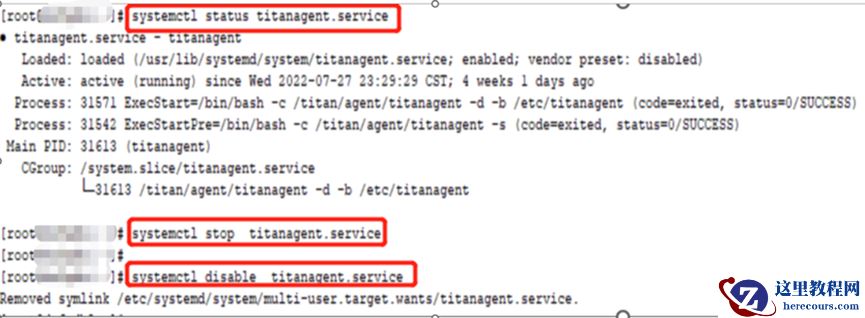
6、禁用titanagent.service后,重启主机集群启动正常
-the end-