环境准备
操作系统: ORACLE Linux7.9-64bit pg 版本:14.8 ogg for pg 版本:21.3 oracle版本: 11.2.0.4 ogg for oracle 版本:19.1(版本太高和oralce版本不兼容,导致无法复制) 2台测试服务器:(源) 192.168.137.103;(目标)192.168.137.102 pg14.8 安装: https://blog.itpub.net/10201716/viewspace-3002437/
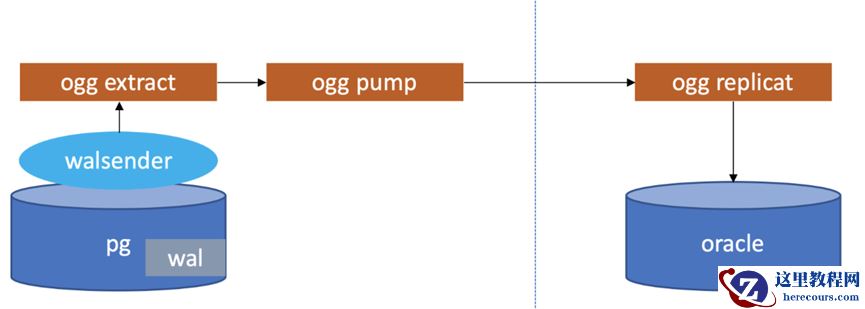
实现原理
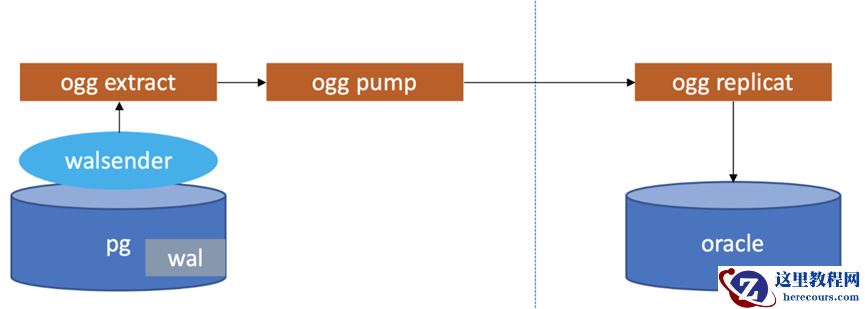
OGG准备专用schema和专用用户并授权
在正式开始配置OGG流程前,根据官方推荐,最好给OGG准备一个专门的schema和专门的用户,并对该用户授予必要的权限,操作如下: (1)创建数据库 创建演示库-test_db
psql -h /data/pgsql/run

alter
user postgres
password
'Cloud_4u';
##初始化密码

create
DATABASE test_db; 测试数据库
\q
 切换到OGG专库,创建schema
psql -h /data/pgsql/run -d test_db -U postgres

create
SCHEMA ggsch; ogg专用数据库shcema
 切换到演示库,创建测试用的表
psql -d test_db -U postgres

create
schema test_schema;

CREATE
TABLE test_schema.COMPANY(

ID
INT PRIMARY
KEY
NOT
NULL,

NAME
TEXT   ,
   AGE
INT     ,
   ADDRESS
CHAR(
50),
   SALARY
REAL
);

CREATE
TABLE  test_schema.DEPARTMENT(

ID
INT PRIMARY
KEY     ,
   DEPT
CHAR(
50) ,
   EMP_ID
INT
);
test_db=
# insert into test_schema.COMPANY values (1,'du',30,'beijing','222');
test_db=
#  insert into test_schema.DEPARTMENT values (1,'tech',3);
————————————————
创建OGG专用用户,并授权
create
role gguser login
password
'Cloud_4u' ;

GRANT
CONNECT
ON
DATABASE postgres
TO gguser;

ALTER
USER gguser
WITH
REPLICATION;

ALTER
USER gguser
WITH SUPERUSER;
psql -d test_db -U postgres

GRANT
USAGE
ON
SCHEMA ggsch
TO gguser;

GRANT
SELECT
ON ALL
TABLES
IN
SCHEMA ggsch
TO gguser;

GRANT
INSERT,
UPDATE,
DELETE,
TRUNCATE
ON ALL
TABLES
IN
SCHEMA ggsch
TO gguser;

-- 心跳和检查点权限

GRANT
CREATE
ON
DATABASE gg_db
TO gguser;

GRANT
CREATE,
USAGE
ON
SCHEMA ggsch
TO gguser;

GRANT
EXECUTE
ON ALL FUNCTIONS
IN
SCHEMA ggsch
TO gguser;

GRANT
SELECT,
INSERT,
UPDATE,
DELETE
ON ALL
TABLES
IN
SCHEMA ggsch
TO gguser;
————————————————
安装ODBC驱动,配置DNS
cd /data/ogg
[postgres@pgdb ogg]$ cat   odbc.ini
[ODBC Data Sources]
PGDSN=DataDirect 14.8 PostgreSQL Wire Protocol
postgres=DataDirect 14.8 PostgreSQL Wire Protocol
scott=DataDirect 14.8 PostgreSQL Wire Protocol

[ODBC]
IANAAppCodePage=106
InstallDir=/data/ogg

[TESTPDB]
Driver=/data/ogg/lib/GGpsql25.so
Description=DataDirect 14.8 PostgreSQL Wire Protocol
Database=test_db
HostName=192.168.137.103
PortNumber=5432

#LogonID=ogguser

#Password=ogg123
TransactionErrorBehavior=2
OGG进程配置
- 管理服务进程
- 配置数据源的提取进程
- 配置目标库的复制进程
配置管理进程
GGSCI(pgdb,作为 gguser@testpdb)
91> edit  param mgr
PORT
7810
DYNAMICPORTLIST
7810
-7820
purgeoldextracts .
/dirdat/*, usecheckpoints,minkeephours
24
AUTORESTART ER *, RETRIES
3, WAITMINUTES
2,RESETMINUTES
10
源端postgresql参数调整
log_directory = '/data/pgsql/data/log'
# directory where log files are written,

# can be absolute or relative to PGDATA
log_filename = 'pg-%Y-%m-%d_%H%M%S.log'
wal_level = logical
#minimal, replica, or logical

max_replication_slots = 10
#max number of replication slots

max_wal_sender = 10
#maximum number of wal sender processes
wal_receiver_status_interval=10s
#optional, keep the system default

wal_sender_timeout
#optional, keep the system default

track_commit_timestamp
#optional, keep the system default
wal_receiver_status_interval=10s
wal_sender_timeout = 60s
track_commit_timestamp=off
调整后重启源端postgresql
开启表级别附加日志
[postgres@pgdb ogg]$
export  ODBCINI=/data/ogg/odbc.ini
[postgres@pgdb ogg]$
[postgres@pgdb ogg]$ ./ggsci

Oracle GoldenGate Command Interpreter
for PostgreSQL
Version
21.3.
0.0.
0 OGGCORE_21.
3.0.
0.0_PLATFORMS_210728.
1047
Oracle Linux
7, x64,
64bit (optimized), PostgreSQL
on Aug
4
2021
20:
27:
55
操作系统字符集标识为 UTF-
8。

Copyright (C)
1995,
2021, Oracle
and/
or its affiliates. All rights reserved.


GGSCI (pgdb)
1> dblogin sourcedb testpdb, userid gguser, password Cloud_4u


2024-
01-
06
20:
25:
49  INFO    OGG-
03036  数据库字符集被标识为 UTF-
8。区域设置:zh_CN.UTF-
8.


2024-
01-
06
20:
25:
49  INFO    OGG-
03037  会话字符集被标识为 UTF-
8。.
GGSCI(pgdb,作为 gguser@testpdb)
48>  add trandata test_schema.COMPANY
 add trandata test_schema.DEPARTMENT
Logging
of supplemental log data
is already enabled
for table test_schema.company
with REPLICA IDENTITY
set
to
DEFAULT

GGSCI(pgdb,作为 gguser@testpdb)
49>

Logging
of supplemental log data
is already enabled
for table test_schema.department
with REPLICA IDENTITY
set
to
DEFAULT
GGSCI(pgdb,作为 gguser@testpdb)
50> info trandata test_schema.COMPANY

Logging
of supplemental log data
is enabled
for table test_schema.company
with REPLICA IDENTITY
set
to
DEFAULT
在pg上注册抽取进程
在pg库上注册抽取进程,实际上就是创建了一个复制槽,output plugin 默认使用test_decoding
GGSCI(pgdb,作为 gguser@testpdb)
53> register extract ext_pg


2024
-01
-06
17:
25:
08  INFO    OGG
-25355  已成功在数据库
'test_db' 中创建用于提取组
'EXT_PG' 的复制插槽
'ext_pg_de21e46e9800bf64'。
配置抽取进程和投递进程
配置抽取进程
GGSCI(
pgdb,作为
gguser@
testpdb)
3> edit  param EXT_PG
EXTRACT ext_pg
SETENV(PGCLIENTENCODING =
"UTF8" )
SETENV(ODBCINI=
"/data/ogg/odbc.ini" )
sourcedb testpdb, userid gguser, password Cloud_4u
LOGALLSUPCOLS
NOCOMPRESSUPDATES
UPDATERECORDFORMAT FULL
--TRANLOGOPTIONS MINEFROMACTIVEDG
DISCARDFILE ./dirrpt/pg.dsc, APPEND, MEGABYTES
4000
CACHEMGR CACHESIZE
1024MB, CACHEDIRECTORY ./dirtmp
REPORTCOUNT EVERY
10000 records, RATE
EXTTRAIL ./dirdat/pg
GETTRUNCATES
TABLE test_schema.COMPANY;

TABLE
test_schema
.DEPARTMENT;
GGSCI(pgdb,作为 gguser@testpdb)
53> register extract ext_pg


2024-
01-
06
17
:
25
:08  INFO    OGG-
25355  已成功在数据库
'test_db' 中创建用于提取组
'EXT_PG' 的复制插槽
'ext_pg_de21e46e9800bf64'。
GGSCI(pgdb,作为 gguser@testpdb)
57> ADD extract ext_pg, TRANLOG,
BEGIN now
已添加提取。

GGSCI(pgdb,作为 gguser@testpdb)
58> add exttrail ./dirdat/pg,extract ext_pg,megabytes
500
已添加 EXTTRAIL。
配置投递进程
GGSCI(
pgdb,作为
gguser@
testpdb)
4> edit param pump_pg1
extract pump_pg1
SETENV(PGCLIENTENCODING =
"UTF8" )
RMTHOST
192.168.
137.102, MGRPORT
7809, COMPRESS
PASSTHRU
NUMFILES
1000
RMTTRAIL ./dirdat/gp
TABLE test_schema.COMPANY;

TABLE
test_schema
.DEPARTMENT;

GGSCI(
pgdb,作为
gguser@
testpdb)
68>add extract pump_pg1,exttrailsource ./dirdat/pg

GGSCI(pgdb,作为 gguser@testpdb)
69> add rmttrail ./dirdat/gp,extract pump_pg1,megabytes
500
配置defgen
说明
利用DEFGEN工具可以为源端和目标端表生成数据定义文件,当源库和目标库类型不一致时,或源端的表和目标端的表结构不一致时,数据定义文件时必须要有的 如果表结构一直可以配置参数ASSUMETARGETDEFS
GGSCI(
pgdb,作为
gguser@
testpdb)
121> edit param defg
DEFSFILE ./dirdef/tb.def, PURGE
sourcedb testpdb, userid gguser, password Cloud_4u
TABLE test_schema.COMPANY;

TABLE
test_schema
.DEPARTMENT;
生成表定义文件
[postgres@pgdb ogg]$ ./defgen paramfile /data/ogg/dirprm/defg.prm
[postgres@pgdb dirdef]$ ls
demo.def  tb.def
拷贝defgen文件到目标端的dirdef目录下
scp tb.def oracle@192.168.137.102
启动复制及投递进程
GGSCI(pgdb,作为 gguser@testpdb)
6> start EXT_PG
GGSCI(pgdb,作为 gguser@testpdb)
6> start pump_pg1
GGSCI(pgdb,作为 gguser@testpdb)
123> info all
Program     Status      Group       Lag at Chkpt  Time Since Chkpt

MANAGER     RUNNING
EXTRACT     ABENDED     E1
00:
00:
00
06:
50:
26
EXTRACT     RUNNING     E2
00:
00:
00
00:
00:
11
EXTRACT     RUNNING     EXT_PG
00:
00:
00
00:
00:
02
EXTRACT     STOPPED     PU2
00:
00:
00
06:
52:
28
EXTRACT     RUNNING     PUMP_PG
00:
00:
00
00:
00:
05
EXTRACT     RUNNING     PUMP_PG1
00:
00:
00
00:
00:
06
目标端oracle配置
oracle库的用户和权限
create
user goldengate
identified
by
"123456";

grant
create
session,
alter
session
to goldengate;

grant
alter
system
to goldengate;

grant
resource
to goldengate;

grant
connect
to goldengate;

grant
select
any dictionary
to goldengate;

grant
flashback
any
table
to goldengate;

grant
select
any
table
to goldengate;

grant
select
any
table
to goldengate;

grant
insert
any
table
to goldengate;

grant
update
any
table
to goldengate;

grant
delete
any
table
to goldengate;

grant
select
on dba_clusters
to goldengate;

grant
execute
on dbms_flashback
to goldengate;

grant
create
table
to goldengate;

grant
create
sequence
to goldengate;

grant
alter
any
table
to goldengate;

grant dba
to goldengate;

grant
lock
any
table
to goldengate;
ogg for oracle 安装(略)
安装的版本是19.1 图像化界面安装
mgr配置
edit param mgr

PORT
7809
DYNAMICPORTLIST
7810
-7980
PURGEOLDEXTRACTS .
/dirdat/*, USECHECKPOINTS, MINKEEPDAYS
3
PURGEDDLHISTORY MINKEEPDAYS
7, MAXKEEPDAYS
10
LAGREPORTHOURS
1
LAGINFOMINUTES
30
LAGCRITICALMINUTES
45
start mgr
目标端配置复制进程
dblogin USERID goldengate
@misdb,password
123456
Successfully logged into database.
GGSCI (Node1 as goldengate
@misdb)
2> edit param rep_pg1
REPLICAT rep_pg1
SETENV (NLS_LANG=
"AMERICAN_AMERICA.AL32UTF8")
USERID goldengate
@misdb,password
123456
SOURCEDEFS ./dirdef/tb.def
MAP test_schema.COMPANY, TARGET togg.COMPANY;

MAP test_schema.DEPARTMENT,TARGET togg.DEPARTMENT;

add checkpointtable goldengate.chkt
add checkpointtable goldengate.checkpointtab
add replicat rep_pg1,exttrail ./dirdat/gp,checkpointtable goldengate.checkpointtab
start rep_pg1

GGSCI (Node1 as goldengate
@misdb)
3>
info all

Program     Status      Group       Lag at Chkpt  Time Since Chkpt

MANAGER     RUNNING
REPLICAT    RUNNING     REP_PG
00:
00:
00
00:
00:
01
REPLICAT    RUNNING     REP_PG1
00:
00:
00
00:
00:
06
测试
test_db=# insert into test_schema.COMPANY values (
3,
'w2',
'33',
'au',
'556');
GGSCI(pgdb,作为 gguser@testpdb)
7> stats PUMP_PG1 , total

正在将 STATS 请求发送到提取组 PUMP_PG1 ...

统计信息开始于
2024-
01-
06
21:
01:
02。

到 ./dirdat/gp 的输出:

从 test_schema.department 提取到 test_schema.department:

*** 自
2024-
01-
06
17:
53:
37 以来的统计信息总计 ***
    插入总数
1.00
    更新总数
0.00
    删除总数
0.00
    更新插入总数
0.00
    放弃总数
0.00
    操作总数
1.00

从 test_schema.company 提取到 test_schema.company:

*** 自
2024-
01-
06
17:
53:
37 以来的统计信息总计 ***
    插入总数
2.00
    更新总数
0.00
    删除总数
0.00
    更新插入总数
0.00
    放弃总数
0.00
    操作总数
2.00
目标端状态

GGSCI (Node1
as goldengate@misdb)
26> stats rep_pg1, total

Sending STATS request
to REPLICAT REP_PG1 ...

Start
of Statistics at
2024-
01-
06
21:
01:
41.

Replicating from test_schema.company
to TOGG.COMPANY:

*** Total statistics since
2024-
01-
06
17:
53:
39 ***
        Total inserts
2.00
        Total updates
0.00
        Total deletes
0.00
        Total upserts
0.00
        Total discards
0.00
        Total operations
2.00

Replicating from test_schema.department
to TOGG.DEPARTMENT:

*** Total statistics since
2024-
01-
06
17:
53:
39 ***
        Total inserts
1.00
        Total updates
0.00
        Total deletes
0.00
        Total upserts
0.00
        Total discards
0.00
        Total operations
1.00

 ID
NAME                AGE ADDRESS                                            SALARY
--- ------------ ---------- -------------------------------------------------- --------------------

2 yang
28 taiyuan
3333

3 w2
33 au
556