部署环境
1.操作系统:openEuler 20.03 (LTS-SP1) 2.数据库版本:21C 3.安装方式: 图形化界面
操作系统设置
1.防火墙
systemctl stop firewalld systemctl disable firewalld
2.配置selinux
#sed -i 's/^SELINUX=.*/SELINUX=disabled/g' /etc/sysconfig/selinux #setenforce 0
3.配置时区
# rm -fr /etc/localtime # ln -s /usr/share/zoneinfo/Asia/Shanghai /etc/localtime
安装系统依赖包
1.配置yum源
mkdir -p /mnt/cdrom 新建cdrom挂载目录 mount /root/openEuler-20.03-LTS-SP1-x86_64-dvd.iso /mnt/cdrom -o loop rm -f * cat <> mnt.repo [mnt] name=/mnt baseurl=file:///mnt/cdrom gpgcheck=0 enable=1y EOF
2.安装依赖包
[root@oula19c /]
#
yum
install -y bc
yum
install -y binutils
yum
install -y elfutils-libelf
yum
install -y elfutils-libelf-devel
yum
install -y fontconfig-devel
yum
install -y glibc
yum
install -y glibc-devel
yum
install -y ksh
yum
install -y libaio
yum
install -y libaio-devel
yum
install -y libXrender
yum
install -y libX11
yum
install -y libXau
yum
install -y libXi
yum
install -y libXtst
yum
install -y libgcc
yum
install -y libnsl
yum
install -y librdmacm
yum
install -y libstdc++
yum
install -y libstdc++-devel
yum
install -y libxcb
yum
install -y libibverbs
yum
install -y make
yum
install -y policycoreutils
yum
install -y policycoreutils-python-utils
yum
install -y smartmontools
yum
install -y sysstat
yum
install -y psmisc
yum
install -y xorg-x11-utils
yum
install -y lsof
yum
install -y libnsl libnsl2
yum
install -y vim
yum
install -y net-tools
yum
install -y openssl-devel
yum
install -y glibc-compat
-2.17
yum
install -y unixODBC unixODBC-devel
yum
install -y libXrender-devel
yum
install -y libXtst-devel
yum
install -y librdmacm-devel
yum
install -y xorg-x11-utils
yum
install -y nfs-utils
yum
install -y tigervnc-
server

####3.下载open没有的包

get
-1.10
-7.el7.x86_64.rpm
wget
-33
-3.2
.3-
[root@oula19c ~]
# rpm -ivh compat-libcap1-1.10-7.el7.x86_64.rpm

warning: compat-libcap1
-1.10
-7.el7.x86_64.rpm: Header V3 RSA/SHA256 Signature,
key
ID ec551f03: NOKEY
Verifying...
################################# [100%]
Preparing...
################################# [100%]
Updating / installing...

1:compat-libcap1
-1.10
-7.el7
################################# [100%]
/sbin/ldconfig: /usr/lib64/libLLVM
-7.so
is
not a symbolic
link

/sbin/ldconfig: /usr/lib64/libLLVM
-7.so
is
not a symbolic
link

[root@oula19c ~]
# rpm -ivh compat-lib
compat-libcap1
-1.10
-7.el7.x86_64.rpm         compat-libstdc++
-33
-3.2
.3
-72.el7.x86_64.rpm
[root@oula19c ~]
# rpm -ivh compat-libstdc++-33-3.2.3-72.el7.x86_64.rpm

warning: compat-libstdc++
-33
-3.2
.3
-72.el7.x86_64.rpm: Header V3 RSA/SHA256 Signature,
key
ID ec551f03: NOKEY
Verifying...
################################# [100%]
Preparing...
################################# [100%]
Updating / installing...

1:compat-libstdc++
-33
-3.2
.3
-72.el7
################################# [100%]
/sbin/ldconfig: /usr/lib64/libLLVM
-7.so
is
not a symbolic
link

/sbin/ldconfig: /usr/lib64/libLLVM
-7.so
is
not a symbolic
link
初始化oracle用户配置
1.建oracle用户
[root@oula19c ~]
#
[root@oula19c ~]
#
[root@oula19c ~]
#
[root@oula19c ~]
# groupadd oinstall
[root@oula19c ~]
# groupadd dba
[root@oula19c ~]
# groupadd oper
[root@oula19c ~]
# useradd -g oinstall -G dba,oper oracle
2.安装路径
 root@oula19c ~]
# mkdir /u01
[root@oula19c ~]
# chown -R oracle:oinstall /u01
[root@oula19c ~]
# su - oracle

Welcome to
4.19.
90-
2109.1.
0.
0108.oe1.x86_64

System information as of
time:  Wed Jan
17
21
:
37
:
38 CST
2024

System
load:
0.
10

Processes:
150
Memory
used:
17.1%
Swap
used:
0.
7%
Usage
On:
17%
IP
address:
192.168.
137.129
Users
online:
2
[oracle@oula19c ~]$ cd /u01
[oracle@oula19c ~]$ cd /u01
[oracle@oula19c u01]$
[oracle@oula19c u01]$ mkdir app
[oracle@oula19c u01]$ mkdir -p app/oracle/product/
19c
3.设置环境变量
[oracle@oula19c ~]$ cat .bash_profile

# Source /root/.bashrc if user has one
[ -f ~/.bashrc ] && . ~/.bashrc

export ORACLE_SID=orcl

export ORACLE_BASE=/u01/app/oracle

export ORACLE_HOME=
$ORACLE_BASE/product/19c

export TNS_ADMIN=
$ORACLE_HOME/network/admin

#export LD_LIBRARY_PATH=$ORACLE_HOME/lib:/usr/lib64:/usr/lib

export  LD_LIBRARY_PATH=
$ORACLE_HOME/lib

export PATH=
$PATH:
$ORACLE_HOME/bin
[oracle@oula19c ~]$
4.解压缩oracle安装包
[oracle@oula19c ~]$ mv LINUX.X64_213000_db_home.zip $ORACLE_HOME
5.安装
[root@oula19c /]
# export DISPLAY=192.168.137.1:0.0
[root@oula19c /]
# xhost +
access control disabled, clients can connect
from any host
[root@oula19c /]
#
[root@oula19c /]
# su - oracle
Last login: Wed Jan
17
21:
43:
19 CST
2024
on pts/
0


Welcome to
4.19
.90
-2109.1
.0
.0108.oe1.x86_64

System information
as
of time:  Wed Jan
17
21:
48:
34 CST
2024

System load:
0.85
Processes:
148
Memory used:
11.9%
Swap used:
5.9%
Usage On:
26%
IP address:
192.168
.137
.129
Users online:
2


[oracle@oula19c ~]$
export DISPLAY=
192.168
.137
.1:
0.0
[oracle@oula19c ~]$ cd $ORACLE_HOME
[oracle@oula19c
19c]$ ./runInstaller
21C特性说明
1.与之前所有的版本不同,21c将dbs和network目录从ORACLE_HOME中剥离到ORACLE_BASE下
 /u01/app/oracle
[oracle@oula19c oracle]$ pwd
/u01/app/oracle
[oracle@oula19c oracle]$ ls -ls
total
36

4 drwxr-x---.
3 oracle oinstall
4096 Jan
17
23
:
40 admin

4 drwxr-x---.
3 oracle oinstall
4096 Jan
17
23
:
43 audit

4 drwxr-x---.
4 oracle oinstall
4096 Jan
17
23
:
30 cfgtoollogs

4 drwxr-x---.
2 oracle oinstall
4096 Jan
17
23
:
57 dbs

4 drwxrwxr-x.
23 oracle oinstall
4096 Jan
17
23
:
22 diag

4 drwxr-x---.
3 oracle oinstall
4096 Jan
17
23
:
40 fast_recovery_area

4 drwxr-x---.
3 oracle oinstall
4096 Jan
17
23
:
22 homes

4 drwxr-x---.
3 oracle oinstall
4096 Jan
17
23
:
40 oradata

4 drwxr-xr-x.
3 oracle oinstall
4096 Jan
17
21
:
38 product
[oracle@oula19c OraDB21Home1]$ pwd
/u01/app/oracle/homes/OraDB21Home1
[oracle@oula19c OraDB21Home1]$ ls
assistants   dbs     hs       log  network  sqlpatch
cfgtoollogs  drdaas  install  mgw  rdbms
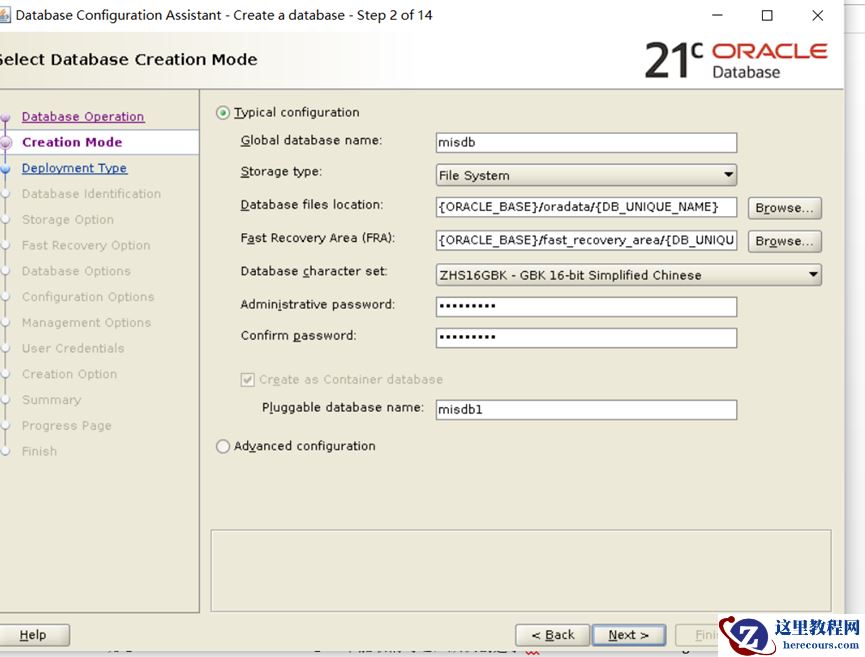
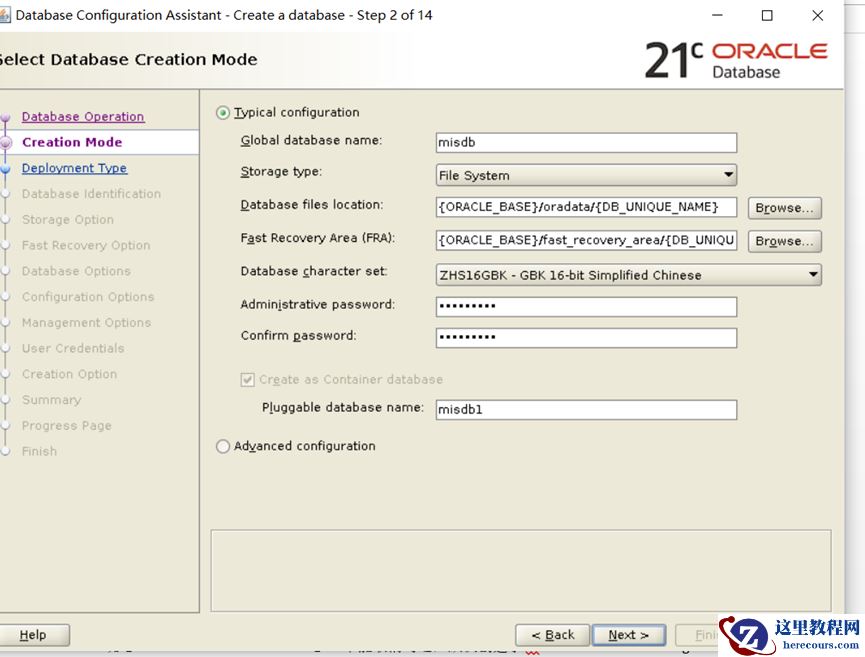
2.CDB是安装的必选项
 3.新特性
1)区块链表
区块链表提出的背景:
当今大多数应用程序都具有中央权限(银行,代管公司,交易交易所,政府办公室等),并且借助Oracle数据库中的区块链表,可以使这些应用程序更安全,而无需增加更改为托管服务器的复杂性去中心化模型
使用的基本原则:
1.空的区块链表,可以删除(drop);
2.区块链表不能建立在Root容器中;
3.NO DROP/DELETE 选项定义了区块链表的删除特性和保留期;
4.在保留期内,有数据的区块链表不能被删除(drop);
5.包含保护期内都区块链表的用户不能递归删除;
6.可以通过删除数据库,清除区块链表;
7.INSERT操作不会彼此阻塞,HASH 值是提交时计算的;
8.仅插入操作,不允许进行任何更新和其他修改
3.新特性
1)区块链表
区块链表提出的背景:
当今大多数应用程序都具有中央权限(银行,代管公司,交易交易所,政府办公室等),并且借助Oracle数据库中的区块链表,可以使这些应用程序更安全,而无需增加更改为托管服务器的复杂性去中心化模型
使用的基本原则:
1.空的区块链表,可以删除(drop);
2.区块链表不能建立在Root容器中;
3.NO DROP/DELETE 选项定义了区块链表的删除特性和保留期;
4.在保留期内,有数据的区块链表不能被删除(drop);
5.包含保护期内都区块链表的用户不能递归删除;
6.可以通过删除数据库,清除区块链表;
7.INSERT操作不会彼此阻塞,HASH 值是提交时计算的;
8.仅插入操作,不允许进行任何更新和其他修改