
前言
本文主要介绍数据库补丁安装,将数据库19.3版本升级到19.23
官方文档
Oracle Database Oracle Database Patch Maintenance, Release 19c and Later Releases
https://docs.oracle.com/en/database/oracle/oracle-database/19/dbptc/index.html
MOS文档
Assistant: Download Reference for Oracle Database/GI Update, Revision, PSU, SPU(CPU), Bundle Patches, Patchsets and Base Releases (Doc ID 2118136.2)
Patch 36233263 - Database Release Update 19.23.0.0.240416
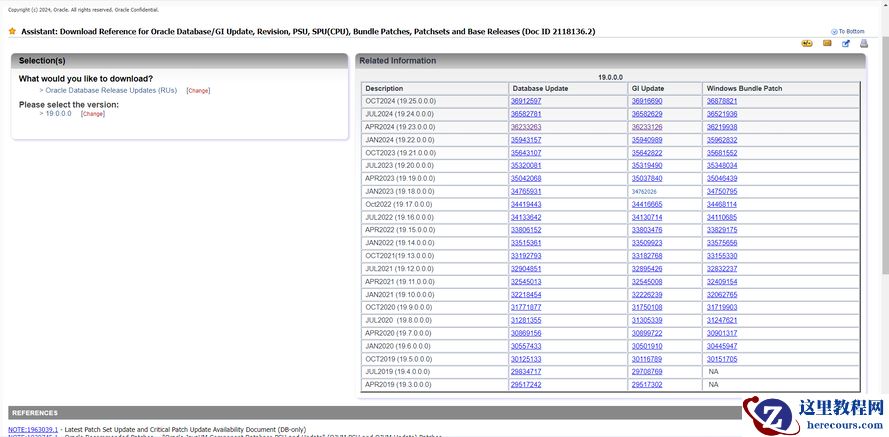
数据库版本
安装
补丁条件
1、OPatch 工具版本不低于12.2.0.1.41
You must use the OPatch utility version 12.2.0.1.41 or later to apply this patch
2、MOS文档建议备份ORACLE_HOME目录
[oracle@forest ~]$ tar -czvf ORACLE_HOME_19.tar.gz /u01/app/oracle/product/19.3.0/
3、替换OPatch目录
[oracle@forest ~]$ cd /u01/app/oracle/product/19.3.0/dbhome_1/
[oracle@forest dbhome_1]$ tar -czvf OPatch_19_3.tar.gz OPatch/
[oracle@forest dbhome_1]$ mv OPatch OPatch_19_3
4、原OPatch版本是12.2.0.1.17
[oracle@forest dbhome_1]$ OPatch_19_3/opatch version
OPatch Version: 12.2.0.1.17
OPatch succeeded.
5、解压缩OPatch
[root@forest ~]# unzip p6880880_190000_Linux-x86-64.zip -d /u01/app/oracle/product/19.3.0/dbhome_1/
[root@forest ~]# chown -R oracle:oinstall /u01/app/oracle/product/19.3.0/dbhome_1/OPatch
[oracle@forest dbhome_1]$ ll -hd OPatch
drwxr-x---. 15 oracle oinstall 4.0K Apr 15  2024 OPatch
6、新版本OPatch版本是12.2.0.1.42
OPatch版本是12.2.0.1.42高于12.2.0.1.41,可以使用
[oracle@forest dbhome_1]$ OPatch/opatch version
OPatch Version: 12.2.0.1.42
OPatch succeeded.
补丁安装前检查
1、临时补丁冲突检测与解决
[root@forest ~]# mv p36233263_190000_Linux-x86-64.zip /home/oracle/
[root@forest ~]# chown -R oracle:oinstall /home/oracle/p36233263_190000_Linux-x86-64.zip
[oracle@forest ~]$ unzip p36233263_190000_Linux-x86-64.zip
[oracle@forest ~]$ cd 36233263/
[oracle@forest 36233263]$ /u01/app/oracle/product/19.3.0/dbhome_1/OPatch/opatch prereq CheckConflictAgainstOHWithDetail -ph ./
[oracle@forest 36233263]$ /u01/app/oracle/product/19.3.0/dbhome_1/OPatch/opatch prereq CheckConflictAgainstOHWithDetail -ph ./
Oracle Interim Patch Installer version 12.2.0.1.42
Copyright (c) 2024, Oracle Corporation.  All rights reserved.
PREREQ session
Oracle Home       : /u01/app/oracle/product/19.3.0/dbhome_1
Central Inventory : /u01/app/oraInventory
   from           : /u01/app/oracle/product/19.3.0/dbhome_1/oraInst.loc
OPatch version    : 12.2.0.1.42
OUI version       : 12.2.0.7.0
Log file location : /u01/app/oracle/product/19.3.0/dbhome_1/cfgtoollogs/opatch/opatch2024-10-18_15-17-05PM_1.log
Invoking prereq "checkconflictagainstohwithdetail"
Prereq "checkConflictAgainstOHWithDetail" passed.
OPatch succeeded.
安装 补丁
1、ADG环境主备都需要安装补丁
2、RAC环境可以在线滚动安装补丁
3、单实例环境,需要关闭实例和监听
4、安装补丁
[oracle@forest 36233263]$ /u01/app/oracle/product/19.3.0/dbhome_1/OPatch/opatch apply
安装补丁过程
[oracle@forest 36233263]$ /u01/app/oracle/product/19.3.0/dbhome_1/OPatch/opatch apply
Oracle Interim Patch Installer version 12.2.0.1.42
Copyright (c) 2024, Oracle Corporation.  All rights reserved.
Oracle Home       : /u01/app/oracle/product/19.3.0/dbhome_1
Central Inventory : /u01/app/oraInventory
   from           : /u01/app/oracle/product/19.3.0/dbhome_1/oraInst.loc
OPatch version    : 12.2.0.1.42
OUI version       : 12.2.0.7.0
Log file location : /u01/app/oracle/product/19.3.0/dbhome_1/cfgtoollogs/opatch/opatch2024-10-18_15-28-50PM_1.log
Verifying environment and performing prerequisite checks...
OPatch continues with these patches:   36233263
Do you want to proceed? [y|n]
y
User Responded with: Y
All checks passed.
Please shutdown Oracle instances running out of this ORACLE_HOME on the local system.
(Oracle Home = '/u01/app/oracle/product/19.3.0/dbhome_1')
Is the local system ready for patching? [y|n]
y
User Responded with: Y
Backing up files...
Applying interim patch '36233263' to OH '/u01/app/oracle/product/19.3.0/dbhome_1'
ApplySession: Optional component(s) [ oracle.network.gsm, 19.0.0.0.0 ] , [ oracle.crypto.rsf, 19.0.0.0.0 ] , [ oracle.pg4mq, 19.0.0.0.0 ] , [ oracle.precomp.companion, 19.0.0.0.0 ] , [ oracle.rdbms.ic, 19.0.0.0.0 ] , [ oracle.rdbms.tg4db2, 19.0.0.0.0 ] , [ oracle.tfa, 19.0.0.0.0 ] , [ oracle.net.cman, 19.0.0.0.0 ] , [ oracle.oid.client, 19.0.0.0.0 ] , [ oracle.rdbms.tg4sybs, 19.0.0.0.0 ] , [ oracle.rdbms.tg4ifmx, 19.0.0.0.0 ] , [ oracle.xdk.companion, 19.0.0.0.0 ] , [ oracle.rdbms.tg4msql, 19.0.0.0.0 ] , [ oracle.rdbms.tg4tera, 19.0.0.0.0 ] , [ oracle.ons.cclient, 19.0.0.0.0 ] , [ oracle.pg4appc, 19.0.0.0.0 ] , [ oracle.options.olap, 19.0.0.0.0 ] , [ oracle.options.olap.api, 19.0.0.0.0 ] , [ oracle.ons.eons.bwcompat, 19.0.0.0.0 ] , [ oracle.network.cman, 19.0.0.0.0 ] , [ oracle.sdo.companion, 19.0.0.0.0 ] , [ oracle.jdk, 1.8.0.191.0 ]  not present in the Oracle Home or a higher version is found.
Patching component oracle.rdbms.rsf, 19.0.0.0.0...
Patching component oracle.rdbms.util, 19.0.0.0.0...
Patching component oracle.rdbms, 19.0.0.0.0...
Patching component oracle.assistants.acf, 19.0.0.0.0...
Patching component oracle.assistants.deconfig, 19.0.0.0.0...
Patching component oracle.assistants.server, 19.0.0.0.0...
Patching component oracle.blaslapack, 19.0.0.0.0...
Patching component oracle.buildtools.rsf, 19.0.0.0.0...
Patching component oracle.ctx, 19.0.0.0.0...
Patching component oracle.dbdev, 19.0.0.0.0...
Patching component oracle.dbjava.ic, 19.0.0.0.0...
Patching component oracle.dbjava.jdbc, 19.0.0.0.0...
Patching component oracle.dbjava.ucp, 19.0.0.0.0...
Patching component oracle.duma, 19.0.0.0.0...
Patching component oracle.javavm.client, 19.0.0.0.0...
Patching component oracle.ldap.owm, 19.0.0.0.0...
Patching component oracle.ldap.rsf, 19.0.0.0.0...
Patching component oracle.ldap.security.osdt, 19.0.0.0.0...
Patching component oracle.marvel, 19.0.0.0.0...
Patching component oracle.network.rsf, 19.0.0.0.0...
Patching component oracle.odbc.ic, 19.0.0.0.0...
Patching component oracle.ons, 19.0.0.0.0...
Patching component oracle.ons.ic, 19.0.0.0.0...
Patching component oracle.oracore.rsf, 19.0.0.0.0...
Patching component oracle.perlint, 5.28.1.0.0...
Patching component oracle.precomp.common.core, 19.0.0.0.0...
Patching component oracle.precomp.rsf, 19.0.0.0.0...
Patching component oracle.rdbms.crs, 19.0.0.0.0...
Patching component oracle.rdbms.dbscripts, 19.0.0.0.0...
Patching component oracle.rdbms.deconfig, 19.0.0.0.0...
Patching component oracle.rdbms.oci, 19.0.0.0.0...
Patching component oracle.rdbms.rsf.ic, 19.0.0.0.0...
Patching component oracle.rdbms.scheduler, 19.0.0.0.0...
Patching component oracle.rhp.db, 19.0.0.0.0...
Patching component oracle.rsf, 19.0.0.0.0...
Patching component oracle.sdo, 19.0.0.0.0...
Patching component oracle.sdo.locator.jrf, 19.0.0.0.0...
Patching component oracle.sqlplus, 19.0.0.0.0...
Patching component oracle.sqlplus.ic, 19.0.0.0.0...
Patching component oracle.wwg.plsql, 19.0.0.0.0...
Patching component oracle.xdk.rsf, 19.0.0.0.0...
Patching component oracle.rdbms.hsodbc, 19.0.0.0.0...
Patching component oracle.ldap.client, 19.0.0.0.0...
Patching component oracle.rdbms.rman, 19.0.0.0.0...
Patching component oracle.rdbms.dv, 19.0.0.0.0...
Patching component oracle.xdk.parser.java, 19.0.0.0.0...
Patching component oracle.ldap.rsf.ic, 19.0.0.0.0...
Patching component oracle.oraolap.api, 19.0.0.0.0...
Patching component oracle.javavm.server, 19.0.0.0.0...
Patching component oracle.mgw.common, 19.0.0.0.0...
Patching component oracle.xdk, 19.0.0.0.0...
Patching component oracle.odbc, 19.0.0.0.0...
Patching component oracle.xdk.xquery, 19.0.0.0.0...
Patching component oracle.nlsrtl.rsf, 19.0.0.0.0...
Patching component oracle.rdbms.lbac, 19.0.0.0.0...
Patching component oracle.network.client, 19.0.0.0.0...
Patching component oracle.network.listener, 19.0.0.0.0...
Patching component oracle.install.deinstalltool, 19.0.0.0.0...
Patching component oracle.ctx.atg, 19.0.0.0.0...
Patching component oracle.nlsrtl.rsf.core, 19.0.0.0.0...
Patching component oracle.nlsrtl.rsf.ic, 19.0.0.0.0...
Patching component oracle.nlsrtl.rsf, 19.0.0.0.0...
Patching component oracle.rdbms.install.common, 19.0.0.0.0...
Patching component oracle.oraolap.dbscripts, 19.0.0.0.0...
Patching component oracle.sdo.locator, 19.0.0.0.0...
Patching component oracle.rdbms.drdaas, 19.0.0.0.0...
Patching component oracle.nlsrtl.rsf.lbuilder, 19.0.0.0.0...
Patching component oracle.oraolap, 19.0.0.0.0...
Patching component oracle.ovm, 19.0.0.0.0...
Patching component oracle.rdbms.hs_common, 19.0.0.0.0...
Patching component oracle.ctx.rsf, 19.0.0.0.0...
Patching component oracle.dbtoolslistener, 19.0.0.0.0...
Patching component oracle.ldap.ssl, 19.0.0.0.0...
Patching component oracle.rdbms.install.plugins, 19.0.0.0.0...
Patching component oracle.precomp.common, 19.0.0.0.0...
Patching component oracle.precomp.lang, 19.0.0.0.0...
Patching component oracle.jdk, 1.8.0.201.0...
Patch 36233263 successfully applied.
Sub-set patch [29517242] has become inactive due to the application of a super-set patch [36233263].
Please refer to Doc ID 2161861.1 for any possible further required actions.
Log file location: /u01/app/oracle/product/19.3.0/dbhome_1/cfgtoollogs/opatch/opatch2024-10-18_15-28-50PM_1.log
OPatch succeeded.
补丁安装后检查
1、登录数据库
[oracle@forest ~]$ . oraenv
ORACLE_SID = [oracle] ? FOREST
The Oracle base has been set to /u01/app/oracle
[oracle@forest ~]$ sqlplus / as sysdba
SQL*Plus: Release 19.0.0.0.0 - Production on Fri Oct 18 15:41:12 2024
Version 19.23.0.0.0
Copyright (c) 1982, 2023, Oracle.  All rights reserved.
Connected to an idle instance.
SQL>
2、启动数据库
SQL> startup
ORACLE instance started.
Total System Global Area 4.2950E+10 bytes
Fixed Size                 23388200 bytes
Variable Size            5502926848 bytes
Database Buffers         3.7313E+10 bytes
Redo Buffers              110825472 bytes
Database mounted.
Database opened.
3、打开pdb
SQL> alter pluggable database all open;
Pluggable database altered.
4、退出
SQL> quit
Disconnected from Oracle Database 19c Enterprise Edition Release 19.0.0.0.0 - Production
Version 19.23.0.0.0
5、进入补丁目录
[oracle@forest ~]$ cd $ORACLE_HOME/OPatch
6、执行./datapatch -sanity_checks
[oracle@forest OPatch]$ ./datapatch -sanity_checks
SQL Patching sanity checks version 19.23.0.0.0 on Fri 18 Oct 2024 03:45:05 PM CST
Copyright (c) 2021, 2024, Oracle.  All rights reserved.
Log file for this invocation: /u01/app/oracle/cfgtoollogs/sqlpatch/sanity_checks_20241018_154505_31345/sanity_checks_20241018_154505_31345.log
Running checks
JSON report generated in /u01/app/oracle/cfgtoollogs/sqlpatch/sanity_checks_20241018_154505_31345/sqlpatch_sanity_checks_summary.json file
Checks completed. Printing report:
Check: Database component status - INFO
  There should be no INVALID components prior patching due to risk of potential errors.
  Listed components have a non-valid status.
  Run '?/rdbms/admin/utlrp.sql' (per container) to try recompiling invalid objects and restore component status.
  PDB$SEED:
    | COMPONENT | STATUS  |
    |-----------+---------|
    |    SDO    | INVALID |
    |-----------+---------|
Check: PDB Violations - OK
Check: Invalid System Objects - OK
Check: Tablespace Status - OK
Check: Backup jobs - OK
Check: Temp file exists - OK
Check: Temp file online - OK
Check: Data Pump running - OK
Check: Container status - OK
Check: Oracle Database Keystore - OK
Check: Dictionary statistics gathering - WARNING
  Patching the database while dictionary statistics are being collected may lead to performance issues.
  Dictionary statistics are currently being collected in the database.
  Consider patching the database when dictionary statistics are not being collected. To check if such operations are currently running, run this query:
    SELECT sofar, totalwork, units, start_time, time_remaining, message
    FROM sys.v$session_longops
    WHERE opname = 'Gather Dictionary Schema Statistics'
    AND time_remaining > 0;
  PDB$SEED:
    |     LATEST      |        OPERATION        |
    |-----------------+-------------------------|
    | 17-APR-19 02:03 | gather_dictionary_stats |
    |-----------------+-------------------------|
  PDB2:
    |     LATEST      |        OPERATION        |
    |-----------------+-------------------------|
    | 17-APR-19 02:03 | gather_dictionary_stats |
    |-----------------+-------------------------|
Check: Scheduled Jobs - WARNING
  Execution of scheduler jobs while database patching is running may lead to failures and/or performance issues.
  There are jobs currently running or scheduled to be executed during next hour.
  Consider patching the database when jobs are not running and will not be scheduled to run during patching.
  To check for jobs that are running or scheduled to run:
    SELECT owner as schema_name, job_name, state, next_run_date
    FROM sys.all_scheduler_jobs
    WHERE state = 'RUNNING'
    UNION
      SELECT owner as schema_name, job_name, state, next_run_date
      FROM sys.all_scheduler_jobs
      WHERE state = 'SCHEDULED'
      and cast(next_run_date as date) > sysdate
      and cast(next_run_date as date) < sysdate + 1/24;
Use of uninitialized value in subroutine entry at /u01/app/oracle/product/19.3.0/dbhome_1/sqlpatch/sqlpatch_sanity_checks.pm line 3252.
Use of uninitialized value in subtraction (-) at /u01/app/oracle/product/19.3.0/dbhome_1/sqlpatch/sqlpatch_sanity_checks.pm line 3286.
Use of uninitialized value $rowElem in concatenation (.) or string at /u01/app/oracle/product/19.3.0/dbhome_1/sqlpatch/sqlpatch_sanity_checks.pm line 3287.
Use of uninitialized value in subroutine entry at /u01/app/oracle/product/19.3.0/dbhome_1/sqlpatch/sqlpatch_sanity_checks.pm line 3252.
Use of uninitialized value in subtraction (-) at /u01/app/oracle/product/19.3.0/dbhome_1/sqlpatch/sqlpatch_sanity_checks.pm line 3286.
Use of uninitialized value $rowElem in concatenation (.) or string at /u01/app/oracle/product/19.3.0/dbhome_1/sqlpatch/sqlpatch_sanity_checks.pm line 3287.
  PDB1:
    |      JOB_NAME      | NEXT_RUN_DATE | SCHEMA_NAME |  STATE  |
    |--------------------+---------------+-------------+---------|
    | ORA$AT_OS_OPT_SY_1 |               |     SYS     | RUNNING |
    |--------------------+---------------+-------------+---------|
  PDB2:
    |      JOB_NAME      | NEXT_RUN_DATE | SCHEMA_NAME |  STATE  |
    |--------------------+---------------+-------------+---------|
    | ORA$AT_OS_OPT_SY_1 |               |     SYS     | RUNNING |
    |--------------------+---------------+-------------+---------|
Check: GoldenGate triggers - OK
Check: Logminer DDL triggers - OK
Check: Check sys public grants - OK
Check: Statistics gathering running - OK
Check: Optim dictionary upgrade parameter - OK
Check: Symlinks on oracle home path - OK
Check: Central Inventory - OK
Check: Queryable Inventory dba directories - OK
Check: Queryable Inventory locks - OK
Check: Queryable Inventory package - ERROR
  Datapatch uses Queryable Inventory to get OPatch Inventory information and create a patching installation plan.
  The Queryable Inventory package is not able to retrieve OPatch Inventory information.
  Refer to MOS Note 1602089.1 for details on verifying the Queryable Inventory package before patching.
  CDB$ROOT:
    | RESULT  |
    |---------|
    | Failure |
    |---------|
Check: Queryable Inventory external table - SKIPPED (ERROR)
  Message: Skipped as previous check wasn't executed successfully.
Check: Imperva processes - OK
Check: Guardium processes - OK
Check: Locale - OK
Refer to MOS Note 2680521.1 and debug log
/u01/app/oracle/cfgtoollogs/sqlpatch/sanity_checks_20241018_154505_31345/sanity_checks_debug_20241018_154505_31345.log
SQL Patching sanity checks completed on Fri 18 Oct 2024 03:45:30 PM CST
7、安装补丁数据修补程序
./datapatch -verbose
[oracle@forest OPatch]$ ./datapatch -verbose
SQL Patching tool version 19.23.0.0.0 Production on Fri Oct 18 15:46:31 2024
Copyright (c) 2012, 2024, Oracle.  All rights reserved.
Log file for this invocation: /u01/app/oracle/cfgtoollogs/sqlpatch/sqlpatch_7314_2024_10_18_15_46_31/sqlpatch_invocation.log
Connecting to database...OK
Gathering database info...done
Note:  Datapatch will only apply or rollback SQL fixes for PDBs
       that are in an open state, no patches will be applied to closed PDBs.
       Please refer to Note: Datapatch: Database 12c Post Patch SQL Automation
       (Doc ID 1585822.1)
Bootstrapping registry and package to current versions...done
Determining current state...done
Current state of interim SQL patches:
  No interim patches found
Current state of release update SQL patches:
  Binary registry:
    19.23.0.0.0 Release_Update 240406004238: Installed
  PDB CDB$ROOT:
    Applied 19.3.0.0.0 Release_Update 190410122720 successfully on 16-OCT-24 05.36.55.677813 PM
  PDB PDB$SEED:
    Applied 19.3.0.0.0 Release_Update 190410122720 successfully on 16-OCT-24 05.45.02.081538 PM
  PDB PDB1:
    Applied 19.3.0.0.0 Release_Update 190410122720 successfully on 16-OCT-24 05.45.02.081538 PM
  PDB PDB2:
    Applied 19.3.0.0.0 Release_Update 190410122720 successfully on 16-OCT-24 05.45.02.081538 PM
Adding patches to installation queue and performing prereq checks...done
Installation queue:
  For the following PDBs: CDB$ROOT PDB$SEED PDB1 PDB2
    No interim patches need to be rolled back
    Patch 36233263 (Database Release Update : 19.23.0.0.240416 (36233263)):
      Apply from 19.3.0.0.0 Release_Update 190410122720 to 19.23.0.0.0 Release_Update 240406004238
    No interim patches need to be applied
WARNING: Following components are NOT in a valid state.
         This could cause patching failure. If it does, consider
         running utlrp.sql to bring components to VALID state.
         Then, re-run datapatch.
         PDB$SEED : SDO [INVALID]
Installing patches...
Patch installation complete.  Total patches installed: 4
Validating logfiles...done
Patch 36233263 apply (pdb CDB$ROOT): SUCCESS
  logfile: /u01/app/oracle/cfgtoollogs/sqlpatch/36233263/25638263/36233263_apply_FOREST_CDBROOT_2024Oct18_15_48_26.log (no errors)
Patch 36233263 apply (pdb PDB$SEED): SUCCESS
  logfile: /u01/app/oracle/cfgtoollogs/sqlpatch/36233263/25638263/36233263_apply_FOREST_PDBSEED_2024Oct18_15_59_39.log (no errors)
Patch 36233263 apply (pdb PDB1): SUCCESS
  logfile: /u01/app/oracle/cfgtoollogs/sqlpatch/36233263/25638263/36233263_apply_FOREST_PDB1_2024Oct18_15_59_39.log (no errors)
Patch 36233263 apply (pdb PDB2): SUCCESS
  logfile: /u01/app/oracle/cfgtoollogs/sqlpatch/36233263/25638263/36233263_apply_FOREST_PDB2_2024Oct18_15_59_39.log (no errors)
Automatic recompilation incomplete; run utlrp.sql to revalidate.
  PDBs: CDB$ROOT PDB1 PDB2 PDB$SEED
SQL Patching tool complete on Fri Oct 18 16:08:32 2024
8、检查日志错误
Check the following log files in $ORACLE_BASE/cfgtoollogs/sqlpatch/36233263/<unique patch                      ID> for errors:
36233263_apply_<database SID>_<CDB name>_<timestamp>.log
[oracle@forest ~]$ ll -h /u01/app/oracle/cfgtoollogs/sqlpatch/36233263/25638263/36233263_apply_FOREST_CDBROOT_2024Oct18_15_48_26.log
-rw-r--r--. 1 oracle oinstall 23M Oct 18 15:59 /u01/app/oracle/cfgtoollogs/sqlpatch/36233263/25638263/36233263_apply_FOREST_CDBROOT_2024Oct18_15_48_26.log
9、编译无效对象
export PATH=$PATH:$ORACLE_HOME/bin
cd $ORACLE_HOME/rdbms/admin
$ORACLE_HOME/perl/bin/perl $ORACLE_HOME/rdbms/admin/catcon.pl -n 1 -e -b utlrp -d $ORACLE_HOME/rdbms/admin utlrp.sql
[oracle@forest ~]$ ll -h $ORACLE_HOME/perl/bin/perl
-rwxr-xr-x. 1 oracle oinstall 3.8M Apr  7  2024 /u01/app/oracle/product/19.3.0/dbhome_1/perl/bin/perl
[oracle@forest ~]$ ll -h $ORACLE_HOME/rdbms/admin/catcon.pl
-rw-r--r--. 1 oracle oinstall 38K Apr  9  2024 /u01/app/oracle/product/19.3.0/dbhome_1/rdbms/admin/catcon.pl
[oracle@forest ~]$ export PATH=$PATH:$ORACLE_HOME/bin
[oracle@forest ~]$ cd $ORACLE_HOME/rdbms/admin
执行命令报错
[oracle@forest admin]$ $ORACLE_HOME/perl/bin/perl $ORACLE_HOME/rdbms/admin/catcon.pl -n 1 -e -b utlrp -d $ORACLE_HOME/rdbms/admin utlrp.sql
catcon::set_log_file_base_path: ALL catcon-related output will be written to [/u01/app/oracle/product/19.3.0/dbhome_1/rdbms/admin/utlrp_catcon_11902.lst]
catcon::set_log_file_base_path: catcon: See [/u01/app/oracle/product/19.3.0/dbhome_1/rdbms/admin/utlrp*.log] files for output generated by scripts
catcon::set_log_file_base_path: catcon: See [/u01/app/oracle/product/19.3.0/dbhome_1/rdbms/admin/utlrp_*.lst] files for spool files, if any
catcon::print_exec_DB_script_output:   ] end of output produced in exec_DB_script
catcon::catconInit2: unexpected error in get_instance_status_and_name
Unexpected error encountered in catconInit2; exiting
[oracle@forest ~]$ . oraenv
ORACLE_SID = [oracle] ? FOREST
The Oracle base has been set to /u01/app/oracle
再次执行不报错,执行成功,环境变量问题
[oracle@forest admin]$ $ORACLE_HOME/perl/bin/perl $ORACLE_HOME/rdbms/admin/catcon.pl -n 1 -e -b utlrp -d $ORACLE_HOME/rdbms/admin utlrp.sql
catcon::set_log_file_base_path: ALL catcon-related output will be written to [/u01/app/oracle/product/19.3.0/dbhome_1/rdbms/admin/utlrp_catcon_24814.lst]
catcon::set_log_file_base_path: catcon: See [/u01/app/oracle/product/19.3.0/dbhome_1/rdbms/admin/utlrp*.log] files for output generated by scripts
catcon::set_log_file_base_path: catcon: See [/u01/app/oracle/product/19.3.0/dbhome_1/rdbms/admin/utlrp_*.lst] files for spool files, if any
catcon.pl: completed successfully
10、升级RMAN catalog目录
$ rman catalog username/password@alias
UPGRADE CATALOG;
UPGRADE CATALOG;
11、Update Permissions for extjob
# chown root $ORACLE_HOME/bin/extjob
# chmod 4750 $ORACLE_HOME/bin/extjob
[root@forest ~]# ll -h /u01/app/oracle/product/19.3.0/dbhome_1/bin/extjob
-rwxr-xr-x. 1 oracle oinstall 2.9M Oct 18 15:35 /u01/app/oracle/product/19.3.0/dbhome_1/bin/extjob
[root@forest ~]# chown root /u01/app/oracle/product/19.3.0/dbhome_1/bin/extjob
[root@forest ~]# chmod 4750 /u01/app/oracle/product/19.3.0/dbhome_1/bin/extjob
[root@forest ~]# ll -h /u01/app/oracle/product/19.3.0/dbhome_1/bin/extjob
-rwsr-x---. 1 root oinstall 2.9M Oct 18 15:35 /u01/app/oracle/product/19.3.0/dbhome_1/bin/extjob
安装补丁成功
[oracle@forest ~]$ sqlplus / as sysdba
SQL*Plus: Release 19.0.0.0.0 - Production on Fri Oct 18 16:29:03 2024
Version 19.23.0.0.0
Copyright (c) 1982, 2023, Oracle.  All rights reserved.
Connected to:
Oracle Database 19c Enterprise Edition Release 19.0.0.0.0 - Production
Version 19.23.0.0.0
SQL> select banner_full from v$version;
BANNER_FULL
--------------------------------------------------------------------------------
Oracle Database 19c Enterprise Edition Release 19.0.0.0.0 - Production
Version 19.23.0.0.0
SQL> show pdbs
    CON_ID CON_NAME                       OPEN MODE  RESTRICTED
---------- ------------------------------ ---------- ----------
         2 PDB$SEED                       READ ONLY  NO
         3 PDB1                           READ WRITE NO
         4 PDB2                           READ WRITE NO
SQL> select action,comments from registry$history;
ACTION
------------------------------
COMMENTS
--------------------------------------------------------------------------------
BOOTSTRAP
RDBMS_19.23.0.0.0DBRU_LINUX.X64_240405
RU_APPLY
Patch applied on 19.3.0.0.0: Release_Update - 190410122720
RU_APPLY
Patch applied from 19.3.0.0.0 to 19.23.0.0.0: Release_Update - 240406004238
编辑推荐:
下一篇:
相关推荐
-

-
-
-
-
-
-
-
-
-
-
-
-
-
-

雷神推出 MIX PRO II 迷你主机:基于 Ultra 200H,玻璃上盖 + ARGB 灯效
2 月 9 日消息,雷神 (THUNDEROBOT) 现已宣布推出基于英
-

制造商 Musnap 推出彩色墨水屏电纸书 Ocean C:支持手写笔、第三方安卓应用
2 月 10 日消息,制造商 Musnap 现已在海外推出一款 Oce
热文推荐
- OPatch安装补丁将Oracle 19.3升级到19.23
OPatch安装补丁将Oracle 19.3升级到19.23
26-03-03 - Oracle数据库如何模拟ORA-600 [4193]错误?如何解决?
![Oracle数据库如何模拟ORA-600 [4193]错误?如何解决?](https://www.herecours.com/d/file/efpub/2026/03-03/20260303173515849201.jpg "Oracle数据库如何模拟ORA-600 [4193]错误?如何解决?")
Oracle数据库如何模拟ORA-600 [4193]错误?如何解决?
26-03-03 - shutdown abort关库,真的有可能起不来吗?

shutdown abort关库,真的有可能起不来吗?
26-03-03 - 又是windown服务器断电引起的ora-00333
又是windown服务器断电引起的ora-00333
26-03-03 - 同事不小心drop column了一个列,真的凉凉了吗?

同事不小心drop column了一个列,真的凉凉了吗?
26-03-03 - 数据库数据恢复—Oracle数据库数据恢复案例
数据库数据恢复—Oracle数据库数据恢复案例
26-03-03 - 企业数据管理是否“镜花水月”

企业数据管理是否“镜花水月”
26-03-03 - Oracle自动处理表空间不足脚本

Oracle自动处理表空间不足脚本
26-03-03 - 如何一键完成20个Oracle实例运维脚本部署

如何一键完成20个Oracle实例运维脚本部署
26-03-03 - 03 高效调优:Oracle内存体系的精细化管理实践

03 高效调优:Oracle内存体系的精细化管理实践
26-03-03