
一文让你熟悉掌握oracle监听的配置
**熟悉oracle的朋友都知道,在netca创建监听后,默认就是创建的动态监听,其配置文件如下:
[oracle@his admin]$ cat listener.ora# listener.ora Network Configuration File: /u01/app/oracle/product/11.2.0/db_1/network/admin/listener.ora# Generated by Oracle configuration tools.LISTENER =
(DESCRIPTION_LIST =
(DESCRIPTION =
(ADDRESS = (PROTOCOL = IPC)(KEY = EXTPROC1521))
(ADDRESS = (PROTOCOL = TCP)(HOST = his)(PORT = 1521))
)
)
ADR_BASE_LISTENER = /u01/app/oracle
**但在日常运维过程中,如果多个版本的库、多个实例需要注册到这个监听的情况下,很多人就搞不清楚到底怎么来正确配置监听了。
**监听分动态默认监听、动态非默认监听和静态监听,下面就是一些配置案例
静态监听
**配置后,无论实例是启动还是关闭,通过lsnrctl status看到的服务和实例都是不会掉的,状态是UNKONWN,为什么是这个状态,因为监听器不知道实例允许的状态。
**此配置,一般用于搭建dg或者远程重启数据库等情况下使用。
[oracle@his admin]$ cat listener.ora
# listener.ora Network Configuration File: /u01/app/oracle/product/11.2.0/db_1/network/admin/listener.ora
# Generated by Oracle configuration tools.
LISTENER = --监听的名字
(DESCRIPTION_LIST =
(DESCRIPTION =
(ADDRESS = (PROTOCOL = IPC)(KEY = EXTPROC1521))
(ADDRESS = (PROTOCOL = TCP)(HOST = his)(PORT = 1521))
)
)
SID_LIST_LISTENER = --实例列表的_监听的名字(和监听名字对应)
(SID_LIST = --实例的列表
(SID_DESC = --实例的描述
(GLOBAL_DBNAME = orcl) --全局数据库名称
(ORACLE_HOME = /u01/app/oracle/product/11.2.0/db_1) --实例的oracle_home目录,如果是不同的版本,只用一个监听,就改这里的位置。
(SID_NAME = orcl) --实例名
)
)
ADR_BASE_LISTENER = /u01/app/oracle
[oracle@his admin]$ lsnrctl status
LSNRCTL for Linux: Version 11.2.0.4.0 - Production on 04-DEC-2024 18:12:53
Copyright (c) 1991, 2013, Oracle. All rights reserved.
Connecting to (DESCRIPTION=(ADDRESS=(PROTOCOL=IPC)(KEY=EXTPROC1521)))
STATUS of the LISTENER
------------------------
Alias LISTENER
Version TNSLSNR for Linux: Version 11.2.0.4.0 - Production
Start Date 04-DEC-2024 18:07:18
Uptime 0 days 0 hr. 5 min. 34 sec
Trace Level off
Security ON: Local OS Authentication
SNMP OFF
Listener Parameter File /u01/app/oracle/product/11.2.0/db_1/network/admin/listener.ora
Listener Log File /u01/app/oracle/diag/tnslsnr/his/listener/alert/log.xml
Listening Endpoints Summary...
(DESCRIPTION=(ADDRESS=(PROTOCOL=ipc)(KEY=EXTPROC1521)))
(DESCRIPTION=(ADDRESS=(PROTOCOL=tcp)(HOST=his)(PORT=1521)))
Services Summary...
Service "orcl" has 1 instance(s).    --服务,该服务注册了一个实例进来
Instance "orcl", status UNKNOWN, has 1 handler(s) for this service...    --服务对应的实例,当我实例没有启动的时候,监听器就只监听到了一个实例和服务。
The command completed successfully

案例1:静态监听创建后通过远程链接支持启停数据库。

[oracle@his admin]$ sqlplus / as sysdbaSQL*Plus: Release 11.2.0.4.0 Production on Wed Dec 4 18:17:49 2024Copyright (c) 1982, 2013, Oracle.  All rights reserved.Connected to an idle instance.SQL> startup ORACLE instance started.Total System Global Area 4275781632 bytesFixed Size		    2260088 bytesVariable Size		 1157628808 bytesDatabase Buffers	 3103784960 bytesRedo Buffers		   12107776 bytesDatabase mounted.Database opened.SQL> exitDisconnected from Oracle Database 11g Enterprise Edition Release 11.2.0.4.0 - 64bit ProductionWith the Partitioning, OLAP, Data Mining and Real Application Testing options[oracle@his admin]$ lsnrctl statusLSNRCTL for Linux: Version 11.2.0.4.0 - Production on 04-DEC-2024 18:18:05Copyright (c) 1991, 2013, Oracle.  All rights reserved.Connecting to (DESCRIPTION=(ADDRESS=(PROTOCOL=IPC)(KEY=EXTPROC1521)))STATUS of the LISTENER------------------------Alias                     LISTENERVersion                   TNSLSNR for Linux: Version 11.2.0.4.0 - ProductionStart Date                04-DEC-2024 18:07:18Uptime                    0 days 0 hr. 10 min. 47 secTrace Level               offSecurity                  ON: Local OS AuthenticationSNMP                      OFFListener Parameter File   /u01/app/oracle/product/11.2.0/db_1/network/admin/listener.oraListener Log File         /u01/app/oracle/diag/tnslsnr/his/listener/alert/log.xmlListening Endpoints Summary...
  (DESCRIPTION=(ADDRESS=(PROTOCOL=ipc)(KEY=EXTPROC1521)))
  (DESCRIPTION=(ADDRESS=(PROTOCOL=tcp)(HOST=his)(PORT=1521)))Services Summary...Service "orcl" has 2 instance(s).    --当实例启动后服务发现了两个实例
  Instance "orcl", status UNKNOWN, has 1 handler(s) for this service...    --第一个实例还是UNKNOWN
  Instance "orcl", status READY, has 1 handler(s) for this service...       --第二个实例是READY,这个是什么呢?其实就是动态监听,当数据库起来后,实例就会动态的注册到监听,关闭后就消失。Service "orclXDB" has 1 instance(s).
  Instance "orcl", status READY, has 1 handler(s) for this service...The command completed successfully
默认动态监听
[oracle@his admin]$ cat listener.ora# listener.ora Network Configuration File: /u01/app/oracle/product/11.2.0/db_1/network/admin/listener.ora# Generated by Oracle configuration tools.LISTENER =
  (DESCRIPTION_LIST =
    (DESCRIPTION =
      (ADDRESS = (PROTOCOL = IPC)(KEY = EXTPROC1521))
      (ADDRESS = (PROTOCOL = TCP)(HOST = his)(PORT = 1521))
    )
  )
ADR_BASE_LISTENER = /u01/app/oracle
[oracle@his admin]$ lsnrctl startLSNRCTL for Linux: Version 11.2.0.4.0 - Production on 04-DEC-2024 18:28:02Copyright (c) 1991, 2013, Oracle.  All rights reserved.Starting /u01/app/oracle/product/11.2.0/db_1/bin/tnslsnr: please wait...
TNSLSNR for Linux: Version 11.2.0.4.0 - ProductionSystem parameter file is /u01/app/oracle/product/11.2.0/db_1/network/admin/listener.oraLog messages written to /u01/app/oracle/diag/tnslsnr/his/listener/alert/log.xml
Listening on: (DESCRIPTION=(ADDRESS=(PROTOCOL=ipc)(KEY=EXTPROC1521)))
Listening on: (DESCRIPTION=(ADDRESS=(PROTOCOL=tcp)(HOST=his)(PORT=1521)))
Connecting to (DESCRIPTION=(ADDRESS=(PROTOCOL=IPC)(KEY=EXTPROC1521)))STATUS of the LISTENER------------------------Alias                     LISTENERVersion                   TNSLSNR for Linux: Version 11.2.0.4.0 - ProductionStart Date                04-DEC-2024 18:28:02Uptime                    0 days 0 hr. 0 min. 0 secTrace Level               offSecurity                  ON: Local OS AuthenticationSNMP                      OFFListener Parameter File   /u01/app/oracle/product/11.2.0/db_1/network/admin/listener.ora
Listener Log File         /u01/app/oracle/diag/tnslsnr/his/listener/alert/log.xml
Listening Endpoints Summary...
  (DESCRIPTION=(ADDRESS=(PROTOCOL=ipc)(KEY=EXTPROC1521)))
  (DESCRIPTION=(ADDRESS=(PROTOCOL=tcp)(HOST=his)(PORT=1521)))
The listener supports no services        --这里可以看到监听没有识别到服务和实例,为什么呢?因为没有实例在这台机器上启动。
The command completed successfully
[oracle@his admin]$ ps -ef|grep ora_smonoracle     3042   2200  0 18:28 pts/0    00:00:00 grep --color=auto ora_smon
--此时外部的sqlplus是无法链接进来的。就出现了比较经典的问题,ora-12514

--当数据库启动后
[oracle@his admin]$ sqlplus / as sysdbaSQL*Plus: Release 11.2.0.4.0 Production on Wed Dec 4 18:30:35 2024Copyright (c) 1982, 2013, Oracle.  All rights reserved.Connected to an idle instance.SQL> startupORACLE instance started.Total System Global Area 4275781632 bytesFixed Size		    2260088 bytesVariable Size		 1157628808 bytesDatabase Buffers	 3103784960 bytesRedo Buffers		   12107776 bytesDatabase mounted.Database opened.SQL> exitDisconnected from Oracle Database 11g Enterprise Edition Release 11.2.0.4.0 - 64bit ProductionWith the Partitioning, OLAP, Data Mining and Real Application Testing options[oracle@his admin]$ lsnrctl statusLSNRCTL for Linux: Version 11.2.0.4.0 - Production on 04-DEC-2024 18:31:01Copyright (c) 1991, 2013, Oracle.  All rights reserved.Connecting to (DESCRIPTION=(ADDRESS=(PROTOCOL=IPC)(KEY=EXTPROC1521)))STATUS of the LISTENER------------------------Alias                     LISTENERVersion                   TNSLSNR for Linux: Version 11.2.0.4.0 - ProductionStart Date                04-DEC-2024 18:28:02Uptime                    0 days 0 hr. 2 min. 59 secTrace Level               offSecurity                  ON: Local OS AuthenticationSNMP                      OFFListener Parameter File   /u01/app/oracle/product/11.2.0/db_1/network/admin/listener.oraListener Log File         /u01/app/oracle/diag/tnslsnr/his/listener/alert/log.xmlListening Endpoints Summary...
  (DESCRIPTION=(ADDRESS=(PROTOCOL=ipc)(KEY=EXTPROC1521)))
  (DESCRIPTION=(ADDRESS=(PROTOCOL=tcp)(HOST=his)(PORT=1521)))Services Summary...Service "orcl" has 1 instance(s).
  Instance "orcl", status READY, has 1 handler(s) for this service...    --实例和服务已经注册了进来Service "orclXDB" has 1 instance(s).
  Instance "orcl", status READY, has 1 handler(s) for this service...The command completed successfully
--再次链接

--当通过远程关闭数据库后,还能通过远程再启动数据库实例吗?
答案是不行的,只能关闭数据库,不能再启动了,因为实例只要已关闭,监听器就会关闭对应的数据库服务。这也是为什么克隆搭建dg不能使用动态监听的原因。

非默认动态监听
**此方式一般适用于,多个监听,监听多个端口,而数据库实例既要注册到非默认监听,也要注册到默认的监听上。简单来讲就是创建2监听,一个默认的LISTENER是1521,一个是非默认的LISTENER1是1522,数据库有一个是orcl,我想通过1521和1522都访问到orcl数据库。
[oracle@his admin]$ cat listener.ora
# listener.ora Network Configuration File: /u01/app/oracle/product/11.2.0/db_1/network/admin/listener.ora
# Generated by Oracle configuration tools.LISTENER =
  (DESCRIPTION_LIST =
    (DESCRIPTION =
      (ADDRESS = (PROTOCOL = IPC)(KEY = EXTPROC1521))
      (ADDRESS = (PROTOCOL = TCP)(HOST = his)(PORT = 1521))
    )
  )
LISTENER1 =
  (DESCRIPTION_LIST =
    (DESCRIPTION =
      (ADDRESS = (PROTOCOL = IPC)(KEY = EXTPROC1522))
      (ADDRESS = (PROTOCOL = TCP)(HOST = his)(PORT = 1522))
    )
  )
ADR_BASE_LISTENER = /u01/app/oracle
[oracle@his admin]$ lsnrctl start listener --启动默认监听
LSNRCTL for Linux: Version 11.2.0.4.0 - Production on 04-DEC-2024 18:50:17
Copyright (c) 1991, 2013, Oracle. All rights reserved.
Starting /u01/app/oracle/product/11.2.0/db_1/bin/tnslsnr: please wait...
TNSLSNR for Linux: Version 11.2.0.4.0 - Production
System parameter file is /u01/app/oracle/product/11.2.0/db_1/network/admin/listener.ora
Log messages written to /u01/app/oracle/diag/tnslsnr/his/listener/alert/log.xml
Listening on: (DESCRIPTION=(ADDRESS=(PROTOCOL=ipc)(KEY=EXTPROC1521)))
Listening on: (DESCRIPTION=(ADDRESS=(PROTOCOL=tcp)(HOST=his)(PORT=1521)))
Connecting to (DESCRIPTION=(ADDRESS=(PROTOCOL=IPC)(KEY=EXTPROC1521)))
STATUS of the LISTENER
------------------------
Alias listener
Version TNSLSNR for Linux: Version 11.2.0.4.0 - Production
Start Date 04-DEC-2024 18:50:17
Uptime 0 days 0 hr. 0 min. 0 sec
Trace Level off
Security ON: Local OS Authentication
SNMP OFF
Listener Parameter File /u01/app/oracle/product/11.2.0/db_1/network/admin/listener.ora
Listener Log File /u01/app/oracle/diag/tnslsnr/his/listener/alert/log.xml
Listening Endpoints Summary...
(DESCRIPTION=(ADDRESS=(PROTOCOL=ipc)(KEY=EXTPROC1521)))
(DESCRIPTION=(ADDRESS=(PROTOCOL=tcp)(HOST=his)(PORT=1521)))
The listener supports no services
The command completed successfully
[oracle@his admin]$ lsnrctl start listener1 --启动非默认监听
LSNRCTL for Linux: Version 11.2.0.4.0 - Production on 04-DEC-2024 18:50:21
Copyright (c) 1991, 2013, Oracle. All rights reserved.
Starting /u01/app/oracle/product/11.2.0/db_1/bin/tnslsnr: please wait...
TNSLSNR for Linux: Version 11.2.0.4.0 - Production
System parameter file is /u01/app/oracle/product/11.2.0/db_1/network/admin/listener.ora
Log messages written to /u01/app/oracle/diag/tnslsnr/his/listener1/alert/log.xml
Listening on: (DESCRIPTION=(ADDRESS=(PROTOCOL=ipc)(KEY=EXTPROC1522)))
Listening on: (DESCRIPTION=(ADDRESS=(PROTOCOL=tcp)(HOST=his)(PORT=1522)))
Connecting to (DESCRIPTION=(ADDRESS=(PROTOCOL=IPC)(KEY=EXTPROC1522)))
STATUS of the LISTENER
------------------------
Alias listener1
Version TNSLSNR for Linux: Version 11.2.0.4.0 - Production
Start Date 04-DEC-2024 18:50:21
Uptime 0 days 0 hr. 0 min. 0 sec
Trace Level off
Security ON: Local OS Authentication
SNMP OFF
Listener Parameter File /u01/app/oracle/product/11.2.0/db_1/network/admin/listener.ora
Listener Log File /u01/app/oracle/diag/tnslsnr/his/listener1/alert/log.xml
Listening Endpoints Summary...
(DESCRIPTION=(ADDRESS=(PROTOCOL=ipc)(KEY=EXTPROC1522)))
(DESCRIPTION=(ADDRESS=(PROTOCOL=tcp)(HOST=his)(PORT=1522)))
The listener supports no services
The command completed successfully
[oracle@his admin]$ ss -ltn|grep 152
LISTEN 0 128 [::]:1521 [::]:*
LISTEN 0 128 [::]:1522 [::]:*
[oracle@his admin]$ ps -ef|grep ora_smon
oracle 3423 2200 0 18:52 pts/0 00:00:00 grep --color=auto ora_smon
--现在将实例启动起来
[oracle@his admin]$ lsnrctl status listener
LSNRCTL for Linux: Version 11.2.0.4.0 - Production on 04-DEC-2024 18:52:56
Copyright (c) 1991, 2013, Oracle. All rights reserved.
Connecting to (DESCRIPTION=(ADDRESS=(PROTOCOL=IPC)(KEY=EXTPROC1521)))
STATUS of the LISTENER
------------------------
Alias listener
Version TNSLSNR for Linux: Version 11.2.0.4.0 - Production
Start Date 04-DEC-2024 18:50:17
Uptime 0 days 0 hr. 2 min. 38 sec
Trace Level off
Security ON: Local OS Authentication
SNMP OFF
Listener Parameter File /u01/app/oracle/product/11.2.0/db_1/network/admin/listener.ora
Listener Log File /u01/app/oracle/diag/tnslsnr/his/listener/alert/log.xml
Listening Endpoints Summary...
(DESCRIPTION=(ADDRESS=(PROTOCOL=ipc)(KEY=EXTPROC1521)))
(DESCRIPTION=(ADDRESS=(PROTOCOL=tcp)(HOST=his)(PORT=1521)))
Services Summary...
Service "orcl" has 1 instance(s).
Instance "orcl", status READY, has 1 handler(s) for this service...
Service "orclXDB" has 1 instance(s).
Instance "orcl", status READY, has 1 handler(s) for this service...
The command completed successfully
[oracle@his admin]$ lsnrctl status listener1
LSNRCTL for Linux: Version 11.2.0.4.0 - Production on 04-DEC-2024 18:53:07
Copyright (c) 1991, 2013, Oracle. All rights reserved.
Connecting to (DESCRIPTION=(ADDRESS=(PROTOCOL=IPC)(KEY=EXTPROC1522)))
STATUS of the LISTENER
------------------------
Alias listener1
Version TNSLSNR for Linux: Version 11.2.0.4.0 - Production
Start Date 04-DEC-2024 18:50:21
Uptime 0 days 0 hr. 2 min. 46 sec
Trace Level off
Security ON: Local OS Authentication
SNMP OFF
Listener Parameter File /u01/app/oracle/product/11.2.0/db_1/network/admin/listener.ora
Listener Log File /u01/app/oracle/diag/tnslsnr/his/listener1/alert/log.xml
Listening Endpoints Summary...
(DESCRIPTION=(ADDRESS=(PROTOCOL=ipc)(KEY=EXTPROC1522)))
(DESCRIPTION=(ADDRESS=(PROTOCOL=tcp)(HOST=his)(PORT=1522)))
The listener supports no services
The command completed successfully
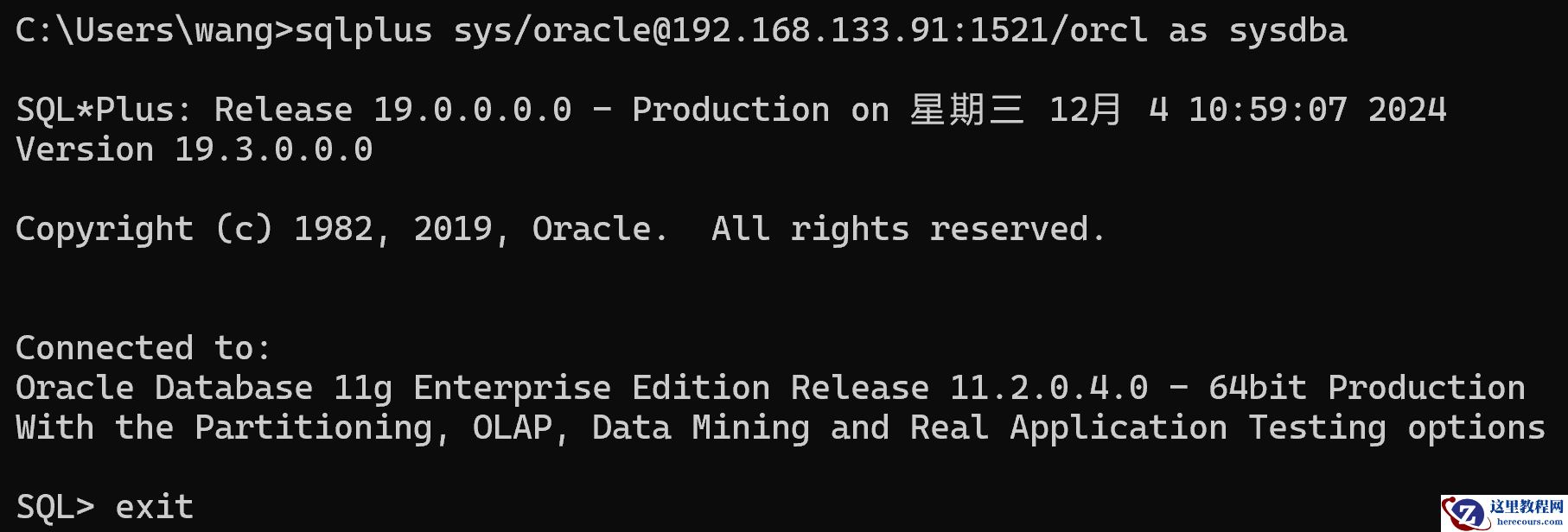
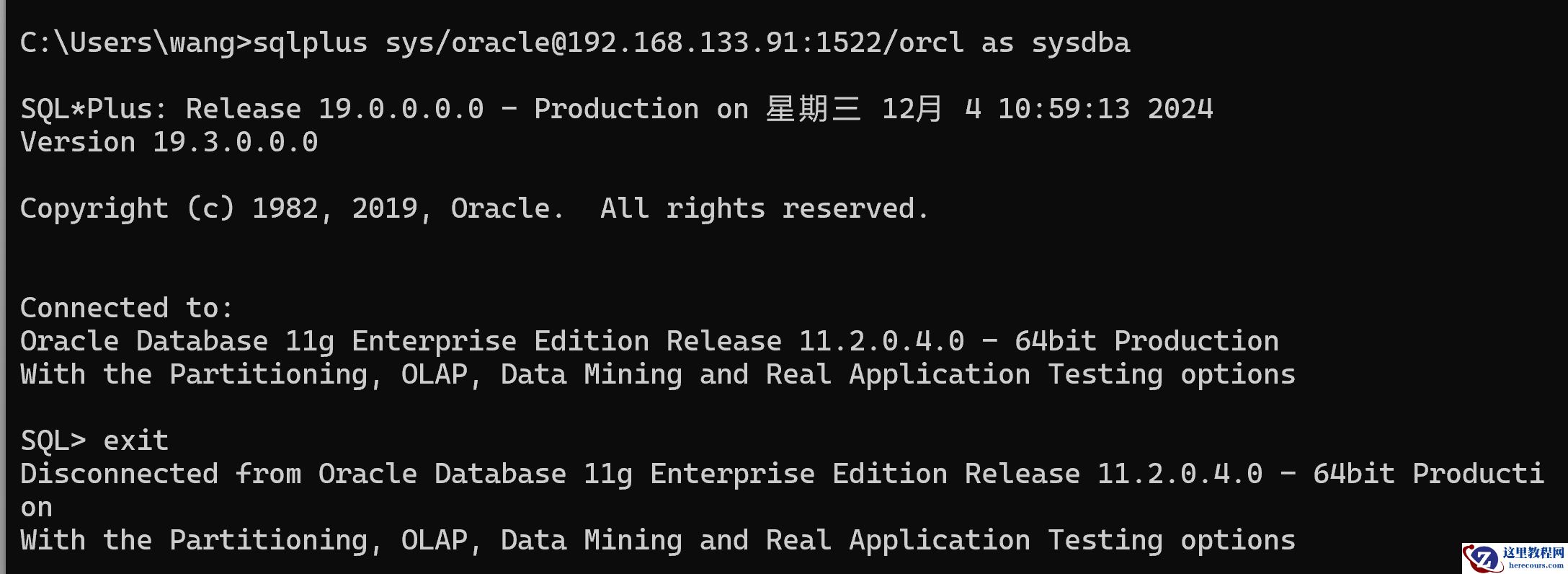
--通过上面可以看到默认监听1521能够监听到orcl,但是非默认监听1522就怎么监听不到了呢?事实是还有两个开关:1、数据库的local_listener参数 2、tnsnames.ora文件中的配置
[oracle@his admin]$ sqlplus / as sysdba
SQL*Plus: Release 11.2.0.4.0 Production on Wed Dec 4 18:54:35 2024
Copyright (c) 1982, 2013, Oracle. All rights reserved.
Connected to:
Oracle Database 11g Enterprise Edition Release 11.2.0.4.0 - 64bit Production
With the Partitioning, OLAP, Data Mining and Real Application Testing options
SQL> show parameter listener
NAME TYPE VALUE
------------------------------------ ----------- ------------------------------
listener_networks string
local_listener string
remote_listener string
SQL> alter system set local_listener='orcl';
System altered.
[oracle@his admin]$ cat tnsnames.ora
# tnsnames.ora Network Configuration File: /u01/app/oracle/product/11.2.0/db_1/network/admin/tnsnames.ora
# Generated by Oracle configuration tools.
ORCL =
(DESCRIPTION =
(ADDRESS = (PROTOCOL = TCP)(HOST = his)(PORT = 1521))
(ADDRESS = (PROTOCOL = TCP)(HOST = his)(PORT = 1522))
(CONNECT_DATA =
(SERVER = DEDICATED)
(SERVICE_NAME = orcl)
)
)
[oracle@his admin]$ lsnrctl reload listener
[oracle@his admin]$ lsnrctl reload listener1
[oracle@his admin]$ lsnrctl status
LSNRCTL for Linux: Version 11.2.0.4.0 - Production on 04-DEC-2024 18:58:09
Copyright (c) 1991, 2013, Oracle. All rights reserved.
Connecting to (DESCRIPTION=(ADDRESS=(PROTOCOL=IPC)(KEY=EXTPROC1521)))
STATUS of the LISTENER
------------------------
Alias listener
Version TNSLSNR for Linux: Version 11.2.0.4.0 - Production
Start Date 04-DEC-2024 18:50:17
Uptime 0 days 0 hr. 7 min. 52 sec
Trace Level off
Security ON: Local OS Authentication
SNMP OFF
Listener Parameter File /u01/app/oracle/product/11.2.0/db_1/network/admin/listener.ora
Listener Log File /u01/app/oracle/diag/tnslsnr/his/listener/alert/log.xml
Listening Endpoints Summary...
(DESCRIPTION=(ADDRESS=(PROTOCOL=ipc)(KEY=EXTPROC1521)))
(DESCRIPTION=(ADDRESS=(PROTOCOL=tcp)(HOST=his)(PORT=1521)))
Services Summary...
Service "orcl" has 1 instance(s).
Instance "orcl", status READY, has 1 handler(s) for this service...
Service "orclXDB" has 1 instance(s).
Instance "orcl", status READY, has 1 handler(s) for this service...
The command completed successfully
[oracle@his admin]$ lsnrctl status listener1
LSNRCTL for Linux: Version 11.2.0.4.0 - Production on 04-DEC-2024 18:58:12
Copyright (c) 1991, 2013, Oracle. All rights reserved.
Connecting to (DESCRIPTION=(ADDRESS=(PROTOCOL=IPC)(KEY=EXTPROC1522)))
STATUS of the LISTENER
------------------------
Alias listener1
Version TNSLSNR for Linux: Version 11.2.0.4.0 - Production
Start Date 04-DEC-2024 18:50:21
Uptime 0 days 0 hr. 7 min. 51 sec
Trace Level off
Security ON: Local OS Authentication
SNMP OFF
Listener Parameter File /u01/app/oracle/product/11.2.0/db_1/network/admin/listener.ora
Listener Log File /u01/app/oracle/diag/tnslsnr/his/listener1/alert/log.xml
Listening Endpoints Summary...
(DESCRIPTION=(ADDRESS=(PROTOCOL=ipc)(KEY=EXTPROC1522)))
(DESCRIPTION=(ADDRESS=(PROTOCOL=tcp)(HOST=his)(PORT=1522)))
Services Summary...
Service "orcl" has 1 instance(s).
Instance "orcl", status READY, has 1 handler(s) for this service...
Service "orclXDB" has 1 instance(s).
Instance "orcl", status READY, has 1 handler(s) for this service...
The command completed successfully
通过上面的观察,发现实例已经注册到了两个监听中。
--链接测试
总结
1、静态监听
**主要用于dg、远程管理数据库启停的需求时候使用,通过它配置,要注意oracle_home目录的配置,
GLOBAL_DBNAME、
SID_NAME,如果是单机就写oracle安装目录的home,如果是rac,在grid用户下配置。
**配置完成后,默认就有一个服务管理了一个实例,状态是UNKNOWN,表示是不知道的意思,不管数据库是否启动,外部链接都可以链接进来。
2、默认动态监听
**默认的就是跟随主机上的数据库自动识别服务,当启动实例后,监听器注册服务,当关闭后,监听器取消服务。
3、非默认动态监听
**用于多种复杂配置环境,不同的实例、不同的端口,区分注册到不同的监听器进行不同的服务。可以更好的管理数据库的行为。初了非默认的动态监听还有非默认的静态监听,是一样的配置,需要结合local_listener参数和tnsnames.ora配置文件使用。





