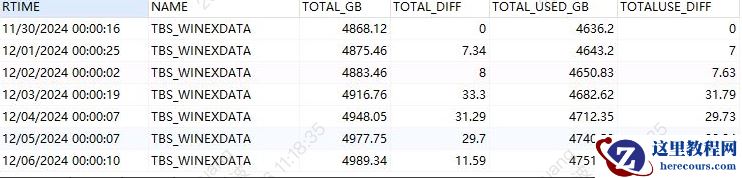
数据库 2025年3月4日21:30-22:30数据库几乎处于不可用状态 ,经 临时查杀会话切换服务后 恢复正常。
问题排查:
数据库告警日志排查:
一节点:由于原业务集中在二节点上,一节点相对较为空闲,
ALERT
告警日志
21
点
30
分至
22
点
30
分之间未出现严重的告警和报错信息
二节点:查看
ALERT
告警日志故障时间点出现大量内存分配不足的错误
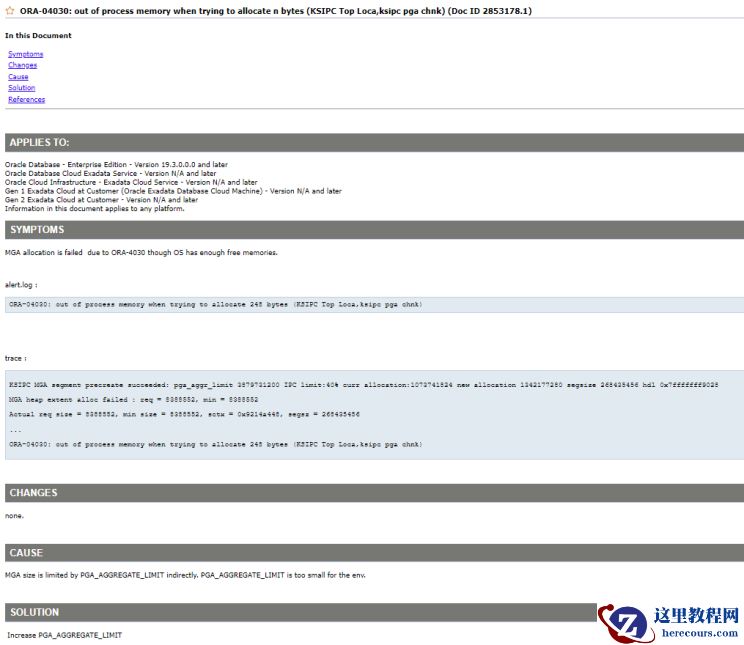
,ORA-04030: out of process memory when trying to allocate 248 bytes (KSIPC Top Loca,ksipc pga chnk)
,进程内存(
PGA
)分配失败,进一步确认此错误在上午
11
点
28分第一次
出现持续了
4
分钟,随后
14
点
26
分陆续出现同时伴随着后台进程中断以及派发失败的错误(
Process J000/GCR1/MZ00 died
,
unable to spawn jobq slave process
),
ORA-04030
错误频率过高,同时触发
Oracle
的日志抑制机制(
DDE: Problem Key 'ORA 4030' was completely flood controlled
)2025-03-04T21:30:16.594587+08:00WARNING: inbound connection timed out (ORA-3136)2025-03-04T21:30:45.978497+08:00kkjcre1p: unable to spawn jobq slave process 2025-03-04T21:30:45.978550+08:00Errors in file /u01/app/oracle/diag/rdbms/orcl/orcl2/trace/orcl2_cjq0_56974.trc:2025-03-04T21:31:08.050594+08:00Thread 2 advanced to log sequence 83353 (LGWR switch) Current log# 3 seq# 83353 mem# 0: +DATA/orcl/ONLINELOG/group_3.266.10918248052025-03-04T21:31:08.326745+08:00ARC3 (PID:52999): Archived Log entry 187797 added for T-2.S-83352 ID 0xaf90c6eb LAD:12025-03-04T21:31:17.978170+08:00Process MZ00 died, see its trace file2025-03-04T21:31:23.076052+08:00Thread 2 advanced to log sequence 83354 (LGWR switch) Current log# 8 seq# 83354 mem# 0: +DATA/orcl/ONLINELOG/group_8.322.10918247692025-03-04T21:31:23.105092+08:00ARC0 (PID:52980): Archived Log entry 187798 added for T-2.S-83353 ID 0xaf90c6eb LAD:12025-03-04T21:31:49.681514+08:00kkjcre1p: unable to spawn jobq slave process 2025-03-04T21:31:49.681568+08:00Errors in file /u01/app/oracle/diag/rdbms/orcl/orcl2/trace/orcl2_cjq0_56974.trc:2025-03-04T21:32:21.362890+08:00Errors in file /u01/app/oracle/diag/rdbms/orcl/orcl2/trace/orcl2_j000_19143.trc:ORA-04030: out of process memory when trying to allocate 25784 bytes (KSIPC Top Loca,KSXP OSD LW CTX)ORA-04030: out of process memory when trying to allocate 248 bytes (KSIPC Top Loca,ksipc pga chnk)2025-03-04T21:32:21.506147+08:00Process J000 died, see its trace file2025-03-04T21:32:21.506234+08:00kkjcre1p: unable to spawn jobq slave process 2025-03-04T21:32:21.506279+08:00Errors in file /u01/app/oracle/diag/rdbms/orcl/orcl2/trace/orcl2_cjq0_56974.trc:2025-03-04T21:32:53.506189+08:00Process PPA7 died, see its trace file2025-03-04T21:33:24.976265+08:00Errors in file /u01/app/oracle/diag/rdbms/orcl/orcl2/trace/orcl2_j000_68996.trc:ORA-04030: out of process memory when trying to allocate 25784 bytes (KSIPC Top Loca,KSXP OSD LW CTX)ORA-04030: out of process memory when trying to allocate 248 bytes (KSIPC Top Loca,ksipc pga chnk)2025-03-04T21:33:25.102396+08:00Process J000 died, see its trace file2025-03-04T21:33:25.102484+08:00kkjcre1p: unable to spawn jobq slave process 2025-03-04T21:33:25.102528+08:00Errors in file /u01/app/oracle/diag/rdbms/orcl/orcl2/trace/orcl2_cjq0_56974.trc:2025-03-04T21:33:57.103192+08:00Process PPA7 died, see its trace file2025-03-04T21:34:29.145357+08:00kkjcre1p: unable to spawn jobq slave process 2025-03-04T21:34:29.145411+08:00Errors in file /u01/app/oracle/diag/rdbms/orcl/orcl2/trace/orcl2_cjq0_56974.trc:2025-03-04T21:35:01.145196+08:00Process PPA7 died, see its trace file2025-03-04T21:35:32.963592+08:00kkjcre1p: unable to spawn jobq slave process 2025-03-04T21:35:32.963658+08:00Errors in file /u01/app/oracle/diag/rdbms/orcl/orcl2/trace/orcl2_cjq0_56974.trc:2025-03-04T21:36:05.114190+08:00Process PPA7 died, see its trace file2025-03-04T21:36:36.599489+08:00Errors in file /u01/app/oracle/diag/rdbms/orcl/orcl2/trace/orcl2_j000_55290.trc:ORA-04030: out of process memory when trying to allocate 25784 bytes (KSIPC Top Loca,KSXP OSD LW CTX)ORA-04030: out of process memory when trying to allocate 248 bytes (KSIPC Top Loca,ksipc pga chnk)2025-03-04T21:36:36.660996+08:00Process J000 died, see its trace file2025-03-04T21:36:36.661095+08:00kkjcre1p: unable to spawn jobq slave process
进一步查看
trace
文件选取
/u01/app/oracle/diag/rdbms/orcl/
orcl2/trace/
orcl2_ora_36774.trc
为例:
MGA (Managed Global Area) allocation is failed due to ORA-4030 though OS has enough free memories.
Trace file /u01/app/oracle/diag/rdbms/orcl/orcl2/trace/orcl2_ora_36774.trc
Oracle Database 19c Enterprise Edition Release 19.0.0.0.0 - Production
Version 19.3.0.0.0
Build label: RDBMS_19.3.0.0.0DBRU_LINUX.X64_190417
ORACLE_HOME: /u01/app/oracle/product/19.0.0/dbhome_1
System name: Linux
Node name: dbn02
Release: 3.10.0-957.el7.x86_64
Version: #1 SMP Thu Oct 4 20:48:51 UTC 2018
Machine: x86_64
Instance name: orcl2
Redo thread mounted by this instance: 2
Oracle process number: 3421
Unix process pid: 36774, image: oracle@db02
*** 2025-03-04T11:28:15.590583+08:00
*** CLIENT ID:() 2025-03-04T11:28:15.590606+08:00
*** SERVICE NAME:() 2025-03-04T11:28:15.590610+08:00
*** MODULE NAME:() 2025-03-04T11:28:15.590613+08:00
*** ACTION NAME:() 2025-03-04T11:28:15.590617+08:00
*** CLIENT DRIVER:() 2025-03-04T11:28:15.590620+08:00
KSIPC MGA segment precreate succeeded: pga_aggr_limit 51539607552 IPC limit:40% curr allocation:5905580032 new allocation 6174015488 segsize 268435456 hdl 0x7fff37fe9a18
MGA heap extent alloc failed : req = 8388552, min = 8388552
Actual req size = 8388552, min size = 8388552, sctx = 0x3b42cd240, segsz = 268435456
----- Start Diag Diagnostic Dump -----
Diagnostic call stack dump is performed due to inability to allocate memory to generate a new incident during error handling.
DDE is switched to protected mode during the diagnostic dump to prevent recursive errors in the error handling code.
Dump error and call stack for the diagnostic dump:
*** 2025-03-04T11:28:15.644177+08:00
dbkedDefDump(): Starting incident default dumps (flags=0x0, level=1, mask=0x0)
----- Error Stack Dump -----
<error barrier> at 0x7fff37fe9760 placed dbge.c@994
ORA-04030: out of process memory when trying to allocate 248 bytes (KSIPC Top Loca,ksipc pga chnk)
<error barrier> at 0x7fff37fea810 placed ksipc.c@13489
----- SQL Statement (None) -----
Current SQL information unavailable - no session.
匹配
Oracle
官方
MOS
文档
ORA-04030: out of process memory when trying to allocate n bytes (KSIPC Top Loca,ksipc pga chnk) (Doc ID 2853178.1)
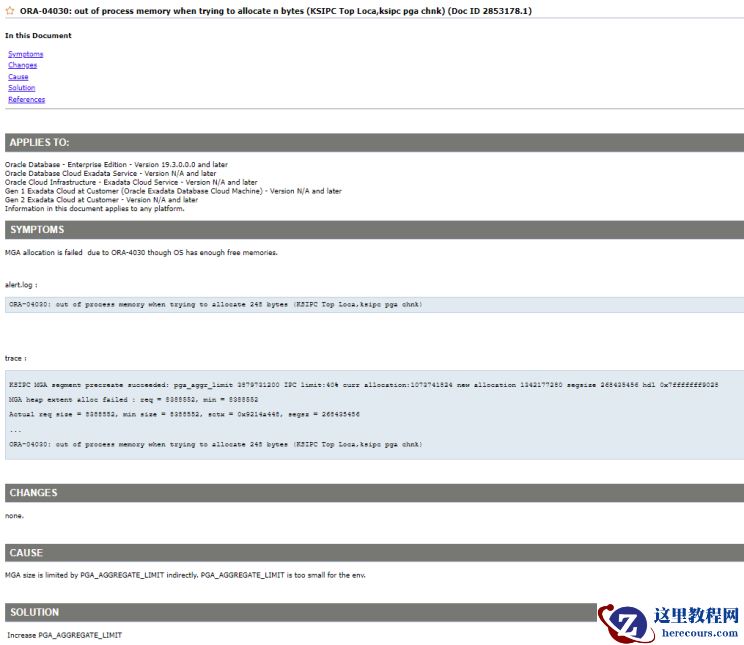 出现以上问题主要原因有以下三点:
1.
当前
PGA_AGGREGATE_LIMIT
设置不足
2.
大量
PGA
内存的使用
3.
大量
MGA
内存的使用
解决办法:
增加
PGA_AGGREGATE_LIMIT
的限定值。
评估
PGA_AGGREGATE_LIMIT
的值
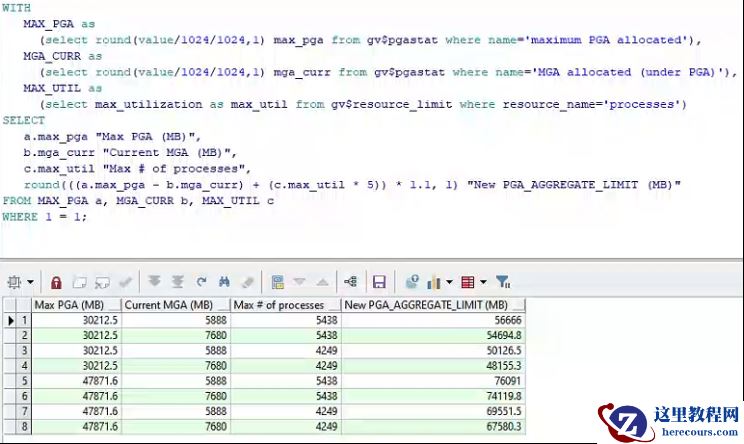
PGA_AGGREGATE_LIMIT = ((maximum aggregate PGA in use for the life of the instance) + ((maximum number of attached processes for the life the instance) * 5M)) * 1.1
出现以上问题主要原因有以下三点:
1.
当前
PGA_AGGREGATE_LIMIT
设置不足
2.
大量
PGA
内存的使用
3.
大量
MGA
内存的使用
解决办法:
增加
PGA_AGGREGATE_LIMIT
的限定值。
评估
PGA_AGGREGATE_LIMIT
的值
PGA_AGGREGATE_LIMIT = ((maximum aggregate PGA in use for the life of the instance) + ((maximum number of attached processes for the life the instance) * 5M)) * 1.1