一、XTTS简介
1.1、简介
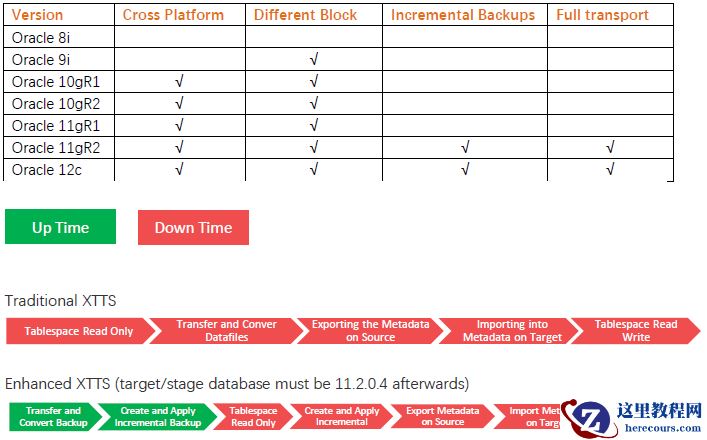
XTTS(Cross Platform Transportable Tablespaces)属于跨平台迁移表空间,它是从Oracle 8i开始就引入的一种基于表空间传输的物理迁移方法,命名为TTS,经历各个版本的不断演进,从11gR2开始,在相对停机时间要求日益减少的情况,为了应对越来越大的数据量跨平台迁移,Oracle推出了新的解决方案—加强版TTS(以下简称XTTS),XTTS使用增量备份的方式实现跨平台的数据迁移,从真正意义上大大缩短停机时间。在U2L如火如荼的今天,通过XTTS快捷、高效、平稳、安全的将Oracle数据库“小型机+集中式存储”环境迁移至“X86架构平台+分布式存储”已然成为一大神技。XTTS的发展历史:
从8i,tts技术的诞生,引入了相同平台相同块大小之间的表空间传输。到了9i,tts开始支持同平台中,不同块大小的表空间传输。 10g时代,不仅引入了跨平台的表空间传输方案,也就是我们说的xtts;10gR2开始支持传输整个数据库。 11gR1开始,可以传输表空间中的某个特定分区。 在11.2.0.4开始,为了应对越来越大的数据量,而停机时间甚至还在减少的情况,出现了新的解决方案—使用增量备份方式的xtts。XTTS 各版本的功能比对如下
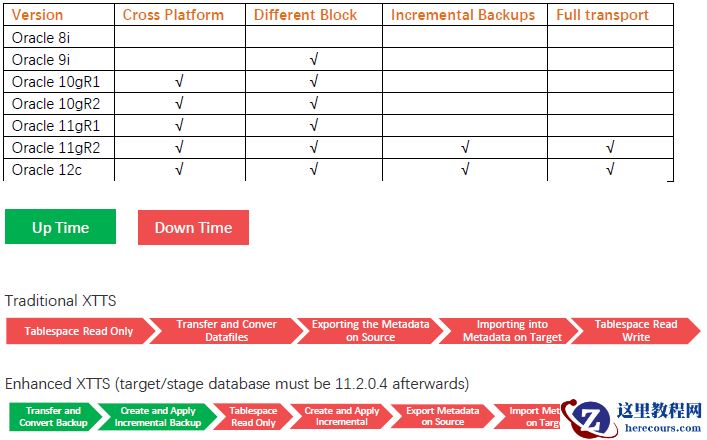 在 Oracle11gR2(推荐使用 11.2.0.4 及之后版本)以后,Oracle 推出了通过前滚数据文件,拷贝数据后再进行多次增量备份的 XTTS 来完成迁移过程,在这个过程中通过开启块跟踪特性,根据 SCN 号来执行一系列的增量备份,并且通过对块跟踪文件的扫描,来完成增量数据的增量备份应用,最后在通过一定的停机时间,在源库 read only 的状态下进行最后一次增量备份转换应用,使得整个迁移过程的停机时间同源库数据块的变化率成正比。这样大大的缩短了停机时间。为了减少正式的停机时间,oracle在xtts中引入了rman的增量备份前滚功能。通过一次又一次的增量备份,使停应用的时间主要包含四个方面:将表空间置为只读,最后进行一次增量前滚,元数据导入,数据文件校验。和传统的表空间传输相比,通过减少数据文件的传输时间,而大大减少了整体停机时间。平台+分布式存储”已然成为一大神技。
1.2、跨平台增量备份的主要步骤有:
1. 初始设置 2.准备阶段(源数据保持在线)
-
备份(level=0)要传输的表空间
将备份和其他必要的设置文件传输到目标系统
在目标系统中恢复数据文件的字节序
3. 前滚阶段(源数据保持在线 - 重复此阶段直到目标数据文件副本与源数据库相同)
-
在源系统上创建增量备份
将增量备份和其他必要的设置文件传输到目标系统
将增量备份转换为目标系统的字节序,并将备份应用于目标数据文件副本
重复上述步骤,直到准备好传输表空间
4. 传输阶段(源数据为只读)
-
修改源数据库中的表空间为只读状态
最后再次执行前滚阶段
这一步确保目标数据文件的副本与源数据库一致,并生成必要的导出文件。
由于增量备份大小较小,因此此步骤所需的时间明显比传统的XTTS方法在处理大量数据时要短。
使用数据泵把这个表空间的元数据导入至目标数据库
修改目标数据库中的表空间为可读写状态
1.3、XTTS全量迁移方法
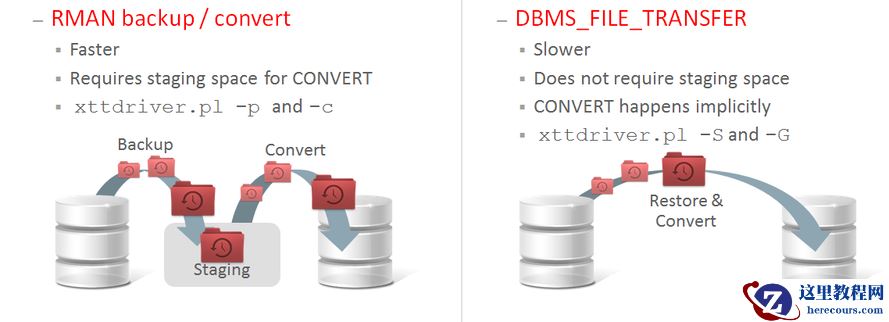
对于XTTS的全量操作,Oracle提供了2种方式来进行,分别如下: 1)dbms_file_transfer(DFT) -- (using xttdriver.pl -S and -G options)DBMS_FILE_TRANSFER 包是 Oracle 提供的一个用于复制二进制数据库文件或在数据库之间传输二进制文件的程序包,在 XTTS 迁移中,利用不同的参数进行数据文件传输转换完成迁移。dbms_file_transfer方法通过dbms_file_transfer.get_file()子程序,借助数据库链接将数据文件从源系统传输至目标系统。与RMAN方法相比,dbms_file_transfer具有以下优势:1.无需在源系统或目标系统上配置暂存区空间;2.数据文件在传输过程中自动完成格式转换,无需单独执行转换步骤。要求:目标端数据库版本必须是11.2.0.4以及更新的版本。如果数据库版本低于11.2.0.4(大于Oracle10R1),那么目标端环境,仍然需要安装11.2.0.4以及更新版本的临时环境,因为XTTS增量的核心脚本功能必须是基于11.2.0.4(+)版本。使用dbms_file_transfer方法需满足以下条件:
• 目标数据库需运行11.2.0.4版本。需注意增量转换主目录或实例不参与dbms_file_transfer文件传输• 源数据库中需创建指向数据文件存储位置的数据库目录对象• 目标数据库中需创建用于存放数据文件的数据库目录对象• 目标数据库中需配置指向源数据库的数据库链接2)RMAN(Recovery Manager )备份 -- (using xttdriver.pl -p and -c options)通过使用 rman-xttconvert 包提供的参数,对数据库进行基于表空间的备份,将备份产生的备份集写到本地或者 NFS 盘上,然后再通过 rman-xttconvert 包中包含的不同平台之间数据文件格式转换的包对进行数据文件格式转换,最后通过记录的表空间 FILE_ID 号生产元数据的导入脚本,通过 db_link 执行完成。RMAN备份方法通过在源系统上运行RMAN,对需要迁移的数据文件创建备份。随后必须手动将这些备份文件通过网络传输至目标系统。在目标系统上,RMAN会根据需要完成数据文件的格式转换。经过RMAN转换后的数据文件将被置于目标数据库最终使用的存储位置。在早期版本的xttdriver.pl脚本中,这是唯一支持的迁移方式。使用RMAN备份方法需满足以下条件:RMAN生成的数据文件副本需要在源系统和目标系统上分别配置中转区。在xtt.properties配置文件中,需通过以下参数指定中转路径:dfcopydir:源系统中转目录stageondest:目标系统中转目录数据文件完成格式转换后的最终存储位置,则通过storageondest参数在xtt.properties中定义。具体参数说明及容量规划指南,请参阅配置文件xtt.properties中的"参数描述"。下文将详细说明这两种迁移方式的操作细则,推荐优先采用dbms_file_transfer方法。
1.4、脚本rman_xttconvert_v3.zip
XTTS基于一组 rman-xttconvert_3.0 的脚本文件包(Mos 1389592.1)来实现跨平台的数据迁移,主要包含 Perl脚本xttdriver 脚本。xttdriver.pl 是备份、转换和增量应用的执行脚本,xtt.properties 是属性文件,其中包含 XTTS 配置的路径、参数等。脚本下载地址:11G - Reduce Transportable Tablespace Downtime using Cross Platform Incremental Backup (Doc ID 1389592.1)为了方便大家下载:我把脚本下载下来放到这里了。
 rman_xttconvert_v3.zip
1.5、脚本xttdriver.pl的命令参数选项
The following table describes the options available for the main supporting script xttdriver.pl.
| Option | Description |
|---|---|
| -S prepare source for transfer |
-S option is used only when Prepare phase method is dbms_file_transfer.Prepare step is run once on the source system during Phase 2A with the environment (ORACLE_HOME and ORACLE_SID) set to the source database. This step creates files xttnewdatafiles.txt and getfile.sql. |
| -G get datafiles from source |
-G option is used only when Prepare phase method is dbms_file_transfer.Get datafiles step is run once on the destination system during Phase 2A with the environment (ORACLE_HOME and ORACLE_SID) set to the destination database. The -S option must be run beforehand and files xttnewdatafiles.txt and getfile.sql transferred to the destination system.This option connects to the destination database and runs script getfile.sql. getfile.sql invokes dbms_file_transfer.get_file() subprogram for each datafile to transfer it from the source database directory object (defined by parameter srcdir) to the destination database directory object (defined by parameter dstdir) over a database link (defined by parameter srclink). |
| -p prepare source for backup |
-p option is used only when Prepare phase method is RMAN backup.Prepare step is run once on the source system during Phase 2B with the environment (ORACLE_HOME and ORACLE_SID) set to the source database. This step connects to the source database and runs the xttpreparesrc.sql script once for each tablespace to be transported, as configured in xtt.properties. xttpreparesrc.sql does the following:
|
| -c convert datafiles |
-c option is used only when Prepare phase method is RMAN backup.Convert datafiles step is run once on the destination system during Phase 2B with the environment (ORACLE_HOME and ORACLE_SID) set to the destination database. This step uses the rmanconvert.cmd file created in the Prepare step to convert the datafile copies to the proper endian format. Converted datafile copies are written on the destination system to the location specified by the parameter storageondest set in xtt.properties. |
| -i create incremental | Create incremental step is run one or more times on the source system with the environment (ORACLE_HOME and ORACLE_SID) set to the source database. This step reads the SCNs listed in $TMPDIR/xttplan.txt and generates an incremental backup that will be used to roll forward the datafile copies on the destination system. |
| -r rollforward datafiles | Rollforward datafiles step is run once for every incremental backup created with the environment (ORACLE_HOME and ORACLE_SID) set to the destination database. This step connects to the incremental convert instance using the parameters cnvinst_home and cnvinst_sid, converts the incremental backup pieces created by the Create Incremental step, then connects to the destination database and rolls forward the datafile copies by applying the incremental for each tablespace being transported. |
| -s determine new FROM_SCN | Determine new FROM_SCN step is run one or more times with the environment (ORACLE_HOME and ORACLE_SID) set to the source database. This step calculates the next FROM_SCN, records it in the file xttplan.txt, then uses that SCN when the next incremental backup is created in step 3.1. It reports the mapping of the new FROM_SCN to wall clock time to indicate how far behind the changes in the next incremental backup will be. |
| -e generate Data Pump TTS command | Generates Data Pump TTS command step which can be executed on the destination system. This command is executed on the source and the command file created can be transfered to the destination for execution.
This step creates the template of a Data Pump Import command that uses a network_link to import metadata of objects that are in the tablespaces being transported.It should be executed on the source and the resulting file transferred to the destination. |
| -d debug | -d option enables debug mode for xttdriver.pl and RMAN commands it executes. Debug mode can also be enabled by setting environment variable XTTDEBUG=1. |
1.6、xtt.properties文件参数介绍
The following table describes the parameters defined in the xtt.properties file that is used by xttdriver.pl.
| Parameter | Description | Example Setting |
|---|---|---|
| tablespaces | Comma-separated list of tablespaces to transport from source database to destination database. Must be a single line, any subsequent lines will not be read. | tablespaces=TS1,TS2需要传输的表空间。 |
| platformid | Source database platform id, obtained from V$DATABASE.PLATFORM_ID. |
platformid=2使用平台,要查询源库的select platform_id from v$database;中获取 |
| srcdir |
Directory object in the source database that defines where the source datafiles currently reside. Multiple locations can be used separated by ",". The srcdir to dstdir mapping can either be N:1 or N:N. i.e. there can be multiple source directories and the files will be written to a single destination directory, or files from a particular source directory can be written to a particular destination directory.This parameter is used only when Prepare phase method is dbms_file_transfer. |
srcdir=SOURCEDIRsrcdir=SRC1,SRC2当使用dbms_file_transfer时,表示源库存放数据文件的地方。 |
| dstdir |
Directory object in the destination database that defines where the destination datafiles will be created. If multiple source directories are used (srcdir), then multiple destinations can be defined so a particular source directory is written to a particular destination directory. This parameter is used only when Prepare phase method is dbms_file_transfer. |
dstdir=DESTDIRdstdir=DST1,DST2当使用dbms_file_transfer时,表示目标库存放数据文件的地方。 |
| srclink |
Database link in the destination database that refers to the source database. Datafiles will be transferred over this database link using dbms_file_transfer.This parameter is used only when Prepare phase method is dbms_file_transfer. |
srclink=TTSLINK |
| dfcopydir |
Location on the source system where datafile copies are created during the "-p prepare" step. This location must have sufficient free space to hold copies of all datafiles being transported. This location may be an NFS-mounted filesystem that is shared with the destination system, in which case it should reference the same NFS location as the stageondest parameter for the destination system. See Note 359515.1 for mount option guidelines.This parameter is used only when Prepare phase method is RMAN backup. |
dfcopydir=/stage_source源库用于存放备份的文件地方,使用rman时,需要空间比较大,要根据自己库的大小预留。 |
| backupformat | Location on the source system where incremental backups are created. This location must have sufficient free space to hold the incremental backups created for one iteration through the process documented above. This location may be an NFS-mounted filesystem that is shared with the destination system, in which case it should reference the same NFS location as the stageondest parameter for the destination system. | backupformat=/stage_source源库用于存增量放备份的文件地方。 |
| stageondest | Location on the destination system where datafile copies are placed by the user when they are transferred manually from the source system. This location must have sufficient free space to hold copies of all datafiles being transported. This is also the location from where datafiles copies and incremental backups are read when they are converted in the "-c conversion of datafiles" and "-r roll forward datafiles" steps. This location may be a DBFS-mounted filesystem. This location may be an NFS-mounted filesystem that is shared with the source system, in which case it should reference the same NFS location as the dfcopydir and backupformat parameters for the source system. See Note 359515.1 for mount option guidelines. | stageondest=/stage_dest目标库用于存放备份的文件地方和增量备份文件的地方,需要空间比较大,要根据自己库的大小预留。 |
| storageondest |
Location on the destination system where the converted datafile copies will be written during the "-c conversion of datafiles" step. This location must have sufficient free space to permanently hold the datafiles that are transported. This is the final location of the datafiles where they will be used by the destination database.This parameter is used only when Prepare phase method is RMAN backup. |
storageondest=+DATA - or - storageondest=/oradata/prod/%U数据文件存储的地方。 |
| backupondest | Location on the destination system where converted incremental backups on the destination system will be written during the "-r roll forward datafiles" step. This location must have sufficient free space to hold the incremental backups created for one iteration through the process documented above. NOTE: If this is set to an ASM location then define properties asm_home and asm_sid below. If this is set to a file system location, then comment out asm_home and asm_sid parameters below. | backupondest=+RECO |
| cnvinst_home |
Only set this parameter if a separate incremental convert home is in use.ORACLE_HOME of the incremental convert instance that runs on the destination system. |
cnvinst_home=/u01/app/oracle/product/11.2.0.4/xtt_home |
| cnvinst_sid |
Only set this parameter if a separate incremental convert home is in use.ORACLE_SID of the incremental convert instance that runs on the destination system. |
cnvinst_sid=xtt |
| asm_home | ORACLE_HOME for the ASM instance that runs on the destination system. NOTE: If backupondest is set to a file system location, then comment out both asm_home and asm_sid. | asm_home=/u01/app/11.2.0.4/grid |
| asm_sid | ORACLE_SID for the ASM instance that runs on the destination system. | asm_sid=+ASM1 |
| parallel |
Defines the degree of parallelism set in the RMAN CONVERT command file rmanconvert.cmd. This file is created during the prepare step and used by RMAN in the convert datafiles step to convert the datafile copies on the destination system. If this parameter is unset, xttdriver.pl uses parallel=8.NOTE: RMAN parallelism used for the datafile copies created in the RMAN Backup prepare phase and the incremental backup created in the rollforward phase is controlled by the RMAN configuration on the source system. It is not controlled by this parameter. |
parallel=3 |
| rollparallel |
Defines the level of parallelism for the -r roll forward operation. |
rollparallel=2 |
| getfileparallel |
Defines the level of parallelism for the -G operationDefault value is 1. Maximum supported value is 8. |
getfileparallel=4 |
1.6、rman_xttconvert_v3文件参数介绍
xttplan.txt - containing the tablespace names, their current SCNs and their datafile numbers xttnewdatafiles.txt - containing the tablespace names, datafile numbers, the destination directory object name and the source filenames getfile.sql - The PL/SQL script(formatting ours) that will be used at the destination to get the datafilesfrom the source xttpreparesrc.sql - the PL/SQL scriptused to create the files in this step xttprepareNaNd - the command tsbkupmap.txt - containing the tablespace names, datafile numbers and the incremental backup pieces incrbackups.txt - containing the actual location of the incremental backup pieces rmanincrNaNd - containing the RMAN scripts used to create the incremental backups. xttdetnewfromscnsrc.sql - the PL/SQLscript used to create the files in this stepxttplan.txt.new- after the first run of'xttdriver.pl -i' this is just a copy of the xttplan.txt
两个主要的支持脚本文件如下:
Perl 脚本 xttdriver.pl 用于执行 XTTS 跨平台增量备份的主要步骤。
参数文件 xtt.properties:存储站点特定配置的文件。
二、XTTS迁移示例
| 源库 | 目标库 | |
| IP 地址 | 192.168.0.100 | 192.168.0.101 |
| 数据库版本 | Oracle Database 19c Version 19.22.0.0.0 | Oracle Database 19c Version 19.22.0.0.0 |
| 平台 | Red Hat Enterprise Linux Server release 7.9 (Maipo) | Red Hat Enterprise Linux Server release 7.9 (Maipo) |
| 字节序 | Little | Little |
| 字符集 | AMERICAN_AMERICA.ZHS16GBK | AMERICAN_AMERICA.ZHS16GBK |
| 迁移表空间 | TS1,TS2 | TS1,TS2 |
2.1、数据库检查
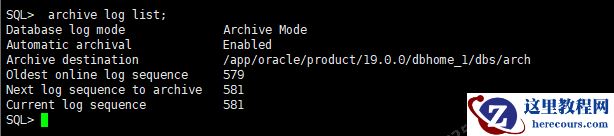
2.1.1、数据库归档情况
SQL> archive log list;
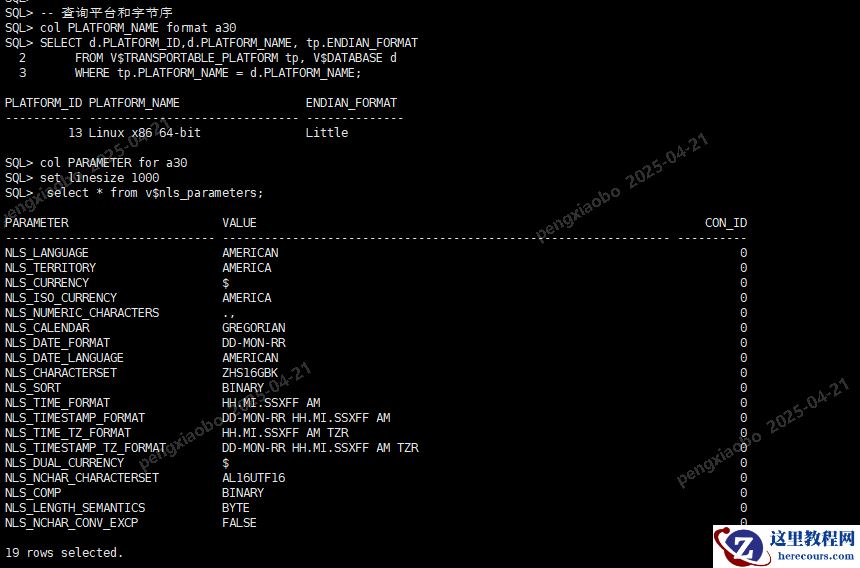
2.1.2、数据库字节序和字符集
-- 查询平台和字节序col PLATFORM_NAME format a30SELECT d.PLATFORM_ID,d.PLATFORM_NAME, tp.ENDIAN_FORMAT FROM V$TRANSPORTABLE_PLATFORM tp, V$DATABASE d WHERE tp.PLATFORM_NAME = d.PLATFORM_NAME;-- 查询字符集col PARAMETER for a30set linesize 1000select userenv('language') from dual;
2.1.3、获取数据库业务表空间和对象信息
--获取除系统表空间的信息 select TABLESPACE_NAME,BLOCK_SIZE,CONTENTS,STATUSfrom dba_tablespaceswhere tablespace_name not in ('SYSTEM','SYSAUX','UNDOTBS1','TEMP','EXAMPLE');--获取对象信息select owner,tablespace_name,count(*)from dba_segments where tablespace_name not in ('SYSTEM','SYSAUX','UNDOTBS1','TEMP','EXAMPLE')group by owner,tablespace_name order by tablespace_name;
2.1.4、检查表空间时候自包含
需要传输的表空间为,要确保表空间为自包含的表空间。 exec dbms_tts.transport_set_check('TS1',true); exec dbms_tts.transport_set_check('TS2',true);-- 查看结果,结果为空,表示为自包含col violations for a100select * from transport_set_violations;在表空间传输的中,要求表空间集为自包含的,自包含表示用于传输的内部表空间集没有引用指向外部表空间集。
2.1.5、获取迁移用户的权限信息
--获取创建业务用户的脚本信息SELECT DBMS_METADATA.GET_DDL('USER', USERNAME) DDL_SQL FROM DBA_USERS WHERE USERNAME IN (select owner from dba_segments where tablespace_name not in ('SYSTEM','SYSAUX','UNDOTBS1','TEMP','EXAMPLE') group by owner,tablespace_name) AND USERNAME NOT IN ('SYS');--获取业务用户的信息权限信息SELECT DBMS_METADATA.GET_GRANTED_DDL('SYSTEM_GRANT', USERNAME) DDL_SQL FROM DBA_USERS WHERE USERNAME IN (select owner from dba_segments where tablespace_name not in ('SYSTEM','SYSAUX','UNDOTBS1','TEMP','EXAMPLE') group by owner,tablespace_name) AND USERNAME NOT IN ('SYS');--获取业务用户的角色权限信息SELECT DBMS_METADATA.GET_GRANTED_DDL('ROLE_GRANT', USERNAME) DDL_SQL FROM DBA_USERS WHERE USERNAME IN (select owner from dba_segments where tablespace_name not in ('SYSTEM','SYSAUX','UNDOTBS1','TEMP','EXAMPLE') group by owner,tablespace_name) AND USERNAME NOT IN ('SYS');--获取业务用户的对象权限信息SELECT DBMS_METADATA.GET_GRANTED_DDL('OBJECT_GRANT', USERNAME) DDL_SQL FROM DBA_USERS WHERE USERNAME IN (select owner from dba_segments where tablespace_name not in ('SYSTEM','SYSAUX','UNDOTBS1','TEMP','EXAMPLE') group by owner,tablespace_name) AND USERNAME NOT IN ('SYS');
2.1.6、开启块改变跟踪功能
Block change tracking 进程记录自从上一次0级备份以来数据块的变化,并把这些信息记录在跟踪文件中。RMAN 使用这个文件判断增量备份中需要备份的变更数据。这极大的提高了备份性能和速度,RMAN 可以不再扫描整个文件以查找变更数据。test SQL>ALTER DATABASE ENABLE BLOCK CHANGE TRACKING USING FILE '/oradata/test/changetracking.chg';
2.1.7、情况recyclebin
sqlplus / as sysdbapurge dba_recyclebin;
2.1.8、目标端补丁情况
建议目标端打最新的PSU补丁。 SQL> SELECT * FROM dba_registry_history; ACTION_TIME ACTION NAMESPACE VERSION ID COMMENTS BUNDLE_SERIES --------------------------------------------------------------------------- ------------------------------ ------------------------------ ------------------------------ ---------- --------------------------------------------------------------------------------------------------------------------------------------------------------------------------------------------------------------------------------------------------------------- ------------------------------ BOOTSTRAP DATAPATCH 19 RDBMS_19.22.0.0.0DBRU_LINUX.X64_231229.1 11-JUL-24 08.55.13.610320 AM RU_APPLY SERVER 19.0.0.0.0 Patch applied on 19.22.0.0.0: Release_Update - 240104023954
2.1.9、组件检查
SQL> col status for a20 SQL> col comp_name for a40 SQL> select comp_id,comp_name,version,status from dba_registry; COMP_ID COMP_NAME VERSION STATUS ------------------------------ ---------------------------------------- ------------------------------ -------------------- CATALOG Oracle Database Catalog Views 19.0.0.0.0 VALID CATPROC Oracle Database Packages and Types 19.0.0.0.0 VALID RAC Oracle Real Application Clusters 19.0.0.0.0 OPTION OFF JAVAVM JServer JAVA Virtual Machine 19.0.0.0.0 VALID XML Oracle XDK 19.0.0.0.0 VALID CATJAVA Oracle Database Java Packages 19.0.0.0.0 VALID APS OLAP Analytic Workspace 19.0.0.0.0 VALID XDB Oracle XML Database 19.0.0.0.0 VALID OWM Oracle Workspace Manager 19.0.0.0.0 VALID CONTEXT Oracle Text 19.0.0.0.0 VALID ORDIM Oracle Multimedia 19.0.0.0.0 VALID SDO Spatial 19.0.0.0.0 VALID XOQ Oracle OLAP API 19.0.0.0.0 VALID OLS Oracle Label Security 19.0.0.0.0 VALID APEX Oracle Application Express 18.2.0.00.12 VALID DV Oracle Database Vault 19.0.0.0.0 VALID 16 rows selected.
2.1.10、迁移对象个数统计
-- 需要迁移的对象和数量select owner, object_type, count(*) from dba_objectswhere object_name not like 'BIN%' and owner in ('TS1','TS2')group by owner, object_type order by 1,2 desc; -- 无效对象select owner, object_type, count(*) from dba_objectswhere status <> 'VALID' and owner in ('TS1','TS2')group by owner, object_type order by 1, 2 desc; -- 非业务用户下是否有业务数据SELECT * FROM dba_objects d where d.created >= sysdate - 10 and d.object_name not like 'WR%' and d.owner IN ('SYS','SYSTEM') order by d.created desc;
2.2、rman方式全量迁移
在此步骤中,表空间的数据文件将从源端数据库传输到目标端数据库,本步骤只需要执行一次,数据文件传输过程中不影响源端数据库正常访问。此处有2种方法:dbms_file_transfer和rman方法。对于数据文件很多的情况下来说,dbms_file_transfer是推荐的方法。此处使用rman方式。
2.2.1、安装部署xtts脚本
mkdir -p /oradata/xtts/inc_bk mkdir -p /oradata/xtts/df_bk unzip rman_xttconvert_v3.zip
2.2.2、修改xtt.properties文件
vi xtt.propertiestablespaces=TS1,TS2platformid=13#srcdir=SOURCEDIR#dstdir=DESTDIR#srclink=ttslinkdfcopydir=/oradata/xtts/df_bkbackupformat=/oradata/xtts/inc_bkstageondest=/oradata/xtts/df_bkstorageondest=/oradata/pripdbbackupondest=/oradata/xtts/inc_bk#cnvinst_home=/oracle/app/oracle/product/11.2.0/dbhome_1#cnvinst_sid=pripdb
2.2.3、源端调用 xttdriver.pl -p做迁移准备
首先,确保源库处于OPEN阶段,所有表空间都处于online状态: SQL> select tablespace_name,status from dba_tablespaces; TABLESPACE_NAME STATUS ------------------------------ -------------------- SYSTEM ONLINE SYSAUX ONLINE UNDOTBS1 ONLINE TEMP ONLINE USERS ONLINE TS1 ONLINE TS2 ONLINE 7 rows selected. 如果表空间的状态不是online,请使用下面的sql生产的sql进行修改。select 'ALTER TABLESPACE '||tablespace_name||' READ WRITE;' exec_sqlfrom dba_tablespaceswhere tablespace_name not in ('SYSTEM','SYSAUX','UNDOTBS1','TEMP');在源端执行 xttdriver.pl -p做迁移准备:cd /home/oracle/scriptsexport TMPDIR=/home/oracle/scripts$ORACLE_HOME/perl/bin/perl xttdriver.pl -p
|
============================================================ trace file is /home/oracle/xtts/prepare_Apr21_Mon_13_20_21_562//Apr21_Mon_13_20_21_562_.log ============================================================= -------------------------------------------------------------------- Parsing properties -------------------------------------------------------------------- -------------------------------------------------------------------- Done parsing properties -------------------------------------------------------------------- -------------------------------------------------------------------- Checking properties -------------------------------------------------------------------- -------------------------------------------------------------------- Done checking properties -------------------------------------------------------------------- -------------------------------------------------------------------- Starting prepare phase -------------------------------------------------------------------- Prepare source for Tablespaces: 'TS1' /oradata/xtts/df_bk xttpreparesrc.sql for 'TS1' started at Mon Apr 11 13:20:21 2025 xttpreparesrc.sql for ended at Mon Apr 11 13:20:21 2025 Prepare source for Tablespaces: '''' /oradata/xtts/df_bk xttpreparesrc.sql for '''' started atMon Apr 12 09:16:12 2025 xttpreparesrc.sql for ended at Mon Apr 12 09:16:13 2025 Prepare source for Tablespaces: '''' /oradata/xtts/df_bk xttpreparesrc.sql for '''' started at Mon Apr 12 09:16:13 2025 xttpreparesrc.sql for ended at Mon Apr 12 09:16:13 2025 Prepare source for Tablespaces: '''' /oradata/xtts/df_bk xttpreparesrc.sql for '''' started at Mon Apr 12 09:16:14 2025 xttpreparesrc.sql for ended at Mon Apr 12 09:16:14 2025 -------------------------------------------------------------------- Done with prepare phase -------------------------------------------------------------------- -------------------------------------------------------------------- Find list of datafiles in system -------------------------------------------------------------------- -------------------------------------------------------------------- Done finding list of datafiles in system -------------------------------------------------------------------- |
1、此过程会将相关的表空间文件执行一次镜像拷贝过程,可以认为是全备,可以在rman中执行“list copy;”查看。此处会把数据文件拷贝一份到/u01/app/xtts/df_bk目录。需要注意目录/u01/app/xtts/df_bk的空间。2、会在/home/oracle/scripts 目录下产生几个文件,xttplan.txt、rmanconvert.cmd和xttnewdatafiles.txt:其中 xttplan.txt 文件中的内容如下: TS1:::6057295964526 5 6该文件中的数值代表数据库的 SCN。如果后面再次运行脚本进行增量操作时,该值会发现改变。脚本rmanconvert.cmd的内容:脚本是 perl 脚本产生的 rman convert 脚本,需要将该脚本传递到目标端主机。注意,上述脚本文件格式需要注意,同时并行度是默认的,可以进行调整。host 'echo ts::TSPRIPDB'; convert from platform 'Linux x86 64-bit' datafile '/oradata/xtts/df_bk/TSPRIPDB_5.tf' ,'/oradata/xtts/df_bk/TSPRIPDB_6.tf' format '/oradata/pripdb//%N_%f.dbf' parallelism 8;
2.2.4、将源端的数据文件副本和rmanconvert.cmd传到目标端
将数据文件副本和rmanconvert.cmd文件拷贝到目标端。注意目标端的剩余空间: scp /oradata/xtts/df_bk/* 192.168.0.101:/oradata/xtts/df_bk/ scp /home/oracle/scripts/rmanconvert.cmd 192.168.0.101:/home/oracle/scripts/
2.2.5、在目标端对数据文件拷贝进行字节序的转换
cd /home/oracle/scripts export TMPDIR=/home/oracle/scripts $ORACLE_HOME/perl/bin/perl xttdriver.pl -c 转换后的数据文件拷贝会出现在 xtt.properties 文件中定义的参数 storageondest 下,即最终的数据文件目录。
|
过程输出省略因为我平台的字节序是相同的,因此不需要转换。 |
2.3、rman方式XTTS 第1~n次增量前滚
在此阶段,在源端做增量数据,从源数据库创建增量备份(内部其实是仍然使用rman增量备份), 将其传输到目标端,在目标端转换为目标系统Endian格式,然后应用于转换后的目标数据文件副本, 将其前滚。此阶段可以多次重复运行。每次连续的增量备份都应该比以前的增量备份花费更少的时间, 并且将使目标数据文件副本与源数据库更加一致。这样对于目标库上的数据文件拷贝,通过一次次应用 增量数据就可以逐渐追上源库的生产数据。 这个阶段中的步骤可以运行多次,以使目标中的datafiles更接近源文件的时间/ SCN。 在此阶段,源数据库完全可访问。
2.3.1、模拟产生增量数据变化
create table test_inc tablespace ts1 as select * from dba_objects;
2.3.2、增量数据备份
cd /home/oracle/scriptsexport TMPDIR=/home/oracle/scripts$ORACLE_HOME/perl/bin/perl xttdriver.pl -i上面的操作还会在 TMPDIR 目录下产生xttplan.txt.new、tsbkupmap.txt和incrbackups.txt文件:
2.3.3、将增量备份的数据备传到目标端
这里传递增量数据的时候,还需要将源端/home/oracle/scripts/目录下的 xttplan.txt、 tsbkupmap.txt 和incrbackups.txt文件都传输到目标端。每当你进行一次增量的备份操作,这 3个文件的内容都会发现变化 。 每一次增量操作之后,都需要将这 3个文件传到目标端数据库的 /home/oracle/scripts/目录中。 -- 注意:增量内容应该拷贝到目标端的全量备份路径下 scp /oradata/xtts/inc_bk/* 192.168.0.101:/oradata/xtts/df_bk/ scp /home/oracle/scripts/xttplan.txt 192.168.0.101:/home/oracle/scripts/ scp /home/oracle/scripts/tsbkupmap.txt 192.168.0.101:/home/oracle/scripts/ scp /home/oracle/scripts/incrbackups.txt 192.168.0.101:/home/oracle/scripts/
2.3.4、在目标库上应用增量备份的数据
export XTTDEBUG=1 cd /home/oracle/scripts export TMPDIR=/home/oracle/scripts $ORACLE_HOME/perl/bin/perl xttdriver.pl -r 如果一套库上有多个实例的话,在执行该步骤之前,需要对环境变量进行确认,如检查当前ORACLE_SID是否是 需要执行的SID,否则可能会恢复到其他实例上。(并非是真实的恢复,因为其他实例跟这个备份集没有任何关系, 但恢复的过程会在其他实例上进行一遍,如关闭/启动数据库,包括增量恢复的日志都会在另一个数据库上显示。) 如果发生了这种事情,不用紧张,调整好环境变量,再执行一次perl xttdriver.pl –r即可。误操作的实例不受影响。 注: 1.每次增量时都必须复制xttplan.txt、tsbkupmap.txt和incrbackups.txt,因为它们的内容在每次增量时都是不同的。 2.不修改、不复制文件incrbackups.txt.new。 3.该过程每次执行都会重启目标数据库。 4.如果重新开始,那么需要删除/home/oracle/scripts/FAILED 5.XTTDEBUG=1为打开debug模式,进行调试。Debug 模式可以打印更多的屏幕输出,并且开启 RMAN 的 debug 模式。 要启用 debug 模式,或者以 -d 参数运行 xttdriver.pl 或者在运行 xttdriver.pl 前设置环境变量 XTTDEBUG=1。 这个参数接受3种级别,-d[1/2/3]级别3会显示最多的信息。
2.3.5、源端确定下一个增量备份的FROM_SCN
cd /home/oracle/scripts export TMPDIR=/home/oracle/scripts $ORACLE_HOME/perl/bin/perl xttdriver.pl -s 该步骤会计算下一个FROM_SCN,将其记录在xttplan.txt文件中,然后在创建下一个增量备份时使用该SCN。 该步骤会将-i时生成的xttplan.txt.new改名为xttplan.txt,并将原来的xttplan.txt备份。 建议在目标端每次做完recover动作后,源端就执行一次该命令,以免遗忘。
2.4、rman方式XTTS最后一次增量前滚
2.4.1、将表空间置为只读状态
假设我们进行了多次增量操作之后,在停机时间的时候,再将源端数据库中需要传输的表空间设置为只读模式 :select 'ALTER TABLESPACE '||name||' READ ONLY;' exec_sqlfrom v$tablespace where NAME not in ('SYSTEM','SYSAUX','UNDOTBS1','TEMP'); SQL> ALTER TABLESPACE TS1 READ ONLY; SQL> ALTER TABLESPACE TS2 READ ONLY;SQL> select tablespace_name,status from dba_tablespaces; TABLESPACE_NAME STATUS------------------------------------------------------------ ------------------SYSTEM ONLINESYSAUX ONLINEUNDOTBS1 ONLINETEMP ONLINEUSERS ONLINEEXAMPLE ONLINETS1 READ ONLYTS2 READ ONLY
2.4.2、做最后一次增量数据备份
首先对上一次的增量备份目录做迁移: mv /oradata/xtts/inc_bk /oradata/xtts/inc_bk1 mkdir -p /oradata/xtts/inc_bk 开始做增量备份: cd /home/oracle/scripts export TMPDIR=/home/oracle/scripts $ORACLE_HOME/perl/bin/perl xttdriver.pl -i
2.4.3、将最后一次增量数据传输到目标机器
这里传递增量数据的时候,还需要将源端/home/oracle/scripts/目录下的 xttplan.txt、 tsbkupmap.txt和incrbackups.txt文件都传输到目标端。每当你进行一次增量的备份操作,这 3个文件的内容都会发现变化 。 每一次增量操作之后,都需要将这 3个文件传到目标端数据库的 /home/oracle/scripts/目录中。 -- 注意:增量内容应该拷贝到目标端的全量备份路径下 scp /oradata/xtts/inc_bk/* 192.168.0.101:/oradata/xtts/df_bk/ scp /home/oracle/scripts/xttplan.txt 192.168.0.101:/home/oracle/scripts/ scp /home/oracle/scripts/tsbkupmap.txt 192.168.0.101:/home/oracle/scripts/ scp /home/oracle/scripts/incrbackups.txt 192.168.0.101:/home/oracle/scripts/
2.4.4、恢复最后一次的增量备份
cd /home/oracle/scriptsexport TMPDIR=/home/oracle/scripts$ORACLE_HOME/perl/bin/perl xttdriver.pl -r
2.5、迁移元数据
在导出时,TRANSPORT_TABLESPACES参数需要的表空间要写全,别遗漏。在目标端进行IMPDP时,transport_datafiles需要将所有的数据文件添加进去。如果数据文件很多,人为添加容易出错,可以使用perl xttdriver.pl –e获取全部数据文件列表。
2.5.1、创建业务用户
create user testts1 identified by testts1;create user testts2 identified by testts2;grant dba to testts1, testts2;
2.5.2、导入元数据
可以使用导出和导入分开来执行,也可以直接通过network_link来做远程导入,而不需要做导出操作:-- 在目标端可以执行如下命令生成impdp,命令在xttplugin.txt文件$ cd /home/oracle/scripts$ export TMPDIR=/home/oracle/scripts$ $ORACLE_HOME/perl/bin/perl xttdriver.pl -e
2.5.3、创建dblink
-- 目标端创建dblink create public database link ttslink connect to system identified by testdbapw using '(DESCRIPTION = (ADDRESS_LIST = (ADDRESS = (PROTOCOL = TCP)(HOST = 192.168.0.101 )(PORT = 1521)) ) (CONNECT_DATA = (SERVICE_NAME = test) ) )';
2.5.4、导入元数据
可以使用导出和导入分开来执行,也可以直接通过network_link来做远程导入,而不需要做导出操作: -- 利用dblink直接迁移元数据,这里只会迁移表、索引、约束等,因为其它对象存储在系统表空间中 impdp '"/ as sysdba"' directory=DATA_PUMP_DIR logfile=imp_xtts.log \ network_link=ttslink transport_full_check=no \ EXCLUDE=STATISTICS \ transport_tablespaces=TS1,TS2 \ transport_datafiles='/oradata/test/TS001.dbf','/oradata/test/TS002.dbf'
2.5.5、导入存储过程、触发器、函数、包、视图、序列
-- 导入存储过程、触发器、函数、包、视图、序列impdp '"/ as sysdba"' directory=DATA_PUMP_DIR \network_link=ttslink schemas=TS1,TS2 content=metadata_only exclude=index,table,constraint parallel=8
2.5.6、导入公共同义词和dblink等其它对象
-- 导入公共同义词set long 9999select dbms_metadata.get_ddl('SYNONYM',SYNONYM_NAME,OWNER) FROM dba_synonyms where owner='PUBLIC' and table_owner in ('LHR','XXT'); -- 导入dblinkset long 9999select dbms_metadata.get_ddl('DB_LINK',DB_LINK,OWNER) FROM DBA_DB_LINKS;
2.5.7、目标库的表空间修改为读写模式
SQL> select 'ALTER TABLESPACE '||name||' READ WRITE;' exec_sql from v$tablespace where NAME not in ('SYSTEM','SYSAUX','UNDOTBS1','TEMP'); SQL> ALTER TABLESPACE TS1 READ WRITE; SQL> ALTER TABLESPACE TS2 READ WRITE; SQL> select tablespace_name,status from dba_tablespaces;
2.6、迁移后总结
2.6.1、查看源端、目标端的数据一致性
SQL>select count(*) from test_inc; SQL>select owner, object_type, count(*) from dba_objectswhere object_name not like 'BIN%' and owner in ('TS1','TS2')group by owner, object_typeorder by 1,2 desc; SQL>select owner, object_type, count(*) from dba_objectswhere status <> 'VALID' and owner in ('TS1','TS2')group by owner, object_typeorder by 1, 2 desc;
2.6.2、校验数据文件完整性
运行RMAN,通过运行VALIDATE TABLESPACE检查物理和逻辑块损坏情况,如下所示: RMAN> validate tablespace TS1,TS2 check logical;
2.6.3、收集统计信息
SQL>exec dbms_stats.gather_database_stats(degree => 4); SQL>exec dbms_stats.gather_dictionary_stats(degree => 4); SQL> exec dbms_stats.gather_fixed_objects_stats();
总结
1、若使用rman方式,则源端和目标端的文件系统需要留有足够的空间 2、如果使用dbms_file_Transfer,那么dbms_file_Transfer准备阶段方法要求目标数据库为11.2.0.4。 如果目标端是11.2.0.3或更早的版本,那么需要配置一个增量转换实例。 3、若执行xttdriver.pl脚本报错,要想重新执行,那么需要删除文件FAILED 4、每次执行增量恢复xttdriver.pl -r时,都会重启目标端数据库。如果目标端是一个在用的生产库, 那么需要创建一个临时实例,这样就不会影响生产库。 5、XTTS停机的关键的时间点是增量的备份和恢复的时间,以及元数据的导入时间。 所以,可以通过如下手段减少XTTS的停机时间: 在源库开启块改变跟踪功能BCT 开启并行备份,例如:RMAN> configure device type disk parallelism 8; 提升impdp导入元数据库的速度,例如排除统计信息,开启并行等 6、迁移时尽量减少增量的批次,因为操作批次越多越容易出错 7、导入元数据时,需要分2次导入,第1次导入表、索引等, 第2次导入存储过程、触发器、函数、包、同义词、dblink、序列等。 8、只有被迁移表空间里物理存储的数据库对象才会被拷贝至目标系统; 如果要迁移存储在其它表空间的其它类型的对象(比如存储在 SYSTEM 表空间内的 pl/sql 对象,sequences 等), 你可以使用数据泵来拷贝这些对象至目标系统。
编辑推荐:
- 第38期 Oracle使用跨平台增量备份减少可传输表空间的停机时间之XTTS(使用rman方式)03-03
- [20250504]drop table的恢复思路.txt03-03
- [20250505]drop table的恢复.txt03-03
- 内部讲话曝光!刘强东声称京东外卖利润率不高过 5%,是假道德还是真商战?03-03
- [20250505]建表指定特定的数据文件是否可行.txt03-03
- [20250415]21c下测试软软解析与大量绑定变量的情况.txt03-03
- [20250418]绑定变量太多的分析(21c).txt03-03
- 惊天骗局曝光:“水果第一股”爆雷,多名高管被抓,还有员工打卡等待发工资03-03
相关推荐
-

-
-
-
-
-
-
-
-
-
-
-
-
-
-

雷神推出 MIX PRO II 迷你主机:基于 Ultra 200H,玻璃上盖 + ARGB 灯效
2 月 9 日消息,雷神 (THUNDEROBOT) 现已宣布推出基于英
-

制造商 Musnap 推出彩色墨水屏电纸书 Ocean C:支持手写笔、第三方安卓应用
2 月 10 日消息,制造商 Musnap 现已在海外推出一款 Oce
热文推荐
- 第38期 Oracle使用跨平台增量备份减少可传输表空间的停机时间之XTTS(使用rman方式)
- 内部讲话曝光!刘强东声称京东外卖利润率不高过 5%,是假道德还是真商战?
内部讲话曝光!刘强东声称京东外卖利润率不高过 5%,是假道德还是真商战?
26-03-03 - 惊天骗局曝光:“水果第一股”爆雷,多名高管被抓,还有员工打卡等待发工资
惊天骗局曝光:“水果第一股”爆雷,多名高管被抓,还有员工打卡等待发工资
26-03-03 - [20250418]绑定变量太多的限制.txt
![[20250418]绑定变量太多的限制.txt](/d/file/efpub/2026/03-03/small85d6e1154f1b9627b9d78570d310ec4c1772545943.jpg "[20250418]绑定变量太多的限制.txt")
[20250418]绑定变量太多的限制.txt
26-03-03 - rac防火墙未禁用服务器重启导致二节点启动异常

rac防火墙未禁用服务器重启导致二节点启动异常
26-03-03 - 数据库管理-第317期 Oracle 12.2打补丁又出问题了(20250421)
- 大学生就业新方向:山姆代购,月入过万
大学生就业新方向:山姆代购,月入过万
26-03-03 - 业务高峰期ddl带崩数据库
业务高峰期ddl带崩数据库
26-03-03 - 利润暴跌30%,高管年薪狂涨84倍:谁在掏空贝壳找房?
利润暴跌30%,高管年薪狂涨84倍:谁在掏空贝壳找房?
26-03-03 - schedule job 新增删除操作简单研究

schedule job 新增删除操作简单研究
26-03-03