
我在维护数据库时,发现alter日志报如下错误:
Errors in file /app/oracle/diag/rdbms/ogg/ogg/trace/ogg_rfs_1315163.trc:ORA-19815: WARNING: db_recovery_file_dest_size of 214748364800 bytes is 100.00% used, and has 0 remaining bytes available.2025-07-14T09:23:47.283112+08:00************************************************************************You have following choices to free up space from recovery area:1. Consider changing RMAN RETENTION POLICY. If you are using Data Guard, then consider changing RMAN ARCHIVELOG DELETION POLICY.2. Back up files to tertiary device such as tape using RMAN BACKUP RECOVERY AREA command.3. Add disk space and increase db_recovery_file_dest_size parameter to reflect the new space.4. Delete unnecessary files using RMAN DELETE command. If an operating system command was used to delete files, then use RMAN CROSSCHECK and DELETE EXPIRED commands.************************************************************************Reclaimable space = 0 Available space = 0 看到这个错误的朋友都不会陌生,肯定是和归档日志有关,归档日志满了,或者归档大小设置的不合理。我们查看select * from v$recovery_area_usage;果然,达到100%了。很多朋友认为这样很好处理,删除过期的归档日志,或者设置db_recovery_file_dest_size的大小就可以了。
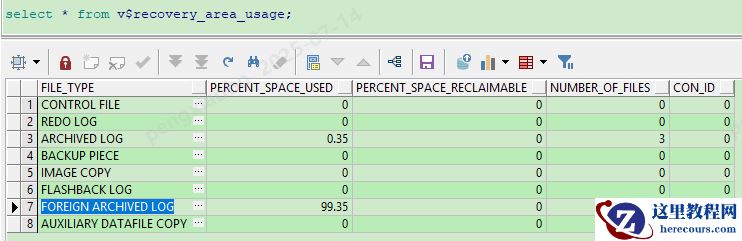 朋友,请看清楚,这里日志是FOREIGN ARCHIVED LOG 到达了99%了。在rman中执行如何清楚的命令是不好用的。
crosscheck backup;
crosscheck archivelog all;
crosscheck backup;
delete noprompt expired backup;
delete noprompt obsolete ;
delete noprompt expired archivelog all;
那么我们该如何清理
FOREIGN ARCHIVED LOG的空间那。
解决方案:
OREIGN ARCHIVED LOG是外部数据库传输过来的日志。
如果数据库正在挖掘外部数据库(如逻辑备用数据库或Streams数据库)的重做日志,通常会创建外部存档日志文件。一旦流进程完成挖掘,这些外部存档的日志文件将被清除。如果
挖掘存在问题并且没有进行,那么这些档案将保存在FRA中。但是,用户可以使用以下RMAN命令选择覆盖并删除它:
RMAN> delete foreign archivelog all;
朋友,请看清楚,这里日志是FOREIGN ARCHIVED LOG 到达了99%了。在rman中执行如何清楚的命令是不好用的。
crosscheck backup;
crosscheck archivelog all;
crosscheck backup;
delete noprompt expired backup;
delete noprompt obsolete ;
delete noprompt expired archivelog all;
那么我们该如何清理
FOREIGN ARCHIVED LOG的空间那。
解决方案:
OREIGN ARCHIVED LOG是外部数据库传输过来的日志。
如果数据库正在挖掘外部数据库(如逻辑备用数据库或Streams数据库)的重做日志,通常会创建外部存档日志文件。一旦流进程完成挖掘,这些外部存档的日志文件将被清除。如果
挖掘存在问题并且没有进行,那么这些档案将保存在FRA中。但是,用户可以使用以下RMAN命令选择覆盖并删除它:
RMAN> delete foreign archivelog all;
第44期 使用什么命令能删除 FOREIGN ARCHIVED LOG
来源:这里教程网
时间:2026-03-03 22:20:08
作者:
编辑推荐:
下一篇:
相关推荐
-

-
-
-
-
-
-
-
-
-
-
-
-
-
-

雷神推出 MIX PRO II 迷你主机:基于 Ultra 200H,玻璃上盖 + ARGB 灯效
2 月 9 日消息,雷神 (THUNDEROBOT) 现已宣布推出基于英
-

制造商 Musnap 推出彩色墨水屏电纸书 Ocean C:支持手写笔、第三方安卓应用
2 月 10 日消息,制造商 Musnap 现已在海外推出一款 Oce
热文推荐
- 第44期 使用什么命令能删除 FOREIGN ARCHIVED LOG
第44期 使用什么命令能删除 FOREIGN ARCHIVED LOG
26-03-03 - 比格比萨,怎么成了披萨界的“穷鬼自助”顶流?
比格比萨,怎么成了披萨界的“穷鬼自助”顶流?
26-03-03 - 保险业加速向外资开放,险企入华前景几何?
保险业加速向外资开放,险企入华前景几何?
26-03-03 - YU7不便宜,为什么还让人觉得“赚到了”?
YU7不便宜,为什么还让人觉得“赚到了”?
26-03-03 - Oracle连接问题排查实录:TNSPING跟踪在定位故障中的实战应用

Oracle连接问题排查实录:TNSPING跟踪在定位故障中的实战应用
26-03-03 - oracle 23ai通过接口访问deepseek模型

oracle 23ai通过接口访问deepseek模型
26-03-03 - 一招解锁:快速解决Oracle ORA-38029错误
一招解锁:快速解决Oracle ORA-38029错误
26-03-03 - 雨花用诚意写下“背包客创业指南”!
雨花用诚意写下“背包客创业指南”!
26-03-03 - 谁在为三块钱的冰杯买单?
谁在为三块钱的冰杯买单?
26-03-03 - Oracle LibCache等待优化(一)
Oracle LibCache等待优化(一)
26-03-03