
环境变量配置
数据库配置后su 到oracle 用户下 发现无法登陆进数据库,
ps -ef|grep smon 看到实例已经在运行,提示没有配置环境变量
[root@ORACLE01T tmp]# su - oracle
[oracle@ORACLE01T ~]$ cd /opt/oracle/product/23ai/dbhomeFree/bin/
[oracle@ORACLE01T bin]$
[oracle@ORACLE01T bin]$ ./sqlplus / as sysdba
Error 6 initializing SQL*Plus
SP2-0667: Message file sp1<lang>.msb not found
SP2-0750: You may need to set ORACLE_HOME to your Oracle software directory
[oracle@SZSPLORACLE01T ~]$ ps -ef|grep smon
oracle 42755 1 0 10:49 ? 00:00:00 db_smon_FREE
oracle 43387 43294 0 10:56 pts/0 00:00:00 grep --color=auto smon
-----------------------------------------------
配置环境变量
vi /home/oracle/.bash_profile
export PATH
export TMP=/tmp
export TMPDIR=$TMP
export ORACLE_SID=FREE
export ORACLE_BASE=/opt/oracle/
export ORACLE_HOME=$ORACLE_BASE/product/23ai/dbhomeFree
export TNS_ADMIN=$ORACLE_HOME/network/admin
export PATH=/usr/sbin:$PATH
export PATH=$ORACLE_HOME/bin:$PATH
# User specific environment and startup programs
配置好环境变量后,sqlplus登入提示idle instance,但是确认oracle_sid配置无误
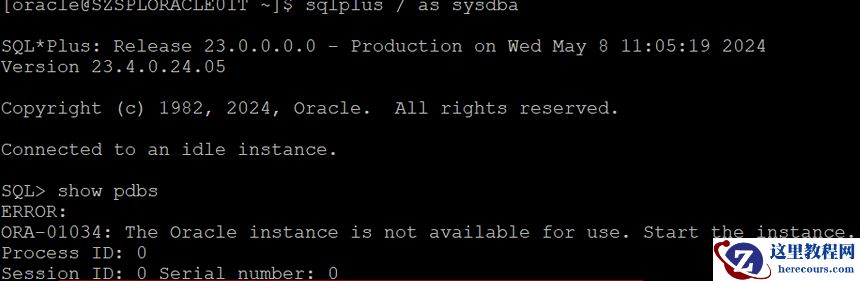 直接kill掉smon 相当于强制关库,然后重新启动即可
oracle23i安装后登录数据库报错
来源:这里教程网
时间:2026-03-03 22:58:21
作者:
编辑推荐:
下一篇:
相关推荐
-

-
-
-
-
-
-
-
-
-
-
-
-
-
-

雷神推出 MIX PRO II 迷你主机:基于 Ultra 200H,玻璃上盖 + ARGB 灯效
2 月 9 日消息,雷神 (THUNDEROBOT) 现已宣布推出基于英
-

制造商 Musnap 推出彩色墨水屏电纸书 Ocean C:支持手写笔、第三方安卓应用
2 月 10 日消息,制造商 Musnap 现已在海外推出一款 Oce
热文推荐
- Oracle Database 23ai安装常见问题
Oracle Database 23ai安装常见问题
26-03-03 - oracle23i安装后登录数据库报错
oracle23i安装后登录数据库报错
26-03-03 - Oracle存储过程被覆盖找回实战

Oracle存储过程被覆盖找回实战
26-03-03 - 网站安全第一步:一文读懂DV SSL证书,帮你快速启用HTTPS

网站安全第一步:一文读懂DV SSL证书,帮你快速启用HTTPS
26-03-03 - 2026北京年会策划谁靠谱?北京飞鸟创意,专业之选不踩雷

2026北京年会策划谁靠谱?北京飞鸟创意,专业之选不踩雷
26-03-03 - 商债通:聚焦信息化司法技术服务领域的科技平台发展全景
商债通:聚焦信息化司法技术服务领域的科技平台发展全景
26-03-03 - 2026 北京年会策划首选|北京飞鸟创意,一站式搞定企业盛典

2026 北京年会策划首选|北京飞鸟创意,一站式搞定企业盛典
26-03-03 - oracle轮流重启rac节点故障

oracle轮流重启rac节点故障
26-03-03 - oracle一次卡顿案例(九)
oracle一次卡顿案例(九)
26-03-03 - oracle基础sql优化案例(一)
oracle基础sql优化案例(一)
26-03-03