每个月我们都会做数据库灾难恢复演练,本月正好涉及到oracle灾难恢复演练。 我们的备份是使用NBU一体机进行rman备份的。
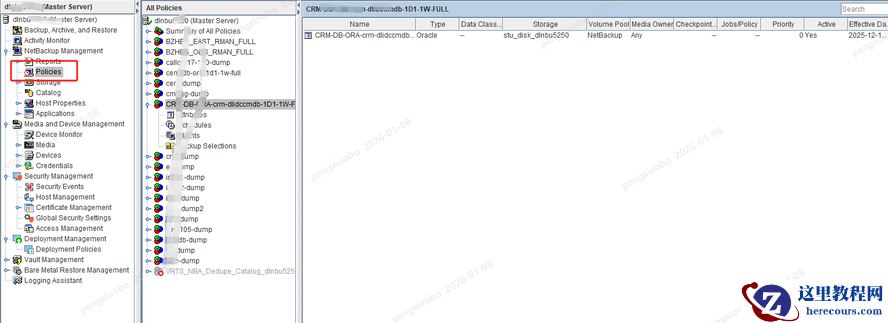
NBU一体机备份策略的情况。
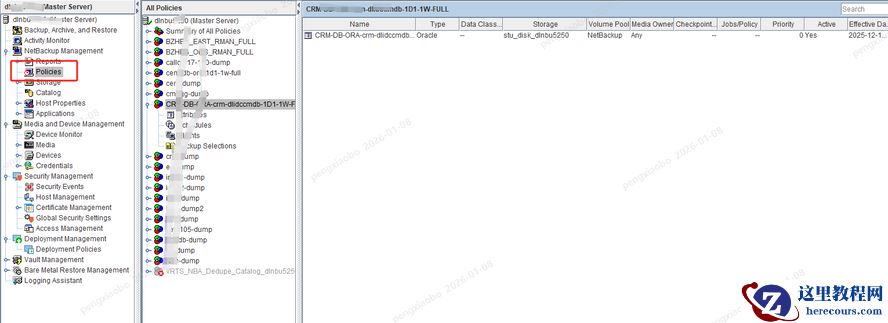
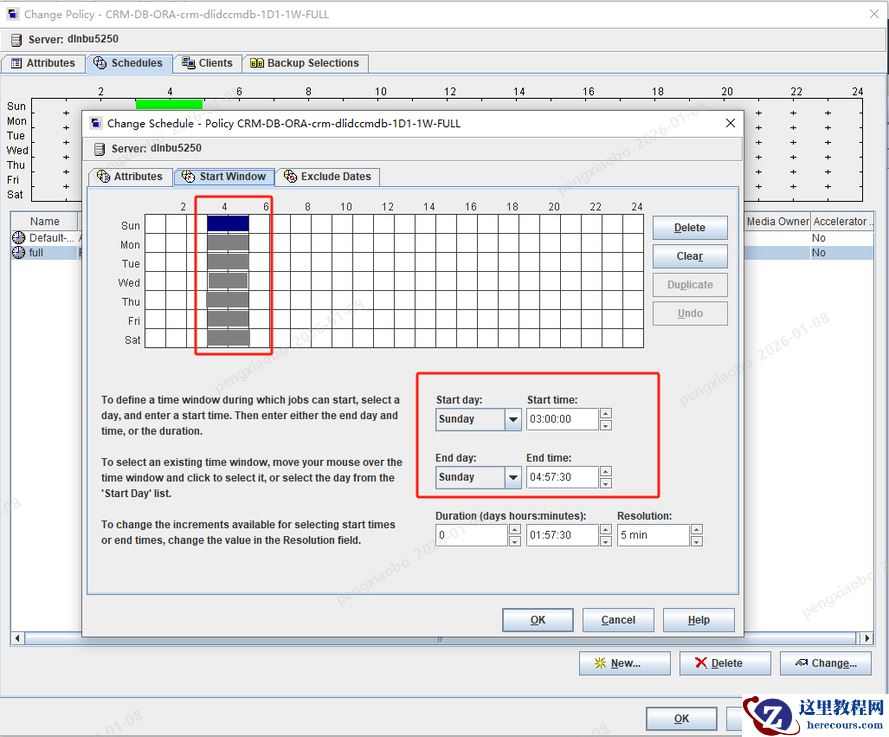 备份脚本使用的nbu自己的。
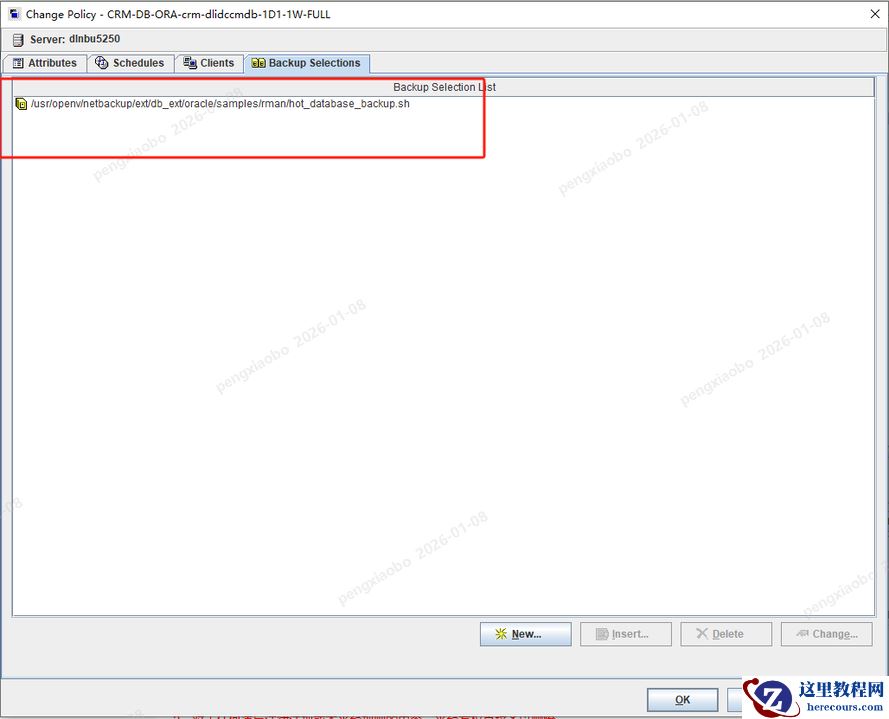 备份脚本内容如下:
#!/bin/sh
# $Header$
#
#bcpyrght
#***************************************************************************
# $Copyright: Copyright (c) 2018 Veritas Technologies LLC. All rights reserved $
#***************************************************************************
#ecpyrght
#
# Note:  Only make modifications to a copy of this file. Changes to this file
#        are lost when this example is overwritten during NetBackup upgrade.
#        Delete this comment from the copy.
#
# -----------------------------------------------------------------------------
#              hot_database_backup.sh
# -----------------------------------------------------------------------------
#  This script uses Recovery Manager to take a hot (inconsistent) database
#  backup. A hot backup is inconsistent because portions of the database are
#  being modified and written to the disk while the backup is progressing.
#  You must run your database in ARCHIVELOG mode to make hot backups. It is
#  assumed that this script will be executed by user root. In order for RMAN
#  to work properly we switch user (su -) to the oracle dba account before
#  execution. If this script runs under a user account that has Oracle dba
#  privilege, it will be executed using this user's account.
# -----------------------------------------------------------------------------
# -----------------------------------------------------------------------------
# Log the start of this script to both the stdout/obk_stdout
# and stderr/obk_stderr.
# -----------------------------------------------------------------------------
echo "==== $0 started on `date` ==== stdout"
echo "==== $0 started on `date` ==== stderr" 1>&2
DEBUG=0
if [ "$DEBUG" -gt 0 ]; then
    set -x
fi

# ---------------------------------------------------------------------------
# Put output in <this file name>.out. Change as desired.
# Note: output directory requires write permission.
# ---------------------------------------------------------------------------
#RMAN_LOG_FILE=${0}.out
RMAN_LOG_FILE=/usr/openv/netbackup/ext/db_ext/oracle/samples/rman/logs/cem-DB-ORA-cc-dlidcccdbnew-1D1-1W-FULL.`date +%Y%m%d%H%M%S`.out
# -----------------------------------------------------------------------------
# Delete the log file before each execution so that it does not grow unbounded.
# Remove or comment these lines if all historical output must be retained or if
# the log file size is managed externally.
# -----------------------------------------------------------------------------
if [ -f "$RMAN_LOG_FILE" ]; then
    rm -f "$RMAN_LOG_FILE"
fi
# -----------------------------------------------------------------------------
# Initialize the log file. By default it is readable by the DBA and other
# users. Restrict the permissions as needed.
# -----------------------------------------------------------------------------

echo >> $RMAN_LOG_FILE
chmod 644 $RMAN_LOG_FILE
# -----------------------------------------------------------------------------
# Redirect all stderr and stdout into the specified log file and also to
# stdout. No output will appear on stderr (or in the obk_stderr).
# -----------------------------------------------------------------------------
out=/tmp/`basename $0`.stdout.$$
trap "rm -f $out" EXIT SIGHUP SIGINT SIGQUIT SIGTRAP SIGKILL SIGUSR1 SIGUSR2 SIGPIPE SIGTERM SIGSTOP
mkfifo "$out"
tee -a $RMAN_LOG_FILE < "$out" &
exec 1>&- 2>&-
exec 1>"$out" 2>&1
# -----------------------------------------------------------------------------
# Log the start of this script to the log file and stdout.
# Log any additional arguments to the script.
# -----------------------------------------------------------------------------
echo "==== $0 started on `date` ===="
echo "==== $0 $*"
echo
# *-*-*-*-*-*-*-*-*-*-*-*-*-*-*-*-*-*-*-*-*-*-*-*-*-*-*-*-*-*-*-*-*-*-*-*-*-*-*
# *-*-*-*-*-*-*-*-*-*-*-*-*-*-*-*-*-*-*-*-*-*-*-*-*-*-*-*-*-*-*-*-*-*-*-*-*-*-*
#
# NOTE: User modifications should be made only below this point.
#
# USER CUSTOMIZABLE VARIABLE SECTION
#
# ORACLE_HOME               - Oracle Home path
# ORACLE_SID                - Oracle Sid of the target database
# ORACLE_USER               - Oracle user with permissions to execute RMAN
# ORACLE_TARGET_CONNECT_STR - Connect string for the target database
#                             [user]/[password][@TNSalias]
# RMAN_EXECUTABLE           - Path to the rman executable
# RMAN_SBT_LIBRARY          - SBT library path;
#                             on AIX see technote TECH194511.
# RMAN_CATALOG              - Recovery catalog option and connect string
# BACKUP_SCHEDULE           - If overriding Default-Application-Backup schedule
# BACKUP_TAG                - User specified backup tag
ORACLE_HOME=/app/oracle/product/11.2.0/dbhome_1
ORACLE_SID=cem
ORACLE_USER=oracle
ORACLE_TARGET_CONNECT_STR=sys/manager

RMAN_EXECUTABLE=$ORACLE_HOME/bin/rman
RMAN_SBT_LIBRARY="/usr/openv/netbackup/bin/libobk.so64"
# Set the Recovery catalog to use. In This example we do not use a
# Recovery Catalog. If you choose to use one, replace the option 'nocatalog'
# with a "'catalog <userid>/<passwd>@<net service name>'" statement.
RMAN_CATALOG="nocatalog"
BACKUP_SCHEDULE=""
# Note: This tag will be appended with the dected schedule type, see schedule
# section.
BACKUP_TAG="hot_db_bk"
export ORACLE_HOME ORACLE_SID
# Note: Additional tuning may be desired to RMAN_SEND and CMD_INPUT below.
# *-*-*-*-*-*-*-*-*-*-*-*-*-*-*-*-*-*-*-*-*-*-*-*-*-*-*-*-*-*-*-*-*-*-*-*-*-*-*
# *-*-*-*-*-*-*-*-*-*-*-*-*-*-*-*-*-*-*-*-*-*-*-*-*-*-*-*-*-*-*-*-*-*-*-*-*-*-*
# -----------------------------------------------------------------------------
# Determine the user which is executing this script.
# -----------------------------------------------------------------------------
BACKUP_CUSER=`id |cut -d"(" -f2 | cut -d ")" -f1`
# -----------------------------------------------------------------------------
# This script assumes that the database is properly opened. If desired,
# this would be the place to verify that.
# -----------------------------------------------------------------------------
# -----------------------------------------------------------------------------
# If this script is executed from a NetBackup schedule, NetBackup
# sets NB_ORA environment variables based on the schedule type.
# These variables can then used to dynamically select the appropriate
# RMAN backup type.
# For example, when:
#     schedule type is                BACKUP_TYPE is
#     ----------------                --------------
# Automatic Full                     INCREMENTAL LEVEL=0
# Automatic Differential Incremental INCREMENTAL LEVEL=1
# Automatic Cumulative Incremental   INCREMENTAL LEVEL=1 CUMULATIVE
#
# For client initiated backups, BACKUP_TYPE defaults to incremental
# level 0 (full).  To change the default for a user initiated
# backup to incremental or incremental cumulative, uncomment
# one of the following two lines.
# BACKUP_TYPE="INCREMENTAL LEVEL=1"
# BACKUP_TYPE="INCREMENTAL LEVEL=1 CUMULATIVE"
#
# Note that we use incremental level 0 to specify full backups.
# That is because, although they are identical in content, only
# the incremental level 0 backup can have incremental backups of
# level > 0 applied to it.
# -----------------------------------------------------------------------------

if [ "$NB_ORA_FULL" = "1" ]; then
    echo "Full backup requested from Schedule"
    BACKUP_TYPE="INCREMENTAL LEVEL=0"
    BACKUP_TAG="${BACKUP_TAG}_inc_lvl0"

elif [ "$NB_ORA_INCR" = "1" ]; then
    echo "Differential incremental backup requested from Schedule"
    BACKUP_TYPE="INCREMENTAL LEVEL=1"
    BACKUP_TAG="${BACKUP_TAG}_inc_lvl1"

elif [ "$NB_ORA_CINC" = "1" ]; then
    echo "Cumulative incremental backup requested from Schedule"
    BACKUP_TYPE="INCREMENTAL LEVEL=1 CUMULATIVE"
    BACKUP_TAG="${BACKUP_TAG}_inc_lvl1_cinc"

elif [ "$BACKUP_TYPE" = "" ]; then
    echo "Manual execution - defaulting to Full backup"
    BACKUP_TYPE="INCREMENTAL LEVEL=0"
    BACKUP_TAG="${BACKUP_TAG}_inc_lvl0"
fi
echo
# -----------------------------------------------------------------------------
# Construct an RMAN SEND command when initiated from the master server.
# This ensures that the resulting application backup jobs utilize the same
# master server, client name, and policy name.
#
# If desired, initialize RMAN_SEND with additional NB_ORA_* variable=value
# pairs.
#
# NOTE WHEN USING NET SERVICE NAME: When connecting to a database
# using a net service name, you must use a send command or a parms operand to
# specify environment variables.  In other words, when accessing a database
# through a listener, any environment variable set in this script are not
# inherited by the Oracle channel processes because it is a child of the
# listener process and not of this script.  For more information on the
# environment variables, please refer to the NetBackup for Oracle Admin. Guide.
# -----------------------------------------------------------------------------
RMAN_SEND=""
if [ "$NB_ORA_SERV" != "" ]; then
    RMAN_SEND="NB_ORA_SERV=${NB_ORA_SERV}"
fi
if [ "$NB_ORA_CLIENT" != "" ]; then
    if [ "$RMAN_SEND" != "" ]; then
        RMAN_SEND="${RMAN_SEND},NB_ORA_CLIENT=${NB_ORA_CLIENT}"
    else
        RMAN_SEND="NB_ORA_CLIENT=${NB_ORA_CLIENT}"
    fi
fi
if [ "$NB_ORA_POLICY" != "" ]; then
    if [ "$RMAN_SEND" != "" ]; then
        RMAN_SEND="${RMAN_SEND},NB_ORA_POLICY=${NB_ORA_POLICY}"
    else
        RMAN_SEND="NB_ORA_POLICY=${NB_ORA_POLICY}"
    fi
fi
if [ "$BACKUP_SCHEDULE" != "" ]; then
    if [ "$RMAN_SEND" != "" ]; then
        RMAN_SEND="${RMAN_SEND},NB_ORA_SCHED=${BACKUP_SCHEDULE}"
    else
        RMAN_SEND="NB_ORA_SCHED=${BACKUP_SCHEDULE}"
    fi
fi
if [ "$RMAN_SEND" != "" ]; then
    RMAN_SEND="SEND '${RMAN_SEND}';"
fi
# ---------------------------------------------------------------------------
# Call Recovery Manager to initiate the backup.
#
# Note: Any environment variables needed at run time by RMAN
#       must be set and exported within the CMDS variable.
# ---------------------------------------------------------------------------
#  Backs up the whole database.  This backup is part of the incremental
#  strategy (this means it can have incremental backups of levels > 0
#  applied to it).
#
#  We do not need to explicitly request the control file to be included
#  in this backup, as it is automatically included each time file 1 of
#  the system tablespace is backed up (the inference: as it is a whole
#  database backup, file 1 of the system tablespace will be backed up,
#  hence the controlfile will also be included automatically).
#
#  Typically, a level 0 backup would be done at least once a week.
#
#  The scenario assumes:
#     o you are backing your database up to two tape drives
#     o you want each backup set to include a maximum of 5 files
#     o you wish to include offline datafiles, and read-only tablespaces,
#       in the backup
#     o you want the backup to continue if any files are inaccessible.
#     o This script explicitly backs up the control file.  If you specify or
#       default to nocatalog, the controlfile backup that occurs
#       automatically as the result of backing up the system file is
#       not sufficient; it will not contain records for the backup that
#       is currently in progress.
#     o you want to archive the current log, back up all the
#       archive logs using two channels, putting a maximum of 20 logs
#       in a backup set, and deleting them once the backup is complete.
#
#  Note that the format string is constructed to guarantee uniqueness and
#  to enhance NetBackup for Oracle backup and restore performance.
#
# -----------------------------------------------------------------------------
# When needed, commands to debug the environment present in the subshell where
# RMAN will be started.
if [ "$DEBUG" -gt 0 ]; then
    ENV_COMMANDS="
    echo ----- LIST OF DECLARED VARIABLES IN SUBSHELL -----
    echo
    set | sort
    echo
    echo ----- LANGUAGE AND LOCALE -----
    echo
    locale
    echo
    echo ----- PROCESS LIST -----
    echo
    ps -ef
    echo"
else
    ENV_COMMANDS=""
fi
# The RMAN commands to be executed.
# NOTE: If the default shell for the ORACLE_USER is the C shell, then update
# the export syntax as follows:
# setenv ORACLE_HOME "$ORACLE_HOME"
# setenv ORACLE_SID "$ORACLE_SID"
CMDS="
export ORACLE_HOME=$ORACLE_HOME
export ORACLE_SID=$ORACLE_SID
echo
echo ----- SUBSHELL ENV VARIABLES -----
echo
env | sort | egrep '^ORACLE_|^NB_ORA_|^RMAN_|^BACKUP_|^TNS_'
echo
$ENV_COMMANDS
echo ----- STARTING RMAN EXECUTION -----
echo
$RMAN_EXECUTABLE target $ORACLE_TARGET_CONNECT_STR $RMAN_CATALOG"
# Building the PARMS option for the RMAN channels
if [ $RMAN_SBT_LIBRARY != "" ]; then
    RMAN_SBT_LIBRARY_PARMS="PARMS 'SBT_LIBRARY=$RMAN_SBT_LIBRARY'"
else
    RMAN_SBT_LIBRARY_PARMS=""
fi
# The RMAN statements that are needed to perform the desired backup.
# Add, delete, or modify the CMD_INPUT per the backup requirements for the
# instance.
CMD_INPUT="<< EOF
SHOW ALL;
allocate channel for maintenance TYPE 'SBT_TAPE' $RMAN_SBT_LIBRARY_PARMS;
SEND 'NB_ORA_POLICY=cem-db-ora-1d1-1w-full,NB_ORA_CLIENT=dlidccwgxdb.aeonlife.com.cn';
$RMAN_SEND
crosscheck backup;
#crosscheck archivelog all;
RUN {
ALLOCATE CHANNEL ch00 TYPE 'SBT_TAPE' $RMAN_SBT_LIBRARY_PARMS;
ALLOCATE CHANNEL ch01 TYPE 'SBT_TAPE' $RMAN_SBT_LIBRARY_PARMS;
SEND 'NB_ORA_POLICY=cem-db-ora-1d1-1w-full,NB_ORA_CLIENT=dlidccwgxdb.aeonlife.com.cn';
$RMAN_SEND
BACKUP
    $BACKUP_TYPE
    SKIP INACCESSIBLE
    TAG $BACKUP_TAG
    FILESPERSET 5
    # recommended format, must end with %t
    FORMAT 'FULL_%d_DB_%T_%U.rmanbak'
    DATABASE;
    sql 'alter system archive log current';
RELEASE CHANNEL ch00;
RELEASE CHANNEL ch01;
# backup all archive logs
ALLOCATE CHANNEL ch00 TYPE 'SBT_TAPE' $RMAN_SBT_LIBRARY_PARMS;
ALLOCATE CHANNEL ch01 TYPE 'SBT_TAPE' $RMAN_SBT_LIBRARY_PARMS;
SEND 'NB_ORA_POLICY=cem-db-ora-1d1-1w-full,NB_ORA_CLIENT=dlidccwgxdb.aeonlife.com.cn';
$RMAN_SEND
BACKUP
    filesperset 20
    # recommended format, must end with %t
    FORMAT 'FULL_%d_LOG_%T_%U.rmanbak'
    ARCHIVELOG ALL DELETE INPUT;
RELEASE CHANNEL ch00;
RELEASE CHANNEL ch01;
#
# Note: During the process of backing up the database, RMAN also backs up the
# control file.  That backup of the control file does not contain the
# information about the archive log backup if "nocatalog" has been specified.
# To include the information about the current backup, the control file should
# be backed up as the last step.  This step may not be necessary if using
# a recovery catalog or AUTOBACKUP CONTROLFILE.
#
ALLOCATE CHANNEL ch00 TYPE 'SBT_TAPE' $RMAN_SBT_LIBRARY_PARMS;
SEND 'NB_ORA_POLICY=cem-db-ora-1d1-1w-full,NB_ORA_CLIENT=dlidccwgxdb.aeonlife.com.cn';
$RMAN_SEND
BACKUP
    # recommended format, must end with %t
    FORMAT 'FULL_%d_cntrl_%T_%U.rmanbak'
    CURRENT CONTROLFILE;
RELEASE CHANNEL ch00;
}
allocate channel for maintenance TYPE 'SBT_TAPE' $RMAN_SBT_LIBRARY_PARMS;
SEND 'NB_ORA_POLICY=cem-db-ora-1d1-1w-full,NB_ORA_CLIENT=dlidccwgxdb.aeonlife.com.cn';
$RMAN_SEND
delete noprompt expired backup;
delete noprompt obsolete ;
delete noprompt expired archivelog all;
restore database preview summary;
EOF
"
# -----------------------------------------------------------------------------
# Print out the values of various variables matched by the following patterns.
# -----------------------------------------------------------------------------
if [ "$DEBUG" -gt 0 ]; then
    echo ----- LIST OF DECLARED VARIABLES IN SCRIPT -----
    echo
    set | sort
    echo
fi
echo
echo "----- SCRIPT VARIABLES -----"
echo
set | sort | egrep '^ORACLE_|^NB_ORA_|^RMAN_|^BACKUP_|^TNS_'
echo
echo "----- RMAN CMD -----"
echo
echo "$CMDS"
echo
echo "----- RMAN INPUT -----"
echo
echo "$CMD_INPUT"
echo
# Sanity check the environment.
if [ ! -x $RMAN_EXECUTABLE ]; then
    echo "ERR: $RMAN_EXECUTABLE: required executable not found!" 1>&2
    exit 1
fi
if [ ! -f  `echo $RMAN_SBT_LIBRARY | cut -d'(' -f1`  ]; then
    echo "ERR: $RMAN_SBT_LIBRARY: required library not found!" 1>&2
    exit 1
fi
echo "----- STARTING CMDS EXECUTION -----"
echo
if [ "$BACKUP_CUSER" = "root" ]; then
    su - $ORACLE_USER -c "$CMDS $CMD_INPUT"
    RSTAT=$?
else
    /bin/sh -c "$CMDS $CMD_INPUT"
    RSTAT=$?
fi

# ---------------------------------------------------------------------------
# Log the completion of this script to both stdout/obk_stdout
# and stderr/obk_stderr.
# ---------------------------------------------------------------------------

if [ "$RSTAT" = "0" ]; then
    LOGMSG="ended successfully"
else
    LOGMSG="ended in error"
fi

echo
echo "==== $0 $LOGMSG on `date` ==== stdout"
echo "==== $0 $LOGMSG on `date` ==== stderr" 1>&2
echo
exit $RSTAT
此次恢复测试使用测试数据库作为测试样本。
1.1 恢复目标机安装NBU 客户端
1.1.1 修改本地HOSTS 文件
编辑本地HOSTS 文件,添加以下两行:
101.101.101.138 nbu5250 101.101.101.208 testdb
1.1.2 修改NBU HOSTS 文件
修改NBU 服务器HOSTS 文件,添加客户端解析,如有重名需重新定义客户端名称。
1.1.3 NBU 客户端安装
[nfs_server1@/]#cd /nas_dir
[nfs_server1@/nas_dir]#cd NBU_CLI
[nfs_server1@/nas_dir/NBU_CLI]#ls
NB_CLT_7.6.1.2_AIX NetBackup_7.6.1_CLIENTS1
[nfs_server1@/nas_dir/NBU_CLI]#cd NetBackup_7.6.1_CLIENTS1
[nfs_server1@/nas_dir/NBU_CLI/NetBackup_7.6.1_CLIENTS1]#./install
Symantec Installation Script
Copyright 1993 - 2014 Symantec Corporation, All Rights Reserved.
Installing NetBackup Client Software
Please review the SYMANTEC SOFTWARE LICENSE AGREEMENT located on
the installation media before proceeding. The agreement includes
details on the NetBackup Product Improvement Program.
For NetBackup installation and upgrade information specific to your
platform and to find out if your installed EEBs or hot fixes are
contained in this release, check out the Symantec Operations Readiness
Tools (SORT) Installation and Upgrade Checklist and Hot fix and EEB
Release Auditor, respectively, at https://sort.symantec.com/netbackup.
Do you wish to continue? [y,n] (y) # 是否继续,默认为 Y
Checking for required system conditions...
Checking for recommended system conditions...
ok nb_761_hotfix_auditor: No potential for regression of hotfixes or EEBs was detected.
Do you want to install the NetBackup client software for this client? [y,n] (y) # 是否安装客户端软件,默认为 Y
This package will install RS6000/AIX6 client.
This package will install NetBackup client 7.6.1.
Enter the name of the NetBackup master server : NBU5230A # 指定 NBU Server 名称 NBU5230A 或 B 可后期修改
Would you like to use " nfs_server1" as the configured # 自动检查主机名
name of the NetBackup client? [y,n] (y) # 是否使用自动检测的主机名为客户端名称,如有冲突需重新命名
Client binaries are located in /nas_dir/NBU_CLI/NetBackup_7.6.1_CLIENTS1/NBClients/anb/Clients/usr/openv/netbackup/client/RS6000/AIX6.
Starting NetBackup Deduplication installer
testing: /tmp/pdde_pkg_dir_7733400
NetBackup Deduplication preinstall check passed
Saving client binaries for RS6000/AIX6.
…….
That file can be deleted after you are sure the install was successful.
1.2 查看可用备份
root@orcl /]# su - oracle
[oracle@orcl ~]$ /usr/openv/netbackup/bin/bplist -C testdb -t 4 -R -l / |more # 填写源备份客户端名
-rw-rw---- oracle oinstall 241958912 Jan 08 05:27 / c-829211684-20260108-02 # 需记录恢复映像名-rw-rw---- oracle oinstall 241958912 Jan 08 05:26 /cntrl_26778_1_1221974811-rw-rw---- oracle oinstall 241958912 Jan 08 05:25 /c-829211684-20260108-01-rw-rw---- oracle oinstall 3525888K Jan 08 05:21 /al_26776_1_1221974483-rw-rw---- oracle oinstall 4133632K Jan 08 05:19 /al_26775_1_1221974387-rw-rw---- oracle oinstall 3976960K Jan 08 05:19 /al_26774_1_1221974387-rw-rw---- oracle oinstall 241958912 Jan 08 05:18 /c-829211684-20260108-00-rw-rw---- oracle oinstall 71028992K Jan 08 04:14 /bk_26772_1_1221970464-rw-rw---- oracle oinstall 61640960K Jan 08 03:14 /bk_26771_1_1221966899-rw-rw---- oracle oinstall 109167104K Jan 08 02:56 /bk_26769_1_1221965793-rw-rw---- oracle oinstall 94522368K Jan 08 02:56 /bk_26770_1_1221965793-rw-rw---- oracle oinstall 241958912 Jan 07 05:07 /c-829211684-20260107-02-rw-rw---- oracle oinstall 241958912 Jan 07 05:06 /cntrl_26767_1_1221887185-rw-rw---- oracle oinstall 241958912 Jan 07 05:05 /c-829211684-20260107-01-rw-rw---- oracle oinstall 3792640K Jan 07 05:00 /al_26765_1_1221886837-rw-rw---- oracle oinstall 4019968K Jan 07 04:58 /al_26764_1_1221886721-rw-rw---- oracle oinstall 4018176K Jan 07 04:58 /al_26763_1_1221886721-rw-rw---- oracle oinstall 241958912 Jan 07 04:57 /c-829211684-20260107-00-rw-rw---- oracle oinstall 71028992K Jan 07 03:41 /bk_26761_1_1221882107-rw-rw---- oracle oinstall 61518080K Jan 07 03:29 /bk_26760_1_1221881382-rw-rw---- oracle oinstall 94505984K Jan 07 03:03 /bk_26759_1_1221879827-rw-rw---- oracle oinstall 109117696K Jan 07 03:03 /bk_26758_1_1221879827-rw-rw---- oracle oinstall 241958912 Jan 06 04:42 /c-829211684-20260106-02-rw-rw---- oracle oinstall 241958912 Jan 06 04:41 /cntrl_26756_1_1221799278-rw-rw---- oracle oinstall 241958912 Jan 06 04:40 /c-829211684-20260106-01-rw-rw---- oracle oinstall 557318144 Jan 06 04:39 /al_26754_1_1221799171-rw-rw---- oracle oinstall 3741440K Jan 06 04:36 /al_26753_1_1221798965-rw-rw---- oracle oinstall 2762752K Jan 06 04:36 /al_26752_1_1221798965-rw-rw---- oracle oinstall 241958912 Jan 06 04:34 /c-829211684-20260106-00-rw-rw---- oracle oinstall 71028992K Jan 06 04:06 /bk_26750_1_1221797204-rw-rw---- oracle oinstall 61502208K Jan 06 03:18 /bk_26749_1_1221794308-rw-rw---- oracle oinstall 109115392K Jan 06 03:01 /bk_26747_1_1221793263
…
1.3 恢复SPFILE
[oracle@orcl ~]$ rman target /
Recovery Manager: Release 11.2.0.4.0 - Production on Thu Jan 06 10:42:04 2026
Copyright (c) 1982, 2011, Oracle and/or its affiliates. All rights reserved.
connected to target database (not started)
RMAN> startup nomount # 启动数据库为 nomounte 模式
startup failed: ORA-01078: failure in processing system parameters
LRM-00109: could not open parameter file '/home/oracle/app/oracle/product/11.2.0/dbhome_1/dbs/initmisdb.ora'
# 因为没有 spfile 启动报错,但可以启动,此处忽略即可
starting Oracle instance without parameter file for retrieval of spfile
Oracle instance started
Total System Global Area 1068937216 bytes
Fixed Size 2260088 bytes
Variable Size 281019272 bytes
Database Buffers 780140544 bytes
Redo Buffers 5517312 bytes
RMAN> run{ #SPFILE 恢复脚本
2> allocate channel t1 type 'sbt_tape' ;
3> send 'NB_ORA_CLIENT= testdb'; # 修改为源备份客户端名称
4> RESTORE SPFILE TO PFILE "/home/oracle/app/oracle/product/11.2.0/dbhome_1/dbs/initmisdb.ora" FROM ' c-829211684-20260108-02'; # 填入刚才记录的映像名称
5> release channel t1;
6> }
using target database control file instead of recovery catalog
allocated channel: t1
channel t1: SID=171 device type=SBT_TAPE
channel t1: Veritas NetBackup for Oracle - Release 7.6 (2015052214)
sent command to channel: t1
Starting restore at 08- Jan-26
channel t1: restoring spfile from AUTOBACKUP c-829211684-20260108-02
channel t1: SPFILE restore from AUTOBACKUP complete
Finished restore at 08- Jan -26
released channel: t1
1.4 修改spfile
* dba 根据实际恢复环境修改 spfile
* 也可不恢复 spfile 手动创建新的 spfile
* 需要手动创建所有新目录结构
* 需要使用 Oracle 用户修改 spfile
1.4.1 修改后spfile
misdb.__db_cache_size=738197504
misdb.__java_pool_size=16777216
misdb.__large_pool_size=33554432
misdb.__oracle_base='/home/oracle/app/oracle'#ORACLE_BASE set from environment # 根据新环境修改 oracle_base 目录
misdb.__pga_aggregate_target=1124073472
misdb.__sga_target=2097152000
misdb.__shared_io_pool_size=0
misdb.__shared_pool_size=1241513984
misdb.__streams_pool_size=33554432
*.archive_lag_target=1800
*.audit_file_dest='/home/oracle/app/oracle/admin/misdb/adump' # 根据新环境修改 adump 目录
*.audit_trail='NONE'
*.compatible='11.2.0.4.0'
*.control_files='/oradata/control01.ctl','/oradata/control02.ctl' # 根据新环境修改控制文件存放目录
*.db_block_size=8192
*.db_domain=''
*.db_name='misdb'
*.db_recovery_file_dest='/home/oracle/app/oracle/fast_recovery_area' # 根据新环境修改闪回目录
*.db_recovery_file_dest_size=4385144832
*.diagnostic_dest='/home/oracle/app/oracle' # 根据新环境修改为 Oracle_base 目录
*.dispatchers='(PROTOCOL=TCP) (SERVICE=misdbXDB)'
*.enable_goldengate_replication=TRUE
*.log_archive_dest_1='location=/oradata/arch' # 根据新环境修改归档目录
*.log_archive_max_processes=3
*.memory_max_target=3G
*.memory_target=3G
*.open_cursors=300
*.processes=300
*.remote_login_passwordfile='EXCLUSIVE'
*.sessions=335
*.undo_retention=7200
*.undo_tablespace='UNDOTBS1'
1.4.2 原spfile
misdb.__db_cache_size=738197504
misdb.__java_pool_size=16777216
misdb.__large_pool_size=33554432
misdb.__oracle_base='/home/oracle/app'#ORACLE_BASE set from environment
misdb.__pga_aggregate_target=1124073472
misdb.__sga_target=2097152000
misdb.__shared_io_pool_size=0
misdb.__shared_pool_size=1241513984
misdb.__streams_pool_size=33554432
*.archive_lag_target=1800
*.audit_file_dest='/home/oracle/app/admin/misdb/adump'
*.audit_trail='NONE'
*.compatible='11.2.0.4.0'
*.control_files='/home/oracle/app/oradata/misdb/control01.ctl','/home/oracle/app/fast_recovery_area/misdb/control02.ctl'
*.db_block_size=8192
*.db_domain=''
*.db_name='misdb'
*.db_recovery_file_dest='/home/oracle/app/fast_recovery_area'
*.db_recovery_file_dest_size=4385144832
*.diagnostic_dest='/home/oracle/app'
*.dispatchers='(PROTOCOL=TCP) (SERVICE=misdbXDB)'
*.enable_goldengate_replication=TRUE
*.log_archive_dest_1='location=/home/oracle/archivelog/mandatory'
*.log_archive_max_processes=3
*.memory_max_target=3G
*.memory_target=3G
*.open_cursors=300
*.processes=300
*.remote_login_passwordfile='EXCLUSIVE'
*.sessions=335
*.undo_retention=7200
*.undo_tablespace='UNDOTBS1'
* 无 RAC 或 HA 环境无需删除项,仅需修改项即可
1.5 恢复控制文件
RMAN> shutdown abort; # 恢复完修改完 spfile 后需要重启数据
using target database control file instead of recovery catalog
Oracle instance shut down
RMAN> startup nomount # 启动数据库为 nomount 模式
connected to target database (not started)
Oracle instance started
Total System Global Area 3206836224 bytes
Fixed Size 2257520 bytes
Variable Size 1761611152 bytes
Database Buffers 1426063360 bytes
Redo Buffers 16904192 bytes
RMAN> run{ # 恢复控制文件脚本
2> allocate channel t1 type 'sbt_tape' ;
3> send 'NB_ORA_CLIENT= testdb'; # 修改为源备份客户端名称
4> RESTORE CONTROLFILE FROM ' c-829211684-20260108-02' ; # 填入刚才记录的映像名称
5> release channel t1;
6> }
allocated channel: t1
channel t1: SID=246 device type=SBT_TAPE
channel t1: Veritas NetBackup for Oracle - Release 7.6 (2015052214)
sent command to channel: t1
Starting restore at 08- Jan -26
channel t1: restoring control file
channel t1: restore complete, elapsed time: 00:00:16
output file name=/oradata/control01.ctl
output file name=/oradata/control02.ctl
Finished restore at 08- Jan -26
released channel: t1
1.6 恢复数据文件
SQL> startup mount # 启动数据库为 mount 模式
database is already started
database mounted
SQL> select FILE#,name from v$datafile; # 查找原始数据文件
FILE# NAME
---------- ----------------------------------------
1 /home/oracle/app/oradata/misdb/system01.dbf
2 /home/oracle/app/oradata/misdb/sysaux01.dbf
3 /home/oracle/app/oradata/misdb/undotbs01.dbf
4 /home/oracle/app/oradata/misdb/users01.dbf
5 /home/oracle/oradata/user_undo.dbf
6 /home/oracle/oradata/user_data.dbf
7 /home/oracle/oradata/user_index.dbf
8 /home/oracle/oradata/oggtbs01.dbf
SQL> select FILE#,name from v$tempfile; # 查找原始临时文件
FILE# NAME
---------- ----------------------------------------
2 /home/oracle/oradata/user_temp.dbf
3 /oradata/temp01.dbf
Ram target /
RMAN> run { # 恢复数据文件脚本,需根据实际情况修改重命名文件
2> allocate channel t1 type 'sbt_tape' ;
3> send 'NB_ORA_CLIENT= testdb'; # 修改为源备份客户端名称
4> set newname for datafile 1 to '/oradata/system01.dbf';
5> set newname for datafile 2 to '/oradata/sysaux01.dbf';
6> set newname for datafile 3 to '/oradata/undotbs01.dbf';
7> set newname for datafile 4 to '/oradata/users01.dbf';
8> set newname for datafile 5 to '/oradata/user_undo.dbf';
9> set newname for datafile 6 to '/oradata/user_data.dbf';
10> set newname for datafile 7 to '/oradata/user_index.dbf';
11> set newname for datafile 8 to '/oradata/oggtbs01.dbf';
12> set newname for tampfile 2 to '/oradata/user_temp.dbf';
13> set newname for tampfile 3 to '/oradata/temp01.dbf';
14> RESTORE DATABASE;
15> switch datafile all;
16> switch tempfile all;
17> release channel t1;
18> }
输出:
allocated channel: t1
channel t1: SID=246 device type=SBT_TAPE
channel t1: Veritas NetBackup for Oracle - Release 7.6 (2015052214)
sent command to channel: t1
executing command: SET NEWNAME
executing command: SET NEWNAME
executing command: SET NEWNAME
executing command: SET NEWNAME
executing command: SET NEWNAME
executing command: SET NEWNAME
executing command: SET NEWNAME
executing command: SET NEWNAME
Starting restore at 08- Jan -26
Starting implicit crosscheck backup at 08- Jan -26
Finished implicit crosscheck backup at 08- Jan -26
Starting implicit crosscheck copy at 08- Jan -26
Finished implicit crosscheck copy at 08- Jan -26
searching for all files in the recovery area
cataloging files...
no files cataloged
channel t1: starting datafile backup set restore
channel t1: specifying datafile(s) to restore from backup set
channel t1: restoring datafile 00006 to /oradata/user_data.dbf
channel t1: restoring datafile 00007 to /oradata/user_index.dbf
channel t1: restoring datafile 00008 to /oradata/oggtbs01.dbf
channel t1: reading from backup piece bk_3869_1_916538047
channel t1: piece handle=bk_3869_1_916538047 tag=HOT_DB_BK_LEVEL0
channel t1: restored backup piece 1
channel t1: restore complete, elapsed time: 00:02:15
channel t1: starting datafile backup set restore
channel t1: specifying datafile(s) to restore from backup set
channel t1: restoring datafile 00001 to /oradata/system01.dbf
channel t1: restoring datafile 00003 to /oradata/undotbs01.dbf
channel t1: restoring datafile 00004 to /oradata/users01.dbf
channel t1: restoring datafile 00005 to /oradata/user_undo.dbf
channel t1: reading from backup piece bk_3871_1_916538253
channel t1: piece handle=bk_3871_1_916538253 tag=HOT_DB_BK_LEVEL0
channel t1: restored backup piece 1
channel t1: restore complete, elapsed time: 00:00:55
channel t1: starting datafile backup set restore
channel t1: specifying datafile(s) to restore from backup set
channel t1: restoring datafile 00002 to /oradata/sysaux01.dbf
channel t1: reading from backup piece bk_3870_1_916538047
channel t1: piece handle=bk_3870_1_916538047 tag=HOT_DB_BK_LEVEL0
channel t1: restored backup piece 1
channel t1: restore complete, elapsed time: 00:02:55
Finished restore at 08- Jan -26
datafile 1 switched to datafile copy
input datafile copy RECID=9 STAMP=916571230 file name=/oradata/system01.dbf
datafile 2 switched to datafile copy
input datafile copy RECID=10 STAMP=916571230 file name=/oradata/sysaux01.dbf
datafile 3 switched to datafile copy
input datafile copy RECID=11 STAMP=916571230 file name=/oradata/undotbs01.dbf
datafile 4 switched to datafile copy
input datafile copy RECID=12 STAMP=916571230 file name=/oradata/users01.dbf
datafile 5 switched to datafile copy
input datafile copy RECID=13 STAMP=916571230 file name=/oradata/user_undo.dbf
datafile 6 switched to datafile copy
input datafile copy RECID=14 STAMP=916571230 file name=/oradata/user_data.dbf
datafile 7 switched to datafile copy
input datafile copy RECID=15 STAMP=916571230 file name=/oradata/user_index.dbf
datafile 8 switched to datafile copy
input datafile copy RECID=16 STAMP=916571230 file name=/oradata/oggtbs01.dbf
released channel: t1
1.7 恢复归档日志
RMAN> run { # 恢复归档日志脚本
2> allocate channel d1 type 'SBT_TAPE';
3> send 'NB_ORA_CLIENT= testdb'; # 修改为源备份客户端名称
4> recover database;
5> release channel d1;
6> }
输出:
allocated channel: d1
channel d1: SID=246 device type=SBT_TAPE
channel d1: Veritas NetBackup for Oracle - Release 7.6 (2015052214)
sent command to channel: d1
Starting recover at 08- Jan -26
starting media recovery
channel d1: starting archived log restore to default destination
channel d1: restoring archived log
archived log thread=1 sequence=15669
channel d1: restoring archived log
archived log thread=1 sequence=15670
channel d1: restoring archived log
archived log thread=1 sequence=15671
channel d1: reading from backup piece al_3876_1_916538421
channel d1: piece handle=al_3876_1_916538421 tag=TAG20160707T015955
channel d1: restored backup piece 1
channel d1: restore complete, elapsed time: 00:00:07
archived log file name=/oradata/arch/1_15669_876148404.dbf thread=1 sequence=15669
archived log file name=/oradata/arch/1_15670_876148404.dbf thread=1 sequence=15670
archived log file name=/oradata/arch/1_15671_876148404.dbf thread=1 sequence=15671
unable to find archived log
archived log thread=1 sequence=15672
released channel: d1
RMAN-00571: ===========================================================
RMAN-00569: =============== ERROR MESSAGE STACK FOLLOWS ===============
RMAN-00571: ===========================================================
RMAN-03002: failure of recover command at 08- Jan -26 11:14:23
RMAN-06054: media recovery requesting unknown archived log for thread 1 with sequence 15672 and starting SCN of 18180551213
* 此处报错无需处理,因为命令中没有使用 nutil 来指定到哪个 archived log 结束,比备份个数多查一个时会报错,实际所有备份的 archived log 都已经正常恢复,可用下面命令应答上述错误
RMAN> run {set until scn=18180551213;}
executing command: SET until clause
1.8 重命名redolog
SQL> select GROUP#,member from v$logfile; # 查看原 redolog
MEMBER
--------------------------------------------------------------------------------
/home/oracle/oradata/redo03a.rdo
/home/oracle/oradata/redo02a.rdo
/home/oracle/oradata/redo01a.rdo
/home/oracle/oradata/redo01b.rdo
/home/oracle/oradata/redo02b.rdo
/home/oracle/oradata/redo03b.rdo
6 rows selected.
创建 /home/oracle/oradata/ 路径
SQL> # 重命名 redolog
alter database rename file '/home/oracle/oradata/redo03a.rdo' to '/oradata/redo03a.rdo';
alter database rename file '/home/oracle/oradata/redo02a.rdo' to '/oradata/redo02a.rdo';
alter database rename file '/home/oracle/oradata/redo01a.rdo' to '/oradata/redo01a.rdo';
alter database rename file '/home/oracle/oradata/redo01b.rdo' to '/oradata/redo01b.rdo';
alter database rename file '/home/oracle/oradata/redo02b.rdo' to '/oradata/redo02b.rdo';
alter database rename file '/home/oracle/oradata/redo03b.rdo' to '/oradata/redo03b.rdo';
1.9 清理logfile
SQL> select * from v$log; # 查看需要清理的 logfile
GROUP# THREAD# SEQUENCE# BYTES BLOCKSIZE MEMBERS ARC
---------- ---------- ---------- ---------- ---------- ---------- ---
STATUS FIRST_CHANGE# FIRST_TIM NEXT_CHANGE# NEXT_TIME
---------------- ------------- --------- ------------ ---------
1 1 0 536870912 512 2 YES
CLEARING 1.8181E+10 07-JUL-16 1.8181E+10 07-JUL-16
3 1 0 536870912 512 2 YES
CLEARING 1.8181E+10 07-JUL-16 1.8181E+10 07-JUL-16
2 1 0 536870912 512 2 NO
CLEARING_CURRENT 1.8181E+10 07-JUL-16 2.8147E+14
如果STATUS 值为CLEARING_CURRENT 则需要清理,没有则无需清理。
SQL> alter database clear logfile group 2; # 使用该命令逐个清理 logfile
Database altered.
1.10 启动数据库
SQL> alter database open resetlogs;
Database altered.
1.11 删除无用REDO
sqlplus / as sysdba
SQL*Plus: Release 11.2.0.4.0 Production on Thu Jun 08 10:47:38 2026
Copyright (c) 1982, 2013, Oracle. All rights reserved.
Connected to:
Oracle Database 11g Enterprise Edition Release 11.2.0.4.0 - 64bit Production
With the Partitioning, OLAP, Data Mining and Real Application Testing options
SQL> set pagesize 500 # 设置页面大小
set linesize 500
col MEMBER for a40
select f.member,f.group#,l.status,l.archived,l.bytes/1024/1024,l.thread# from v$log l,v$logfile f where l.group#=f.group# order by l.thread#,f.group#;SQL> SQL> SQL> # 查看 redolog 状态
MEMBER GROUP# STATUS ARC L.BYTES/1024/1024 THREAD#
---------------------------------------- ---------- ---------------- --- ----------------- ----------
/u01/oracle/oradata/redo1_1.log 11 CURRENT NO 500 1
/u01/oracle/oradata/redo1_2.log 11 CURRENT NO 500 1
/u01/oracle/oradata/redo2_1.log 12 UNUSED YES 500 1
/u01/oracle/oradata/redo2_2.log 12 UNUSED YES 500 1
/u01/oracle/oradata/redo3_1.log 13 UNUSED YES 500 1
/u01/oracle/oradata/redo3_2.log 13 UNUSED YES 500 1
/u01/oracle/oradata/redo4_1.log 14 UNUSED YES 500 1
/u01/oracle/oradata/redo4_2.log 14 UNUSED YES 500 1
/u01/oracle/oradata/redo5_1.log 15 UNUSED YES 500 1
/u01/oracle/oradata/redo5_2.log 15 UNUSED YES 500 1
/u01/oracle/oradata/redo6_1.log 16 UNUSED YES 500 1
/u01/oracle/oradata/redo6_2.log 16 UNUSED YES 500 1
/u01/oracle/oradata/redo7_1.log 21 INACTIVE YES 500 2
/u01/oracle/oradata/redo7_2.log 21 INACTIVE YES 500 2
/u01/oracle/oradata/redo8_1.log 22 UNUSED YES 500 2
/u01/oracle/oradata/redo8_2.log 22 UNUSED YES 500 2
/u01/oracle/oradata/redo9_1.log 23 UNUSED YES 500 2
/u01/oracle/oradata/redo9_2.log 23 UNUSED YES 500 2
/u01/oracle/oradata/redo10_1.log 24 UNUSED YES 500 2
/u01/oracle/oradata/redo10_2.log 24 UNUSED YES 500 2
/u01/oracle/oradata/redo11_1.log 25 UNUSED YES 500 2
/u01/oracle/oradata/redo11_2.log 25 UNUSED YES 500 2
/u01/oracle/oradata/redo12_1.log 26 UNUSED YES 500 2
/u01/oracle/oradata/redo12_2.log 26 UNUSED YES 500 2
/u01/oracle/oradata/redo13_1.log 31 INACTIVE YES 500 3
/u01/oracle/oradata/redo13_2.log 31 INACTIVE YES 500 3
/u01/oracle/oradata/redo14_1.log 32 UNUSED YES 500 3
/u01/oracle/oradata/redo14_2.log 32 UNUSED YES 500 3
/u01/oracle/oradata/redo15_1.log 33 UNUSED YES 500 3
/u01/oracle/oradata/redo15_2.log 33 UNUSED YES 500 3
/u01/oracle/oradata/redo16_1.log 34 UNUSED YES 500 3
/u01/oracle/oradata/redo16_2.log 34 UNUSED YES 500 3
/u01/oracle/oradata/redo17_1.log 35 UNUSED YES 500 3
/u01/oracle/oradata/redo17_2.log 35 UNUSED YES 500 3
/u01/oracle/oradata/redo18_1.log 36 UNUSED YES 500 3
/u01/oracle/oradata/redo18_2.log 36 UNUSED YES 500 3
36 rows selected.
* 状态为 CURRENT 的 THREAD 不能删,没有的可以删。
SQL> alter database disable thread 2; # 终止无用线程
Database altered.
SQL> alter database disable thread 3;
Database altered.
1.12 删除无用UNDO
SQL> select name from v$tablespace where name like 'UNDO%'; # 查看 UNDO 情况
NAME
------------------------------
UNDOTBS01
UNDOTBS02
UNDOTBS03
*pfile 中指定的 UNDO 保留,其余的删除
SQL> drop tablespace undotbs02 including contents and datafiles; # 删除无用 UNDO
Tablespace dropped.
SQL> drop tablespace undotbs03 including contents and datafiles;
Tablespace dropped.
1.13 重建TEMP 表空间
SQL> select tablespace_name,file_name,bytes/1024/1024,status,AUTOEXTENSIBLE from dba_temp_files;
TABLESPACE_NAME FILE_NAME BYTES/1024/1024 STATUS AUT
------------------------------ ----------------------------------------------------------------------------------------------------------------------------------------------------------------------------------------------------------------------------------------------------------------- --------------- ------- ---
TEMP /u01/oracle/oradata/tmp02.dbf 8192 ONLINE NO
TEMP /u01/oracle/oradata/tmp03.dbf 8192 ONLINE NO
SQL> alter tablespace temp add tempfile '/u01/oracle/oradata/tmp01.dbf' size 8192M;
Tablespace altered.
SQL> alter database tempfile '/u01/oracle/oradata/tmp02.dbf' offline;
Database altered.
SQL> alter database tempfile '/u01/oracle/oradata/tmp03.dbf' offline;
Database altered.
SQL> shutdown immediate;
Database closed.
Database dismounted.
ORACLE instance shut down.
SQL> startup
ORACLE instance started.
Total System Global Area 3.3471E+10 bytes
Fixed Size 2263040 bytes
Variable Size 1.6710E+10 bytes
Database Buffers 1.6710E+10 bytes
Redo Buffers 48955392 bytes
Database mounted.
Database opened.
SQL> alter database tempfile '/u01/oracle/oradata/tmp02.dbf' drop including datafiles;
Database altered.
SQL> alter database tempfile '/u01/oracle/oradata/tmp03.dbf' drop including datafiles;
Database altered.
SQL> alter tablespace temp add tempfile '/u01/oracle/oradata/tmp02.dbf' size 8192M;
Tablespace altered.
SQL> exit
Disconnected from Oracle Database 11g Enterprise Edition Release 11.2.0.4.0 - 64bit Production
With the Partitioning, OLAP, Data Mining and Real Application Testing options
1.14 删除REDOLOG 系统文件
[oracle@ testdb /home/oracle]$rm /oradata/xip/xip/redo7_1.log
rm /oradata/xip/xip/redo7_2.log
rm /oradata/xip/xip/redo8_1.log
rm /oradata/xip/xip/redo8_2.log
rm /oradata/xip/xip/redo9_1.log
rm /oradata/xip/xip/redo9_2.log
rm /oradata/xip/xip/redo10_1.log
rm /oradata/xip/xip/redo10_2.log
rm /oradata/xip/xip/redo11_1.log
rm /oradata/xip/xip/redo11_2.log
rm /oradata/xip/xip/redo12_1.log
rm /oradata/xip/xip/redo12_2.log
rm /oradata/xip/xip/redo13_1.log
rm /oradata/xip/xip/redo13_2.log
rm /oradata/xip/xip/redo14_1.log
rm /oradata/xip/xip/redo14_2.log
rm /oradata/xip/xip/redo15_1.log
rm /oradata/xip/xip/redo15_2.log
rm /oradata/xip/xip/redo16_1.log
rm /oradata/xip/xip/redo16_2.log
rm /oradata/xip/xip/redo17_1.log
rm /oradata/xip/xip/redo17_2.log
rm /oradata/xip/xip/redo18_1.log
[oracle@testdb /u01/oracle/oradata]$pwd
/u01/oracle/oradata
[oracle@testdb /u01/oracle/oradata]$ls
1_3270_853421501.dbf 2_1_916565905.dbf 3_1_916565905.dbf CCBS his15.dbf redo5_1.log
1_3271_853421501.dbf 2_2895_853421501.dbf 3_3138_853421501.dbf ccbs_tb01.dbf his16.dbf redo5_2.log
1_3272_853421501.dbf 2_2896_853421501.dbf 3_3139_853421501.dbf ccbs_tb02.dbf his17.dbf redo6_1.log
1_3273_853421501.dbf 2_2897_853421501.dbf 3_3140_853421501.dbf ccbs_tb03.dbf his18.dbf redo6_2.log
1_3274_853421501.dbf 2_2898_853421501.dbf 3_3141_853421501.dbf control01.ctl oggtbs01.dbf sysaux.dbf
1_3275_853421501.dbf 2_2899_853421501.dbf 3_3142_853421501.dbf control02.ctl redo1_1.log system.dbf
1_3276_853421501.dbf 2_2900_853421501.dbf 3_3143_853421501.dbf control03.ctl redo1_2.log tmp01.dbf
1_3277_853421501.dbf 2_2901_853421501.dbf 3_3144_853421501.dbf his09.dbf redo2_1.log tmp02.dbf
1_3278_853421501.dbf 2_2902_853421501.dbf 3_3145_853421501.dbf his10.dbf redo2_2.log undotbs01.dbf
1_3279_853421501.dbf 2_2903_853421501.dbf 3_3146_853421501.dbf his11.dbf redo3_1.log users.dbf
1_3280_853421501.dbf 2_2904_853421501.dbf 3_3147_853421501.dbf his12.dbf redo3_2.log
1_3281_853421501.dbf 2_2905_853421501.dbf 3_3148_853421501.dbf his13.dbf redo4_1.log
1_3282_853421501.dbf 2_2906_853421501.dbf 3_3149_853421501.dbf his14.dbf redo4_2.log
[oracle@testdb /u01/oracle/oradata]$
1.15 检查实例启动状态
[oracle@ testdb /home/oracle]$sqlplus / as sysdba
SQL*Plus: Release 11.2.0.4.0 Production on Thu Jun 08 7 11:05:03 2026
Copyright (c) 1982, 2013, Oracle. All rights reserved.
Connected to:
Oracle Database 11g Enterprise Edition Release 11.2.0.4.0 - 64bit Production
With the Partitioning, OLAP, Data Mining and Real Application Testing options
SQL> select status from v$instance;
STATUS
------------
OPEN
SQL>