原文: https://www.enmotech.com/web/detail/1/798/1.html
导读:本文主要介绍PostgreSQL的日志文件参数及注意事项,从csv日志中载入数据库。通过灵活的数据加载方式,让SQL在处理很多问题上更加简捷便利。
运行日志参数
1.1 运行日志主要参数
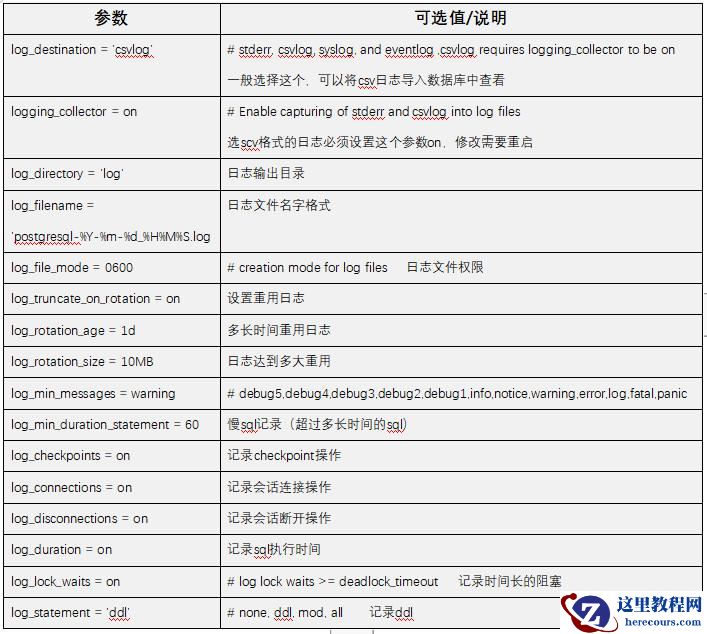
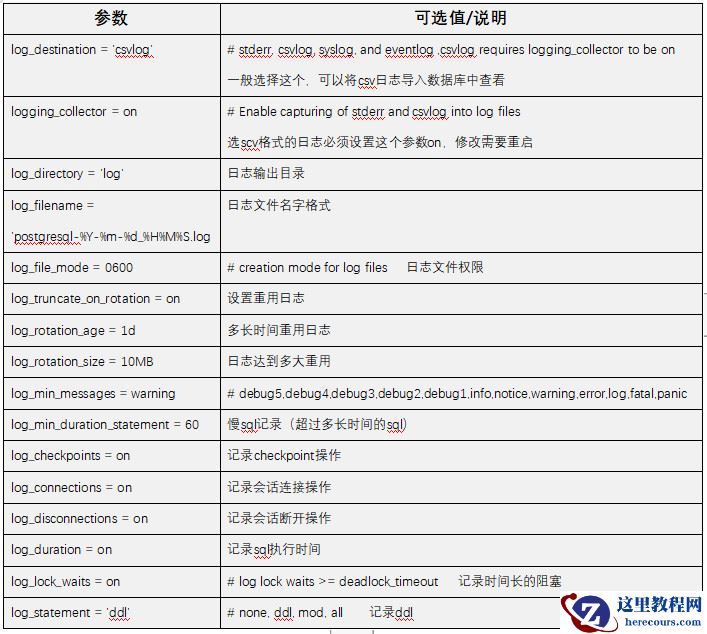
运行日志主要相关的参数如下,默认没有开启的话没有log目录,开启后会自动生成。
1.2 注意事项
设置csv格式日志的话一定要设置logging_collector 为 on
pg10版本的运行日志一般在$PGDATA/log目录下
log目录是开启运行日志后自动生成的
可以通过log_rotation_age来设置多久重新生成一个日志文件
可以通过log_rotation_size来设置多大的日志来重新生成日志文件
上面两个都需要配合log_truncate_on_rotation 为 on来使用
可以开启log_duration来记录sql执行时间
可以开启log_statement来记录数据库ddl
1.3 csv日志载入数据库
Oracle有外部表,pg也有fdw。oracle可以用外部表的方式将alert日志载入到数据库中用SQL来查看。PG可以用copy命令将csv日志载入到数据库中用SQL来查看。这种方式都可以很方便得用sql来查询想要的日志内容。这种方式的有点是显而易见的,就是可以很容易得用SQL来查询和过滤日志,pg的日志文件可以截断分割成若干小文件,可以载入自己需要的日志。而Oracle的alert通常会很大。
缺点也是显而易见的,如果数据库挂了就不能用这种方式来查看日志。而且pg的csv日志不容易直接阅读。
1.3.1 创建日志表
创建了一个数据库和新的表来载入日志
postgres=# create database test; CREATE DATABASE postgres=# \c test You are now connected to database "test" as user "pg12". test=# CREATE TABLE pg_log test-# ( test(# log_time timestamp(3) with time zone, test(# user_name text, test(# database_name text, test(# process_id integer, test(# connection_from text, test(# session_id text, test(# session_line_num bigint, test(# command_tag text, test(# session_start_time timestamp with time zone, test(# virtual_transaction_id text, test(# transaction_id bigint, test(# error_severity text, test(# sql_state_code text, test(# message text, test(# detail text, test(# hint text, test(# internal_query text, test(# internal_query_pos integer, test(# context text, test(# query text, test(# query_pos integer, test(# location text, test(# application_name text, test(# PRIMARY KEY (session_id, session_line_num) test(# );
CREATE TABLE test=#
1.3.2 查看日志文件名字
[pg12@whf307 ~]$ cd $PGDATA/log [pg12@whf307 log]$ ls -rtl total 24 -rw------- 1 pg12 pg12 166 May 30 13:32 postgresql-2019-05-30_133202.log -rw------- 1 pg12 pg12 496 May 30 13:32 postgresql-2019-05-30_133202.csv -rw------- 1 pg12 pg12 0 May 30 13:32 postgresql-2019-05-30_133254.log -rw------- 1 pg12 pg12 170 May 30 13:32 postgresql-2019-05-30_133254.csv -rw------- 1 pg12 pg12 166 May 30 13:33 postgresql-2019-05-30_133324.log -rw------- 1 pg12 pg12 6566 May 30 16:16 postgresql-2019-05-30_133324.csv -rw------- 1 pg12 pg12 0 May 31 00:00 postgresql-2019-05-31_000000.log -rw------- 1 pg12 pg12 0 May 31 00:00 postgresql-2019-05-31_000000.csv [pg12@whf307 log]$
[pg12@whf307 log]$ pwd /soft/pg_data/log [pg12@whf307 log]$
1.3.3 载入到数据库
[pg12@whf307 log]$ psql test psql (12beta1) Type "help" for help.
test=# \d List of relations Schema | Name | Type | Owner --------+--------+-------+------- public | pg_log | table | pg12 (1 row)
test=# copy pg_log from '/soft/pg_data/log/postgresql-2019-05-30_133324.csv' with csv; COPY 32
1.3.4 查看日志
这样就可以用sql来查看了。执行一个普通查询
test=# select relfilenode from pg_class where relname='pg_log'; relfilenode ------------- 16385 (1 row)
载入最新的日志。这里可以重复载入,不会覆盖之前的数据。
[pg12@whf307 log]$ ls -rtl total 32 -rw------- 1 pg12 pg12 166 May 30 13:32 postgresql-2019-05-30_133202.log -rw------- 1 pg12 pg12 496 May 30 13:32 postgresql-2019-05-30_133202.csv -rw------- 1 pg12 pg12 0 May 30 13:32 postgresql-2019-05-30_133254.log -rw------- 1 pg12 pg12 170 May 30 13:32 postgresql-2019-05-30_133254.csv -rw------- 1 pg12 pg12 166 May 30 13:33 postgresql-2019-05-30_133324.log -rw------- 1 pg12 pg12 6566 May 30 16:16 postgresql-2019-05-30_133324.csv -rw------- 1 pg12 pg12 0 May 31 00:00 postgresql-2019-05-31_000000.log -rw------- 1 pg12 pg12 4545 May 31 00:37 postgresql-2019-05-31_000000.csv [pg12@whf307 log]$ psql test psql (12beta1) Type "help" for help.
test=# copy pg_log from '/soft/pg_data/log/postgresql-2019-05-31_000000.csv' with csv; COPY 28
再次查看日志
test=# SELECT COUNT(*) FROM PG_LOG; count ------- 60 (1 row)
test=# select log_time at time zone 'UTC' ,database_name,connection_from,query from pg_log where log_time>to_timestamp('2019-05-31 14:35:00','yyyy-mm-dd hh24:mi:ss'); timezone | database_name | connection_from | query -------------------------+---------------+-----------------+----------------------------------------------------------- 2019-05-31 06:35:42.843 | test | [local] | 2019-05-31 06:35:57.582 | test | [local] | 2019-05-31 06:36:54.369 | test | [local] | selectt relfilenode from pg_class where relname='pg_log'; 2019-05-31 06:36:58.002 | test | [local] | 2019-05-31 06:37:00.192 | test | [local] | 2019-05-31 06:37:11.651 | | [local] |
2019-05-31 06:37:11.651 | test | [local] |(7 rows)
可以看到记录数变成了60,之前的记录没有被覆盖,我们可以一直使用该表,可以用sql来查看sql,数据库,登录时间等等的所有日志。
查看日志起始结束时间:
test=# select min(log_time) at time zone 'UTC',max(log_time) at time zone 'UTC' from pg_log; timezone | timezone -------------------------+------------------------- 2019-05-30 19:33:24.892 | 2019-05-31 06:37:11.651 (1 row)
有了灵活的数据加载方式,让SQL处理很多问题更加简捷便利。

想了解更多关于数据库、云技术的内容吗?
快来关注“数据和云”公众号、“云和恩墨”官方网站,我们期待与大家一同学习和进步!

(扫描上方二维码,关注“数据和云”公众号,即可查看更多科技文章)
编辑推荐:
相关推荐


雷神推出 MIX PRO II 迷你主机:基于 Ultra 200H,玻璃上盖 + ARGB 灯效
2 月 9 日消息,雷神 (THUNDEROBOT) 现已宣布推出基于英

制造商 Musnap 推出彩色墨水屏电纸书 Ocean C:支持手写笔、第三方安卓应用
2 月 10 日消息,制造商 Musnap 现已在海外推出一款 Oce
热文推荐
- PostgreSQL的日志文件和数据加载
PostgreSQL的日志文件和数据加载
26-03-14- 2019全球PostgreSQL生态报告出炉,PG为何从RDBMS中脱颖而出?
- Word 2013文档中打印指定页面范围的设置方法
Word 2013文档中打印指定页面范围的设置方法
26-03-14- 如何设置Word 2013文档的页面显示比例
如何设置Word 2013文档的页面显示比例
26-03-14- PostgreSQL DBA(47) - Index(Btree)
PostgreSQL DBA(47) - Index(Btree)
26-03-14- PostgreSQL DBA(46) - PG Operator classes and families
- PostgreSQL DBA(48) - Index(GiST)
PostgreSQL DBA(48) - Index(GiST)
26-03-14- PostgreSQL DBA(49) - Index(SP-GiST)
PostgreSQL DBA(49) - Index(SP-GiST)
26-03-14- RockyLinux备份恢复测试全攻略(手把手教你完成系统级灾难恢复演练)
- PostgreSQL DBA(51) - Index(GIN)
PostgreSQL DBA(51) - Index(GIN)
26-03-14