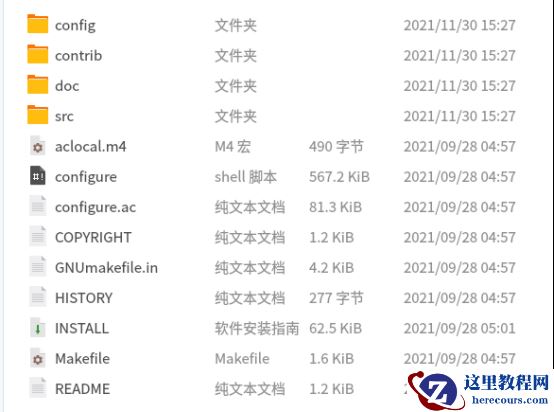
安装unixODBC
wget
tar -xzvf unixODBC-2.3.7.tar.gz
cd unixODBC-2.3.7/
./configure --prefix=/usr/local/odbc
make && make install
安装PostgreSQL ODBC
通过下方链接,下载对应Oracle所有服务器对应版本的PostgreSQL ODBC驱动,进行安装
[root@node1 ~]# rpm -ivh postgresql13-libs-13.8-1PGDG.rhel7.x86_64.rpm
warning: postgresql13-libs-13.8-1PGDG.rhel7.x86_64.rpm: Header V4 DSA/SHA1 Signature, key ID 442df0f8: NOKEY
Preparing...                          ################################# [100%]
Updating / installing...
   1:postgresql13-libs-13.8-1PGDG.rhel################################# [100%]
[root@node1 ~]# rpm -ivh postgresql13-odbc-13.02.0000-1PGDG.rhel7.x86_64.rpm
warning: postgresql13-odbc-13.02.0000-1PGDG.rhel7.x86_64.rpm: Header V4 DSA/SHA1 Signature, key ID 442df0f8: NOKEY
Preparing...                          ################################# [100%]
Updating / installing...
   1:postgresql13-odbc-13.02.0000-1PGD################################# [100%]
安装好后,默认安装到/usr/pgsql-13/下
配置透明网关
$ cd $ORACLE_HOME/hs/admin
$ cat initPG_LINK.ora
HS_FDS_CONNECT_INFO = PG_LINK
HS_FDS_TRACE_LEVEL = 255
HS_FDS_SHAREABLE_NAME=/usr/pgsql-13/lib/psqlodbcw.so
HS_LANGUAGE=AMERICAN_AMERICA.AL32UTF8
HS_NLS_NCHAR=UCS2
set ODBCINI=/home/oracle/odbc.ini
配置监听和tnsnames
# Generated by Oracle configuration tools.
LISTENER =
  (DESCRIPTION =
    (ADDRESS = (PROTOCOL = TCP)(HOST = 0.0.0.0)(PORT = 1521))
  )
SID_LIST_LISTENER =
  (SID_LIST =
    (SID_DESC =
      (GLOBAL_DBNAME = test)
      (ORACLE_HOME = /oracle/app/product/19.3.0/db_1)
      (SID_NAME = test)
    )
    (SID_DESC =
      (SID_NAME = PG_LINK)
      (ORACLE_HOME = /oracle/app/product/19.3.0/db_1)
      (ENVS=LD_LIBRARY_PATH="/usr/pgsql-13/lib:/oracle/app/product/19.3.0/db_1")
      (PROGRAM = dg4odbc)
    )
  )
启动监听
LSNRCTL> start
Starting /oracle/app/product/19.3.0/db_1/bin/tnslsnr: please wait...
TNSLSNR for Linux: Version 19.0.0.0.0 - Production
System parameter file is /oracle/app/product/19.3.0/db_1/network/admin/listener.ora
Log messages written to /oracle/app/diag/tnslsnr/node1/listener/alert/log.xml
Listening on: (DESCRIPTION=(ADDRESS=(PROTOCOL=tcp)(HOST=0.0.0.0)(PORT=1521)))
Connecting to (DESCRIPTION=(ADDRESS=(PROTOCOL=TCP)(HOST=0.0.0.0)(PORT=1521)))
STATUS of the LISTENER
------------------------
Alias                     LISTENER
Version                   TNSLSNR for Linux: Version 19.0.0.0.0 - Production
Start Date                07-NOV-2022 19:14:03
Uptime                    0 days 0 hr. 0 min. 0 sec
Trace Level               off
Security                  ON: Local OS Authentication
SNMP                      OFF
Listener Parameter File   /oracle/app/product/19.3.0/db_1/network/admin/listener.ora
Listener Log File         /oracle/app/diag/tnslsnr/node1/listener/alert/log.xml
Listening Endpoints Summary...
  (DESCRIPTION=(ADDRESS=(PROTOCOL=tcp)(HOST=0.0.0.0)(PORT=1521)))
Services Summary...
Service "PG_LINK" has 1 instance(s).
  Instance "PG_LINK", status UNKNOWN, has 1 handler(s) for this service...
Service "test" has 1 instance(s).
  Instance "test", status UNKNOWN, has 1 handler(s) for this service...
The command completed successfully
配置tnsname
cat tnsnames.ora
PG_LINK =
 (DESCRIPTION=
    (ADDRESS= (PROTOCOL=TCP)(HOST=127.0.0.1)(PORT=1521))
    (CONNECT_DATA=(SID=PG_LINK))
 (HS=OK)
 )
$ tnsping PG_LINK
Attempting to contact (DESCRIPTION= (ADDRESS= (PROTOCOL=TCP)(HOST=127.0.0.1)(PORT=1521)) (CONNECT_DATA=(SID=PG_LINK)) (HS=OK))
OK (10 msec)
配置odbc连接
cat /home/oracle/odbc.ini
[PG_LINK]
#数据源说明,根据实际情况自定义
Description        = PostgreSQL connection to atlasdb
#指定PostgreSQL的ODBC驱动所在位置,rpm安装后所在位置
Driver             = /usr/pgsql-13/lib/psqlodbcw.so
Setup              = /usr/pgsql-13/lib/psqlodbcw.so
#数据库名,远程访问的数据库名
Database           = test
#数据库所在的主机名或IP
Servername         = 10.0.4.4
#数据库用户名(可不填,在代码中指定即可)
UserName           = test
#数据库用户密码(可不填,在代码中指定即可)
Password           = test
#数据库端口
Port               = 5432
SocketBufferSize   = 4096
FetchBufferSize    = 500
ReadOnly           = Yes
RowVersioning      = No
ShowSystemTables   = No
#查询结果的字符编码
ConnSettings       = set client_encoding to UTF8
执行isql访问LightDB
$ export ODBCINI=/home/oracle/odbc.ini
$ isql PG_LINK -v
+---------------------------------------+
| Connected!                            |
|                                       |
| sql-statement                         |
| help [tablename]                      |
| quit                                  |
|                                       |
+---------------------------------------+
SQL> select * from emp;
+-------+-----------+----------+-------+-----------+----------+----------+-------+
| empno | ename     | job      | mgr   | hiredate  | sal      | comm     | deptno|
+-------+-----------+----------+-------+-----------+----------+----------+-------+
| 7369  | SMITH     | CLERK    | 7902  | 1980-12-17| 800.00   |          | 20    |
| 7499  | ALLEN     | SALESMAN | 7698  | 1981-02-20| 1600.00  | 300.00   | 30    |
| 7521  | WARD      | SALESMAN | 7698  | 1981-02-22| 1250.00  | 500.00   | 30    |
| 7566  | JONES     | MANAGER  | 7839  | 1981-04-02| 2975.00  |          | 20    |
| 7654  | MARTIN    | SALESMAN | 7698  | 1981-09-28| 1250.00  | 1400.00  | 30    |
| 7698  | BLAKE     | MANAGER  | 7839  | 1981-05-01| 2850.00  |          | 30    |
| 7782  | CLARK     | MANAGER  | 7839  | 1981-06-09| 2450.00  |          | 10    |
| 7788  | SCOTT     | ANALYST  | 7566  | 1987-04-19| 3000.00  |          | 20    |
| 7839  | KING      | PRESIDENT|       | 1981-11-17| 5000.00  |          | 10    |
| 7844  | TURNER    | SALESMAN | 7698  | 1981-09-08| 1500.00  | 0.00     | 30    |
| 7876  | ADAMS     | CLERK    | 7788  | 1987-05-23| 1100.00  |          | 20    |
| 7900  | JAMES     | CLERK    | 7698  | 1981-12-03| 950.00   |          | 30    |
| 7902  | FORD      | ANALYST  | 7566  | 1981-12-03| 3000.00  |          | 20    |
| 7934  | MILLER    | CLERK    | 7782  | 1982-01-23| 1300.00  |          | 10    |
+-------+-----------+----------+-------+-----------+----------+----------+-------+
SQLRowCount returns 14
SQLRowCount returns 14
14 rows fetched
SQL>
如果报错如下,仔细核对odbc.ini配置文件,我是因为少写了[PG_LINK]标签
$ export ODBCINI=/home/oracle/odbc.ini
$
$ isql PG_LINK -v
[IM002][unixODBC][Driver Manager]Data source name not found and no default driver specified
[ISQL]ERROR: Could not SQLConnect
创建DBlink验证
create database link pg_link connect to "test" identified by "test" using 'PG_LINK';
SQL> select * from "haha"@PG_LINK;
 id----------
  1
遇见的问题
SQL> select * from "emp"@PG_LINK;select * from "emp"@PG_LINK
*ERROR at line 1:
ORA-28562: Heterogeneous Services data truncation errorFetched item was truncated. {01004,NativeErr = -2}
ORA-02063: preceding 2 lines from PG_LINK
https://www.easysoft.com/blog/postgresql-oracle.html
How to Resolve Common Errors Encountered while using Database Gateways (DG4IFMX, Dg4MSQL, DG4SYBS), DG4ODBC or Generic Connectivity (Doc ID 234517.1)
DG4DB2 failed with ORA-28562 Error in data truncation of heterogeneous services (Doc ID 2722398.1)
SQL> select * from nls_database_parameters
PARAMETER                      VALUE
------------------------------ ------------------------------
NLS_RDBMS_VERSION              19.0.0.0.0
NLS_NCHAR_CONV_EXCP            FALSE
NLS_LENGTH_SEMANTICS           BYTE
NLS_COMP                       BINARY
NLS_DUAL_CURRENCY              $
NLS_TIMESTAMP_TZ_FORMAT        DD-MON-RR HH.MI.SSXFF AM TZR
NLS_TIME_TZ_FORMAT             HH.MI.SSXFF AM TZR
NLS_TIMESTAMP_FORMAT           DD-MON-RR HH.MI.SSXFF AM
NLS_TIME_FORMAT                HH.MI.SSXFF AM
NLS_SORT                       BINARY
NLS_DATE_LANGUAGE              AMERICAN
PARAMETER                      VALUE
------------------------------ ------------------------------
NLS_DATE_FORMAT                DD-MON-RR
NLS_CALENDAR                   GREGORIAN
NLS_NUMERIC_CHARACTERS         .,
NLS_NCHAR_CHARACTERSET         AL16UTF16
NLS_CHARACTERSET               AL32UTF8
NLS_ISO_CURRENCY               AMERICA
NLS_CURRENCY                   $
NLS_TERRITORY                  AMERICA
NLS_LANGUAGE                   AMERICAN
20 rows selected.
2、PostgreSQL驱动版本低问题
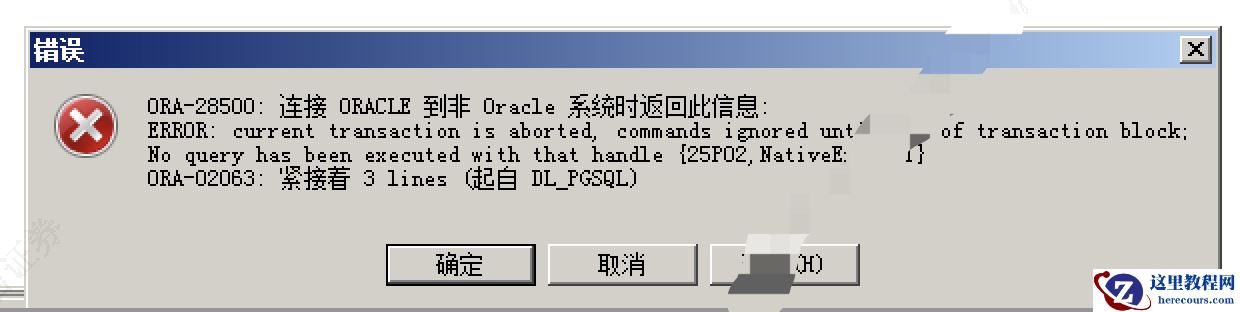
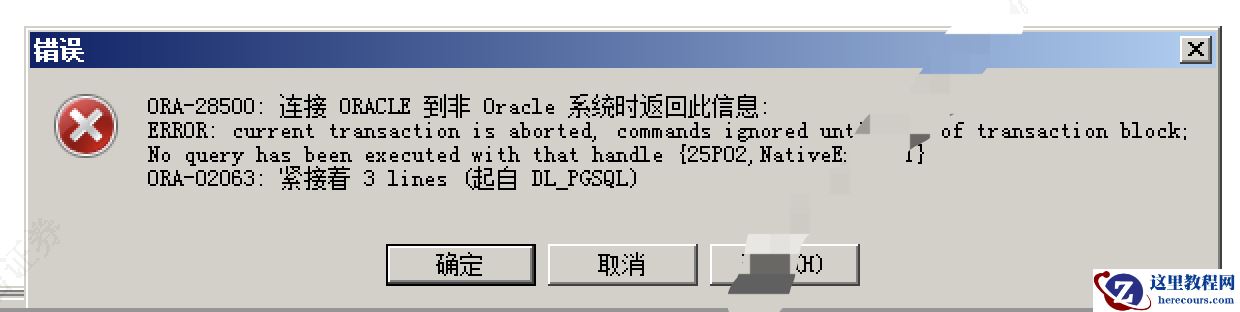
ORA-08500:连接ORACLE到非Oracle系统时返回此信息
ERROR: current transaction is aborted, commands ignored until end of transaction block;
ORA-02063: 紧接着 3 lines
查看数据库日志,会有如下报错,
xxxx xxx [1853958] STATEMENT:  SELECT * FROM "table_name"
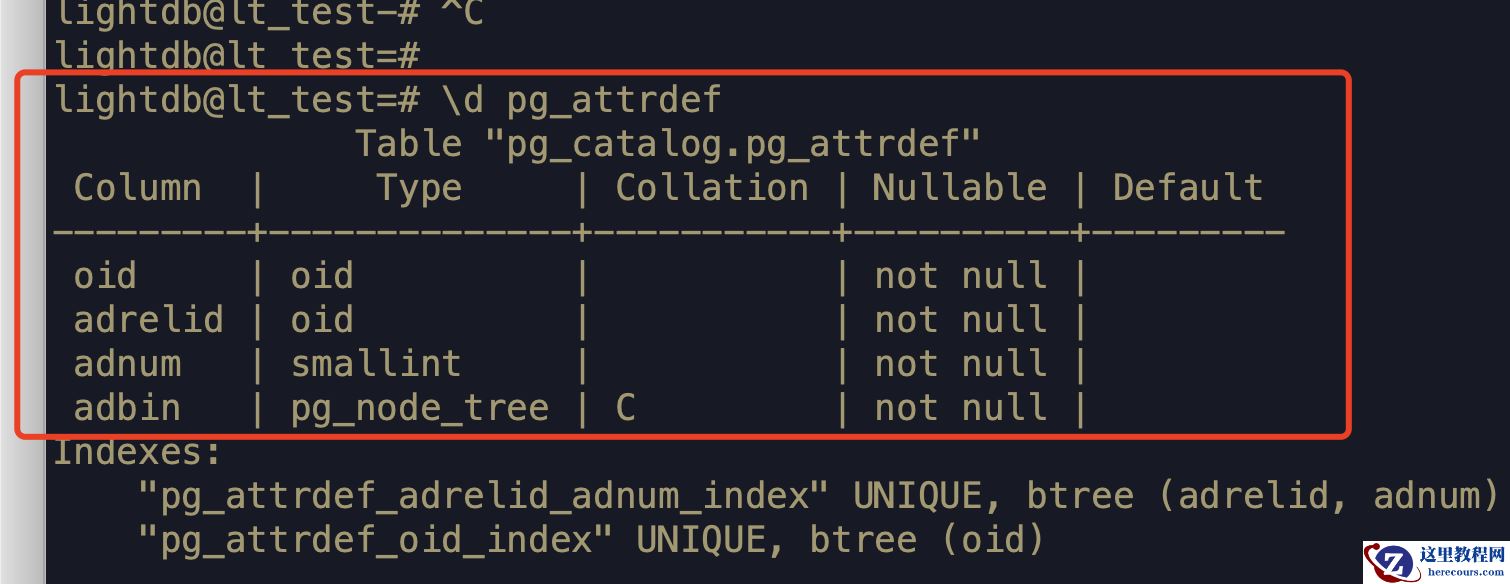
xxxx xxx [1853958] ERROR:  column d.adsrc does not exist at character 150
xxxx xxx [1853958] STATEMENT:  BEGIN;select n.nspname, c.relname, a.attname, a.atttypid, t.typname, a.attnum, a.attlen, a.atttypmod, a.attnotnull, c.relhasrules, c.relkind, c.oid, d.adsrc, case t.typtype when 'd' then t.typbasetype else 0 end, t.typtypmod from (((pg_catalog.pg_class c inner join pg_catalog.pg_namespace n on n.oid = c.relnamespace and c.relname like 'xxxxx' and n.nspname like 'aaaa
') inner join pg_catalog.pg_attribute a on (not a.attisdropped) and a.attnum > 0 and a.attrelid = c.oid) inner join pg_catalog.pg_type t on t.oid = a.atttypid) left outer join pg_attrdef d on a.atthasdef and d.adrelid = a.attrelid and d.adnum = a.attnum order by n.nspname, c.relname, attnum
原因PostgreSQL11以后,pg_attrdef表结构无adsrc字段了,所以
驱动最少用pg12的
MySQL目前只有MariaDB odbc访问PostgreSQL
前言
PostgreSQL 可以通过mysql_fdw访问MySQL(或者MariaDB), 那MySQL如何访问PostgreSQL呢? 答案是CONNECT Store Engine。 MariaDB 从 10.0.2版本开始支持CONNECT Store Engine。 CONNECT存储引擎使MariaDB可以访问外部(本地或远程)数据(MED)。这是通过根据不同的数据类型(尤其是各种格式的文件),通过ODBC或JDBC从其他DBMS或产品(例如Excel或MongoDB)提取的数据或从环境中检索到的数据(例如DIR,WMI)定义表来完成的 和MAC表)。 该存储引擎支持表分区,MariaDB虚拟列,并允许定义特殊列,例如ROWID,FILEID和SERVID。
本文就介绍下Ubuntu MariaDB如何通过CONNECT插件来访问Postgres。 环境 • MariaDB 10.4 • host: 127.0.0.1 • port: 3306 • username: root • password: pass • PostgreSQL 12.2 • host: 192.168.1.6 • port: 5433 • username: postgres • database: postgres • password: • Ubuntu 18.04 LTS 安装CONNECT插件
$ yum install mariadb-plugin-connect mysql> INSTALL SONAME 'ha_connect';
安装ODBC-PostgreSQL • MariaDB服务器上安装ODBC-PostgreSQL $ apt-get install unixodbc odbc-postgresql
配置ODBC.ini
cat >>/etc/odbc.ini <<EOF [pg12] Description = PostgreSQL Driver = PostgreSQL Unicode Trace = No TraceFile = /tmp/psqlodbc.log Database = postgres Servername = 192.168.1.6 UserName = postgres Password = Port = 5433 ReadOnly = Yes RowVersioning = No ShowSystemTables = No ShowOidColumn = No FakeOidIndex = No ConnSettings = EOF
测试odbc
isql -v pg12
测试CONNECT
create database postgres use postgres; CREATE TABLE iris ( sepal_length double(12,2) NULL, sepal_width double(12,2) NULL, petal_length double(12,2) NULL, petal_width double(12,2) NULL, species varchar(20) NULL )ENGINE=CONNECT TABLE_TYPE=ODBC tabname='mysql.iris' CONNECTION='DSN=pg12' ; select * from iris limit 10;
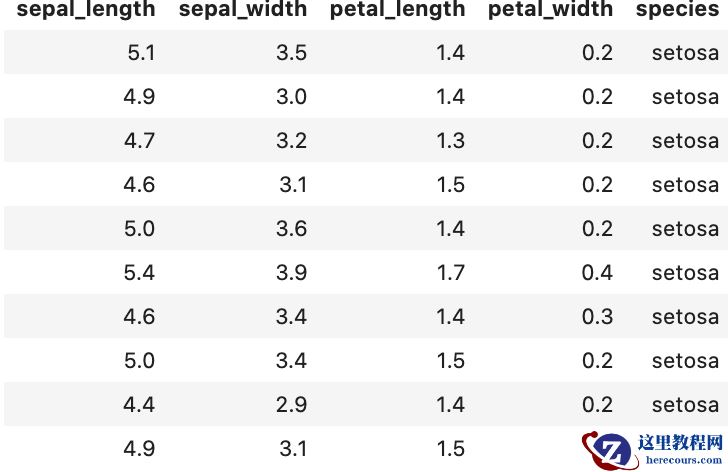
mysql> show create table postgres.iris; >>返回 CREATE TABLE `iris` ( `sepal_length` float DEFAULT NULL, `sepal_width` float DEFAULT NULL, `petal_length` float DEFAULT NULL, `petal_width` float DEFAULT NULL, `species` varchar(20) DEFAULT NULL) ENGINE=CONNECT DEFAULT CHARSET=latin1 CONNECTION='DSN=pg12' `TABLE_TYPE`=ODBC `tabname`='mysql.iris'
参考
https://mp.weixin.qq.com/s?__biz=MzU1NTg2ODQ5Nw==&mid=2247484786&idx=1&sn=9db9f7b1cd61103fff6ed9a7d56b5988&chksm=fbcc8d4cccbb045a6bed55bbcca47d544e8d18c5d73a01a8acbc80d8c2b562ae0a24b4ad7539&token=574247946&lang=zh_CN#rd
编辑推荐:
- Oracle/MySQL通过odbc访问PostgreSQL for LightDB03-14
- 从一道题中学会反弹shell03-14
- PostgreSQL DBA(192) - 整行模糊查询03-14
- PostgreSQL DBA(193) - 数据倾斜下的HashJoin03-14
- LightDB数据库性能瓶颈分析(一)03-14
- PostgreSQL/LightDB分区表之常见问题03-14
- PostgreSQL DBA(194) - Unique&NULL03-14
- PostgreSQL/LightDB copy ERROR: invalid byte sequence for encoding "UTF8": 0x0003-14
相关推荐
-

-
-
-
-
-
-
-
-
-
-
-
-
-
-

雷神推出 MIX PRO II 迷你主机:基于 Ultra 200H,玻璃上盖 + ARGB 灯效
2 月 9 日消息,雷神 (THUNDEROBOT) 现已宣布推出基于英
-

制造商 Musnap 推出彩色墨水屏电纸书 Ocean C:支持手写笔、第三方安卓应用
2 月 10 日消息,制造商 Musnap 现已在海外推出一款 Oce