
分布式表大小
分布式表大小的真实度量是作为分片大小的总和获得的。 Canopy 提供函数来获得表大小。
| UDF | Returns |
|---|---|
| canopy_relation_size(relation_name) | Size of actual data in table |
| canopy_table_size(relation_name) | 包含free spave map和visibility map |
| canopy_total_relation_size(relation_name) | 总共大小 |
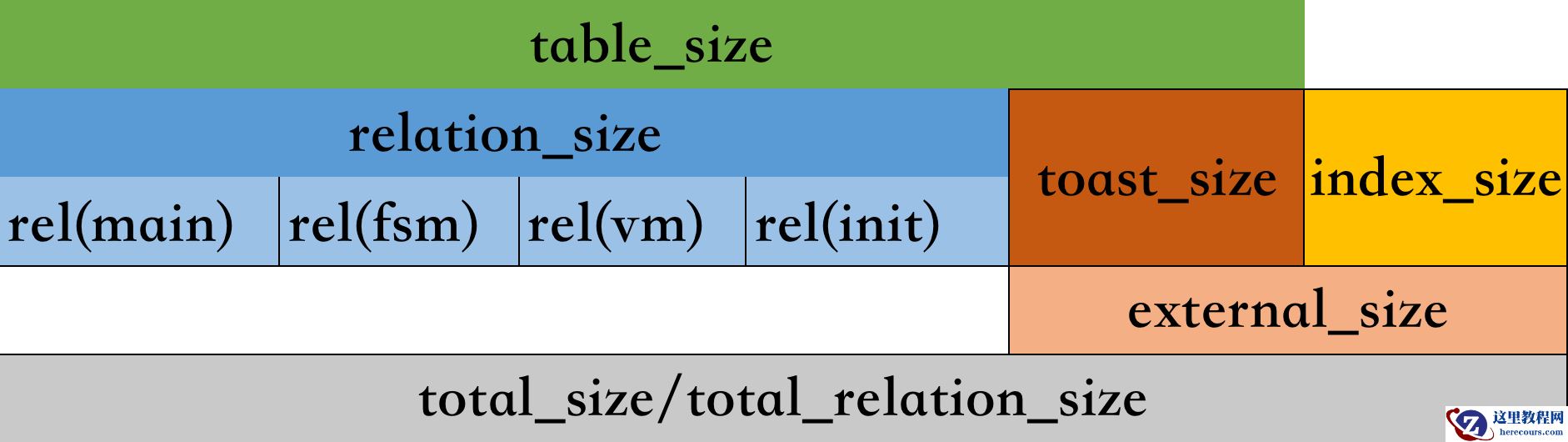 这些函数类似于标准 LightDB 对象大小函数中的三个,另外需要注意的是,如果它们无法连接到节点,则会出错。
下面是使用辅助函数之一列出所有分布式表的大小的示例:
这些函数类似于标准 LightDB 对象大小函数中的三个,另外需要注意的是,如果它们无法连接到节点,则会出错。
下面是使用辅助函数之一列出所有分布式表的大小的示例:
lightdb@test=# select canopy_total_relation_size('test');
 canopy_total_relation_size
----------------------------
                     229376
(1 row)
SELECT logicalrelid AS name,
       pg_size_pretty(canopy_table_size(logicalrelid)) AS size
  FROM pg_dist_partition;
 name | size
------+--------
 test | 224 kB
(1 row)
Vacuuming Distributed Tables
在 LightDB(和其他 MVCC 数据库)中,一行的 UPDATE 或 DELETE 不会立即删除该行的旧版本。过时行的累积称为膨胀,必须清理以避免查询性能下降和磁盘空间需求无限制增长。 LightDB 运行一个称为 auto-vacuum 守护进程的进程,该进程定期清理(也称为删除)过时的行。 在分布式数据库中扩展的不仅仅是用户查询,vacuuming 也是如此。在 LightDB 中,繁忙的大表有很大的膨胀潜力,这既是因为对 LightDB 的真空比例因子参数的敏感性较低,而且通常是因为它们的行流失程度。将表拆分为分布式分片意味着单个分片是更小的表,并且自动真空工作器可以在不同机器上并行处理表的不同部分。通常 auto-vacuum 只能在每个表上运行一个 worker。 由于上述原因,对于大多数情况,Canopy 集群上的自动真空操作可能已经足够好了。但是,对于具有特定工作负载的表,或者有特定“安全”时间安排 vacuum 的公司,手动对表进行 vacuum 可能比将所有工作留给自动 vacuum 更有意义。 要清理表,只需在协调器节点上运行以下命令:
VACUUM my_distributed_table;
对分布式表使用 vacuum 会向该表的每个工作节点发送一个 vacuum 命令(每个位置一个连接)。这是并行完成的。支持除 VERBOSE 之外的所有选项(包括 column_list 参数)。 vacuum 命令也在协调器上运行,并在通知任何工作节点之前执行。注意,语句是原子性的,不合格的vacuum命令(比如没指定表)是不会传播到工作节点执行的。
Analyzing Distributed Tables
Canopy 将 ANALYZE 命令传播到所有工作节点布置。 要分析表,请在协调节点上运行:
ANALYZE my_distributed_table;
列存储(使用限制较多)
Canopy 为分析和数据仓库工作负载引入了仅附加列表存储。当列(而不是行)连续存储在磁盘上时,数据变得更加可压缩,并且查询可以更快地请求列的子集。 要使用列式存储,请在创建表时指定 USING columnar:
CREATE TABLE contestant (
    handle TEXT,
    birthdate DATE,
    rating INT,
    percentile FLOAT,
    country CHAR(3),
    achievements TEXT[]
) USING columnar;
您还可以在基于行(堆)和列式存储之间进行转换。
-- Convert to row-based (heap) storageSELECT alter_table_set_access_method('contestant', 'heap');-- Convert to columnar storage (indexes will be dropped)SELECT alter_table_set_access_method('contestant', 'columnar');
Canopy 在插入期间将行转换为“stripes”中的列存储。每个条带包含一笔交易的数据,或 150000 行,以较少者为准。 (柱状表的条带大小和其他参数可以使用 alter_columnar_table_set 函数更改。) 例如,以下语句将所有五行放入同一个条带中,因为所有值都插入到单个事务中:
-- insert these values into a single columnar stripeINSERT INTO contestant VALUES
  ('a','1990-01-10',2090,97.1,'XA','{a}'),
  ('b','1990-11-01',2203,98.1,'XA','{a,b}'),
  ('c','1988-11-01',2907,99.4,'XB','{w,y}'),
  ('d','1985-05-05',2314,98.3,'XB','{}'),
  ('e','1995-05-05',2236,98.2,'XC','{a}');
最好尽可能制作大条带,因为 Canopy 按条带分别压缩列数据。我们可以使用 VACUUM VERBOSE 查看有关柱状表的信息,例如压缩率、条带数和每个条带的平均行数:
VACUUM VERBOSE contestant;
INFO:  statistics for "contestant":
storage id: 10000000000
total file size: 24576, total data size: 248
compression rate: 1.31x
total row count: 5, stripe count: 1, average rows per stripe: 5
chunk count: 6, containing data for dropped columns: 0, zstd compressed: 6
输出显示 Canopy 使用 zstd 压缩算法获得 1.31x 数据压缩。压缩率将 a) 插入数据在内存中暂存时的大小与 b) 在其最终条带中压缩的数据大小进行比较。 由于它的测量方式,压缩率可能与表的行存储和列存储之间的大小差异匹配,也可能不匹配。真正找到差异的唯一方法是构建包含相同数据的行和列表,并进行比较。 Measuring compression测试压缩 Let’s create a new example with more data to benchmark the compression savings. 让我们创建一个包含更多数据的新示例来对压缩节省进行基准测试。
-- first a wide table using row storageCREATE TABLE perf_row(
  c00 int8, c01 int8, c02 int8, c03 int8, c04 int8, c05 int8, c06 int8, c07 int8, c08 int8, c09 int8,
  c10 int8, c11 int8, c12 int8, c13 int8, c14 int8, c15 int8, c16 int8, c17 int8, c18 int8, c19 int8,
  c20 int8, c21 int8, c22 int8, c23 int8, c24 int8, c25 int8, c26 int8, c27 int8, c28 int8, c29 int8,
  c30 int8, c31 int8, c32 int8, c33 int8, c34 int8, c35 int8, c36 int8, c37 int8, c38 int8, c39 int8,
  c40 int8, c41 int8, c42 int8, c43 int8, c44 int8, c45 int8, c46 int8, c47 int8, c48 int8, c49 int8,
  c50 int8, c51 int8, c52 int8, c53 int8, c54 int8, c55 int8, c56 int8, c57 int8, c58 int8, c59 int8,
  c60 int8, c61 int8, c62 int8, c63 int8, c64 int8, c65 int8, c66 int8, c67 int8, c68 int8, c69 int8,
  c70 int8, c71 int8, c72 int8, c73 int8, c74 int8, c75 int8, c76 int8, c77 int8, c78 int8, c79 int8,
  c80 int8, c81 int8, c82 int8, c83 int8, c84 int8, c85 int8, c86 int8, c87 int8, c88 int8, c89 int8,
  c90 int8, c91 int8, c92 int8, c93 int8, c94 int8, c95 int8, c96 int8, c97 int8, c98 int8, c99 int8);-- next a table with identical columns using columnar storageCREATE TABLE perf_columnar(LIKE perf_row) USING COLUMNAR;
插入大量数据:
INSERT INTO perf_row
  SELECT
    g % 00500, g % 01000, g % 01500, g % 02000, g % 02500, g % 03000, g % 03500, g % 04000, g % 04500, g % 05000,
    g % 05500, g % 06000, g % 06500, g % 07000, g % 07500, g % 08000, g % 08500, g % 09000, g % 09500, g % 10000,
    g % 10500, g % 11000, g % 11500, g % 12000, g % 12500, g % 13000, g % 13500, g % 14000, g % 14500, g % 15000,
    g % 15500, g % 16000, g % 16500, g % 17000, g % 17500, g % 18000, g % 18500, g % 19000, g % 19500, g % 20000,
    g % 20500, g % 21000, g % 21500, g % 22000, g % 22500, g % 23000, g % 23500, g % 24000, g % 24500, g % 25000,
    g % 25500, g % 26000, g % 26500, g % 27000, g % 27500, g % 28000, g % 28500, g % 29000, g % 29500, g % 30000,
    g % 30500, g % 31000, g % 31500, g % 32000, g % 32500, g % 33000, g % 33500, g % 34000, g % 34500, g % 35000,
    g % 35500, g % 36000, g % 36500, g % 37000, g % 37500, g % 38000, g % 38500, g % 39000, g % 39500, g % 40000,
    g % 40500, g % 41000, g % 41500, g % 42000, g % 42500, g % 43000, g % 43500, g % 44000, g % 44500, g % 45000,
    g % 45500, g % 46000, g % 46500, g % 47000, g % 47500, g % 48000, g % 48500, g % 49000, g % 49500, g % 50000
  FROM generate_series(1,50000000) g;
INSERT INTO perf_columnar
  SELECT
    g % 00500, g % 01000, g % 01500, g % 02000, g % 02500, g % 03000, g % 03500, g % 04000, g % 04500, g % 05000,
    g % 05500, g % 06000, g % 06500, g % 07000, g % 07500, g % 08000, g % 08500, g % 09000, g % 09500, g % 10000,
    g % 10500, g % 11000, g % 11500, g % 12000, g % 12500, g % 13000, g % 13500, g % 14000, g % 14500, g % 15000,
    g % 15500, g % 16000, g % 16500, g % 17000, g % 17500, g % 18000, g % 18500, g % 19000, g % 19500, g % 20000,
    g % 20500, g % 21000, g % 21500, g % 22000, g % 22500, g % 23000, g % 23500, g % 24000, g % 24500, g % 25000,
    g % 25500, g % 26000, g % 26500, g % 27000, g % 27500, g % 28000, g % 28500, g % 29000, g % 29500, g % 30000,
    g % 30500, g % 31000, g % 31500, g % 32000, g % 32500, g % 33000, g % 33500, g % 34000, g % 34500, g % 35000,
    g % 35500, g % 36000, g % 36500, g % 37000, g % 37500, g % 38000, g % 38500, g % 39000, g % 39500, g % 40000,
    g % 40500, g % 41000, g % 41500, g % 42000, g % 42500, g % 43000, g % 43500, g % 44000, g % 44500, g % 45000,
    g % 45500, g % 46000, g % 46500, g % 47000, g % 47500, g % 48000, g % 48500, g % 49000, g % 49500, g % 50000
  FROM generate_series(1,50000000) g;
VACUUM (FREEZE, ANALYZE) perf_row;
VACUUM (FREEZE, ANALYZE) perf_columnar;
查询压缩比
SELECT pg_total_relation_size('perf_row')::numeric/
       pg_total_relation_size('perf_columnar') AS compression_ratio;
 compression_ratio--------------------
 8.0196135873627944
(1 row)
Gotchas(陷阱)
• 列式存储按条带压缩。条带是为每个事务创建的,因此每个事务插入一行会将单行放入它们自己的条带中。单行条带的压缩和性能会比行表差。始终批量插入到柱状表。 • 如果将一堆细小的条纹弄乱并列化,则无法修复表格。唯一的解决方法是创建一个新的柱状表并在一个事务中从原始表中复制数据:
BEGIN;CREATE TABLE foo_compacted (LIKE foo) USING columnar;INSERT INTO foo_compacted SELECT * FROM foo;DROP TABLE foo;ALTER TABLE foo_compacted RENAME TO foo;COMMIT;
• 从根本上说不可压缩的数据可能是个问题,尽管使用列式数据仍然很有用,这样在选择特定列时加载到内存中的就更少了。 • 在混合了行和列分区的分区表上,更新必须仔细定位或过滤以仅命中行分区。 • 如果操作针对特定的行分区(例如 UPDATE p2 SET i = i + 1),它将成功;如果针对指定的列分区(例如 UPDATE p1 SET i = i + 1),它将失败。 • 如果操作针对分区表并且具有排除所有列分区的 WHERE 子句(例如 UPDATE parent SET i = i + 1 WHERE timestamp = ‘2020-03-15’),它将成功。 • 如果操作针对的是分区表,但没有排除所有的列分区,则会失败;即使要更新的实际数据只影响行表(例如 UPDATE parent SET i = i + 1 WHERE n = 300)。 Limitations使用限制 后续的canopy会逐步修复当前限制 • Append-only (no UPDATE/DELETE support) • No space reclamation (e.g. rolled-back transactions may still consume disk space) • Support for hash and btree indices only • No index scans, or bitmap index scans • No tidscans • No sample scans • No TOAST support (large values supported inline) • No support for ON CONFLICT statements (except DO NOTHING actions with no target specified). • No support for tuple locks (SELECT … FOR SHARE, SELECT … FOR UPDATE) • No support for serializable isolation level • No support for foreign keys, unique constraints, or exclusion constraints • No support for logical decoding • No support for intra-node parallel scans • No support for AFTER … FOR EACH ROW triggers • No UNLOGGED columnar tables • No TEMPORARY columnar tables
编辑推荐:
相关推荐
-

-
-
-
-
-
-
-
-
-
-
-
-
-
-

雷神推出 MIX PRO II 迷你主机:基于 Ultra 200H,玻璃上盖 + ARGB 灯效
2 月 9 日消息,雷神 (THUNDEROBOT) 现已宣布推出基于英
-

制造商 Musnap 推出彩色墨水屏电纸书 Ocean C:支持手写笔、第三方安卓应用
2 月 10 日消息,制造商 Musnap 现已在海外推出一款 Oce

热文推荐
- LightDB canopy 表管理
LightDB canopy 表管理
26-03-14 - RockyLinux RPM包升级完全指南(手把手教你使用 rpm -U 命令安全更新软件)
- LightDB/Postgres逻辑复制的搭建
LightDB/Postgres逻辑复制的搭建
26-03-14 - PostgreSQL的wal_buffers
PostgreSQL的wal_buffers
26-03-14 - 应“云”而生的云数据库,让数据从“江河”到“大海”
应“云”而生的云数据库,让数据从“江河”到“大海”
26-03-14 - 精彩预告 | 美创科技与您线上相约第十三届中国数据库技术大会

精彩预告 | 美创科技与您线上相约第十三届中国数据库技术大会
26-03-14 - PostgreSQL的"double buffers"刷脏机制和参数
PostgreSQL的"double buffers"刷脏机制和参数
26-03-14 - RockyLinux网络监控分析方法(小白也能掌握的网络流量与性能诊断技巧)
- GPDB&GPCC升级
GPDB&GPCC升级
26-03-14 - 从小白到专家 PG 技术大讲堂 - Part 1:PG 简介
从小白到专家 PG 技术大讲堂 - Part 1:PG 简介
26-03-14
