安装插件
LightDB默认集成了oracle_fdw插件
create extension oracle_fdw;
安装Oracle客户端
oracle轻量客户端可直接从oracle官网下载。
instantclient-basic-linux.x64-21.6.0.0.0dbru.zip
instantclient-sdk-linux.x64-21.6.0.0.0dbru.zip
instantclient-sqlplus-linux.x64-21.6.0.0.0dbru.zip
解压到当前目录
[lightdb@node1 ~]$ pwd
/home/lightdb
[lightdb@node1 ~]$ unzip instantclient-basic-linux.x64-21.6.0.0.0dbru.zip
[lightdb@node1 ~]$ unzip instantclient-sdk-linux.x64-21.6.0.0.0dbru.zip
[lightdb@node1 ~]$ unzip instantclient-sqlplus-linux.x64-21.6.0.0.0dbru.zip
[lightdb@node1 ~]$ ls -ltr | grep 21.6
-rw-r--r--  1 lightdb lightdb  78665919 Jul  1 11:10 instantclient-basic-linux.x64-21.6.0.0.0dbru.zip
-rw-r--r--  1 lightdb lightdb   1001535 Jul  1 11:48 instantclient-sdk-linux.x64-21.6.0.0.0dbru.zip
-rw-r--r--  1 lightdb lightdb    936841 Jul  1 13:12 instantclient-sqlplus-linux.x64-21.6.0.0.0dbru.zip
drwxrwxr-x  4 lightdb lightdb      4096 Jul  1 13:16 instantclient_21_6
配置环境变量
export PATH
export EDITOR=vi
export GGATE=
export NLS_LANG=AMERICAN_AMERICA.AL32UTF8
export ORACLE_BASE=/home/lightdb/instantclient_21_6
export ORACLE_HOME=/home/lightdb/instantclient_21_6
export ORACLE_SID=
export PATH=$ORACLE_HOME:$ORACLE_HOME/OPatch:$GGATE:$PATH
export LD_LIBRARY_PATH=$ORACLE_HOME:/usr/lib:$GGATE:$LD_LIBRARY_PATH
export TNS_ADMIN=$ORACLE_HOME/network/admin
创建foreign 表
Oracle用户名和表名统一大写!!!
create server oradb foreign data wrapper oracle_fdw options (dbserver '//10.0.4.4:1521/orcl1');
--对应删除命令
postgres=# DROP SERVER IF EXISTS oradb CASCADE;
NOTICE:  drop cascades to foreign table haha
DROP SERVER
create user mapping for USER server oradb options (user 'HR', password 'HR');
-- 对应的删除命令
postgres=# drop user mapping if exists for USER SERVER oradb;
DROP USER MAPPING
GRANT USAGE ON FOREIGN DATA WRAPPER oracle_fdw TO CURRENT_USER;
GRANT USAGE ON FOREIGN SERVER oradb TO CURRENT_USER;
create foreign table haha ( id int)
SERVER oradb OPTIONS (schema 'hr', table 'haha');
-- 创建对应结构的表,在PostgreSQL端要指明表结构,对应字段为PostgreSQL的字段类型
drop foreign table JOBS;
create foreign table JOBS
(JOB_ID VARCHAR(10) NOT NULL,
 JOB_TITLE  VARCHAR(35) NOT NULL,
 MIN_SALARY NUMBER(6),
 MAX_SALARY NUMBER(6)) SERVER oradb OPTIONS (schema 'HR', table 'JOBS');
postgres=# select * from haha;
ERROR:  Oracle table "hr"."haha" for foreign table "haha" does not exist or does not allow read access
DETAIL:  ORA-00942: table or view does not exist
HINT:  Oracle table names are case sensitive (normally all uppercase).
如上错误是因为Oracle表默认存储底层为大写,在PostgreSQL端如果查询小写表名,遍报不存在错误,按照如下重建即可,表名haha要指定为大写 HAHA,用户名也一样要大写
postgres=# drop foreign table haha;
DROP FOREIGN TABLE
postgres=# create foreign table haha
postgres-#    ( id int)
postgres-# SERVER oradb OPTIONS (schema 'HR', table 'HAHA');
CREATE FOREIGN TABLE
postgres=# select * from haha;
 id
----
  1
(1 row)
postgres=# \d
                             List of relations
 Schema |                  Name                  |     Type      |  Owner
--------+----------------------------------------+---------------+---------
 public | baselines                              | table         | lightdb
 public | baselines_bl_id_seq                    | sequence      | lightdb
 public | bl_samples                             | table         | lightdb
 public | dual                                   | view          | lightdb
 public | funcs_list                             | table         | lightdb
 public | haha                                   | foreign table | lightdb
可以看到haha表类型为foreign table,指向了oradb的hr用户下的haha表
postgres-# \d haha
                   Foreign table "public.haha"
 Column |  Type   | Collation | Nullable | Default | FDW options
--------+---------+-----------+----------+---------+-------------
 id     | integer |           |          |         |
Server: oradb
FDW options: (schema 'HR', "table" 'HAHA')
查看fdw server
postgres=#
postgres=# select * from pg_foreign_server;
  oid   | srvname | srvowner | srvfdw | srvtype | srvversion |       srvacl        |            srvoptions
--------+---------+----------+--------+---------+------------+---------------------+----------------------------------
 485122 | oradb   |       10 | 485121 |         |            | {lightdb=U/lightdb} | {dbserver=//10.0.4.4:1521/orcl1}
(1 row)
外部表和用户映射关系
postgres=# select * from pg_foreign_table;
 ftrelid | ftserver |       ftoptions
---------+----------+------------------------
  485414 |   485122 | {schema=HR,table=HAHA}
(1 row)
postgres=# select * from pg_user_mapping;
  oid   | umuser | umserver |       umoptions
--------+--------+----------+-----------------------
 485123 |     10 |   485122 | {user=hr,password=hr}
(1 row)
postgres=# select * from pg_foreign_data_wrapper;
  oid   |     fdwname     | fdwowner | fdwhandler | fdwvalidator |       fdwacl        | fdwoptions
--------+-----------------+----------+------------+--------------+---------------------+------------
  15199 | dblink_fdw      |       10 |          0 |        15198 |                     |
  17299 | timescaledb_fdw |       10 |      17297 |        17298 |                     |
 485121 | oracle_fdw      |       10 |     485116 |       485117 | {lightdb=U/lightdb} |
(3 rows)
oracle_fdw性能削减情况
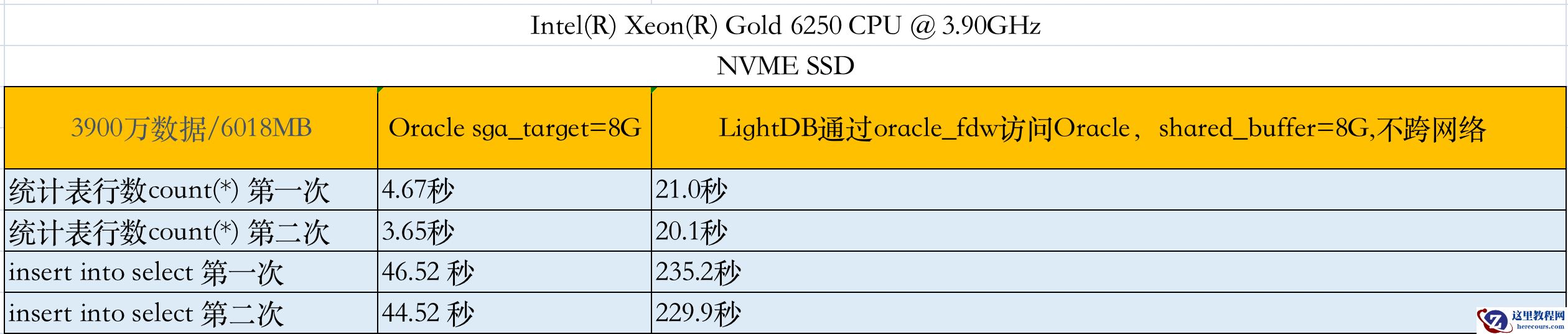
1、创建Oracle测试表
create table haha as select * from dba_objects;
insert into haha select * from haha;
--多次执行后,最后表记录3900万,表大小6018MB
服务器配置和最终测试结果如下表格: