来源:PostgreSQL学徒
前言
今天在某个群里看到这样一个问题
“有大佬知道下图中表空间变化的原因吗,我新创建了一个表空间,统计大小为0,我将一个表迁移到新表空间,再将表从新表空间迁移到其他表空间,再次统计新表空间的大小为4096,按道理也应该是0,个人认为是Linux的inode的元数据,刚好是一个块4096,大佬们怎么看?
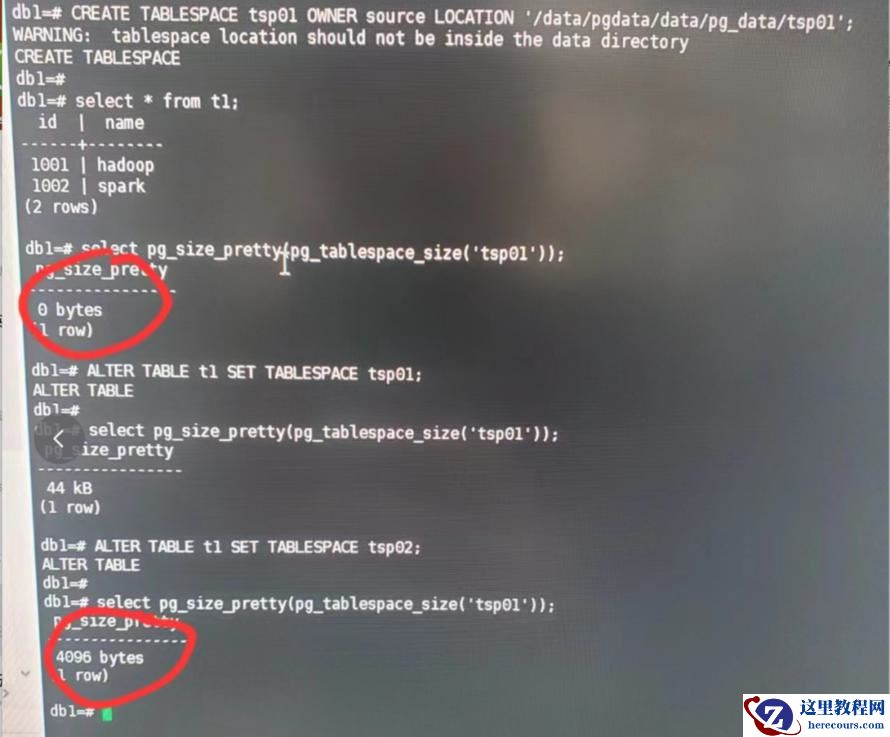
这引起了我的兴趣,简单分析一下。
复现
复现方式很简单,将某张表挪到指定表空间再挪回去即可,大小是 4096 字节。
postgres=# create tablespace myspc location '/home/postgres/mytablespace';
CREATE TABLESPACE
postgres=# create table test(id int,info text);
CREATE TABLE
postgres=# insert into test select n,md5(random()::text) from generate_series(1,10) as n;
INSERT 0 10
postgres=# select pg_size_pretty(pg_tablespace_size('myspc'));
 pg_size_pretty
----------------
 0 bytes
(1 row)
postgres=# alter table test set tablespace myspc ;
ALTER TABLE
postgres=# select pg_size_pretty(pg_tablespace_size('myspc'));
 pg_size_pretty
----------------
 20 kB
(1 row)
postgres=# alter table test set tablespace pg_default ;
ALTER TABLE
postgres=# select pg_size_pretty(pg_tablespace_size('myspc'));
 pg_size_pretty
----------------
 4096 bytes
(1 row)
现在表空间下面什么都没有了,用 du -sh 可以看到也有个 4KB 大小,看样子极有可能就是这个!
[postgres@xiongcc ~]$ ls -l mytablespace/PG_16_202307071/
total 0
[postgres@xiongcc ~]$ du -sh mytablespace/PG_16_202307071/
4.0K    mytablespace/PG_16_202307071/
[postgres@xiongcc ~]$ du -sh mytablespace/
8.0K    mytablespace/
让我们瞅瞅代码,确认一下。
源码分析
调用逻辑:pg_tablespace_size_oid → calculate_tablespace_size,calculate_tablespace_size 的代码很简单,寥寥十几行
/*
 * Calculate total size of tablespace. Returns -1 if the tablespace directory
 * cannot be found.
 */
static int64
calculate_tablespace_size(Oid tblspcOid)
{
 char  tblspcPath[MAXPGPATH];
 char  pathname[MAXPGPATH * 2];
 int64  totalsize = 0;
 DIR     *dirdesc;
 struct dirent *direntry;
 AclResult aclresult;
 /*
  * User must have privileges of pg_read_all_stats or have CREATE privilege
  * for target tablespace, either explicitly granted or implicitly because
  * it is default for current database.
  */
 if (tblspcOid != MyDatabaseTableSpace &&
  !has_privs_of_role(GetUserId(), ROLE_PG_READ_ALL_STATS))
 {
  aclresult = pg_tablespace_aclcheck(tblspcOid, GetUserId(), ACL_CREATE);
  if (aclresult != ACLCHECK_OK)
   aclcheck_error(aclresult, OBJECT_TABLESPACE,
         get_tablespace_name(tblspcOid));
 }
 if (tblspcOid == DEFAULTTABLESPACE_OID)
  snprintf(tblspcPath, MAXPGPATH, "base");
 else if (tblspcOid == GLOBALTABLESPACE_OID)
  snprintf(tblspcPath, MAXPGPATH, "global");
 else
  snprintf(tblspcPath, MAXPGPATH, "pg_tblspc/%u/%s", tblspcOid,
     TABLESPACE_VERSION_DIRECTORY);
 dirdesc = AllocateDir(tblspcPath);
 if (!dirdesc)
  return -1;
 while ((direntry = ReadDir(dirdesc, tblspcPath)) != NULL)
 {
  struct stat fst;
  CHECK_FOR_INTERRUPTS();
  if (strcmp(direntry->d_name, ".") == 0 ||
   strcmp(direntry->d_name, "..") == 0)
   continue;
  snprintf(pathname, sizeof(pathname), "%s/%s", tblspcPath, direntry->d_name);
  if (stat(pathname, &fst) < 0)
  {
   if (errno == ENOENT)
    continue;
   else
    ereport(ERROR,
      (errcode_for_file_access(),
       errmsg("could not stat file \"%s\": %m", pathname)));
  }
  if (S_ISDIR(fst.st_mode))
   totalsize += db_dir_size(pathname);
  totalsize += fst.st_size;
 }
 FreeDir(dirdesc);
 return totalsize;
}
大概流程如下:
tblspcOid,构造表空间的路径。这部分考虑了默认表空间和全局表空间的特殊情况AllocateDir 打开表空间目录,并使用 ReadDir 遍历目录。对于每个目录项(direntry),还会做CHECK_FOR_INTERRUPTS() 用于处理可能的中断请求。snprintf 构建文件或目录的完整路径。stat 失败且错误不是 ENOENT(文件不存在),则报错。totalsize。那让我们看下这 4KB 是什么大小,其实到这里各位已经知道答案了。
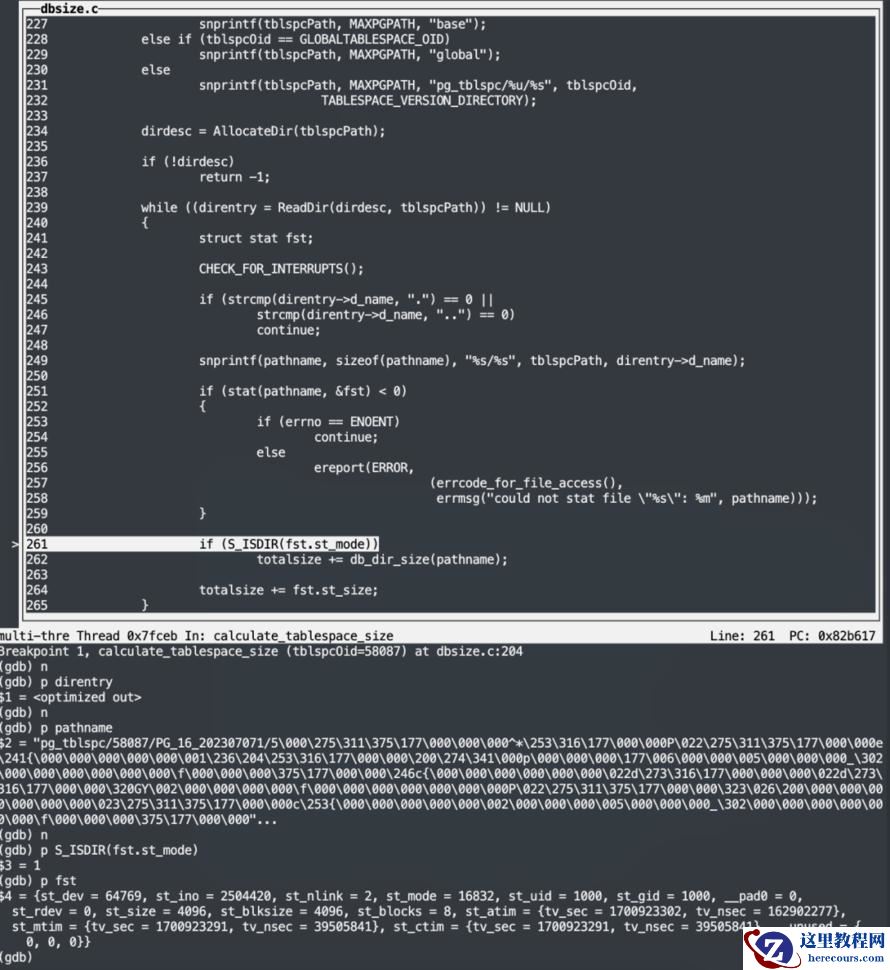
各位可以看到,该文件的 inode 是 2504420,st_size 是 4096,那么这个 inode 是什么呢?让我们也用 stat 命令看看,没错正是 "5" 这个目录,这个 5 就是数据库的 oid
[postgres@xiongcc PG_16_202307071]$ stat 5
  File: ‘5’
  Size: 4096            Blocks: 8          IO Block: 4096   directory
Device: fd01h/64769d    Inode: 2504420     Links: 2
Access: (0700/drwx------)  Uid: ( 1000/postgres)   Gid: ( 1000/postgres)
Access: 2023-11-25 22:54:15.269934346 +0800
Modify: 2023-11-25 22:52:00.034105361 +0800
Change: 2023-11-25 22:52:00.034105361 +0800
 Birth: -
因此这个 4096 字节就是这么来的。Linux 一切皆文件呐!
那么假如你将这个表挪回去,各位应该就能理解为什么计算出来是 20KB 了吧。
postgres=# select pg_size_pretty(pg_tablespace_size('myspc'));
 pg_size_pretty
----------------
 20 kB
(1 row)
[root@xiongcc 5]# du -sh *
8.0K    58100
0       58101
8.0K    58102
[root@xiongcc 5]# du -sh ../5
20K     ../5
发散
其实这里还涉及到一些操作系统相关的知识,我们不妨思考一下:
[postgres@xiongcc 5]$ touch empty.file   ---创建一个空文件
[postgres@xiongcc 5]$ du -sh empty.file   ---大小是0
0       empty.file
可以看到我们使用 du -sh 看到的大小是 0字节,但是注意,其实空文件大小并非是"0",而是 du -sh 的计算方式"欺骗"了我们,实际上仍会占用一个 inode 的大小。
[root@xiongcc 5]# df -i /
Filesystem      Inodes  IUsed   IFree IUse% Mounted on
/dev/vda1      2621440 242516 2378924   10% /
[root@xiongcc 5]# touch empty.file
[root@xiongcc 5]# df -i /   ---inode加1
Filesystem      Inodes  IUsed   IFree IUse% Mounted on
/dev/vda1      2621440 242517 2378923   10% /
具体 inode 大小可以通过 dumpe2fs 查看,可以看到是 256 字节 ????????
[root@xiongcc 5]# dumpe2fs -h /dev/vda1 | grep Inode
dumpe2fs 1.42.9 (28-Dec-2013)
Inode count:              2621440
Inodes per group:         8192
Inode blocks per group:   512
Inode size:               256
而对于目录,目录也是一个特殊的文件 (Linux一切皆文件~) 也会占用一个 inode + 一个 block size,至于 block size 也可以使用 dumpe2fs 查看,可以看到,正是 4096 字节。
[root@xiongcc 5]# dumpe2fs -h /dev/vda1 | grep 'Block size'
dumpe2fs 1.42.9 (28-Dec-2013)
Block size:               4096
[root@xiongcc PG_16_202307071]# stat 5
  File: ‘5’
  Size: 4096            Blocks: 8          IO Block: 4096   directory
Device: fd01h/64769d    Inode: 2504420     Links: 2
Access: (0700/drwx------)  Uid: ( 1000/postgres)   Gid: ( 1000/postgres)
Access: 2023-11-25 22:57:15.645308113 +0800
Modify: 2023-11-25 23:02:19.443251339 +0800
Change: 2023-11-25 23:02:19.443251339 +0800
 Birth: -
那么空目录为啥一开始就消耗block了呢,那是因为其必须默认带两个目录项 "." 和 ".." (至少一个 block,就和 PostgreSQL 的 block 一样,哪怕写 1 个字节也会分配一个数据块),可以看到 PostgreSQL 的代码"巧妙"地处理了这个 "." 和 ".."。
小结
其实这个案例更多和操作系统有关,小结一下:
em,一个有趣的案例 ~