LinuxSVN服务器搭建
来源:互联网
时间:2026-02-26 18:05:40
作者:
系统大全为您提供
1. Ubuntu PC一台,最好是最新的Ubuntu稳定版本 2. 执行以下命令安装subversion: sudo apt-get update sudo apt-get install subversion 3. 假设代码svn仓库的根路径定为 /home/svnroot,执行以下命令新建目录: sudo mkdir /home/svnroot 4. 新建一个代码仓库,假设仓库名为:example cd /home/svnroot sudo svnadmin create example 此命令执行完成后会在 /home/svnroot 下多出来一个名为example的目录,这就是example代码仓库了。 5. 编辑example仓库的访问权限 即:修改 /home/svnroot/example/conf下的三个文件:authz passwd svnserve.conf 其中: passwd 中保存了用户名和密码 authz 中保存了用户组定义及各目录的访问权限定义 svnserve.conf 中保存了本代码仓库使用的配置(是否允许匿名用户?指定用户名和密码数据库...) 这里给出一个典型的配置: passwd实例: [users] xiaoming = 1111 xiaowang = 2222 xiaoli = 3333 laowang = 4444 shuangshuang = 5555 dashi = 6666 authz实例(admin可以读写所有目录,dev能读写branch,dev只读trunk/tag): [aliases] # joe = /C=XZ/ST=Dessert/L=Snake City/O=Snake Oil, Ltd./OU=Research Institute/CN=Joe Average [groups] admin = xiaoli dev = laowang,shuangshuang,dashi,xiaowang,xiaoming [/] @admin = rw @dev = r [/trunk] @admin = rw @dev = r [/tag] @admin = rw @dev = r [/branch] @admin = rw @dev = rw svnserve.conf实例(关闭匿名访问,指定用户数据库和鉴权数据库): ### This file controls the configuration of the svnserve daemon, if you ### use it to allow access to this repository. (If you only allow ### access through https://www.herecours.com/d/file/efpub/2026/26-26/20260226175133569725 and/or file: URLs, then this file is ### irrelevant.) ### Visit https://www.herecours.com/d/file/efpub/2026/26-26/20260226175133569725//subversion.tigris.org/ for more information. [general] ### These options control access to the repository for unauthenticated ### and authenticated users. Valid values are "write", "read", ### and "none". The sample settings below are the defaults. anon-access = none auth-access = write ### The password-db option controls the location of the password ### database file. Unless you specify a path starting with a /, ### the file's location is relative to the directory containing ### this configuration file. ### If SASL is enabled (see below), this file will NOT be used. ### Uncomment the line below to use the default password file. password-db = passwd ### The authz-db option controls the location of the authorization ### rules for path-based access control. Unless you specify a path ### starting with a /, the file's location is relative to the the ### directory containing this file. If you don't specify an ### authz-db, no path-based access control is done. ### Uncomment the line below to use the default authorization file. authz-db = authz ### This option specifies the authentication realm of the repository. ### If two repositories have the same authentication realm, they should ### have the same password database, and vice versa. The default realm ### is repository's uuid. # realm = My First Repository [sasl] ### This option specifies whether you want to use the Cyrus SASL ### library for authentication. Default is false. ### This section will be ignored if svnserve is not built with Cyrus ### SASL support; to check, run 'svnserve --version' and look for a line ### reading 'Cyrus SASL authentication is available.' # use-sasl = true ### These options specify the desired strength of the security layer ### that you want SASL to provide. 0 means no encryption, 1 means ### integrity-checking only, values larger than 1 are correlated ### to the effective key length for encryption (e.g. 128 means 128-bit ### encryption). The values below are the defaults. # min-encryption = 0 # max-encryption = 256 6. 添加svn服务为系统自启动项目 - 创建svnd.sh ,内容如下 #!/bin/bash svnserve -d -r /home/svnroot 将这个文件放在 /etc/init.d/svnd.sh 这个脚本的功能:启动svn服务,只有在启动服务后,外部的机器才能通过各种svn工具来访问svn服务器。 - 添加可执行权限 sudo chmod a+x /etc/init.d/svnd.sh - 编辑 rc.local vim /etc/rc.local 在exit 0之前,加上 /etc/init.d/svnd.sh - 重启服务器,然后执行命令: ps -e | grep svnserve 从命令结果来检查svn服务是否已经自动的随系统启动。
以上就是系统大全给大家介绍的如何使的方法都有一定的了解了吧,好了,如果大家还想了解更多的资讯,那就赶紧点击系统大全官网吧。
本文来自系统大全https://www.herecours.com/d/file/efpub/2026/26-26/20260226175133569725//www.win7cn.com/如需转载请注明!推荐:win7纯净版
编辑推荐:
- linux网络基础之三层交换机与NAT地址转换笔记02-26
- LinuxSVN服务器搭建02-26
- linux下安装jdktomcat并配置02-26
- 如何安装linux系统02-26
- unzip(linux命令)02-26
- Linux命令(2):ls命令02-26
- Linux常用命令02-26
- Linux设置固定IP02-26
相关推荐
-

-
-
-
-
-
-
-
-
-
-
-
-
-
-

雷神推出 MIX PRO II 迷你主机:基于 Ultra 200H,玻璃上盖 + ARGB 灯效
2 月 9 日消息,雷神 (THUNDEROBOT) 现已宣布推出基于英
-

制造商 Musnap 推出彩色墨水屏电纸书 Ocean C:支持手写笔、第三方安卓应用
2 月 10 日消息,制造商 Musnap 现已在海外推出一款 Oce
热文推荐
- linux下安装jdktomcat并配置
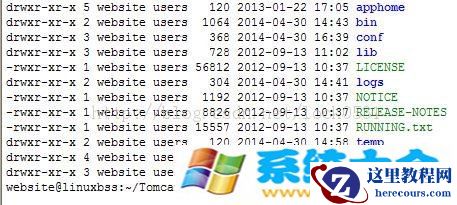
linux下安装jdktomcat并配置
26-02-26 - Linux命令(2):ls命令
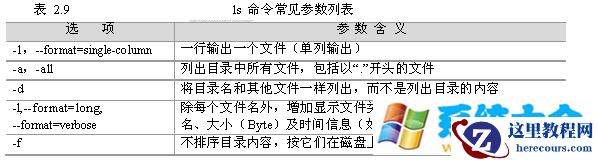
Linux命令(2):ls命令
26-02-26 - linux之虚拟机三种联网模式与远程登录管理
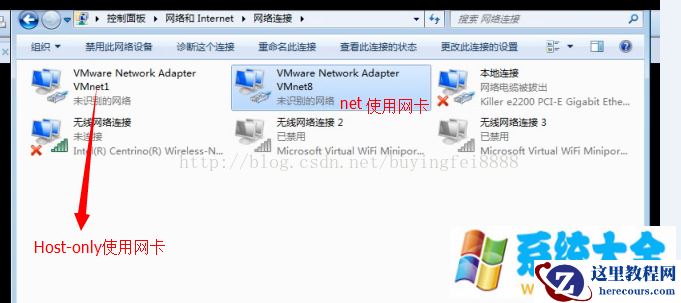
linux之虚拟机三种联网模式与远程登录管理
26-02-26 - Linux怎么样扩展XFS系统文件
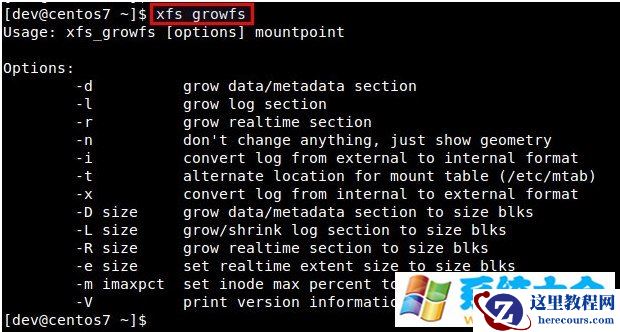
Linux怎么样扩展XFS系统文件
26-02-26 - Linux解决文件删除了但磁盘可利用率没变
Linux解决文件删除了但磁盘可利用率没变
26-02-26 - 为Linux手动制作U盘启动及基本原理
为Linux手动制作U盘启动及基本原理
26-02-26 - Cygwin安装
Cygwin安装
26-02-26 - 如何在Linux下使用rsync进行数据备份

如何在Linux下使用rsync进行数据备份
26-02-26 - AWE 2026 中国家电及消费电子博览会 3 月 12~15 日在上海举行:首次启用“一展双区”,超 1200 家企业参展
- Ubuntu系统Grub出现故障怎么办
Ubuntu系统Grub出现故障怎么办
26-02-26