
前几天需要在uwp中实现吸顶,就在网上找了一些文章:
吸顶大法 -- UWP中的工具栏吸顶的实现方式之一
在UWP中页面滑动导航栏置顶
发现前人的实现方式大多是控制ListViewBase的Header变换高度,或者建立一个ScrollViewer在里面放置ListViewBase。经过测试,这两种方法或多或少的都有问题。所以我想试试用Composition API实现吸顶的效果。
首先先了解一下Composition API是什么。
只看这几句微软给的介绍也是云里来雾里去的,还是看代码吧。
CompositionAPI中有一种动画叫表达式动画。大致效果就是让一个Visual或者PropertySet的属性随着自身另一个属性,或者另一个Visual或者PropertySet的属性的变化而变化。
对于不含Pivot的简单情况,就有这样一个基本的思路了:
获取到ListViewBase的ScrollViewer;
获取到ScrollViewer的ManipulationPropertySet和ListViewHeader的Visual;
让ManipulationPropertySet和Visual发生关系。
我们先来建立一个简单的页面。
<Pagex:Class="TestSwipeBack.ScrollTest"xmlns="http://schemas.microsoft.com/winfx/2006/xaml/presentation"xmlns:x="http://schemas.microsoft.com/winfx/2006/xaml"xmlns:local="using:TestSwipeBack"xmlns:d="http://schemas.microsoft.com/expression/blend/2008"xmlns:mc="http://schemas.openxmlformats.org/markup-compatibility/2006"mc:Ignorable="d" Loaded="Page_Loaded"><Grid Background="{ThemeResource ApplicationPageBackgroundThemeBrush}"><ListView x:Name="_listview" ItemsSource="{x:Bind ItemSource,Mode=OneWay}"><ListView.Header><Grid x:Name="_header"><Grid.RowDefinitions><RowDefinition Height="100" /><RowDefinition Height="50" /></Grid.RowDefinitions><Grid Background="LightBlue"><Button>123</Button><TextBlock FontSize="25" HorizontalAlignment="Center" VerticalAlignment="Center">我会被隐藏</TextBlock></Grid><Grid Background="Pink" Grid.Row="1"><Button>123</Button><TextBlock FontSize="25" HorizontalAlignment="Center" VerticalAlignment="Center">我会吸顶</TextBlock></Grid></Grid></ListView.Header><ListView.ItemTemplate><DataTemplate><TextBlock Text="{Binding }" /></DataTemplate></ListView.ItemTemplate></ListView></Grid></Page>
原本ListViewBase里Header是在ItemsPanelRoot下方的,使用Canvans.SetZIndex把ItemsPanelRoot设置到下方。
Canvas.SetZIndex(_listview.ItemsPanelRoot, -1);
然后在后台获取ListView内的ScrollViewer。
_scrollviewer = FindFirstChild<ScrollViewer> T FindFirstChild<T>(FrameworkElement element) childrenCount = children = ( i = ; i < childrenCount; i++ child = VisualTreeHelper.GetChild(element, i) = (child ( i = ; i < childrenCount; i++ (children[i] != subChild = FindFirstChild<T> (subChild !=
获取ListViewHeader的Visual和ScrollViewer的ManipulationPropertySet。
var _headerVisual = ElementCompositionPreview.GetElementVisual(_header);var _manipulationPropertySet = ElementCompositionPreview.GetScrollViewerManipulationPropertySet(_scrollviewer);
创建表达式动画,然后运行。
var _compositor = Window.Current.Compositor;var _headerAnimation = _compositor.CreateExpressionAnimation("_manipulationPropertySet.Translation.Y > -100f ? 0: -100f -_manipulationPropertySet.Translation.Y");//_manipulationPropertySet.Translation.Y是ScrollViewer滚动的数值,手指向上移动的时候,也就是可视部分向下移动的时候,Translation.Y是负数。_headerAnimation.SetReferenceParameter("_manipulationPropertySet", _manipulationPropertySet);
_headerVisual.StartAnimation("Offset.Y", _headerAnimation);
现在滑动Demo看看,是不是在滚动100像素之后,Header就停住了?
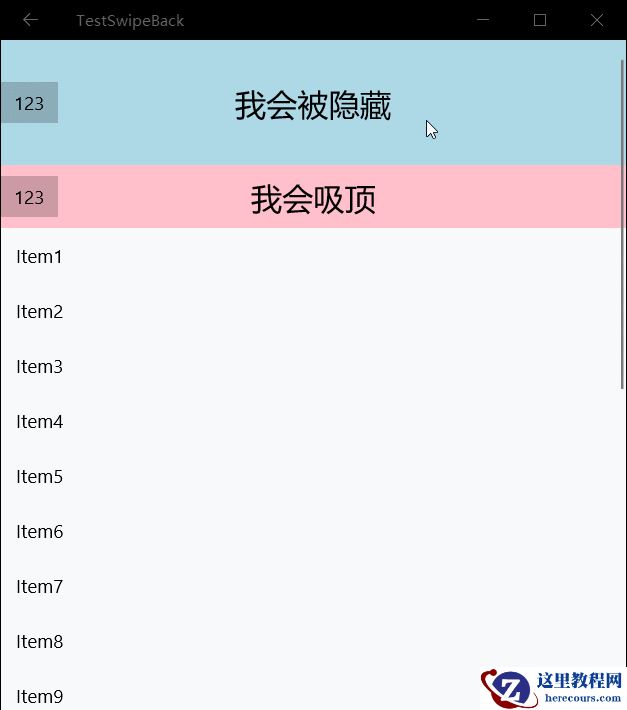
注:在一个Visual或者propertySet被附加了动画(即StartAnimation或者StartAnimationGroup)之后,取出(propertySet.TryGetScalar)相应的属性就只能取到0,但是赋值或者插入数值是会生效的。
编辑推荐:


相关推荐
-

-
-
-
-
-
-
-
-
-
-
-
-
-
-

雷神推出 MIX PRO II 迷你主机:基于 Ultra 200H,玻璃上盖 + ARGB 灯效
2 月 9 日消息,雷神 (THUNDEROBOT) 现已宣布推出基于英
-

制造商 Musnap 推出彩色墨水屏电纸书 Ocean C:支持手写笔、第三方安卓应用
2 月 10 日消息,制造商 Musnap 现已在海外推出一款 Oce
热文推荐
- UWP中使用Composition API实现吸顶的实例教程
UWP中使用Composition API实现吸顶的实例教程
26-02-21 - .net core mvc实现一个在线房间棋牌游戏微信支付和及时通讯的简易框架
- 操作 ASP.NET Web API 的实例教程
操作 ASP.NET Web API 的实例教程
26-02-21 - .Net Core + Angular Cli 实现开发环境搭建
.Net Core + Angular Cli 实现开发环境搭建
26-02-21 - 关于操作 ASP.NET Web API的实例
关于操作 ASP.NET Web API的实例
26-02-21 - 分享一个手机微网站的设计与实现

分享一个手机微网站的设计与实现
26-02-21 - socket传输protobuf字节流的实例详解

socket传输protobuf字节流的实例详解
26-02-21 - Task用法之任务等待wait实例
Task用法之任务等待wait实例
26-02-21 - 编写一个webapi框架的开端
编写一个webapi框架的开端
26-02-21 - Visual Studio 中自定义生成事件的详细介绍
Visual Studio 中自定义生成事件的详细介绍
26-02-21