Java if-else语句
在一个if语句后面可以跟一个可选的else语句,当布尔表达式为假时执行。
语法
if…else语句的语法如下:
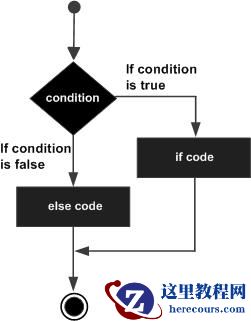
if(Boolean_expression) { // Executes when the Boolean expression is true}else { // Executes when the Boolean expression is false}如果布尔表达式评估结果为真,则执行 if 代码块,否则执行 else 代码块。
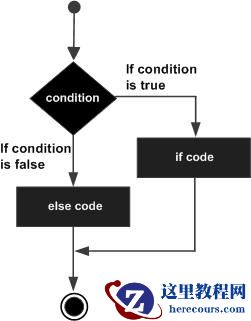
流程图
示例
public class Test { public static void main(String args[]) { int x = 30; if( x < 20 ) { System.out.print("This is if statement"); }else { System.out.print("This is else statement"); } }}这将产生以下结果 −
输出
This is else statement
if语句和else if语句
if语句后面可以跟着一个可选的else if语句,这样可以很方便地使用单个if…else if语句来测试各种条件。
当使用if、else if和else语句时,有几点需要记住。
一个if语句可以有零个或一个else语句,并且必须出现在任何else if语句之后。一个if语句可以有零个或多个else if语句,并且它们必须出现在else语句之前。
一旦某个else if语句成功,剩下的else if语句和else语句将不会被测试。
语法
以下是if…else语句的语法 −
if(Boolean_expression 1) { // Executes when the Boolean expression 1 is true}else if(Boolean_expression 2) { // Executes when the Boolean expression 2 is true}else if(Boolean_expression 3) { // Executes when the Boolean expression 3 is true}else { // Executes when the none of the above condition is true.}示例
public class Test { public static void main(String args[]) { int x = 30; if( x == 10 ) { System.out.print("Value of X is 10"); }else if( x == 20 ) { System.out.print("Value of X is 20"); }else if( x == 30 ) { System.out.print("Value of X is 30"); }else { System.out.print("This is else statement"); } }}这将产生以下结果 –
输出
Value of X is 30