环境规划:
| IP地址 | 主机名 | 角色 | 备注 |
| 10.4.132.50 | k8s01 | mycat,master | |
| 10.4.132.42 | k8s02 | slave | |
| 10.4.132.66 | k8s03 | slave |
Mycat下载地址:http://dl.mycat.io/1.6.7.3/20190828135747/Mycat-server-1.6.7.3-release-20190828135747-linux.tar.gz Mysql下载地址: http://mirrors.163.com/mysql/Downloads/MySQL-5.7/mysql-5.7.27-linux-glibc2.12-x86_64.tar.gz Mycal管理集群端口:[root@k8s01 conf]# mysql -h 127.0.0.1 -u root -p123456 -P 9066 Mycat数据端口:[root@k8s01 conf]# mysql -h 127.0.0.1 -u root -p123456 -P 8066 1.下载安装mysql(1台master节点和2台slave节点) [root@k8s01 soft]# wget http://mirrors.163.com/mysql/Downloads/MySQL-5.7/mysql-5.7.27-linux-glibc2.12-x86_64.tar.gz [root@k8s01 soft]# tar xvf mysql-5.7.27-linux-glibc2.12-x86_64.tar.gz -C /usr/local/ [root@k8s01 soft]# cd /usr/local/ [root@k8s01 local]# mv mysql-5.7.27-linux-glibc2.12-x86_64/ mysql-5.7.27 [root@k8s01 local]# chown -R root:root mysql-5.7.27/ [root@k8s01 local]# cd mysql-5.7.27/ [root@k8s01 mysql-5.7.27]# mkdir data [root@k8s01 mysql-5.7.27]# useradd -r -M -s /bin/nologin mysql [root@k8s01 mysql-5.7.27]# chown -R mysql:mysql data/ [root@k8s01 mysql-5.7.27]# ./bin/mysqld --initialize --user=mysql --basedir=/usr/local/mysql-5.7.27 --datadir=/usr/local/mysql-5.7.27/data 2019-11-02T04:24:41.908404Z 0 [Warning] TIMESTAMP with implicit DEFAULT value is deprecated. Please use --explicit_defaults_for_timestamp server option (see documentation for more details). 2019-11-02T04:24:46.687678Z 0 [Warning] InnoDB: New log files created, LSN=45790 2019-11-02T04:24:47.428823Z 0 [Warning] InnoDB: Creating foreign key constraint system tables. 2019-11-02T04:24:47.487404Z 0 [Warning] No existing UUID has been found, so we assume that this is the first time that this server has been started. Generating a new UUID: b42cef88-fd28-11e9-a5cc-000c29ee86d5. 2019-11-02T04:24:47.488204Z 0 [Warning] Gtid table is not ready to be used. Table 'mysql.gtid_executed' cannot be opened. 2019-11-02T04:24:47.612739Z 1 [Note] A temporary password is generated for root@localhost: 3m;5yQ_7T#jc --登陆密码 [root@k8s01 mysql-5.7.27]# cp -a support-files/mysql.server /etc/init.d/mysqld [root@k8s01 mysql-5.7.27]# chkconfig --add mysqld [root@k8s01 mysql-5.7.27]# chkconfig mysqld on [root@k8s01 mysql-5.7.27]# vim /etc/init.d/mysqld basedir=/usr/local/mysql-5.7.27 datadir=/usr/local/mysql-5.7.27/data [root@k8s01 mysql-5.7.27]# vim /etc/my.cnf [mysqld] basedir=/usr/local/mysql-5.7.27 datadir=/usr/local/mysql-5.7.27/data socket=/tmp/mysql.sock symbolic-links=0 server_id=10 binlog_format=ROW max_binlog_size=2G sync_binlog=1 binlog_cache_size=64M log_bin=bin-log log_bin_index=bin-index [mysqld_safe] log-error=/usr/local/mysql-5.7.27/data/mariadb.log pid-file=/usr/local/mysql-5.7.27/data/mariadb.pid [root@k8s01 mysql-5.7.27]# /etc/init.d/mysqld restart ERROR! MySQL server PID file could not be found! Starting MySQL.Logging to '/usr/local/mysql-5.7.27/data/mariadb.log'. ... SUCCESS! [root@k8s01 mysql-5.7.27]# vim /etc/profile export PATH=$PATH:/usr/local/mysql-5.7.27/bin [root@k8s01 mysql-5.7.27]# mysql -u root -p Enter password: Welcome to the MySQL monitor. Commands end with ; or \g. Your MySQL connection id is 3 Server version: 5.7.27 Copyright (c) 2000, 2019, Oracle and/or its affiliates. All rights reserved. Oracle is a registered trademark of Oracle Corporation and/or its affiliates. Other names may be trademarks of their respectiveowners. Type 'help;' or '\h' for help. Type '\c' to clear the current input statement. mysql> set password=password('System135'); Query OK, 0 rows affected, 1 warning (0.00 sec) mysql> flush privileges; Query OK, 0 rows affected (0.00 sec) mysql> exit Bye [root@k8s01 mysql-5.7.27]# mysql -u root -pSystem135 mysql: [Warning] Using a password on the command line interface can be insecure. Welcome to the MySQL monitor. Commands end with ; or \g. Your MySQL connection id is 6 Server version: 5.7.27 MySQL Community Server (GPL) Copyright (c) 2000, 2019, Oracle and/or its affiliates. All rights reserved. Oracle is a registered trademark of Oracle Corporation and/or its affiliates. Other names may be trademarks of their respective owners. Type 'help;' or '\h' for help. Type '\c' to clear the current input statement. mysql> show databases; +--------------------+ | Database | +--------------------+ | information_schema | | mysql | | performance_schema | | sys | +--------------------+ 4 rows in set (0.00 sec) mysql> 2.master节点和slave节点做主从 master节点:
3.两个slave节点(两个slave节点都要连接到master节点)
mysql> show slave status \G *************************** 1. row *************************** Slave_IO_State: Waiting for master to send event Master_Host: 10.4.132.50 Master_User: repl Master_Port: 3306 Connect_Retry: 60 Master_Log_File: bin-log.000002 Read_Master_Log_Pos: 3093 Relay_Log_File: k8s02-relay-bin.000002 Relay_Log_Pos: 318 Relay_Master_Log_File: bin-log.000002 Slave_IO_Running: Yes Slave_SQL_Running: Yes 。。。。。。。。。。。。。。。。。。。。。。。。。。。。。。。。。。。。。。。。。。。。。。。。。
4.验证主从数据是否同步 master节点: mysql> system hostname k8s01 mysql> create database wuhan charset utf8; Query OK, 1 row affected (0.00 sec)
slave1节点: mysql> system hostname k8s02
mysql> slave2节点:
5.下载安装配置Mycat(master节点)
[root@k8s01
soft]# rpm -ivh jdk-8u221-linux-x64.rpm
warning: jdk-8u221-linux-x64.rpm: Header V3 RSA/SHA256 Signature, key ID ec551f03: NOKEY
Preparing... ################################# [100%]
Updating / installing...
1:jdk1.8-2000:1.8.0_221-fcs ################################# [100%]
Unpacking JAR files...
tools.jar...
plugin.jar...
javaws.jar...
deploy.jar...
rt.jar...
jsse.jar...
charsets.jar...
localedata.jar...
[root@k8s01 soft]# tar xvf Mycat-server-1.6.7.3-release-20190828135747-linux.tar.gz -C /usr/local/
[root@k8s01 soft]# cd /usr/local/mycat/conf/
[root@k8s01 conf]# vim schema.xml
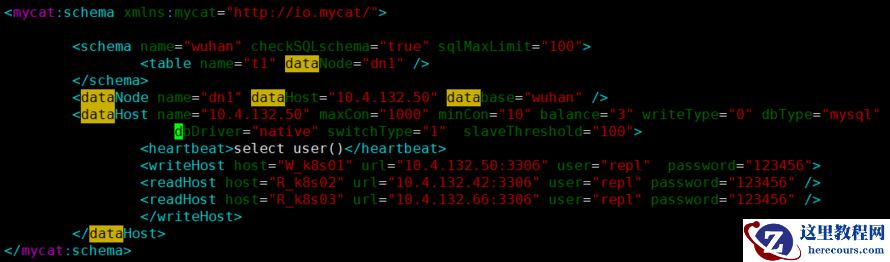 配置讲解:
schema name="wuhan" --需要做读取写分离的库
checkSQLschema="true" --执行sql时是否去掉schema名
sqlMaxLimit="100" --如果sql语句没有加limit限制,此时默认值是100
<table name="t1" --指定读写分离的表
dataNode="dn1" --数据节点
<dataNode name="dn1" --对应上面的数据节点(任意起)
dataHost="10.4.132.50" --数据主机名(任意起)
database="wuhan" --库名
<dataHost name="10.4.132.50" --对应以上值
balance="0" --不开启读写分离机制,所有操作都在master上。1 所有读操作都在slave节点上。 2 所有读操作都随机在master和slave节点上。 3 所有读操作都发送到slave节点,master节点只负责写。
<heartbeat>select user()</heartbeat> --心跳探测
<writeHost host="W_k8s01" url="10.4.132.50:3306" user="repl" password="123456"> --后端主机(用户名和密码是mycat服务器可以登陆后面mysql的权限)
<schema name="hubei" checkSQLschema="true" sqlMaxLimit="100" dataNode="dn1"> --不写table name关键字,表示全库所有表做读写分离。
[root@k8s01 conf]# vim server.xml
配置讲解:
schema name="wuhan" --需要做读取写分离的库
checkSQLschema="true" --执行sql时是否去掉schema名
sqlMaxLimit="100" --如果sql语句没有加limit限制,此时默认值是100
<table name="t1" --指定读写分离的表
dataNode="dn1" --数据节点
<dataNode name="dn1" --对应上面的数据节点(任意起)
dataHost="10.4.132.50" --数据主机名(任意起)
database="wuhan" --库名
<dataHost name="10.4.132.50" --对应以上值
balance="0" --不开启读写分离机制,所有操作都在master上。1 所有读操作都在slave节点上。 2 所有读操作都随机在master和slave节点上。 3 所有读操作都发送到slave节点,master节点只负责写。
<heartbeat>select user()</heartbeat> --心跳探测
<writeHost host="W_k8s01" url="10.4.132.50:3306" user="repl" password="123456"> --后端主机(用户名和密码是mycat服务器可以登陆后面mysql的权限)
<schema name="hubei" checkSQLschema="true" sqlMaxLimit="100" dataNode="dn1"> --不写table name关键字,表示全库所有表做读写分离。
[root@k8s01 conf]# vim server.xml
[root@k8s01 logs]# ../bin/mycat restart
Stopping Mycat-server...
Stopped Mycat-server.
Starting Mycat-server...
[root@k8s01 logs]#
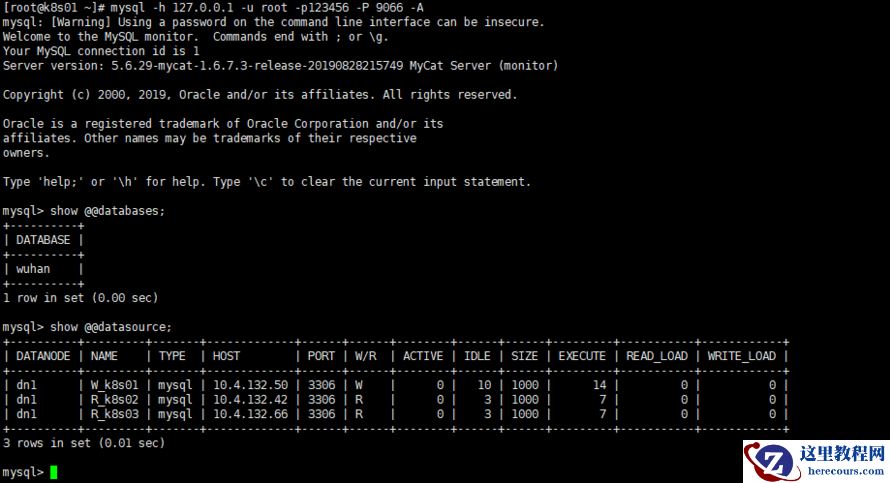
6.查看各节点的状态
 7.测试mycat实现的读写分离(登陆一次查询后要退出,再登陆查询)
日志查看结果:
 可重复登陆查询,写入数据结果(必须退出会话再登陆查询):

编辑推荐:
- mysql5.7GroupReplication多主模式在Centos7.2上安装部署03-01
- Mycat中间件实现Mysql主从读写分离03-01
- 3DMAX给时尚大气的异形天花吊顶建模03-01
- mysql复制+keepalived+haproxy配置(负载均衡)03-01
- Mysql数据库报ERROR 1045 (28000)报错及MySQL忘记密码找回03-01
- mysql 5.6.25报错ERROR 1372 (HY000): Password hash 的一点思考03-01
- 3dMAX巧用粒子流创建雨景特效教程03-01
- 随笔:sending data状态包含了使用内部临时表03-01
相关推荐
-

-
-
-
-
-
-
-
-
-
-
-
-
-
-

雷神推出 MIX PRO II 迷你主机:基于 Ultra 200H,玻璃上盖 + ARGB 灯效
2 月 9 日消息,雷神 (THUNDEROBOT) 现已宣布推出基于英
-

制造商 Musnap 推出彩色墨水屏电纸书 Ocean C:支持手写笔、第三方安卓应用
2 月 10 日消息,制造商 Musnap 现已在海外推出一款 Oce

热文推荐
- Mycat中间件实现Mysql主从读写分离
Mycat中间件实现Mysql主从读写分离
26-03-01 - 3DMAX给时尚大气的异形天花吊顶建模

3DMAX给时尚大气的异形天花吊顶建模
26-03-01 - mysql复制+keepalived+haproxy配置(负载均衡)
mysql复制+keepalived+haproxy配置(负载均衡)
26-03-01 - mysql 5.6.25报错ERROR 1372 (HY000): Password hash 的一点思考
- 3dMAX巧用粒子流创建雨景特效教程

3dMAX巧用粒子流创建雨景特效教程
26-03-01 - 随笔:sending data状态包含了使用内部临时表

随笔:sending data状态包含了使用内部临时表
26-03-01 - 如何基于生产环境mysql 5.6.25主从部署新的mysql从库操作指南
- 使用proxysql 1.4.14中间件实现mysql 5.7.26主从的读写分离
- Innodb中mysql如何快速删除2T的大表

Innodb中mysql如何快速删除2T的大表
26-03-01 - 宜信的105条数据库军规
宜信的105条数据库军规
26-03-01