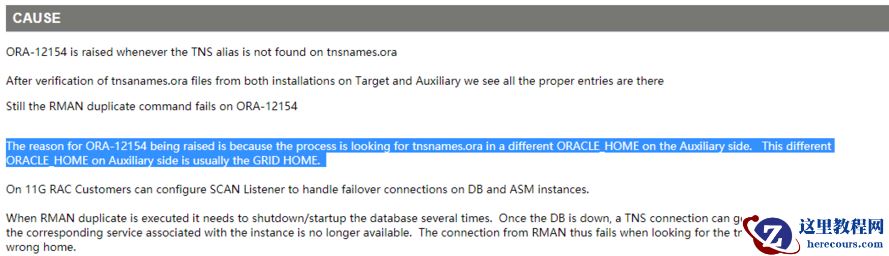
RU安装参考:http://blog.itpub.net/20747382/viewspace-2199389/
数据库版本: 12.2.0.1.0(已经安装p26133434_122010_Linux-x86-64)
RUR:p26133434_122010_Linux-x86-64.zip
1,Opatch 版本检查
[grid@prod04 soft]$ /u01/app/grid/OPatch/opatch version
OPatch Version: 12.2.0.1.14
OPatch succeeded.
[grid@prod04 soft]$ /u01/app/oracle/product/12.2.0/dbhome_1/OPatch/opatch version
OPatch Version: 12.2.0.1.14
OPatch succeeded.
2,补丁安装
[root@prod04 ~]# /u01/app/grid/OPatch/opatchauto apply /soft/28251142
OPatchauto session is initiated at Wed Aug 8 12:28:08 2018
System initialization log file is /u01/app/grid/cfgtoollogs/opatchautodb/systemconfig2018-08-08_12-28-14PM.log.
Session log file is /u01/app/grid/cfgtoollogs/opatchauto/opatchauto2018-08-08_12-28-26PM.log
The id for this session is XX8F
OPATCHAUTO-72141: Grid patching cannot be performed in rolling mode.
OPATCHAUTO-72141: Grid is installed only on a single node.
OPATCHAUTO-72141: Execute opatchauto in non-rolling mode.
OPatchAuto failed.
OPatchauto session completed at Wed Aug 8 12:28:42 2018
Time taken to complete the session 0 minute, 35 seconds
opatchauto failed with error code 42
[root@prod04 ~]# /u01/app/grid/OPatch/opatchauto apply /soft/28251142 -nonrolling
OPatchauto session is initiated at Wed Aug 8 12:28:53 2018
System initialization log file is /u01/app/grid/cfgtoollogs/opatchautodb/systemconfig2018-08-08_12-28-57PM.log.
Session log file is /u01/app/grid/cfgtoollogs/opatchauto/opatchauto2018-08-08_12-29-05PM.log
The id for this session is ZCJ5
Executing OPatch prereq operations to verify patch applicability on home /u01/app/grid
Executing OPatch prereq operations to verify patch applicability on home /u01/app/oracle/product/12.2.0/dbhome_1
Patch applicability verified successfully on home /u01/app/oracle/product/12.2.0/dbhome_1
Patch applicability verified successfully on home /u01/app/grid
Verifying SQL patch applicability on home /u01/app/oracle/product/12.2.0/dbhome_1
SQL patch applicability verified successfully on home /u01/app/oracle/product/12.2.0/dbhome_1
Preparing to bring down database service on home /u01/app/oracle/product/12.2.0/dbhome_1
Successfully prepared home /u01/app/oracle/product/12.2.0/dbhome_1 to bring down database service
Bringing down database service on home /u01/app/oracle/product/12.2.0/dbhome_1
Following database(s) and/or service(s) are stopped and will be restarted later during the session: cdb
Database service successfully brought down on home /u01/app/oracle/product/12.2.0/dbhome_1
Bringing down CRS service on home /u01/app/grid
Prepatch operation log file location: /u01/app/grid_base/crsdata/prod04/crsconfig/crspatch_prod04_2018-08-08_12-31-44AM.log
CRS service brought down successfully on home /u01/app/grid
Performing prepatch operation on home /u01/app/oracle/product/12.2.0/dbhome_1
Perpatch operation completed successfully on home /u01/app/oracle/product/12.2.0/dbhome_1
Start applying binary patch on home /u01/app/oracle/product/12.2.0/dbhome_1
Binary patch applied successfully on home /u01/app/oracle/product/12.2.0/dbhome_1
Performing postpatch operation on home /u01/app/oracle/product/12.2.0/dbhome_1
Postpatch operation completed successfully on home /u01/app/oracle/product/12.2.0/dbhome_1
Start applying binary patch on home /u01/app/grid
Binary patch applied successfully on home /u01/app/grid
Starting CRS service on home /u01/app/grid
Postpatch operation log file location: /u01/app/grid_base/crsdata/prod04/crsconfig/crspatch_prod04_2018-08-08_12-42-15AM.log
CRS service started successfully on home /u01/app/grid
Starting database service on home /u01/app/oracle/product/12.2.0/dbhome_1
Database service successfully started on home /u01/app/oracle/product/12.2.0/dbhome_1
Preparing home /u01/app/oracle/product/12.2.0/dbhome_1 after database service restarted
No step execution required.........
Trying to apply SQL patch on home /u01/app/oracle/product/12.2.0/dbhome_1
SQL patch applied successfully on home /u01/app/oracle/product/12.2.0/dbhome_1
OPatchAuto successful.
--------------------------------Summary--------------------------------
Patching is completed successfully. Please find the summary as follows:
Host:prod04
RAC Home:/u01/app/oracle/product/12.2.0/dbhome_1
Version:12.2.0.1.0
Summary:
==Following patches were SKIPPED:
Patch: /soft/28251142/27128906
Reason: This patch is not applicable to this specified target type - "rac_database"
Patch: /soft/28251142/26839277
Reason: This patch is not applicable to this specified target type - "rac_database"
Patch: /soft/28251142/27144050
Reason: This patch is not applicable to this specified target type - "rac_database"
==Following patches were SUCCESSFULLY applied:
Patch: /soft/28251142/27872031
Log: /u01/app/oracle/product/12.2.0/dbhome_1/cfgtoollogs/opatchauto/core/opatch/opatch2018-08-08_12-33-05PM_1.log
Patch: /soft/28251142/28222334
Log: /u01/app/oracle/product/12.2.0/dbhome_1/cfgtoollogs/opatchauto/core/opatch/opatch2018-08-08_12-33-05PM_1.log
Host:prod04
CRS Home:/u01/app/grid
Version:12.2.0.1.0
Summary:
==Following patches were SUCCESSFULLY applied:
Patch: /soft/28251142/26839277
Log: /u01/app/grid/cfgtoollogs/opatchauto/core/opatch/opatch2018-08-08_12-35-28PM_1.log
Patch: /soft/28251142/27128906
Log: /u01/app/grid/cfgtoollogs/opatchauto/core/opatch/opatch2018-08-08_12-35-28PM_1.log
Patch: /soft/28251142/27144050
Log: /u01/app/grid/cfgtoollogs/opatchauto/core/opatch/opatch2018-08-08_12-35-28PM_1.log
Patch: /soft/28251142/27872031
Log: /u01/app/grid/cfgtoollogs/opatchauto/core/opatch/opatch2018-08-08_12-35-28PM_1.log
Patch: /soft/28251142/28222334
Log: /u01/app/grid/cfgtoollogs/opatchauto/core/opatch/opatch2018-08-08_12-35-28PM_1.log
OPatchauto session completed at Wed Aug 8 13:02:46 2018
Time taken to complete the session 33 minutes, 54 seconds
[root@prod04 ~]#
3,补丁确认
之前几经安装了26133434 RU,安装28251142 RUR之后, 之前数据库补丁回滚。
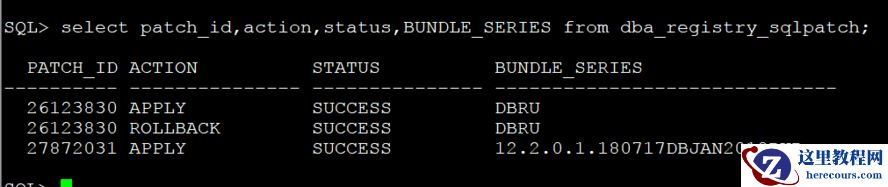 #database
[oracle@prod04 ~]$ /u01/app/oracle/product/12.2.0/dbhome_1/OPatch/opatch lspatches
28222334;OCW JAN 2018 RELEASE UPDATE REVISION 12.2.0.1.0(ID:180620) (28222334)
27872031
;Database Jan 2018 Release Update Revision : 12.2.0.1.180717 (27872031)
OPatch succeeded.
#grid
[grid@prod04 ~]$ /u01/app/grid/OPatch/opatch lspatches
28222334;OCW JAN 2018 RELEASE UPDATE REVISION 12.2.0.1.0(ID:180620) (28222334)
27872031;Database Jan 2018 Release Update Revision : 12.2.0.1.180717 (27872031)
27144050;Tomcat Release Update 12.2.0.1.0(ID:171023.0830) (27144050)
27128906;ACFS Release Update : 12.2.0.1.0 (27128906)
26839277;DBWLM RELEASE UPDATE 12.2.0.1.0(ID:170913) (26839277)
OPatch succeeded.
#database
[oracle@prod04 ~]$ /u01/app/oracle/product/12.2.0/dbhome_1/OPatch/opatch lspatches
28222334;OCW JAN 2018 RELEASE UPDATE REVISION 12.2.0.1.0(ID:180620) (28222334)
27872031
;Database Jan 2018 Release Update Revision : 12.2.0.1.180717 (27872031)
OPatch succeeded.
#grid
[grid@prod04 ~]$ /u01/app/grid/OPatch/opatch lspatches
28222334;OCW JAN 2018 RELEASE UPDATE REVISION 12.2.0.1.0(ID:180620) (28222334)
27872031;Database Jan 2018 Release Update Revision : 12.2.0.1.180717 (27872031)
27144050;Tomcat Release Update 12.2.0.1.0(ID:171023.0830) (27144050)
27128906;ACFS Release Update : 12.2.0.1.0 (27128906)
26839277;DBWLM RELEASE UPDATE 12.2.0.1.0(ID:170913) (26839277)
OPatch succeeded.
12.2.0.1 Grid RUR 安装
来源:这里教程网
时间:2026-03-03 11:51:21
作者:
编辑推荐:
- 如何在word2010中清除内容格式03-03
- 12.2.0.1 Grid RUR 安装03-03
- OPATCHAUTO-72141: Grid patching cannot be performed in rolling mode on single no03-03
- word2010中如何对文字进行排序03-03
- Word2010如何快速打出大字体03-03
- 如何使用word2010密钥03-03
- OGG 安装03-03
- 在word文档中如何显示网格03-03
下一篇:
相关推荐
-

-
-
-
-
-
-
-
-
-
-
-
-
-
-

雷神推出 MIX PRO II 迷你主机:基于 Ultra 200H,玻璃上盖 + ARGB 灯效
2 月 9 日消息,雷神 (THUNDEROBOT) 现已宣布推出基于英
-

制造商 Musnap 推出彩色墨水屏电纸书 Ocean C:支持手写笔、第三方安卓应用
2 月 10 日消息,制造商 Musnap 现已在海外推出一款 Oce
热文推荐
- 12.2.0.1 Grid RUR 安装
12.2.0.1 Grid RUR 安装
26-03-03 - 甲骨文再遭打击,亚马逊计划2020年初完全弃用甲骨文的数据库

甲骨文再遭打击,亚马逊计划2020年初完全弃用甲骨文的数据库
26-03-03 - 12.2.0.1.0 Grid RU安装

12.2.0.1.0 Grid RU安装
26-03-03 - 12c RAC增加节点
12c RAC增加节点
26-03-03 - 12.2 Grid RUR 安装

12.2 Grid RUR 安装
26-03-03 - word2010中怎样设置水印
word2010中怎样设置水印
26-03-03 - 怎样删除word2010的页眉页脚
怎样删除word2010的页眉页脚
26-03-03 - 一个RESOURCE MANAGER引起的问题分析
一个RESOURCE MANAGER引起的问题分析
26-03-03 - RMAN Active Duplicate on RAC fails with ORA-17629 and ORA-17627
- SQL优化案例-分区索引之无前缀索引(六)
SQL优化案例-分区索引之无前缀索引(六)
26-03-03