微信群有朋友问,PL/SQL Developer显示0.1的时候自动将0删除,即".1",因此有什么方法,可以显示小数点之前的0? 其实不止PL/SQL Developer,即使sqlplus命令行也有这问题,
SQL> create table tbl(a float); Table created. SQL> insert into tbl values(1); 1 row created. SQL> insert into tbl values(0.1); 1 row created. SQL> insert into tbl values(1.21); 1 row created. SQL> commit; Commit complete. SQL> select * from tbl; A ---------- 1 .1 1.21
可以看出,浮点数0.1默认显示,就会删除小数点前面的0,如果小数点前不是0,不会删除(否则语义就错了)。 有人回复,
用decode函数,第一位是点就加一个0。
从语义上看这是可以,但这么做,相当于绕道解决,Oracle既然支持浮点数,就不会只提供这种使用方法。
其实《SQL Language Reference》中对于to_char函数数字类型参数的格式化说明有介绍,
 对于小数点显示,以下有几种用法。
用法一:
如果使用"fm99.99",顶格显示小数点左侧,是0则不会显示了,小数点右侧只保留有效值,
对于小数点显示,以下有几种用法。
用法一:
如果使用"fm99.99",顶格显示小数点左侧,是0则不会显示了,小数点右侧只保留有效值,
SQL> SELECT to_char(a, 'fm99.99') from tbl; TO_CHAR(A,'FM99.99 ------------------ 1. .1 1.21
用法二: 如果使用"99.99",小数点右侧保留2位不足补0,小数点左侧若为0,则不会进行显示,
SQL> SELECT to_char(a, '99.99') from tbl; TO_CHAR(A,'99.99') ------------------ 1.00 .10 1.21
用法三: 使用格式符“0.00”效果,小数点前位数,无论是否是0值,都会显示,小数点右侧保留两位小数,
SQL> SELECT to_char(a, '0.00') FROM tbl; TO_CHAR(A,'0.00 --------------- 1.00 0.10 1.21
用法四: 使用"fm0.00",和“0.00”有微小差别,就是小数点前只有1位,“0.00”小数点前其实有两位,十位是一个空格,
SQL> SELECT to_char(a, 'fm0.00') from tbl; TO_CHAR(A,'FM0. --------------- 1.00 0.10 1.21
因此,至少保证格式符,小数点左侧个位要是0,才能满足要求,还要注意保留的位数。 对于格式符fm含义,文档中有介绍,Format Model只会影响显示,不会影响数据库的存储,
A format model is a character literal that describes the format of datetime or numeric data stored in a character string. A format model does not change the internal representation of the value in the database. When you convert a character string into a date or number, a format model determines how Oracle Database interprets the string. In SQL statements, you can use a format model as an argument of the TO_CHAR and TO_DATE functions to specify:
The format for Oracle to use to return a value from the database
The format for a value you have specified for Oracle to store in the database
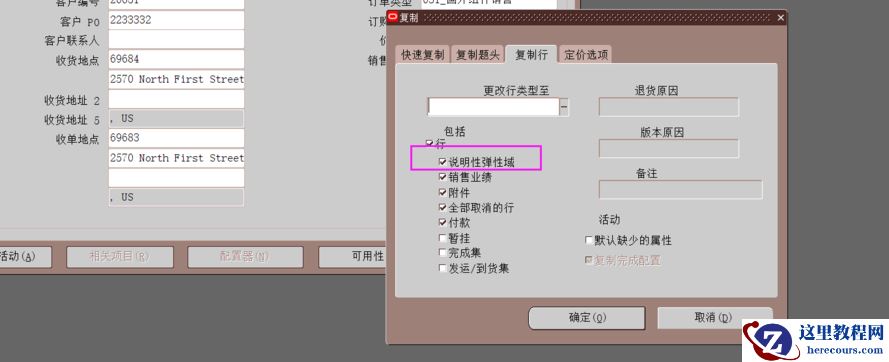
其实PL/SQL Developer中可以控制这种显示,中文设置如下,
 英文设置如下,
 即对于数字类型,默认采用to_char,就可以显示小数点左侧个位0,朋友们可以自行测试。