前段时间使用 dbca建立数据库的时候出现的是建立单实例的界面,把这个问题反馈给oracle 原厂给的反馈是由于 Bug 28027670 引起的。在硬件是X7-2,软件版本是18.1.0.0.0 到 18.1.6.0.0之间的版本都有可能出现。
在主机目录 /opt/OracleHomes/agent_home/agent_inst/sysman/emd/state/fetchlet_state/OSLineToken/parse-log-MLTS-61F17558F73C07A86BC281760F81167A,并且还有,同时 在主机的/var/log/message查看到有关于kernel的报错([kernel:.*(error|crit|fatal)])
/var/log/messages contains the following errors: BROADCOM[32717]: ERROR SemCreate() semget() failed! No space left on device BROADCOM[32717]: ERROR ngBmapiInitialize() LockCreate() failed! BROADCOM[32717]: ERROR /usr/share/hwdata/pci.ids file should be updated BROADCOM[32717]: ERROR GetSriovInfo() fopen() /sys/bus/pci/devices/0000:5e:00.0/virtfn0/uevent failed! 2
In a non-virtualized configuration new database instances fail to start with an error indicating insufficient semaphores, such as the following: SQL> startup nomount ORA-27154: post/wait create failed ORA-27300: OS system dependent operation:semget failed with status: 28 ORA-27301: OS failure message: No space left on device ORA-27302: failure occurred at: sskgpcreates
In a virtualized (OVM) configuration OneCommand (OEDA) step "Create Virtual Machine" fails with the following error: Error: Command [/opt/exadata_ovm/exadata.img.domu_maker start-domain /EXAVMIMAGES/conf/final-vm.xml] run on node n1v1.oracle.com as user root did not execute successfully... Error running oracle.onecommand.deploy.machines.VmUtils method createVms
/var/log/exadata.img.domu_maker.trc contains the following error: [WARNING][/opt/exadata_ovm/exadata.img.domu_maker - 6214][exadata_img_domu_maker_start_domain][] [CMD: kpartx -a -v /EXAVMIMAGES/GuestImages/texa2b3npv07adm.de.t-internal.com/System.img] [CMD_STATUS: 3] ----- START STDERR ----- Limit for the maximum number of semaphores reached. You can check and set the limits in /proc/sys/kernel/sem. create/reload failed on loop6p1 Limit for the maximum number of semaphores reached. You can check and set the limits in /proc/sys/kernel/sem. create/reload failed on loop6p2 Limit for the maximum number of semaphores reached. You can check and set the limits in /proc/sys/kernel/sem. create/reload failed on loop6p3
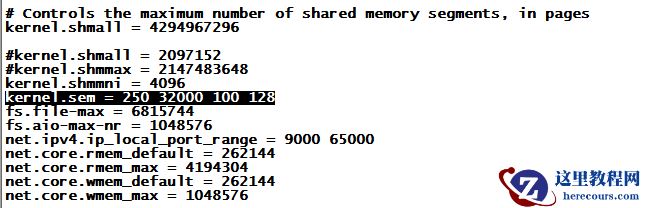
而当我们在安装oracle数据库的时候在设置kernel的时候参数是kernel.sem
ORACLE在各操作系统信号量与共享内存的维护,例如一下主机:
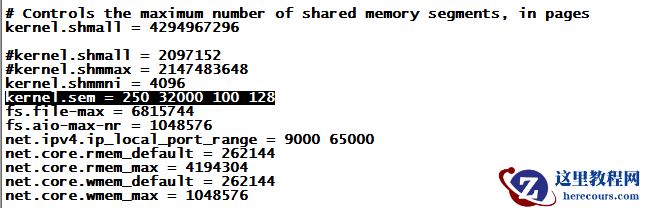
kernel.sem=250 32000 100 128
每个信号对象集的最大信号对象数;系统范围内最大信号对象数;每个信号对象支持的最大操作数;系统范围内最大信号对象集数。
根据相关日志,我们可以看到信号量阵列泄漏引起的问题。
这可以通过以 root用户身份运行以下bash代码来确定。
此 bash代码标识已分配进程不再存在的信号量数组。
shell脚本为
# for semid in $(ipcs -s | egrep ' 3[ ]*$' | awk '{print $2}'); do for pid in $(ipcs -s -p -i $semid | awk '/^[0-9]/{print $NF}'|sort -u); do if ! ps -p $pid >/dev/null 2>&1; then echo "safe to remove semid $semid - no pid $pid" fi done done
输出结果:
>>>>>>>>>sample output<<<<<<< safe to remove semid 98306 - no pid 15494 safe to remove semid 1703939 - no pid 33680 safe to remove semid 3309572 - no pid 57755 safe to remove semid 5373957 - no pid 269913 safe to remove semid 8814598 - no pid 138286 safe to remove semid 10878983 - no pid 30220 safe to remove semid 13860872 - no pid 175465 safe to remove semid 17301513 - no pid 268284 safe to remove semid 18907146 - no pid 271790 safe to remove semid 22347787 - no pid 156966 safe to remove semid 24412172 - no pid 191491
如果在您的环境上有类似的输出,您可以采取下面的解决方案。
通过以根用户身份运行以下shell脚本代码,删除泄漏的不再与正在运行的进程关联的信号量数组。在集群中的所有数据库服务器上运行此代码。
# for semid in $(ipcs -s | egrep ' 3[ ]*$' | awk '{print $2}'); do
for pid in $(ipcs -s -p -i $semid | awk '/^[0-9]/{print $NF}'|sort -u); do
if ! ps -p $pid >/dev/null 2>&1; then
echo "removing semid $semid"
ipcrm -s $semid
fi
done
done
这个适用于 X7数据库服务器上泄漏的信号量阵列导致数据库实例启动失败或OEDA步骤“创建虚拟机”失败。metalink文章地址 ( Doc ID 2421498.1 )