
[20190423]简单测试user和SYS_CONTEXT ('USERENV','CURRENT_USER').txt 1.环境: SCOTT@book> @ ver1 PORT_STRING VERSION BANNER ------------------------------ -------------- -------------------------------------------------------------------------------- x86_64/Linux 2.4.xx 11.2.0.4.0 Oracle Database 11g Enterprise Edition Release 11.2.0.4.0 - 64bit Production 2.建立测试脚本: --//create table job_times (sid number, time_ela number,method varchar2(20)); $ cat u1.txt set verify off host sleep $(echo &&3/50 | bc -l ) variable vmethod varchar2(20); exec :vmethod := '&&2'; insert into job_times values ( sys_context ('userenv', 'sid') ,dbms_utility.get_time ,:vmethod) ; commit ; declare v_id number; v_d date; v varchar2(30); begin for i in 1 .. &&1 loop v := USER; --//v := sys_context('USERENV', 'CURRENT_USER'); --//SELECT USER INTO v FROM dual; end loop; end ; / update job_times set time_ela = dbms_utility.get_time - time_ela where sid=sys_context ('userenv', 'sid') and method=:vmethod; commit; quit --//注:最好不要写成 SELECT USER INTO v FROM dual;之类的语句!!特别是使用sys_context方式,我没有测试. 3.测试: $ sqlplus -s -l scott/book @u1.txt 1e6 user 0 >/dev/null $ seq 50 | xargs -I{} -P 50 sqlplus -s -l scott/book @u1.txt 1e6 user50 {} >/dev/null --//修改脚本,重复测试: $ sqlplus -s -l scott/book @u1.txt 1e6 sys_context 0 >/dev/null $ seq 50 | xargs -I{} -P 50 sqlplus -s -l scott/book @u1.txt 1e6 sys_context50 {} >/dev/null --//修改脚本,重复测试,使用SELECT USER INTO v FROM dual; $ sqlplus -s -l scott/book @u1.txt 1e6 suser 0 >/dev/null 4.结果: SCOTT@book> Select method,count(*),round(avg(TIME_ELA),0),sum(TIME_ELA) from job_times where method in ('user','user50','sys_context','sys_context50','suser','suser50') group by method order by 3 ; METHOD COUNT(*) ROUND(AVG(TIME_ELA),0) SUM(TIME_ELA) -------------------- ---------- ---------------------- ------------- sys_context 1 191 191 sys_context50 50 660 32977 suser 1 1610 1610 user 1 1755 1755 suser50 50 6296 314790 user50 50 6701 335063 6 rows selected. --//可以发现通过sys_context取user最快,实际上具体应用很少人使用sys_context取user. --//问题在与user函数,实际上调用SELECT USER FROM SYS.DUAL,如果查询共享池就可以发现问题. SCOTT@book> select * from (select sql_id,sql_text,executions from v$sqlarea order by 3 desc) where rownum<=3; SQL_ID SQL_TEXT EXECUTIONS ------------- ------------------------------------------------------------ ---------- 1v717nvrhgbn9 SELECT USER FROM SYS.DUAL 50198062 d6r1mk4p3j2uf SELECT USER FROM DUAL 34955112 96g93hntrzjtr select /*+ rule */ bucket_cnt, row_cnt, cache_cnt, null_cnt, 51568 timestamp#, sample_size, minimum, maximum, distcnt, lowval, hival, density, col#, spare1, spare2, avgcln from hist_head $ where obj#=:1 and intcol#=:2 --//执行次数异常之高.实际上使用user函数,在SYS.STANDARD 包中 SCOTT@book> @ desc_proc sys STANDARD user INPUT OWNER PACKAGE_NAME OBJECT_NAME sample : @desc_proc sys dbms_stats gather_%_stats OWNER PACKAGE_NAME OBJECT_NAME SEQUENCE ARGUMENT_NAME DATA_TYPE IN_OUT DEFAULTED ---------- -------------------- ------------------------------ ---------- -------------------- -------------------- --------- ---------- SYS STANDARD USER 1 VARCHAR2 OUT N SCOTT@book> alter system flush shared_pool ; System altered. SCOTT@book> alter system flush shared_pool ; System altered. $ sqlplus -s -l scott/book @u1.txt 1e5 Suser 0 >/dev/null SCOTT@book> select * from (select sql_id,sql_text,executions from v$sqlarea order by 3 desc) where rownum<=2; SQL_ID SQL_TEXT EXECUTIONS ------------- ------------------------------------------------------------ ---------- d6r1mk4p3j2uf SELECT USER FROM DUAL 100000 96g93hntrzjtr select /*+ rule */ bucket_cnt, row_cnt, cache_cnt, null_cnt, 52549 timestamp#, sample_size, minimum, maximum, distcnt, lowval, hival, density, col#, spare1, spare2, avgcln from hist_head $ where obj#=:1 and intcol#=:2
[20190423]简单测试user和SYS_CONTEXT ('USERENV','CURRENT_USER').txt
来源:这里教程网
时间:2026-03-03 13:20:52
作者:
编辑推荐:
下一篇:
相关推荐
-

-
-
-
-
-
-
-
-
-
-
-
-
-
-

雷神推出 MIX PRO II 迷你主机:基于 Ultra 200H,玻璃上盖 + ARGB 灯效
2 月 9 日消息,雷神 (THUNDEROBOT) 现已宣布推出基于英
-

制造商 Musnap 推出彩色墨水屏电纸书 Ocean C:支持手写笔、第三方安卓应用
2 月 10 日消息,制造商 Musnap 现已在海外推出一款 Oce
热文推荐
- 数据库基础原理1:Oracle数据库体系结构
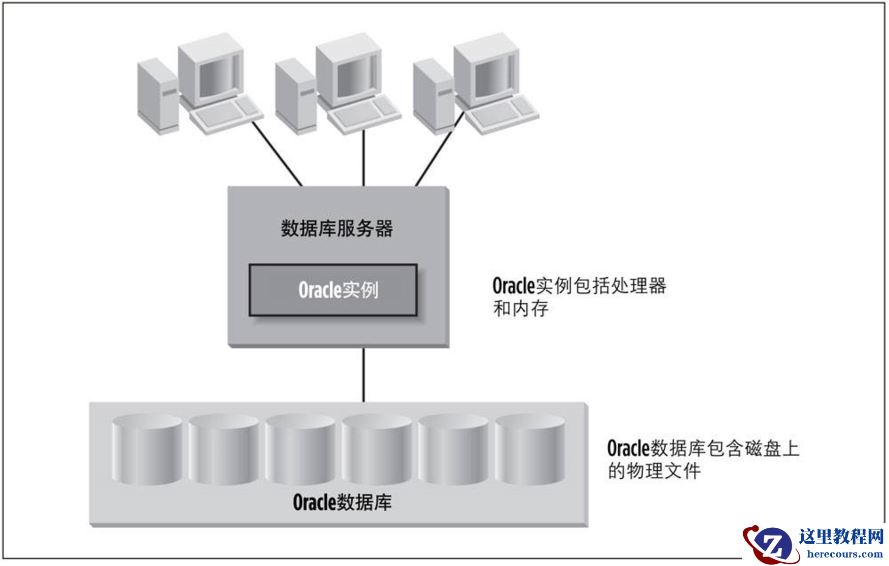
数据库基础原理1:Oracle数据库体系结构
26-03-03 - 10-oracle_表达式
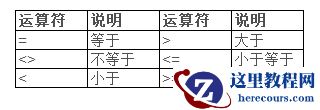
10-oracle_表达式
26-03-03 - 数据架构选型必读:4月数据库产品技术解析
数据架构选型必读:4月数据库产品技术解析
26-03-03 - 11-oracle_索引
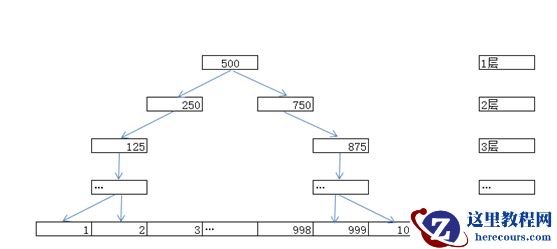
11-oracle_索引
26-03-03 - Oracle 基础实践2-1:网络配置-单实例网络环境配置
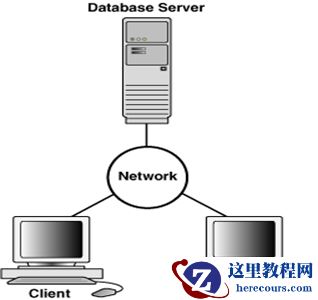
Oracle 基础实践2-1:网络配置-单实例网络环境配置
26-03-03 - 面对oracle ocfs2文件丢失,你能想到解决办法有哪些?
面对oracle ocfs2文件丢失,你能想到解决办法有哪些?
26-03-03 - Oracle一次奇怪的死锁分析
Oracle一次奇怪的死锁分析
26-03-03 - Oracle RushQL勒索病毒恢复方法
Oracle RushQL勒索病毒恢复方法
26-03-03 - Oracle 基础实践3-1:容器数据库的三个特性
Oracle 基础实践3-1:容器数据库的三个特性
26-03-03 - Oracle 11gR2 RAC 集群的启停方式的比较

Oracle 11gR2 RAC 集群的启停方式的比较
26-03-03