问题背景: 客户数据库宕机,需要排查数据库宕机原因 1> 查看alert日志 Wed Nov 13 22:00:11 2019 Errors in file /oracle/app/oracle/diag/rdbms/orcl/orcl/trace/orcl_j004_26935.trc (incident=73515): ORA-00600: internal error code, arguments: [kcbo_unlink_q_3], [0x3710B87B0], [1], [0], [1], [0], [0], [0], [], [], [], [] Incident details in: /oracle/app/oracle/diag/rdbms/orcl/orcl/incident/incdir_73515/orcl_j004_26935_i73515.trc Wed Nov 13 22:00:14 2019 Trace dumping is performing id=[cdmp_20191113220014] Errors in file /oracle/app/oracle/diag/rdbms/orcl/orcl/trace/orcl_j004_26935.trc (incident=73516): ORA-00600: internal error code, arguments: [1100], [0x3710B87E0], [0x3710B87E0], [], [], [], [], [], [], [], [], [] ORA-00600: internal error code, arguments: [kcbo_unlink_q_3], [0x3710B87B0], [1], [0], [1], [0], [0], [0], [], [], [], [] Incident details in: /oracle/app/oracle/diag/rdbms/orcl/orcl/incident/incdir_73516/orcl_j004_26935_i73516.trc Wed Nov 13 22:00:15 2019 Sweep [inc][73516]: completed Sweep [inc][73515]: completed Sweep [inc2][73515]: completed Trace dumping is performing id=[cdmp_20191113220018] Wed Nov 13 22:00:21 2019 Errors in file /oracle/app/oracle/diag/rdbms/orcl/orcl/trace/orcl_pmon_2510.trc (incident=72019): ORA-00600: internal error code, arguments: [1100], [0x3710B87E0], [0x3710B87E0], [], [], [], [], [], [], [], [], [] Incident details in: /oracle/app/oracle/diag/rdbms/orcl/orcl/incident/incdir_72019/orcl_pmon_2510_i72019.trc Errors in file /oracle/app/oracle/diag/rdbms/orcl/orcl/trace/orcl_pmon_2510.trc: ORA-00600: internal error code, arguments: [1100], [0x3710B87E0], [0x3710B87E0], [], [], [], [], [], [], [], [], [] PMON (ospid: 2510): terminating the instance due to error 472 Instance terminated by PMON, pid = 2510 Thu Nov 14 08:04:36 2019 Starting ORACLE instance (normal) LICENSE_MAX_SESSION = 0 LICENSE_SESSIONS_WARNING = 0 Picked latch-free SCN scheme 3 Autotune of undo retention is turned on. 2> 数据库遭遇了ORA-00600的错误, 继续查看 Incident details in: /oracle/app/oracle/diag/rdbms/orcl/orcl/incident/incdir_73516/orcl_j004_26935_i73516.trc Dump file /oracle/app/oracle/diag/rdbms/orcl/orcl/incident/incdir_73515/orcl_j004_26935_i73515.trc Oracle Database 11g Enterprise Edition Release 11.2.0.1.0 - 64bit Production With the Partitioning, OLAP, Data Mining and Real Application Testing options ORACLE_HOME = /oracle/app/oracle/product/11.2.0/db_1 System name: Linux Node name: OA-DBSVR Release: 3.10.0-123.el7.x86_64 Version: #1 SMP Mon May 5 11:16:57 EDT 2014 Machine: x86_64 Instance name: orcl Redo thread mounted by this instance: 1 Oracle process number: 189 Unix process pid: 26935, image: oracle@OA-DBSVR (J004) *** 2019-11-13 22:00:11.667 *** SESSION ID:(437.12455) 2019-11-13 22:00:11.667 *** CLIENT ID:() 2019-11-13 22:00:11.667 *** SERVICE NAME:(SYS$USERS) 2019-11-13 22:00:11.667 *** MODULE NAME:(DBMS_SCHEDULER) 2019-11-13 22:00:11.667 *** ACTION NAME:(ORA$AT_SA_SPC_SY_8162) 2019-11-13 22:00:11.667 Dump continued from file: /oracle/app/oracle/diag/rdbms/orcl/orcl/trace/orcl_j004_26935.trc ORA-00600: internal error code, arguments: [kcbo_unlink_q_3], [0x3710B87B0], [1], [0], [1], [0], [0], [0], [], [], [], [] ========= Dump for incident 73515 (ORA 600 [kcbo_unlink_q_3]) ======== *** 2019-11-13 22:00:11.669 dbkedDefDump(): Starting incident default dumps (flags=0x2, level=3, mask=0x0) ----- Current SQL Statement for this session (sql_id=8szmwam7fysa3) ----- insert into wri$_adv_objspace_trend_data select timepoint, space_usage, space_alloc, quality from table(dbms_space.object_growth_trend(:1, :2, :3, :4, NULL, NULL, NULL, 'FALSE', :5, 'FALSE')) ----- PL/SQL Stack ----- ----- PL/SQL Call Stack ----- object line object handle number name insert into wri$_adv_objspace_trend_data select timepoint, space_usage, space_alloc, quality from table(dbms_space.object_growth_trend(:1, :2, :3, :4, NULL, NULL, NULL, 'FALSE', :5, 'FALSE')) 这条sql引发了数据库ORA-00600错误 tkprof orcl_j004_26935_i73516.trc orcl_j004_26935_i73516.txt 内容如下 [oracle@OA-DBSVR incdir_73515]$ cat orcl_j004_26935_i73515.txt TKPROF: Release 11.2.0.1.0 - Development on Thu Nov 14 15:28:37 2019 Copyright (c) 1982, 2009, Oracle and/or its affiliates. All rights reserved. Trace file: orcl_j004_26935_i73515.trc Sort options: default ******************************************************************************** count = number of times OCI procedure was executed cpu = cpu time in seconds executing elapsed = elapsed time in seconds executing disk = number of physical reads of buffers from disk query = number of buffers gotten for consistent read current = number of buffers gotten in current mode (usually for update) rows = number of rows processed by the fetch or execute call ******************************************************************************** Trace file: orcl_j004_26935_i73515.trc Trace file compatibility: 11.1.0.7 Sort options: default 1 session in tracefile. 0 user SQL statements in trace file. 0 internal SQL statements in trace file. 0 SQL statements in trace file. 0 unique SQL statements in trace file. 160288 lines in trace file. 0 elapsed seconds in trace file. 3> 查询一下这条sql是做什么用的wri$_adv_objspace_trend_data insert into wri$_adv_objspace_trend_data select timepoint, space_usage, space_alloc, quality from table(dbms_space.object_growth_trend(:1, :2, :3, :4, NULL, NULL, NULL, 'FALSE', :5, 'FALSE')) 自动SQL调整顾问:自动标识并尝试调整高负载的SQL,任务名是“sqltuning advisor”。 也花费了大量时间这显然是不正常的。 在Metalink上存在如下一个Bug: Bug 5376783: DBMS_SPACE.OBJECT_GROWTH_TREND CALL TAKES A LOT OF DISK READS 这个Bug在DBMS_SPACE.OBJECT_GROWTH_TREND进行空间分析时被触发,根本原因在于内部算法在执行空间检查时,耗费了大量的评估IO成本,导致了大量的IO资源使用: 在后台跟踪里可以看到这个步骤的资源消耗: insert into wri$_adv_objspace_trend_data select timepoint, space_usage, space_alloc, quality from table(dbms_space.object_growth_trend(:1, :2, :3, :4, NULL, NULL, NULL, 'FALSE', :5, 'FALSE')) 临时的处理办法是,暂时关闭这个自动任务: execute dbms_scheduler.disable('sys.auto_space_advisor_job'); 这个Bug在10.2.0.2之后的版本中被修正。记录一下供参考! -The End-
ORA-00600: internal error code, arguments: [kcbo_unlink_q_3], [0x3710B87B0]
来源:这里教程网
时间:2026-03-03 14:33:23
作者:
编辑推荐:
- ORA-00600: internal error code, arguments: [kcbo_unlink_q_3], [0x3710B87B0]03-03
- Oracle:db file scattered read03-03
- [20191115]oracle实例占用内存计算.txt03-03
- oracle数据库事务transaction 不同的锁lock类型03-03
- oracle事务transaction锁lock一点儿小思考或总结03-03
- 这届双11,是一盏“阿拉丁神灯”03-03
- Oracle 12c的DG自动同步密码文件--ASM 新特性:共享密码文件03-03
- Oracle03-03
下一篇:
相关推荐
-

-
-
-
-
-
-
-
-
-
-
-
-
-
-

雷神推出 MIX PRO II 迷你主机:基于 Ultra 200H,玻璃上盖 + ARGB 灯效
2 月 9 日消息,雷神 (THUNDEROBOT) 现已宣布推出基于英
-

制造商 Musnap 推出彩色墨水屏电纸书 Ocean C:支持手写笔、第三方安卓应用
2 月 10 日消息,制造商 Musnap 现已在海外推出一款 Oce


热文推荐
- oracle事务transaction锁lock一点儿小思考或总结
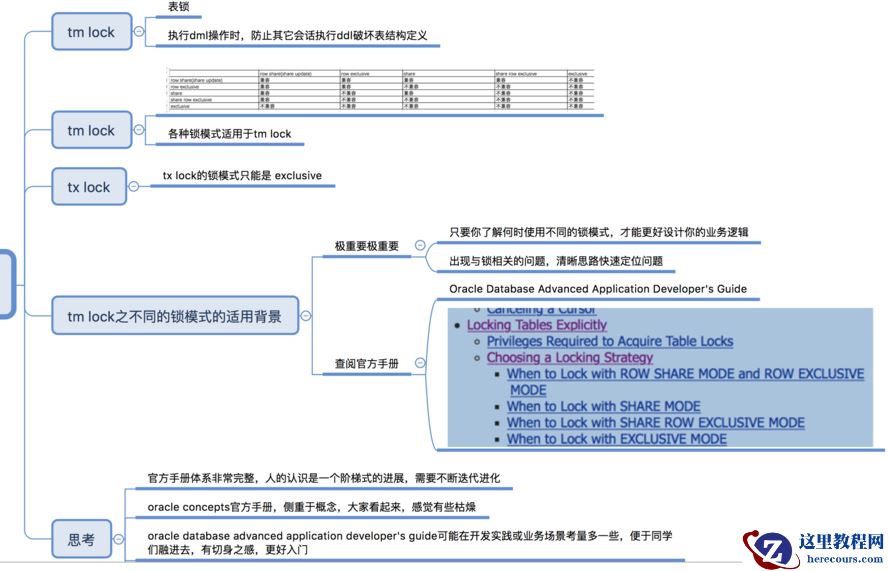
oracle事务transaction锁lock一点儿小思考或总结
26-03-03 - 这届双11,是一盏“阿拉丁神灯”

这届双11,是一盏“阿拉丁神灯”
26-03-03 - oracle数据库事务不同事务隔离级别与v$transaction flag列思考
- Oracle 12C:数据库PSU补丁安装
Oracle 12C:数据库PSU补丁安装
26-03-03 - Oracle Database Server 'TNS Listener'远程数据投毒漏洞(CVE-2012-1675)
- oracle不同的事务transaction隔离级别isolation level进一步理解
- Oracle Client 安装
Oracle Client 安装
26-03-03 - 今日头条在消息服务平台和容灾体系建设方面的实践与思考
今日头条在消息服务平台和容灾体系建设方面的实践与思考
26-03-03 - log file sync等待事件
log file sync等待事件
26-03-03 - oracle事务隔离级别transaction isolation level初识