
Oracle 12C
新特性
-
数据泵新参数
(VIEWS_AS_TABLES)
在Oracle 12C
中,数据泵增加了新的参数
VIEWS_AS_TABLES
通过这个参数:
expdp:
可以将视图当成表一样导出数据
而不是定义语句
。
VIEWS_AS_TABLES
参数解释:
[oracle@cjcos trace]$ expdp help=y
VIEWS_AS_TABLES
Identifies one or more views to be exported as tables.
For example, VIEWS_AS_TABLES=HR.EMP_DETAILS_VIEW.
[oracle@cjcos trace]$ impdp help=y
VIEWS_AS_TABLES
Identifies one or more views to be imported as tables.
For example, VIEWS_AS_TABLES=HR.EMP_DETAILS_VIEW.
Note that in network import mode, a table name is appended to the view name.
实验如下:
创建测试表和测试视图
SQL> conn cjc/cjc@cjcpdb
SQL> create table t1 as select * from dba_objects;
SQL> create view v1_t1 as select object_id,object_name from t1;
SQL> col tname for a10
SQL> select *from tab;
TNAME
TABTYPE
CLUSTERID
---------- ------------- ----------
V1_T1
VIEW
T1
TABLE
在12C
之前
,
导出和导入视图方式如下:
导出V1_T1
视图
[root@cjcos ~]# mkdir /dir
[root@cjcos ~]# chown oracle.oinstall /dir
SQL> conn sys/oracle@cjcpdb as sysdba
SQL> create directory expdp_dir as '/dir';
SQL> grant read,write on directory expdp_dir to cjc;
[oracle@cjcos ~]$
expdp cjc/cjc@cjcpdb include=view:"in('V1_T1')" directory=expdp_dir dumpfile=v1_t1a.dmp logfile=v1_t1a.log
Export: Release 19.0.0.0.0 - Production on Mon Feb 10 22:43:23 2020
Version 19.3.0.0.0
Copyright (c) 1982, 2019, Oracle and/or its affiliates. All rights reserved.
Connected to: Oracle Database 19c Enterprise Edition Release 19.0.0.0.0 - Production
Starting "CJC"."SYS_EXPORT_SCHEMA_01": cjc/********@cjcpdb include=view:in('V1_T1') directory=expdp_dir dumpfile=v1_t1a.dmp logfile=v1_t1a.log
Processing object type SCHEMA_EXPORT/VIEW/VIEW
Master table "CJC"."SYS_EXPORT_SCHEMA_01" successfully loaded/unloaded
******************************************************************************
Dump file set for CJC.SYS_EXPORT_SCHEMA_01 is:
/dir/v1_t1a.dmp
Job "CJC"."SYS_EXPORT_SCHEMA_01" successfully completed at Mon Feb 10 22:45:13 2020 elapsed 0 00:01:37
导入V1_T1
视图
到chen
用户下
SQL> create user chen identified by cjc default tablespace users;
SQL> grant connect,resource to chen;
[oracle@cjcos ~]$
impdp cjc/cjc@cjcpdb remap_schema=cjc:chen remap_tablespace=cjctbs:users directory=expdp_dir dumpfile=v1_t1a.dmp logfile=v1_t1a_impdp.log
Import: Release 19.0.0.0.0 - Production on Tue Feb 11 10:24:35 2020
Version 19.3.0.0.0
Copyright (c) 1982, 2019, Oracle and/or its affiliates. All rights reserved.
Connected to: Oracle Database 19c Enterprise Edition Release 19.0.0.0.0 - Production
Master table "CJC"."SYS_IMPORT_FULL_01" successfully loaded/unloaded
Starting "CJC"."SYS_IMPORT_FULL_01": cjc/********@cjcpdb remap_schema=cjc:chen remap_tablespace=cjctbs:users directory=expdp_dir dumpfile=v1_t1a.dmp logfile=v1_t1a_impdp.log
Processing object type SCHEMA_EXPORT/VIEW/VIEW
ORA-39082: Object type VIEW:"CHEN"."V1_T1" created with compilation warnings
Job "CJC"."SYS_IMPORT_FULL_01" completed with 1 error(s) at Tue Feb 11 10:24:59 2020 elapsed 0 00:00:13
查看
SQL> conn chen/cjc@cjcpdb
SQL> col tname for a10
SQL> select * from tab;
TNAME
TABTYPE
CLUSTERID
---------- ------------- ----------
V1_T1
VIEW
SQL>
select dbms_metadata.get_ddl('VIEW','V1_T1','CHEN') from dual;
 从12C
开始
,
导出视图可以使用
views_as_tables
参数,将视图当做表处理。
expdp:
使用
views_as_tables
参数导出视图数据
[oracle@cjcos ~]$
expdp cjc/cjc@cjcpdb views_as_tables=v1_t1 directory=expdp_dir dumpfile=v1_t1.dmp logfile=v1_t1.log
Export: Release 19.0.0.0.0 - Production on Mon Feb 10 22:06:14 2020
Version 19.3.0.0.0
Copyright (c) 1982, 2019, Oracle and/or its affiliates. All rights reserved.
Connected to: Oracle Database 19c Enterprise Edition Release 19.0.0.0.0 - Production
Starting "CJC"."SYS_EXPORT_TABLE_01": cjc/********@cjcpdb views_as_tables=v1_t1 directory=expdp_dir dumpfile=v1_t1.dmp logfile=v1_t1.log
Processing object type TABLE_EXPORT/VIEWS_AS_TABLES/TABLE_DATA
Processing object type TABLE_EXPORT/VIEWS_AS_TABLES/TABLE
. . exported "CJC"."V1_T1" 2.990 MB 72488 rows
Master table "CJC"."SYS_EXPORT_TABLE_01" successfully loaded/unloaded
******************************************************************************
Dump file set for CJC.SYS_EXPORT_TABLE_01 is:
/dir/v1_t1.dmp
Job "CJC"."SYS_EXPORT_TABLE_01" successfully completed at Mon Feb 10 22:07:45 2020 elapsed 0 00:00:56
impdp
导入数据
[oracle@cjcos ~]$
impdp cjc/cjc@cjcpdb remap_table=v1_t1:v2_t1 directory=expdp_dir dumpfile=v1_t1.dmp
Import: Release 19.0.0.0.0 - Production on Mon Feb 10 22:23:45 2020
Version 19.3.0.0.0
Copyright (c) 1982, 2019, Oracle and/or its affiliates. All rights reserved.
Connected to: Oracle Database 19c Enterprise Edition Release 19.0.0.0.0 - Production
Master table "CJC"."SYS_IMPORT_FULL_01" successfully loaded/unloaded
Starting "CJC"."SYS_IMPORT_FULL_01": cjc/********@cjcpdb remap_table=v1_t1:v2_t1 directory=expdp_dir dumpfile=v1_t1.dmp
Processing object type TABLE_EXPORT/VIEWS_AS_TABLES/TABLE
Processing object type TABLE_EXPORT/VIEWS_AS_TABLES/TABLE_DATA
. . imported "CJC"."V2_T1" 2.990 MB 72488 rows
Job "CJC"."SYS_IMPORT_FULL_01" successfully completed at Mon Feb 10 22:24:08 2020 elapsed 0 00:00:18
查看
SQL> conn cjc/cjc@cjcpdb
SQL> select * from tab;
TNAME
TABTYPE
CLUSTERID
---------- ------------- ----------
V1_T1
VIEW
T1
TABLE
V2_T1
TABLE
从12C
开始
,
导出视图可以使用
views_as_tables
参数,将视图当做表处理。
expdp:
使用
views_as_tables
参数导出视图数据
[oracle@cjcos ~]$
expdp cjc/cjc@cjcpdb views_as_tables=v1_t1 directory=expdp_dir dumpfile=v1_t1.dmp logfile=v1_t1.log
Export: Release 19.0.0.0.0 - Production on Mon Feb 10 22:06:14 2020
Version 19.3.0.0.0
Copyright (c) 1982, 2019, Oracle and/or its affiliates. All rights reserved.
Connected to: Oracle Database 19c Enterprise Edition Release 19.0.0.0.0 - Production
Starting "CJC"."SYS_EXPORT_TABLE_01": cjc/********@cjcpdb views_as_tables=v1_t1 directory=expdp_dir dumpfile=v1_t1.dmp logfile=v1_t1.log
Processing object type TABLE_EXPORT/VIEWS_AS_TABLES/TABLE_DATA
Processing object type TABLE_EXPORT/VIEWS_AS_TABLES/TABLE
. . exported "CJC"."V1_T1" 2.990 MB 72488 rows
Master table "CJC"."SYS_EXPORT_TABLE_01" successfully loaded/unloaded
******************************************************************************
Dump file set for CJC.SYS_EXPORT_TABLE_01 is:
/dir/v1_t1.dmp
Job "CJC"."SYS_EXPORT_TABLE_01" successfully completed at Mon Feb 10 22:07:45 2020 elapsed 0 00:00:56
impdp
导入数据
[oracle@cjcos ~]$
impdp cjc/cjc@cjcpdb remap_table=v1_t1:v2_t1 directory=expdp_dir dumpfile=v1_t1.dmp
Import: Release 19.0.0.0.0 - Production on Mon Feb 10 22:23:45 2020
Version 19.3.0.0.0
Copyright (c) 1982, 2019, Oracle and/or its affiliates. All rights reserved.
Connected to: Oracle Database 19c Enterprise Edition Release 19.0.0.0.0 - Production
Master table "CJC"."SYS_IMPORT_FULL_01" successfully loaded/unloaded
Starting "CJC"."SYS_IMPORT_FULL_01": cjc/********@cjcpdb remap_table=v1_t1:v2_t1 directory=expdp_dir dumpfile=v1_t1.dmp
Processing object type TABLE_EXPORT/VIEWS_AS_TABLES/TABLE
Processing object type TABLE_EXPORT/VIEWS_AS_TABLES/TABLE_DATA
. . imported "CJC"."V2_T1" 2.990 MB 72488 rows
Job "CJC"."SYS_IMPORT_FULL_01" successfully completed at Mon Feb 10 22:24:08 2020 elapsed 0 00:00:18
查看
SQL> conn cjc/cjc@cjcpdb
SQL> select * from tab;
TNAME
TABTYPE
CLUSTERID
---------- ------------- ----------
V1_T1
VIEW
T1
TABLE
V2_T1
TABLE
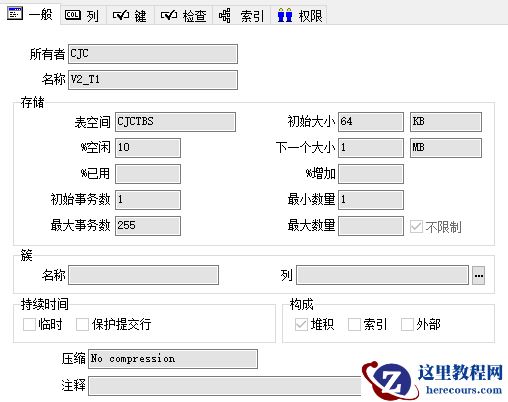 SQL>
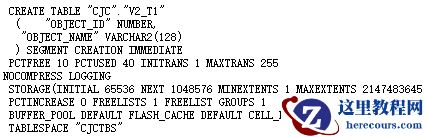
select dbms_metadata.get_ddl('TABLE','V2_T1','CJC') from dual;
SQL>
select dbms_metadata.get_ddl('TABLE','V2_T1','CJC') from dual;
 欢迎关注我的微信公众号"IT小Chen",共同学习,共同成长!!!

Oracle 12C新特性-数据泵新参数(VIEWS_AS_TABLES)
来源:这里教程网
时间:2026-03-03 15:01:10
作者:
编辑推荐:
- Oracle 12C新特性-数据泵新参数(VIEWS_AS_TABLES)03-03
- 直播预告丨先睹为快!Oracle 20c新特性解析 - 2020云和恩墨大讲堂03-03
- startup 启动报错03-03
- 5-10年的DBA如何独当一面?这10个建议送给你(附图书工具推荐)03-03
- [20200126]使用DBMS_SHARED_POOL.MARKHOT与sql语句.txt03-03
- [20200211]视图v$db_object_cache的CHILD_LATCH字段.txt03-03
- [20200211]使用DBMS_SHARED_POOL.MARKHOT与sql_id的计算.txt03-03
- [20200211]zsh的bug.txt03-03
下一篇:
相关推荐
-

-
-
-
-
-
-
-
-
-
-
-
-
-
-

雷神推出 MIX PRO II 迷你主机:基于 Ultra 200H,玻璃上盖 + ARGB 灯效
2 月 9 日消息,雷神 (THUNDEROBOT) 现已宣布推出基于英
-

制造商 Musnap 推出彩色墨水屏电纸书 Ocean C:支持手写笔、第三方安卓应用
2 月 10 日消息,制造商 Musnap 现已在海外推出一款 Oce


热文推荐
- Oracle 12C新特性-数据泵新参数(VIEWS_AS_TABLES)
- 直播预告丨先睹为快!Oracle 20c新特性解析 - 2020云和恩墨大讲堂
- startup 启动报错
startup 启动报错
26-03-03 - 5-10年的DBA如何独当一面?这10个建议送给你(附图书工具推荐)
5-10年的DBA如何独当一面?这10个建议送给你(附图书工具推荐)
26-03-03 - Oracle 12C升级到18C
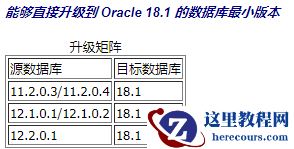
Oracle 12C升级到18C
26-03-03 - rman_换设备迁移恢复

rman_换设备迁移恢复
26-03-03 - Sqlcl 连接Oracle DataBase 19c
Sqlcl 连接Oracle DataBase 19c
26-03-03 - Oracle 12C新特性-在线把非分区表转为分区表
Oracle 12C新特性-在线把非分区表转为分区表
26-03-03 - Oracle 12C新特性In-Memory
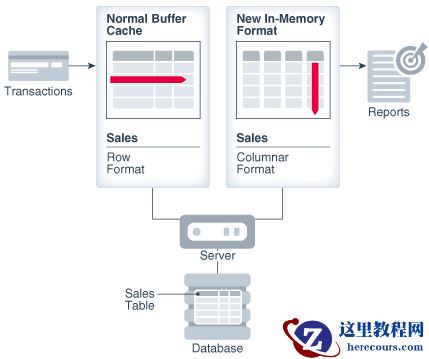
Oracle 12C新特性In-Memory
26-03-03 - Oracle 19C 无法启用Auto Indexes特性
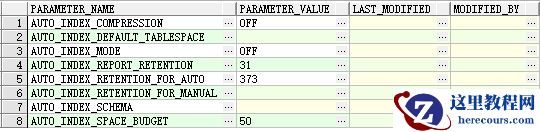
Oracle 19C 无法启用Auto Indexes特性
26-03-03