Oracle
轻量级实时监控工具
-oratop
适用于oracle单机、oracle RAC、oracle ADG
支持的数据库版本:
11gR2 (11.2.0.3, 11.2.0.4)
12cR1 (12.1.0.1, 12.1.0.2, 12.2.0.1)
18c、19c、20c ...
 本文包括两部分内容
一:翻译官方文档
oratop User Guide
二:安装和测试使用oratop
说明:
oratop User Guide
文档以及oratop(
11gR2和12cR1
)安装包来自
oratop - Utility for Near Real-time Monitoring of Databases, RAC and Single Instance (Doc ID 1500864.1)
12cR1
以后的版本默认在:
$Oracle_HOME/suptools/oratop
目录下
一:翻译官方
oratop User Guide
文档
oratop
A Database Monitoring Tool
Jan 2019
使用Oracle调用接口(OCI)API的基于文本的用户界面实用程序,其外观类似于Unix“top”实用程序
。它收集的数据来源于数据库内部视图。该工具即适用于Oracle单机环境,也适用于RAC集群环境。它为用户提供了近实时监视数据库的能力,并不会取代Unix“top”、EMGC、EM database Express或服务器可管理性工具(如ASH、AWR、ADDM等),这些工具提供了更深入和不同维度的数据。
A text-based user interface utility using Oracle Call Interface (OCI) API that
resembles Unix “top”
utility in appearance. Its data gathering is solely from the database using internal views. The utility can be run against Real Application Cluster (RAC) or non-RAC databases. It provides a user the ability to monitor the database in near real time and it is not intended to replace Unix “top”, EMGC, EM
Database
Express, or server manageability tools like ASH, AWR, ADDM, etc., that provides in-depth and granular details.
本文包括两部分内容
一:翻译官方文档
oratop User Guide
二:安装和测试使用oratop
说明:
oratop User Guide
文档以及oratop(
11gR2和12cR1
)安装包来自
oratop - Utility for Near Real-time Monitoring of Databases, RAC and Single Instance (Doc ID 1500864.1)
12cR1
以后的版本默认在:
$Oracle_HOME/suptools/oratop
目录下
一:翻译官方
oratop User Guide
文档
oratop
A Database Monitoring Tool
Jan 2019
使用Oracle调用接口(OCI)API的基于文本的用户界面实用程序,其外观类似于Unix“top”实用程序
。它收集的数据来源于数据库内部视图。该工具即适用于Oracle单机环境,也适用于RAC集群环境。它为用户提供了近实时监视数据库的能力,并不会取代Unix“top”、EMGC、EM database Express或服务器可管理性工具(如ASH、AWR、ADDM等),这些工具提供了更深入和不同维度的数据。
A text-based user interface utility using Oracle Call Interface (OCI) API that
resembles Unix “top”
utility in appearance. Its data gathering is solely from the database using internal views. The utility can be run against Real Application Cluster (RAC) or non-RAC databases. It provides a user the ability to monitor the database in near real time and it is not intended to replace Unix “top”, EMGC, EM
Database
Express, or server manageability tools like ASH, AWR, ADDM, etc., that provides in-depth and granular details.
 Abstract
摘要
or
a
top可用于监视任何平台上的Oracle数据库,但是可执行文件必须在支持的Unix平台上运行,并具有与Oracle兼容的客户端。要监视其他平台(如Windows)上的数据库,只需在Unix客户机上的tnsnames.ora中定义一个别名,然后像使用sqlplus一样连接到远程数据库。
oratop can be used to monitor Oracle databases on any platform but the
executable
must run on supported Unix platforms with an Oracle compatible client. To monitor databases on other platforms like Windows, simply define an alias in tnsnames.ora on a Unix client and connect to the remote database as you would with sqlplus.
Oracle支持的最低版本是11gR2。MOS Note(Doc ID 1500864.1)中提供了与11gR2和12cR1 Oracle版本兼容的独立oratop
下载
。对于以后的Oracle版本,它位于文件夹$Oracle_HOME/suptools/oratop下。此外,它还与Oracle跟踪文件分析器(TFA)捆绑在一起。
Minimum supported Oracle release is 11gR2. A standalone oratop compatible with 11gR2
and 12cR1 Oracle releases is available in MOS Note (Doc ID 1500864.1). For later Oracle releases it is available under the folder
$ORACLE_HOME/suptools/oratop.
Also, i
t is bundled
with Oracle Trace File Analyzer (TFA).
Release 15.0.0
版本15.0.0
除了一些bug修复之外,
还有一些
实例部分section2
中的
次要的列名、位置、替换和新添加的更改
。
废弃的特性:多租户的可插入数据库(pdb容器级)监视和基于RAC服务的监视。原因是该工具可用的服务器统计信息有限。
安全性:不再允许在命令行或重定向(FIFO管道)上使用
明文
密码登录,只允许在提示符处(
***加密输入密码
)。
In addition to some bug fixes, some minor columns name, placement, replacement and new
addition changes mostly in the instance section, section2.
Obsoleted Features
:
Multitenant’s pluggable database (pdb container level) monitoring and RAC service-based monitoring. Reason is the limited server stats available to the tool.
Security
:
Login with visible password on the command line or redirection (FIFO pipe) is no
longer permissible, its allowed only at the prompt (hidden).
INTRODUCTION
介绍
Oratop工具
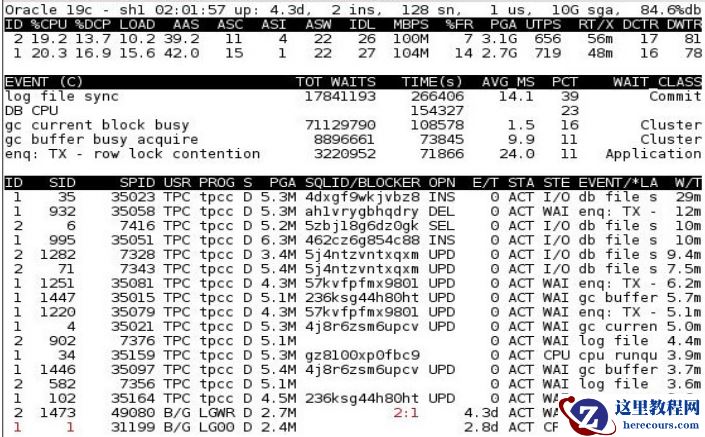
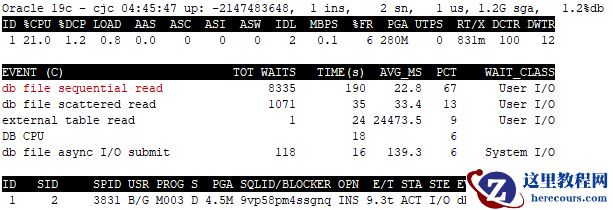
允许有特权的用户监视Oracle数据库活动。它几乎实时地动态运行,并为正在运行的数据库提供一个活动窗口。它是单实例和RAC感知的实用程序。(参见下面图1所示的示例快照)
The Oracle program named oratop allows privileged users to monitor oracle database activities.
It runs dynamically in near real time and provides a live window to a running database. It is Single instance and RAC aware utility. (see sample snapshot shown in Figure 1 below)
Key motivations include
(
主要监控
)
:
监控当前的数据库活动,
Monitoring current database activities,
监控数据库性能,
Database performance,
识别争用和瓶颈。
Identifying contentions and bottleneck
Features Highlights
(
特色亮点
)
进程和SQL
监视
Process & SQL Monitoring
实时等待事件监控
Real time wait events
支持ADG监控
Active Data Guard support
支持
多租户数据库(CDB
)(仅种子级)
Multitenant Database (CDB) support (seed level only)
VISUAL LAYOUT
(可视化界面)
The “oratop” displays relevant database activity information presented in four sections.
oratop在下面四个部分显示了数据库活动信息。
1:全局数据库信息
Section 1 DATABASE
: Global database information
2:数据库实例信息
Section 2 INSTANCE
: Database instance Activity
3:类似AWR中的前五等待事件
Section 3 EVENT
: AWR like “Top 5 Timed Events“
4:进程或SQL信息
Section 4 PROCESS | SQL
: Processes or SQL mode information
Abstract
摘要
or
a
top可用于监视任何平台上的Oracle数据库,但是可执行文件必须在支持的Unix平台上运行,并具有与Oracle兼容的客户端。要监视其他平台(如Windows)上的数据库,只需在Unix客户机上的tnsnames.ora中定义一个别名,然后像使用sqlplus一样连接到远程数据库。
oratop can be used to monitor Oracle databases on any platform but the
executable
must run on supported Unix platforms with an Oracle compatible client. To monitor databases on other platforms like Windows, simply define an alias in tnsnames.ora on a Unix client and connect to the remote database as you would with sqlplus.
Oracle支持的最低版本是11gR2。MOS Note(Doc ID 1500864.1)中提供了与11gR2和12cR1 Oracle版本兼容的独立oratop
下载
。对于以后的Oracle版本,它位于文件夹$Oracle_HOME/suptools/oratop下。此外,它还与Oracle跟踪文件分析器(TFA)捆绑在一起。
Minimum supported Oracle release is 11gR2. A standalone oratop compatible with 11gR2
and 12cR1 Oracle releases is available in MOS Note (Doc ID 1500864.1). For later Oracle releases it is available under the folder
$ORACLE_HOME/suptools/oratop.
Also, i
t is bundled
with Oracle Trace File Analyzer (TFA).
Release 15.0.0
版本15.0.0
除了一些bug修复之外,
还有一些
实例部分section2
中的
次要的列名、位置、替换和新添加的更改
。
废弃的特性:多租户的可插入数据库(pdb容器级)监视和基于RAC服务的监视。原因是该工具可用的服务器统计信息有限。
安全性:不再允许在命令行或重定向(FIFO管道)上使用
明文
密码登录,只允许在提示符处(
***加密输入密码
)。
In addition to some bug fixes, some minor columns name, placement, replacement and new
addition changes mostly in the instance section, section2.
Obsoleted Features
:
Multitenant’s pluggable database (pdb container level) monitoring and RAC service-based monitoring. Reason is the limited server stats available to the tool.
Security
:
Login with visible password on the command line or redirection (FIFO pipe) is no
longer permissible, its allowed only at the prompt (hidden).
INTRODUCTION
介绍
Oratop工具
允许有特权的用户监视Oracle数据库活动。它几乎实时地动态运行,并为正在运行的数据库提供一个活动窗口。它是单实例和RAC感知的实用程序。(参见下面图1所示的示例快照)
The Oracle program named oratop allows privileged users to monitor oracle database activities.
It runs dynamically in near real time and provides a live window to a running database. It is Single instance and RAC aware utility. (see sample snapshot shown in Figure 1 below)
Key motivations include
(
主要监控
)
:
监控当前的数据库活动,
Monitoring current database activities,
监控数据库性能,
Database performance,
识别争用和瓶颈。
Identifying contentions and bottleneck
Features Highlights
(
特色亮点
)
进程和SQL
监视
Process & SQL Monitoring
实时等待事件监控
Real time wait events
支持ADG监控
Active Data Guard support
支持
多租户数据库(CDB
)(仅种子级)
Multitenant Database (CDB) support (seed level only)
VISUAL LAYOUT
(可视化界面)
The “oratop” displays relevant database activity information presented in four sections.
oratop在下面四个部分显示了数据库活动信息。
1:全局数据库信息
Section 1 DATABASE
: Global database information
2:数据库实例信息
Section 2 INSTANCE
: Database instance Activity
3:类似AWR中的前五等待事件
Section 3 EVENT
: AWR like “Top 5 Timed Events“
4:进程或SQL信息
Section 4 PROCESS | SQL
: Processes or SQL mode information
 Oracle
客户端环境变量
Oracle Client Home Environment
Shell环境变量设置:
Shell environment settings:
$ export ORACLE_HOME=<path>
$ export LD_LIBRARY_PATH=$ORACLE_HOME/lib
$ export PATH=$ORACLE_HOME/bin:$ORACLE_HOME/suptools/oratop:$PATH
帮助和参数选项
Help and Input arguments options
各种选项和选择的具体细节可以在命令行中使用help(或' -h ')或在运行时交互式地(按键盘键' h ')获得。
Specific detail of the various options and selection can be obtained using help (or ‘
-h
’) at the command line or interactively at runtime (keyboard key press ‘
h
’).
一.命令行模式
I. COMMAND LINE MODE
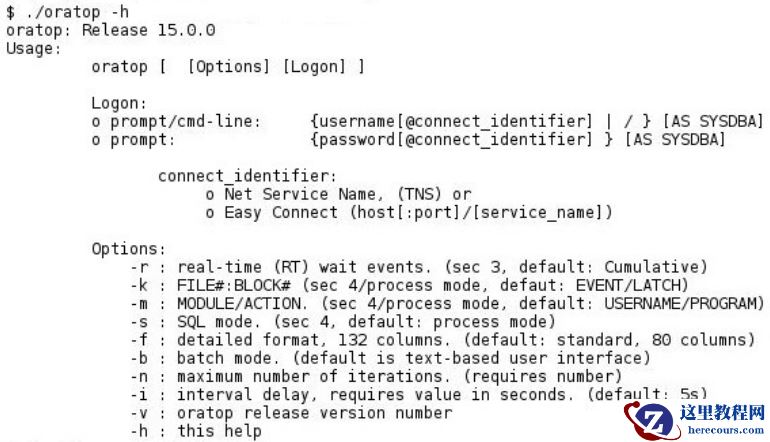
通过“-h”选项可以获得命令行概要,如图2所示。
Command line synopsis can be obtained by invoking the utility with “-h” option as shown in
Figure 2.
Oracle
客户端环境变量
Oracle Client Home Environment
Shell环境变量设置:
Shell environment settings:
$ export ORACLE_HOME=<path>
$ export LD_LIBRARY_PATH=$ORACLE_HOME/lib
$ export PATH=$ORACLE_HOME/bin:$ORACLE_HOME/suptools/oratop:$PATH
帮助和参数选项
Help and Input arguments options
各种选项和选择的具体细节可以在命令行中使用help(或' -h ')或在运行时交互式地(按键盘键' h ')获得。
Specific detail of the various options and selection can be obtained using help (or ‘
-h
’) at the command line or interactively at runtime (keyboard key press ‘
h
’).
一.命令行模式
I. COMMAND LINE MODE
通过“-h”选项可以获得命令行概要,如图2所示。
Command line synopsis can be obtained by invoking the utility with “-h” option as shown in
Figure 2.
 Logon
登录
连接方法在很大程度上类似于sqlplus,但是,命令行不允许使用密码,而是提示用户输入密码。有关工具的使用,请参见图2。
Connection method is largely similar to sqlplus, however, passwords are not allowed
at the command line, rather the user will be prompted for it. See Figure 2 for tool
usage.
Examples
,
例如
$ oratop
用户将被提示输入密码
User will be prompted to enter credentials.
连接本地数据库
Bequeath
1
export ORACLE_SID=<sid>
oratop / as sysdba
连接远程数据库
Remote Connection
2
TNS
导出TNS_ADMIN并使用tnsnames中定义的TNS别名进行连接。或将TWO_TASK设置为tns别名,并在没有别名的情况下进行连接。
export TNS_ADMIN and connect with a TNS alias name as defined in tnsnames.ora,
or set TWO_TASK to the tns alias and connect without alias name
EZConnect
用户将被提示输入密码
user will be prompted to enter password
oratop system@rmtdbhost:1530/db1.domain.com
Batch Mode
批处理模式
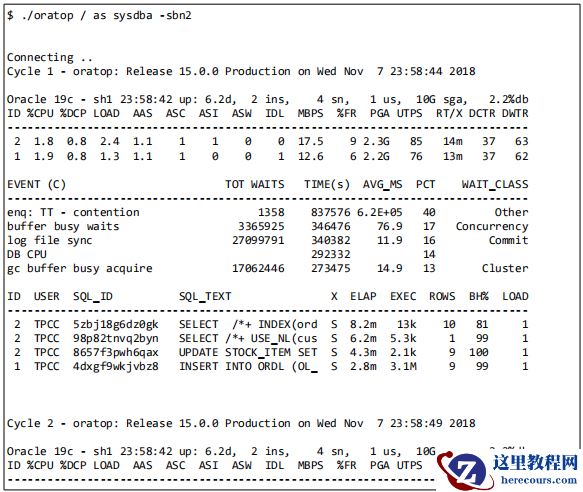
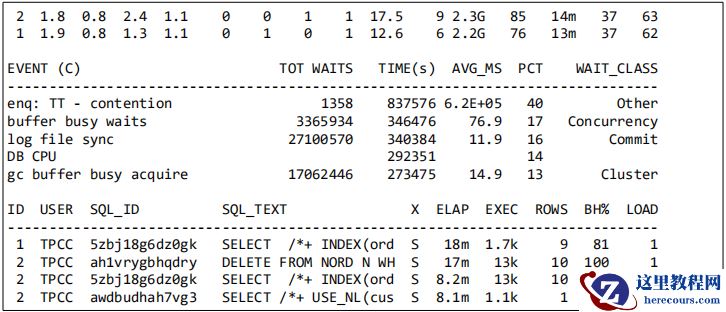
批处理模式适用于带有相关输入选项的命令行。下面的图3显示了在sql模式下批量运行2个周期的输出(第4部分)。
Batch mode is applicable at the command line with the relevant input options. See Figure 3
below shows output from batch run of 2 cycles in sql mode (section 4).
Logon
登录
连接方法在很大程度上类似于sqlplus,但是,命令行不允许使用密码,而是提示用户输入密码。有关工具的使用,请参见图2。
Connection method is largely similar to sqlplus, however, passwords are not allowed
at the command line, rather the user will be prompted for it. See Figure 2 for tool
usage.
Examples
,
例如
$ oratop
用户将被提示输入密码
User will be prompted to enter credentials.
连接本地数据库
Bequeath
1
export ORACLE_SID=<sid>
oratop / as sysdba
连接远程数据库
Remote Connection
2
TNS
导出TNS_ADMIN并使用tnsnames中定义的TNS别名进行连接。或将TWO_TASK设置为tns别名,并在没有别名的情况下进行连接。
export TNS_ADMIN and connect with a TNS alias name as defined in tnsnames.ora,
or set TWO_TASK to the tns alias and connect without alias name
EZConnect
用户将被提示输入密码
user will be prompted to enter password
oratop system@rmtdbhost:1530/db1.domain.com
Batch Mode
批处理模式
批处理模式适用于带有相关输入选项的命令行。下面的图3显示了在sql模式下批量运行2个周期的输出(第4部分)。
Batch mode is applicable at the command line with the relevant input options. See Figure 3
below shows output from batch run of 2 cycles in sql mode (section 4).
 请注意。在RAC
环境中,虽然第
2
部分
(
实例部分
)
仅限于基于文本的用户界面中的前
5
个实例,但是所有可用的实例都将以批处理模式列出。
Note. in RAC environment, while section 2 (instance section) is restricted to the top 5 instances in
the text-based user interface, all of the available instances will be listed in the batch mode.
I. INTERACTIVE MODE
交换模式
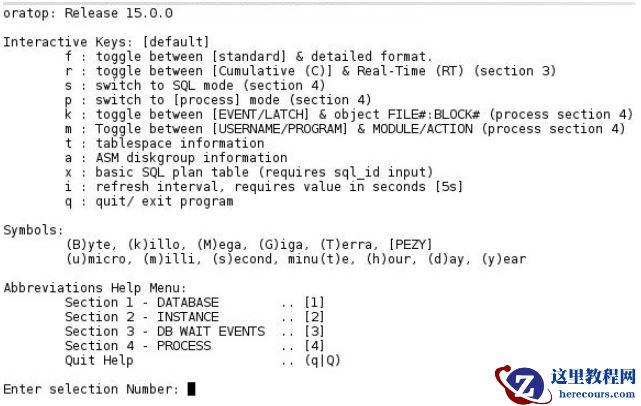
在启动实用程序后,按下键盘键“h”,可以看到运行时交互和详细选项(参见下面的图4)
Runtime interactive and detail options can be seen after starting the utility followed by
pressing the keyboard key ‘h’, (See Figure 4 below).
请注意。在RAC
环境中,虽然第
2
部分
(
实例部分
)
仅限于基于文本的用户界面中的前
5
个实例,但是所有可用的实例都将以批处理模式列出。
Note. in RAC environment, while section 2 (instance section) is restricted to the top 5 instances in
the text-based user interface, all of the available instances will be listed in the batch mode.
I. INTERACTIVE MODE
交换模式
在启动实用程序后,按下键盘键“h”,可以看到运行时交互和详细选项(参见下面的图4)
Runtime interactive and detail options can be seen after starting the utility followed by
pressing the keyboard key ‘h’, (See Figure 4 below).
 Detailed format (long)
详细的格式(长)
Detailed format (long)
详细的格式(长)
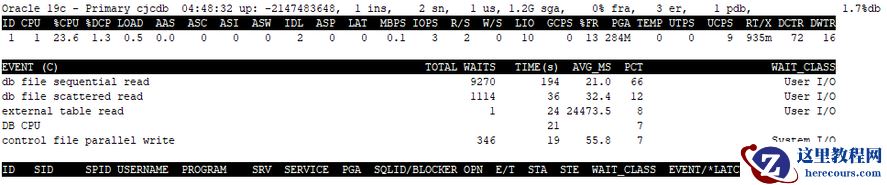
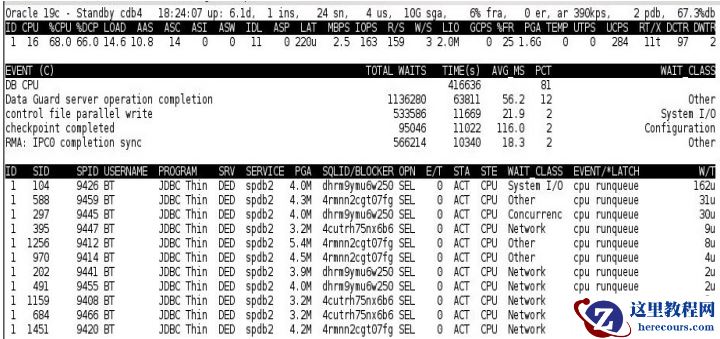 图5
.
长格式(
按
f
键
)
显示扩展和附加信息
Figure 5.
Long format (key press ‘f’) shows expanded and additional information
Miscellaneous
杂项
%DCP
列“%DCP”(在第2节中)表示数据库实例占用主机cpu百分比。
Column “
%DCP
” (in section 2) is the database instance cpu usage as %CPU of the host.
图5
.
长格式(
按
f
键
)
显示扩展和附加信息
Figure 5.
Long format (key press ‘f’) shows expanded and additional information
Miscellaneous
杂项
%DCP
列“%DCP”(在第2节中)表示数据库实例占用主机cpu百分比。
Column “
%DCP
” (in section 2) is the database instance cpu usage as %CPU of the host.
 值已红色显示
Values appears in
RED color
用红色标记和突出显示的值仅仅是一个警告或强调重要性
Values flagged and highlighted in
red color
are merely a warning or to emphasize
importance
Exiting
3
退出
退出程序时,用户可按下列任意键:“q”或“
Q
”,或按Esc键或Ctrl+c(中止)
在所有情况下,都要执行适当的OCI会话清理和注销
To quit the program, user may press any of the following keyboard keys: "q" or "Q", or
Esc key or Ctrl+c (to abort)
In all cases, proper OCI session cleanup and logout is performed.
Unprivileged user
特权用户
一个典型错误,非特权用户连接oratop会报错
“ORA-00942: table or view does not exist”
,系统管理员可以对普通用户授权
GRANT SELECT ANY DICTIONARY TO <username>;
退出实用程序时,在某些情况下(极端情况),程序可能会将终端(xterm) SHELL环境置于不希望的设置中。要将终端恢复到原来的设置,例如在Linux上,用户可以发出“reset”命令。
A typical error encountered by a non-privileged user upon connection to the database
using the tool is “ORA-00942: table or view does not exist”
To allow the non-privileged user to use oratop, the system administrator with a DBA role may issue the following grant: “
GRANT SELECT ANY DICTIONARY TO <username>;”
3
Upon exiting the utility and in some situation (corner cases) the program may leave the
terminal (xterm) SHELL environment in an undesirable setting. To restore the
terminal to its original settings is platform specific, e.g. on Linux, the user may issue the command “
reset
”.
TECHNICAL DETAILS
技术细节
“oratop”程序是用C程序编写的,使用的是Oracle程序接口(OCI)。它不会对数据库服务器造成压力,并且在服务器上留下很小的痕迹,即程序使用的sql。它使用Unix“termio”、“ioctl”库和VT100转义字符来实现光标控制、字体颜色、程序退出控制和终端(xterm)大小调整功能。
The “oratop” program is written in C program using Oracle program interface (OCI). It is not
intrusive to a database server, and it leaves small footprints on the server, namely the sqls used by the program. It employs Unix “termio, “ioctl” libraries, and VT100 escape characters to achieve cursor control, font colors, program exit
control and terminal (xterm) resizing capability.
在客户端,or
a
top程序是一个非常
轻量级
的进程,它使用
很少
的CPU和内存。对于服务器进程,它的资源也很少,但是依赖于服务器。
On the client side, the oratop program is a very light process that uses minimal CPU and
Memory. For the server process, its resources are minimal too but server
dependent.
Limitations
限制
程序不能移植到Windows/NT
平台
;它只在Unix平台上运行。
不过,可以通过从Unix上兼容的Oracle客户机远程连接来监视在Windows上运行的数据库。该程序与正在使用的oracle版本的oracle客户端兼容。
更高版本的Oracle release home中的oratop也可以用于监视较低版本的数据库。
数据库需要配置如下参数:
statistics_level=TYPICAL
The program is not portable to Windows/NT; it runs on Unix platforms only.
Nevertheless, one can monitor a database running on Windows by connecting remotely
from a compatible Oracle client on Unix.
The program is compatible with oracle client of the oracle release in use.
oratop from higher Oracle release home can be used also to monitor databases with lower version.
Requires server to have been started with the following parameter
statistics_level=TYPICAL
4
Caveats
警告
程序在运行时可能会出现异常,大多数异常都是意料之中的,因为事件可能发生在程序执行/
获取操作的过程中。
The program may exhibit anomalies at run time, most of which are expected since an event may
occur while the program is in the middle of executing/ fetching operations.
Blank Screen
白屏
在
负载特别高的服务器
上
,
下列操作可
能使
终端机在短时间内
白屏:
On a busy server, the following operations may leave the terminal blank for a short period:
程序初始化
A program initialization
终端大小调整(缩小/扩展终端)
A terminal resizing (shrink/expand the terminal)
一个实例加入或离开集群
An instance joining/leaving the cluster
退出交互式按键菜单
Quitting interactive keys menus
退出程序时
Upon exiting the program
对键盘按键反应迟缓
Sluggish response to keyboard key press
oratop SQL性能可能会受到超载系统的影响。在繁忙的服务器上按下键盘键与程序进行交互可能会出现响应缓慢的情况,或者是由于远程运行时的网络延迟造成的。按键响应时间也可能取决于间隔/执行状态。
oratop SQL performance may be impacted on an over loaded systems.
Pressing a keyboard key to interact with the program may appear to have slow response on a
busy server or due to network latency if run remotely. Key press response time may also depends on the interval/execution state.
异常终止与任何SQL会话一样,程序可能由于服务器错误而失败,并且将显示特定的错误。
Abnormal termination
Like any SQL session, the program may fail due to a server error, and the particular error will
be displayed.
CONCLUSION
结论
oratop实用程序为dba用户提供了实时监控运行数据库状态和活动方式。它聚合了一些有用的诊断信息,比如数据库的整体性能,从最优到由于瓶颈而可能出现的性能下降,低效的sql,潜在的阻塞,内存泄漏等等。此外,它还可以用于调优数据库、应用程序和用户并发。Statistics_level不能设置为“BASIC”,因为它将禁用所需的timed_statistics。
The oratop utility provides dba user a quick overview of a running database status and activity. It
aggregates useful diagnostics such as overall database performance from optimal to possible degradation due bottleneck, badly performing SQLs,
potential blocker(s), memory leak, etc. Furthermore, it can be useful in tuning some aspects of the database, application and user concurrency.
4
Statistics_level
cannot
be set to “BASIC” since it will disable the required
timed_statistics
二:安装和测试使用oratop
操作系统信息
[root@cjcos ~]# cat /etc/redhat-release
Red Hat Enterprise Linux Server release 7.5 (Maipo)
[root@cjcos ~]# uname -a
Linux cjcos 4.1.12-112.16.4.el7uek.x86_64 #2 SMP Mon Mar 12 23:57:12 PDT 2018 x86_64 x86_64 x86_64 GNU/Linux
数据库信息
SQL> select banner_full from v$version;
BANNER_FULL
---------------------------------------------------------------------
Oracle Database 19c Enterprise Edition Release 19.0.0.0.0 - Production
Version 19.3.0.0.0
SQL> show pdbs
CON_ID CON_NAME
OPEN MODE RESTRICTED
---------- ------------------------------ ---------- ----------
2 PDB$SEED
READ ONLY NO
3 CJCPDB
READ WRITE NO
自带oratop工具
[oracle@cjcos ~]$ cd $ORACLE_HOME/suptools/oratop
[oracle@cjcos oratop]$ pwd
/u01/app/oracle/product/19.0.0/dbhome_1/suptools/oratop
[oracle@cjcos oratop]$ ll -rth
total 128K
-rwxr-x--x 1 oracle oinstall 127K Jan 25 17:10 oratop
默认没有设置oratop命令的环境变量
[oracle@cjcos ~]$ oratop
bash: oratop: command not found...
Oratop工具
11gR2和12cR1
版本在下面文章里下载:
oratop - Utility for Near Real-time Monitoring of Databases, RAC and Single Instance (Doc ID 1500864.1)
12cR1
以后版本,默认在
$ORACLE_HOME/suptools/oratop
下。
设置环境变量
[oracle@cjcos ~]$ vim .bash_profile
......
export ORACLE_SID=cjcdb
#export PATH=$ORACLE_HOME/bin:$PATH
export PATH=$ORACLE_HOME/bin:$ORACLE_HOME/suptools/oratop:$PATH
export LD_LIBRARY_PATH=$ORACLE_HOME/lib:$LD_LIBRARY_PATH
[oracle@cjcos ~]$ source .bash_profile
查看帮助信息
值已红色显示
Values appears in
RED color
用红色标记和突出显示的值仅仅是一个警告或强调重要性
Values flagged and highlighted in
red color
are merely a warning or to emphasize
importance
Exiting
3
退出
退出程序时,用户可按下列任意键:“q”或“
Q
”,或按Esc键或Ctrl+c(中止)
在所有情况下,都要执行适当的OCI会话清理和注销
To quit the program, user may press any of the following keyboard keys: "q" or "Q", or
Esc key or Ctrl+c (to abort)
In all cases, proper OCI session cleanup and logout is performed.
Unprivileged user
特权用户
一个典型错误,非特权用户连接oratop会报错
“ORA-00942: table or view does not exist”
,系统管理员可以对普通用户授权
GRANT SELECT ANY DICTIONARY TO <username>;
退出实用程序时,在某些情况下(极端情况),程序可能会将终端(xterm) SHELL环境置于不希望的设置中。要将终端恢复到原来的设置,例如在Linux上,用户可以发出“reset”命令。
A typical error encountered by a non-privileged user upon connection to the database
using the tool is “ORA-00942: table or view does not exist”
To allow the non-privileged user to use oratop, the system administrator with a DBA role may issue the following grant: “
GRANT SELECT ANY DICTIONARY TO <username>;”
3
Upon exiting the utility and in some situation (corner cases) the program may leave the
terminal (xterm) SHELL environment in an undesirable setting. To restore the
terminal to its original settings is platform specific, e.g. on Linux, the user may issue the command “
reset
”.
TECHNICAL DETAILS
技术细节
“oratop”程序是用C程序编写的,使用的是Oracle程序接口(OCI)。它不会对数据库服务器造成压力,并且在服务器上留下很小的痕迹,即程序使用的sql。它使用Unix“termio”、“ioctl”库和VT100转义字符来实现光标控制、字体颜色、程序退出控制和终端(xterm)大小调整功能。
The “oratop” program is written in C program using Oracle program interface (OCI). It is not
intrusive to a database server, and it leaves small footprints on the server, namely the sqls used by the program. It employs Unix “termio, “ioctl” libraries, and VT100 escape characters to achieve cursor control, font colors, program exit
control and terminal (xterm) resizing capability.
在客户端,or
a
top程序是一个非常
轻量级
的进程,它使用
很少
的CPU和内存。对于服务器进程,它的资源也很少,但是依赖于服务器。
On the client side, the oratop program is a very light process that uses minimal CPU and
Memory. For the server process, its resources are minimal too but server
dependent.
Limitations
限制
程序不能移植到Windows/NT
平台
;它只在Unix平台上运行。
不过,可以通过从Unix上兼容的Oracle客户机远程连接来监视在Windows上运行的数据库。该程序与正在使用的oracle版本的oracle客户端兼容。
更高版本的Oracle release home中的oratop也可以用于监视较低版本的数据库。
数据库需要配置如下参数:
statistics_level=TYPICAL
The program is not portable to Windows/NT; it runs on Unix platforms only.
Nevertheless, one can monitor a database running on Windows by connecting remotely
from a compatible Oracle client on Unix.
The program is compatible with oracle client of the oracle release in use.
oratop from higher Oracle release home can be used also to monitor databases with lower version.
Requires server to have been started with the following parameter
statistics_level=TYPICAL
4
Caveats
警告
程序在运行时可能会出现异常,大多数异常都是意料之中的,因为事件可能发生在程序执行/
获取操作的过程中。
The program may exhibit anomalies at run time, most of which are expected since an event may
occur while the program is in the middle of executing/ fetching operations.
Blank Screen
白屏
在
负载特别高的服务器
上
,
下列操作可
能使
终端机在短时间内
白屏:
On a busy server, the following operations may leave the terminal blank for a short period:
程序初始化
A program initialization
终端大小调整(缩小/扩展终端)
A terminal resizing (shrink/expand the terminal)
一个实例加入或离开集群
An instance joining/leaving the cluster
退出交互式按键菜单
Quitting interactive keys menus
退出程序时
Upon exiting the program
对键盘按键反应迟缓
Sluggish response to keyboard key press
oratop SQL性能可能会受到超载系统的影响。在繁忙的服务器上按下键盘键与程序进行交互可能会出现响应缓慢的情况,或者是由于远程运行时的网络延迟造成的。按键响应时间也可能取决于间隔/执行状态。
oratop SQL performance may be impacted on an over loaded systems.
Pressing a keyboard key to interact with the program may appear to have slow response on a
busy server or due to network latency if run remotely. Key press response time may also depends on the interval/execution state.
异常终止与任何SQL会话一样,程序可能由于服务器错误而失败,并且将显示特定的错误。
Abnormal termination
Like any SQL session, the program may fail due to a server error, and the particular error will
be displayed.
CONCLUSION
结论
oratop实用程序为dba用户提供了实时监控运行数据库状态和活动方式。它聚合了一些有用的诊断信息,比如数据库的整体性能,从最优到由于瓶颈而可能出现的性能下降,低效的sql,潜在的阻塞,内存泄漏等等。此外,它还可以用于调优数据库、应用程序和用户并发。Statistics_level不能设置为“BASIC”,因为它将禁用所需的timed_statistics。
The oratop utility provides dba user a quick overview of a running database status and activity. It
aggregates useful diagnostics such as overall database performance from optimal to possible degradation due bottleneck, badly performing SQLs,
potential blocker(s), memory leak, etc. Furthermore, it can be useful in tuning some aspects of the database, application and user concurrency.
4
Statistics_level
cannot
be set to “BASIC” since it will disable the required
timed_statistics
二:安装和测试使用oratop
操作系统信息
[root@cjcos ~]# cat /etc/redhat-release
Red Hat Enterprise Linux Server release 7.5 (Maipo)
[root@cjcos ~]# uname -a
Linux cjcos 4.1.12-112.16.4.el7uek.x86_64 #2 SMP Mon Mar 12 23:57:12 PDT 2018 x86_64 x86_64 x86_64 GNU/Linux
数据库信息
SQL> select banner_full from v$version;
BANNER_FULL
---------------------------------------------------------------------
Oracle Database 19c Enterprise Edition Release 19.0.0.0.0 - Production
Version 19.3.0.0.0
SQL> show pdbs
CON_ID CON_NAME
OPEN MODE RESTRICTED
---------- ------------------------------ ---------- ----------
2 PDB$SEED
READ ONLY NO
3 CJCPDB
READ WRITE NO
自带oratop工具
[oracle@cjcos ~]$ cd $ORACLE_HOME/suptools/oratop
[oracle@cjcos oratop]$ pwd
/u01/app/oracle/product/19.0.0/dbhome_1/suptools/oratop
[oracle@cjcos oratop]$ ll -rth
total 128K
-rwxr-x--x 1 oracle oinstall 127K Jan 25 17:10 oratop
默认没有设置oratop命令的环境变量
[oracle@cjcos ~]$ oratop
bash: oratop: command not found...
Oratop工具
11gR2和12cR1
版本在下面文章里下载:
oratop - Utility for Near Real-time Monitoring of Databases, RAC and Single Instance (Doc ID 1500864.1)
12cR1
以后版本,默认在
$ORACLE_HOME/suptools/oratop
下。
设置环境变量
[oracle@cjcos ~]$ vim .bash_profile
......
export ORACLE_SID=cjcdb
#export PATH=$ORACLE_HOME/bin:$PATH
export PATH=$ORACLE_HOME/bin:$ORACLE_HOME/suptools/oratop:$PATH
export LD_LIBRARY_PATH=$ORACLE_HOME/lib:$LD_LIBRARY_PATH
[oracle@cjcos ~]$ source .bash_profile
查看帮助信息
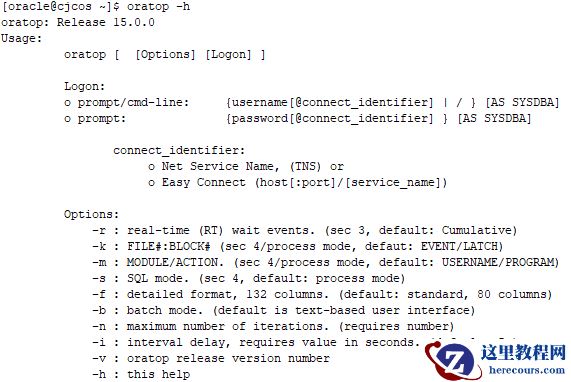 登录
[oracle@cjcos ~]$ oratop
oratop: Release 15.0.0 Production on Thu Feb 20 04:41:26 2020
Copyright (c) 2011, Oracle. All rights reserved.
Enter username: / as sysdba
Connecting ..
Processing ...
登录
[oracle@cjcos ~]$ oratop
oratop: Release 15.0.0 Production on Thu Feb 20 04:41:26 2020
Copyright (c) 2011, Oracle. All rights reserved.
Enter username: / as sysdba
Connecting ..
Processing ...
 按f显示长格式
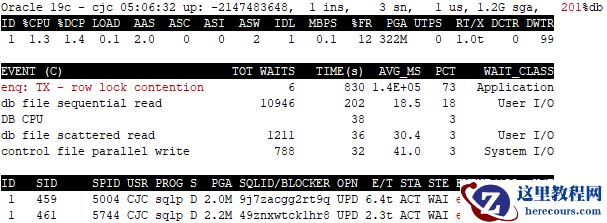
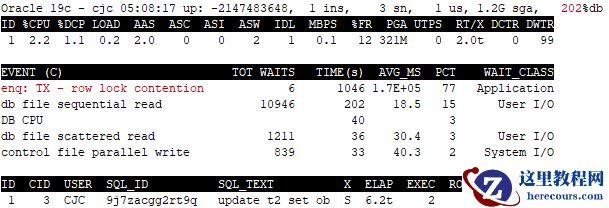
 模拟锁阻塞
会话信息
[oracle@cjcos ~]$ oratop / as sysdba
模拟锁阻塞
会话信息
[oracle@cjcos ~]$ oratop / as sysdba
 SQL> select sql_text from v$sql where sql_id='9j7zacgg2rt9q';
SQL_TEXT
--------------------------------------------------------------------------------
update t2 set object_id=10000 where object_id=1000
SQL> select sql_text from v$sql where sql_id='49znxwtck1hr8';
SQL_TEXT
--------------------------------------------------------------------------------
update t2 set object_id=10000000 where object_id=1000
SQL信息
[oracle@cjcos ~]$ oratop / as sysdba -s
SQL> select sql_text from v$sql where sql_id='9j7zacgg2rt9q';
SQL_TEXT
--------------------------------------------------------------------------------
update t2 set object_id=10000 where object_id=1000
SQL> select sql_text from v$sql where sql_id='49znxwtck1hr8';
SQL_TEXT
--------------------------------------------------------------------------------
update t2 set object_id=10000000 where object_id=1000
SQL信息
[oracle@cjcos ~]$ oratop / as sysdba -s
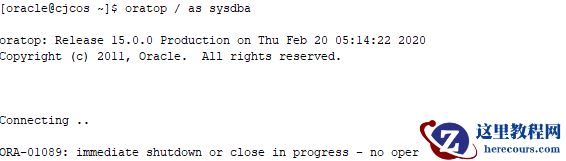
 关闭数据库
关闭数据库
 欢迎关注我的微信公众号"IT小Chen",共同学习,共同成长!!!

Oracle轻量级实时监控工具-oratop
来源:这里教程网
时间:2026-03-03 15:09:21
作者:
编辑推荐:
下一篇:
相关推荐
-

-
-
-
-
-
-
-
-
-
-
-
-
-
-

雷神推出 MIX PRO II 迷你主机:基于 Ultra 200H,玻璃上盖 + ARGB 灯效
2 月 9 日消息,雷神 (THUNDEROBOT) 现已宣布推出基于英
-

制造商 Musnap 推出彩色墨水屏电纸书 Ocean C:支持手写笔、第三方安卓应用
2 月 10 日消息,制造商 Musnap 现已在海外推出一款 Oce
热文推荐
- Oracle轻量级实时监控工具-oratop

Oracle轻量级实时监控工具-oratop
26-03-03 - Oracle Database 20c 官方文档以及云端版本已发布
Oracle Database 20c 官方文档以及云端版本已发布
26-03-03 - DB2数据库适配NC65
DB2数据库适配NC65
26-03-03 - ISO 镜像安装oracle 10g
ISO 镜像安装oracle 10g
26-03-03 - ORA-01555 快照太旧

ORA-01555 快照太旧
26-03-03 - ORACLE数据库之大数据量TRUNCATE和DELETE操作对表空间的影响
- Oracle 12C新特性-数据泵新参数(LOGTIME)

Oracle 12C新特性-数据泵新参数(LOGTIME)
26-03-03 - Oracle性能优化-SQL优化(案例一)
Oracle性能优化-SQL优化(案例一)
26-03-03 - number----char(to_char)
number----char(to_char)
26-03-03 - redo日志组调整
redo日志组调整
26-03-03